Agent Gateway (A2A Protocol) - 概覽
在 LiteLLM AI Gateway 新增 A2A Agents、透過 A2A Protocol 呼叫 agents,並在 LiteLLM Logs 追蹤 request/response logs。管理哪些 Teams、Keys 可以存取哪些已上線的 Agents。

 LiteLLM






| 功能 | 支援 |
|---|---|
| 支援的 Agent 提供者 | A2A, Vertex AI Agent Engine, LangGraph, Azure AI Foundry, Bedrock AgentCore, Pydantic AI |
| 記錄 | ✅ |
| 負載平衡 | ✅ |
| 串流 | ✅ |
| Iteration Budgets | ✅ |
LiteLLM 依照 A2A (Agent-to-Agent) Protocol 呼叫 agents。
新增您的代理程式
新增 A2A 代理程式
您可以透過 LiteLLM Admin UI 新增相容於 A2A 的 agents。
- 前往 Agentic > Agents
- 點擊 Add New Agent
- 在 Configure 步驟中,輸入 agent 名稱(例如
ij-local)以及您的 A2A agent URL - 選擇 Protocol Version(
1.0或0.3)-LiteLLM 提供給用戶端的此 agent wire format - 完成其餘步驟並儲存 agent
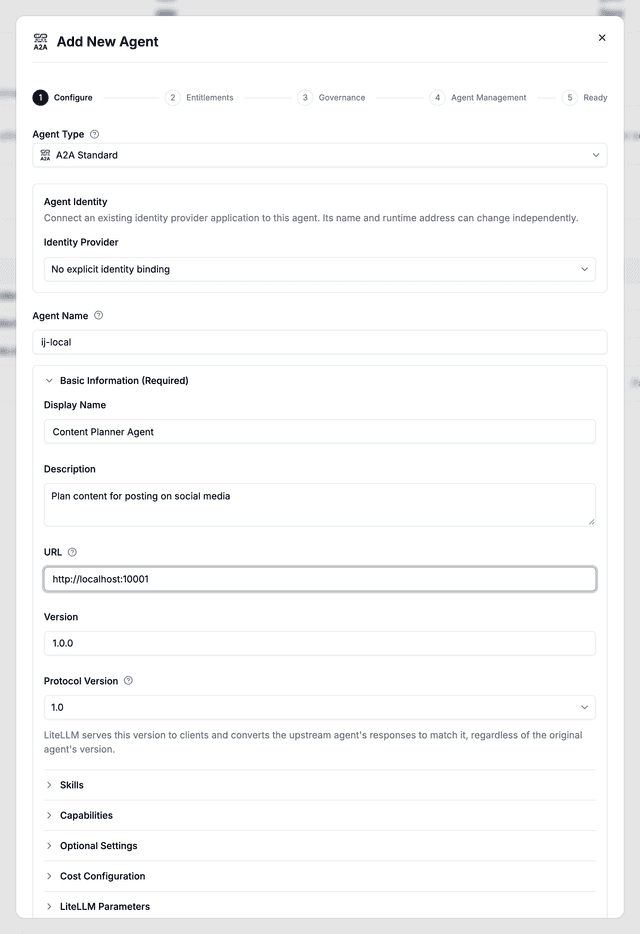
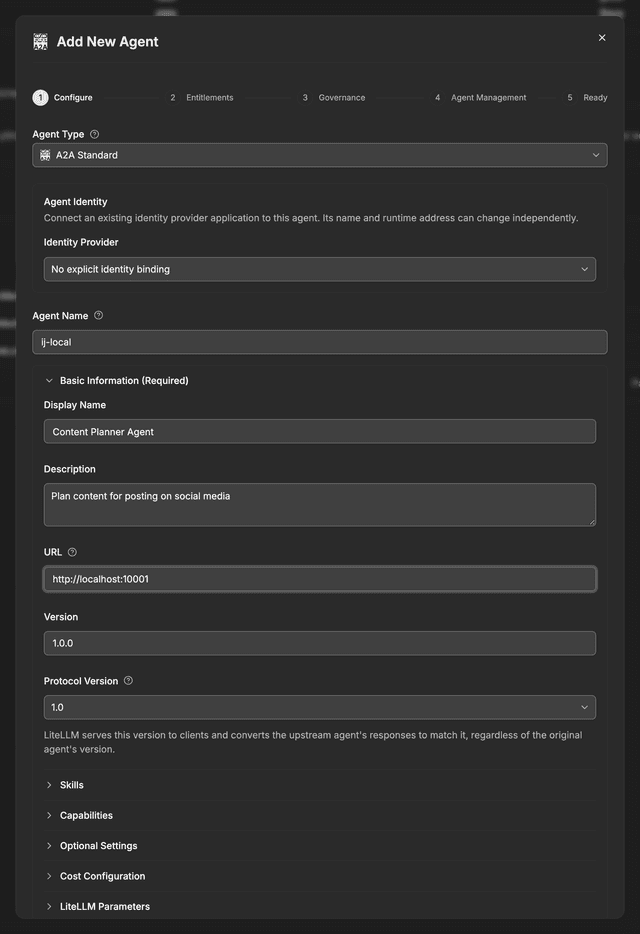
URL 應該是您的 A2A agent 的呼叫 URL(例如 http://localhost:10001)。
在 config.yaml 中定義代理程式
也可以在 config.yaml 中,於頂層 agents 鍵下宣告 agents,當閘道部署自 ConfigMap 或其他唯讀來源時特別有用。agent_name 與 agent_card_params 皆為必要;缺少任一項的項目會在啟動時略過。
agents:
  - agent_name: my-agent
    agent_card_params:
      name: "My Agent"
      url: "http://localhost:10001"
      protocolVersion: "1.0"  # or "0.3"
protocolVersion 在透過 API 註冊時也可用相同方式設定。
可選的 litellm_params 區塊會帶入每個 agent 的設定,例如 api_key、headers、agent_card_path 與 Microsoft Entra 憑證;透過 A2A 的 Foundry agents 顯示了一個完整項目
以設定檔定義的 agents 會與 UI 中建立的 agents 一起顯示在 Agents 分頁與 GET /v1/agents 中,並且會保留在定期從資料庫重新載入後的狀態。使用以下方式驗證:
curl -s http://localhost:4000/v1/agents \
  -H "Authorization: Bearer $LITELLM_MASTER_KEY"
如果在 UI 中建立的 agent 已經使用了您之後在 config.yaml 中宣告的名稱,則以資料庫記錄為準,而該名稱的設定檔項目會被略過,因此該名稱永遠會解析為您可以編輯的記錄。刪除資料庫中的 agent 後,該設定檔項目會在下一次重新載入時重新取回該名稱。
在 config.yaml 中宣告的 agents 不會儲存在資料庫中,因此無法從 Admin UI 編輯或刪除。請改為變更設定檔並重新啟動閘道。
agents 鍵會從下一個版本開始正確讀取(在 v1.95.0 之後)。在較舊版本中,請使用 agent_list,並請注意,已連接資料庫的 gateways 會丟棄設定檔定義的 agents。
新增 Azure AI Foundry 代理程式
請依照這份指南,將您的 azure ai foundry agent 加入 LiteLLM Agent Gateway
目前 Foundry 入口網站中建立的 agents 會公開 A2A endpoint,而不是 Assistants API;請如透過 A2A 的 Foundry agents 所示,使用 Entra 憑證將這些 agents 註冊在 agents: 下
新增 Vertex AI Agent Engine
請依照這份指南,將您的 Vertex AI Agent Engine 加入 LiteLLM Agent Gateway
新增 Bedrock AgentCore 代理程式
請依照這份指南,將您的 bedrock agentcore agent 加入 LiteLLM Agent Gateway
新增 LangGraph 代理程式
請依照這份指南註冊 LangGraph agent 並設定其 agent card
新增 Pydantic AI 代理程式
請依照這份指南,將您的 pydantic ai agent 加入 LiteLLM Agent Gateway
協定版本控管
LiteLLM proxy 會使用 a2a-sdk 1.x 來路由 A2A agents,並可依每個 agent 向用戶端提供 A2A 0.3 或 1.0 wire format。上游 agents 可使用任一版本;LiteLLM 會將 message/send、message/stream 與延伸卡片回應正規化為您所固定的版本。
| 版本 | Wire shape | 範例送出結果 |
|---|---|---|
| 0.3 | 由 kind 區分的物件(message、task、status-update、…) | {"kind": "message", "role": "user", "parts": [{"kind": "text", "text": "..."}]} |
| 1.0 | Protobuf JSON envelopes(message、task、statusUpdate、artifactUpdate) | {"message": {"role": "ROLE_USER", "parts": [{"text": "..."}]}} |
鎖定版本
在註冊 agent(UI 下拉選單或 API)時,將 agent_card_params.protocolVersion 設為 "0.3" 或 "1.0"。LiteLLM 會在代理的 agent card 上提供該版本,並將上游回應轉換為相符格式。
僅接受 "0.3" 與 "1.0";其他值會在註冊時回傳 HTTP 400。
當 protocolVersion 未鎖定時
如果 agent 沒有固定版本,LiteLLM 會根據用戶端請求推斷提供的版本:
| 用戶端信號 | 提供的版本 |
|---|---|
JSON-RPC 方法 SendMessage 或 SendStreamingMessage | 1.0 |
Request header a2a-version: 1.x | 1.0 |
否則(例如沒有 header 的 message/send) | 0.3 |
protocolVersion當未設定時,代理的 agent card 預設為 1.0,但沒有 a2a-version header 的舊版 message/send 呼叫者會收到 0.3 形狀的回應。請明確固定 protocolVersion,以確保您的 card 與回應始終一致。
Task methods(tasks/get、tasks/list、…)會原封不動轉送到上游 agent。版本轉換僅適用於 LiteLLM 整合的訊息傳遞路徑。
相依性
LiteLLM proxy A2A routes 需要 a2a-sdk >= 1.1.0(已包含在 proxy / proxy-dev dependency groups 中)。如果您從自己的程式碼呼叫 agents,請安裝相對應的 SDK 版本:
pip install "a2a-sdk>=1.1.0,<2.0"
呼叫您的代理程式
請參閱 Invoking A2A Agents 指南,了解如何使用以下方式呼叫您的 agents:
- A2A SDK - 原生 A2A protocol,完整支援 tasks 與 artifacts
- OpenAI SDK - 熟悉的
/chat/completions介面,搭配a2a/模型前綴
追蹤代理程式記錄
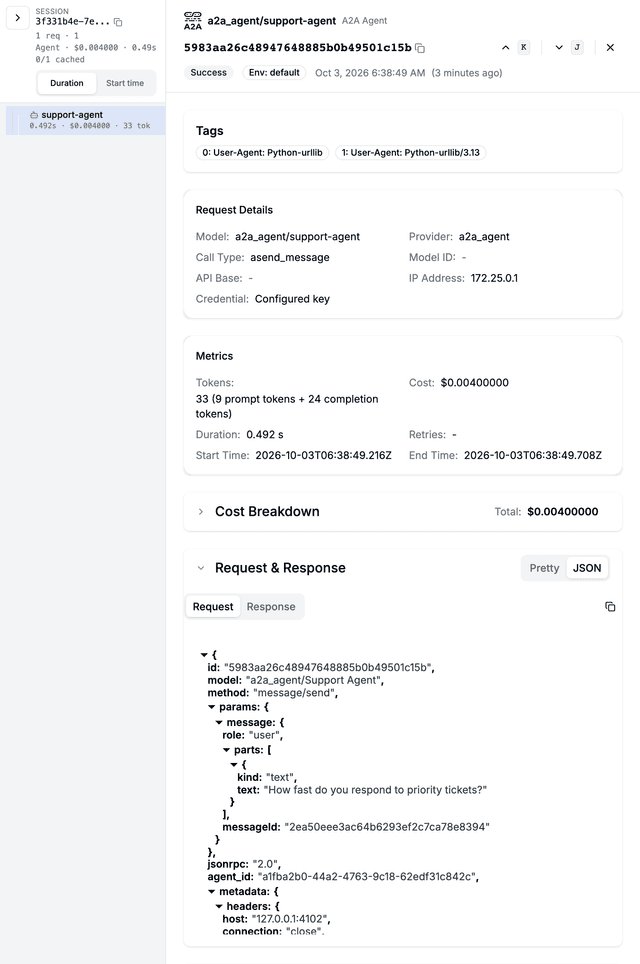
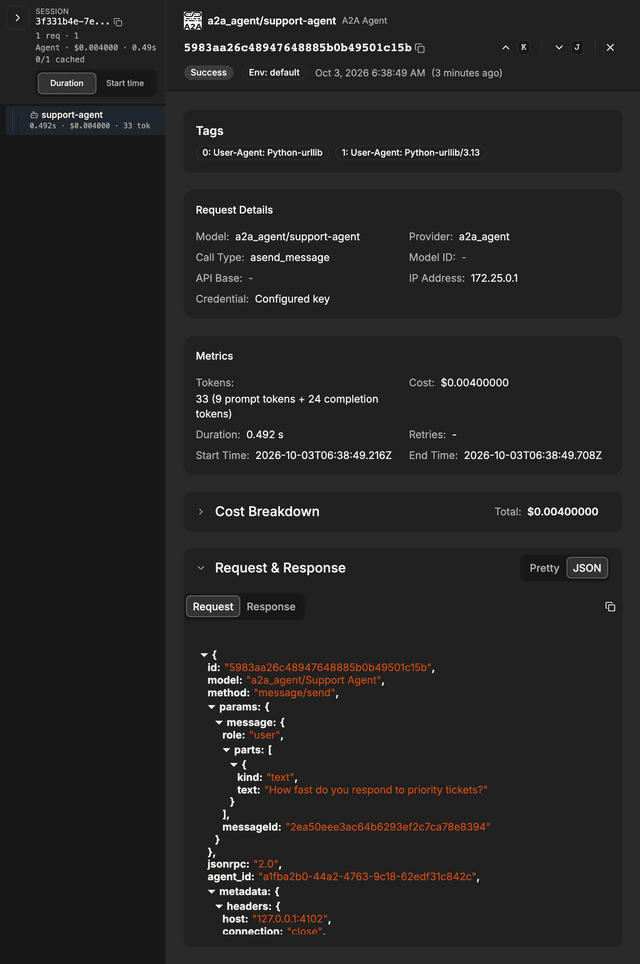
在呼叫 agent 之後,您可以在 LiteLLM 的 Logs 分頁查看 request logs。
logs 會顯示:
- Request/Response 內容,送出至 agent 與自 agent 收到的內容(開啟某一列,然後將 Request & Response 區段切換為 JSON;需要
store_prompts_in_spend_logs: true) - User、Key、Team 資訊,用於追蹤誰發出該 request
- Latency 與 cost 指標
轉送 LiteLLM Context 標頭
當 LiteLLM 呼叫您的 A2A agent 時,會傳送特殊 header,以啟用:
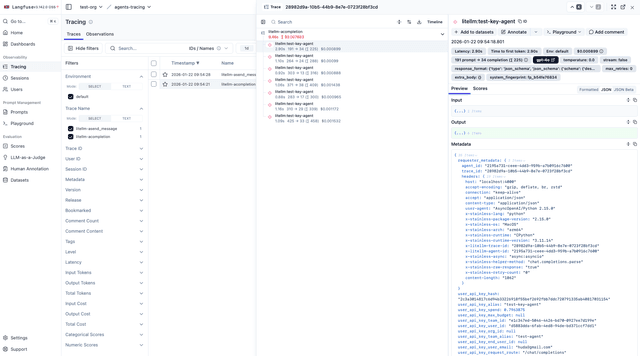
- Trace Grouping:來自同一次 agent 執行的所有 LLM calls 會顯示在同一個 trace 下
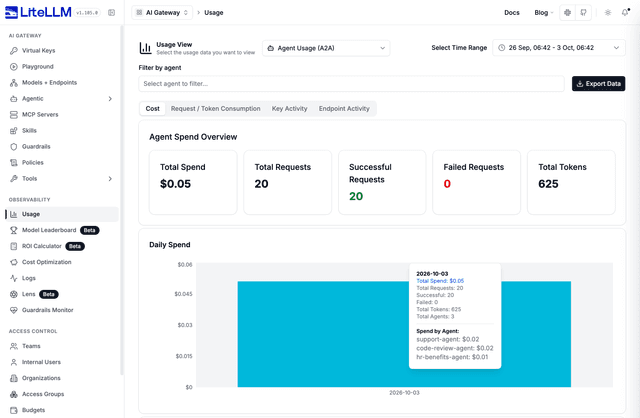
- Agent Spend Tracking:成本會歸屬到特定 agent
| Header | 用途 |
|---|---|
X-LiteLLM-Trace-Id | 將所有 LLM calls 連結到同一個執行流程 |
X-LiteLLM-Agent-Id | 將支出歸屬到正確的 agent |
若要啟用這些功能,您的 A2A server 必須將這些 header 轉送 給它回呼 LiteLLM 時所發出的任何 LLM calls。
實作步驟
步驟 1:從傳入的 A2A request 擷取 header
def get_litellm_headers(request) -> dict:
    """Extract X-LiteLLM-* headers from incoming A2A request."""
    all_headers = request.call_context.state.get('headers', {})
    return {
        k: v for k, v in all_headers.items()
        if k.lower().startswith('x-litellm-')
    }
步驟 2:將 header 轉送到您的 LLM calls 進行回呼 LiteLLM 的 calls 時,傳入擷取到的 header:
- OpenAI SDK
- LangChain
- LiteLLM SDK
- HTTP (requests/httpx)
from openai import OpenAI

headers = get_litellm_headers(request)

client = OpenAI(
    api_key="sk-your-litellm-key",
    base_url="http://localhost:4000",
    default_headers=headers,  # Forward headers
)

response = client.chat.completions.create(
    model="gpt-5.6-terra",
    messages=[{"role": "user", "content": "Hello"}]
)
from langchain_openai import ChatOpenAI

headers = get_litellm_headers(request)

llm = ChatOpenAI(
    model="gpt-5.6-terra",
    openai_api_key="sk-your-litellm-key",
    base_url="http://localhost:4000",
    default_headers=headers,  # Forward headers
)
import litellm

headers = get_litellm_headers(request)

response = litellm.completion(
    model="gpt-5.6-terra",
    messages=[{"role": "user", "content": "Hello"}],
    api_base="http://localhost:4000",
    extra_headers=headers,  # Forward headers
)
import httpx

headers = get_litellm_headers(request)
headers["Authorization"] = "Bearer sk-your-litellm-key"

response = httpx.post(
    "http://localhost:4000/v1/chat/completions",
    headers=headers,
    json={"model": "gpt-5.6-terra", "messages": [{"role": "user", "content": "Hello"}]}
)
結果
啟用標頭轉送後,您會看到:
Langfuse 中的追蹤分組:
代理程式支出歸因:
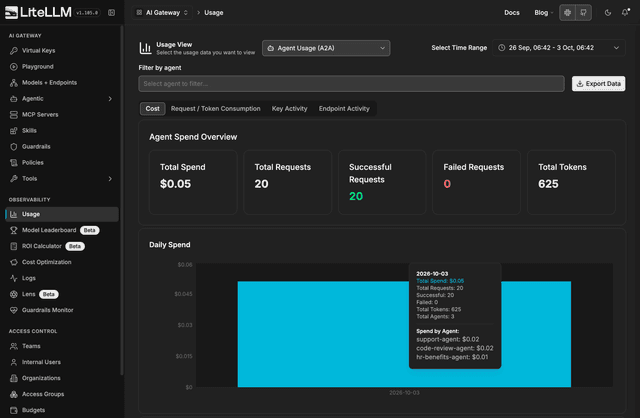
開啟 使用情況,選擇 Agent Usage (A2A),並停留在 Cost 分頁以查看每個代理程式的支出。
API 參考
端點
| 端點 | 方法 | 用途 |
|---|---|---|
POST /a2a/{agent_id} | JSON-RPC 2.0 | 主要 — 所有 A2A 方法(請見下表) |
POST /a2a/{agent_id}/message/send | JSON-RPC | 只有 message/send 的別名 |
POST /v1/a2a/{agent_id}/message/send | JSON-RPC | 只有 message/send 的別名 |
GET /a2a/{agent_id}/.well-known/agent.json | Agent card | 探索(url 欄位中的代理 URL) |
GET /a2a/{agent_id}/.well-known/agent-card.json | Agent card | 探索(標準路徑) |
{agent_id} 可以是代理 UUID 或已註冊的代理名稱。
支援的 JSON-RPC 方法
在 method 欄位中的 POST /a2a/{agent_id} 送出以下任一項:
| 方法 | 說明 |
|---|---|
message/send | 傳送訊息;回傳 task 或 message(LiteLLM 整合路徑) |
message/stream | 串流變體(NDJSON/SSE) |
tasks/get | 依 params.id 取得任務狀態 |
tasks/list | 列出任務(可選 params.contextId) |
tasks/cancel | 依 params.id 取消任務 |
tasks/resubscribe | 訂閱任務更新(串流) |
tasks/pushNotificationConfig/set | 註冊推播通知組態 |
tasks/pushNotificationConfig/get | 取得推播組態 |
tasks/pushNotificationConfig/list | 列出任務的推播組態 |
tasks/pushNotificationConfig/delete | 刪除推播組態 |
agent/getAuthenticatedExtendedCard | 擴充代理卡片 |
路由: message/send 和 message/stream 會透過 LiteLLM 的 A2A 用戶端(記錄、防護欄、支出)。所有其他方法都會轉送到 agent_card_params.url 中的上游 URL。任務 API 需要該 URL;僅完成橋接的代理只支援訊息方法。
請參閱 支援的 A2A 方法 以取得範例、別名與限制。
驗證
請在兩個標頭中的任一個包含您的 LiteLLM Virtual Key。當傳入的 Authorization 標頭可能帶有要傳送給後端代理的權杖時,建議使用 x-litellm-api-key(例如,使用 基於慣例的直通 來轉送呼叫者的身分時)。
Authorization: Bearer sk-your-litellm-key
# or
x-litellm-api-key: Bearer sk-your-litellm-key
每個代理程式的權限檢查
在 Virtual Key 通過驗證後,LiteLLM 會檢查呼叫端的金鑰(及其團隊)是否允許呼叫所請求的代理。如果不允許,回應為 HTTP 403。完整的交集模型與存取群組請參閱 代理權限管理。
Trace ID 強制執行(選用,每個代理程式)
代理可以要求每個傳入請求都攜帶 trace ID,以便進行跨系統稽核串接。請在代理的 litellm_params 中設定 require_trace_id_on_calls_to_agent: true。設定後,缺少 x-litellm-trace-id(或 x-litellm-session-id)的請求會以 HTTP 400 拒絕。
curl -X POST http://localhost:4000/v1/agents \
  -H "Authorization: Bearer sk-master-key" \
  -H "Content-Type: application/json" \
  -d '{
    "agent_name": "audit-critical-agent",
    "agent_card_params": { ... },
    "litellm_params": {
      "require_trace_id_on_calls_to_agent": true
    }
  }'
對由代理擁有的金鑰所發出的傳出呼叫強制要求 trace ID,則由同一個 litellm_params 區塊上的 require_trace_id_on_calls_by_agent 控制。
子代理程式身分傳遞
當後端代理本身呼叫 LiteLLM(用於 chat completions 或呼叫子代理)時,LiteLLM 會轉送兩個標頭以維持追蹤連續性:
X-LiteLLM-Trace-Id— 將鏈中的所有呼叫連結到單一追蹤X-LiteLLM-Agent-Id— 將支出歸屬於來源代理
呼叫端的 virtual key 和 end-user ID 不會自動轉送。如果下游代理需要使用者身分,請透過 extra_headers 或 x-a2a-{agent_name_or_id}-{header} 慣例 明確傳遞。
請求格式
LiteLLM 遵循 A2A JSON-RPC 2.0 規格。訊息本文格式取決於代理固定的 protocolVersion(若未固定,則取決於上方的用戶端信號)。
- 0.3 wire format
- 1.0 wire format
{
  "jsonrpc": "2.0",
  "id": "unique-request-id",
  "method": "message/send",
  "params": {
    "message": {
      "role": "user",
      "parts": [{"kind": "text", "text": "Your message here"}],
      "messageId": "unique-message-id"
    }
  }
}
在代理固定為 1.0 時,請使用 a2a-sdk 1.x 用戶端(建議)或送出帶有 PascalCase 方法 / a2a-version: 1.0 標頭的 JSON-RPC。
// Build with a2a.types.Message, Part, Role, then wrap in SendMessageRequest
回應格式
- 0.3 response
- 1.0 response
{
  "jsonrpc": "2.0",
  "id": "unique-request-id",
  "result": {
    "kind": "task",
    "id": "task-id",
    "contextId": "context-id",
    "status": {"state": "completed", "timestamp": "2025-01-01T00:00:00Z"},
    "artifacts": [
      {
        "artifactId": "artifact-id",
        "name": "response",
        "parts": [{"kind": "text", "text": "Agent response here"}]
      }
    ]
  }
}
{
  "jsonrpc": "2.0",
  "id": "unique-request-id",
  "result": {
    "message": {
      "role": "ROLE_AGENT",
      "messageId": "msg-abc",
      "parts": [{"text": "Agent response here"}]
    }
  }
}
串流事件使用 statusUpdate / artifactUpdate 鍵,而不是 kind: "status-update"。
代理 JSON-RPC 錯誤會在 error 欄位中回傳,並在可行時使用與請求相同的 id。對於長時間執行的工作,請在 message/send 回傳 submitted 任務後,使用 tasks/get 輪詢。
範例:tasks/get
curl -X POST "http://localhost:4000/a2a/my-agent" \
  -H "Authorization: Bearer $LITELLM_API_KEY" \
  -H "Content-Type: application/json" \
  -d '{
    "jsonrpc": "2.0",
    "id": "req-2",
    "method": "tasks/get",
    "params": {"id": "task-id-from-send-response"}
  }'
代理程式登錄
想建立一個中央登錄,讓您的團隊能夠探索公司內可用的代理嗎?
使用 AI Hub 將代理公開,並在整個組織中可供探索。這讓開發者能夠瀏覽可用的代理,而不必重新建置它們。
搜尋登錄
GET /v1/agents 會列出金鑰可存取的每個代理。加入 query=<task>,依任務與每個代理名稱、描述及技能之間的語意相似度來排序這些相同的代理。請先選擇嵌入模型:
model_list:
  - model_name: text-embedding-3-small
    litellm_params:
      model: openai/text-embedding-3-small
      api_key: os.environ/OPENAI_API_KEY

litellm_settings:
  agent_search_embedding_model: text-embedding-3-small
$ curl -s "http://localhost:4000/v1/agents?query=translate+a+pdf+document&top_k=3" \
    -H "Authorization: Bearer $LITELLM_KEY" | jq -c '.[] | {agent_name, search_score}'
{"agent_name":"document-translator","search_score":0.6732403392080719}
{"agent_name":"trip-planner","search_score":0.1121043964671429}
{"agent_name":"warehouse-sql-analyst","search_score":0.0946962275274791}
top_k 預設為 5,且上限為 100。每個結果都是一般的代理物件加上一個 search_score(餘弦相似度,越高越好)。排序只會涵蓋金鑰允許查看的代理,因此被限制只能看到兩個代理的金鑰,不論查詢內容為何,都只會回傳那兩個。若沒有 agent_search_embedding_model,query 會回傳 400 agent_search_not_configured;如果嵌入呼叫失敗,請求會回傳 503 agent_search_unavailable。代理嵌入會在每個程序中計算一次,並在代理卡片變更前重複使用。
MCP 用戶端會將相同的搜尋作為虛擬工具取得。其 object_permission 上具有 mcp_tool_search_enabled: true 的金鑰,會在 tools/list 上、同時跨越 /mcp/ 與 /mcp-rest,於 mcp_tool_search 和 mcp_tool_call 旁看到 agent_search(query, top_k):
$ curl -s -X POST http://localhost:4000/mcp-rest/tools/call \
    -H "Authorization: Bearer $KEY" \
    -d '{"name":"agent_search","arguments":{"query":"check how many units are left in stock","top_k":1}}' \
  | jq -r '.content[0].text | fromjson'
[
  {
    "agent_id": "b21b8787-8b9e-4c5f-a45c-3f5e4061d70e",
    "agent_name": "warehouse-sql-analyst",
    "description": "Answers questions about stock by running SQL queries against the inventory database",
    "skills": [{"name": "Query stock levels", "description": "Run a SQL query against the inventory database and summarize the stock levels it returns", "tags": ["sql", "analytics"]}],
    "score": 0.37912064119364597
  }
]
請參閱 MCP 工具搜尋 了解如何在金鑰上啟用虛擬工具。