代理程式權限管理
控制在 LiteLLM 中,哪些 A2A 代理程式可由特定金鑰或團隊存取。
概觀
代理程式權限管理可讓您限制 LiteLLM Virtual Key 或 Team 可存取哪些代理程式。這對以下情境很有用:
- 多租戶環境:讓不同團隊存取不同的代理程式
- 安全性:防止金鑰呼叫其不應有權限存取的代理程式
- 合規性:對敏感的代理程式工作流程強制執行存取政策
設定權限後:
GET /v1/agents只會回傳金鑰/團隊可存取的代理程式POST /a2a/{agent_id}(呼叫代理程式)若遭拒絕存取,會回傳403 Forbidden
在金鑰上設定權限
此範例示範如何建立具有代理程式權限的金鑰並測試存取。
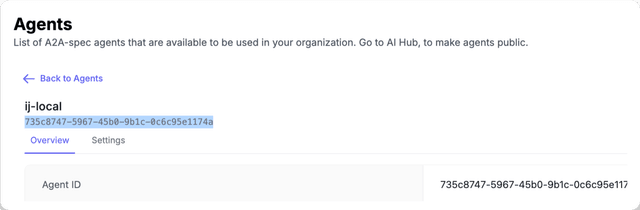
1. 取得您的 Agent ID
- UI
- API
- 前往側邊欄的 Agents
- 點進您要的代理程式
- 複製 Agent ID
curl "http://localhost:4000/v1/agents" \
  -H "Authorization: Bearer sk-master-key"
回應:
{
  "agents": [
    {"agent_id": "agent-123", "name": "Support Agent"},
    {"agent_id": "agent-456", "name": "Sales Agent"}
  ]
}
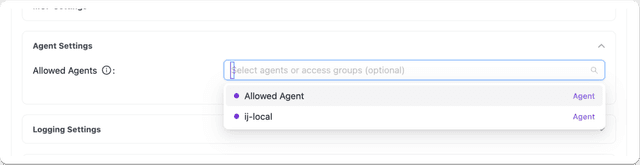
2. 建立具有代理程式權限的金鑰
- UI
- API
- 前往 Keys → Create Key
- 展開 Agent Settings
- 選取您要允許的代理程式
curl -X POST "http://localhost:4000/key/generate" \
  -H "Authorization: Bearer sk-master-key" \
  -H "Content-Type: application/json" \
  -d '{
    "object_permission": {
      "agents": ["agent-123"]
    }
  }'
3. 測試存取
允許的代理程式(成功):
curl -X POST "http://localhost:4000/a2a/agent-123" \
  -H "Authorization: Bearer sk-your-new-key" \
  -H "Content-Type: application/json" \
  -d '{"message": {"role": "user", "parts": [{"type": "text", "text": "Hello"}]}}'
被封鎖的代理程式(403 失敗):
curl -X POST "http://localhost:4000/a2a/agent-456" \
  -H "Authorization: Bearer sk-your-new-key" \
  -H "Content-Type: application/json" \
  -d '{"message": {"role": "user", "parts": [{"type": "text", "text": "Hello"}]}}'
回應:
{
  "error": {
    "message": "Access denied to agent: agent-456",
    "code": 403
  }
}
在團隊上設定權限
限制屬於某個團隊的所有金鑰只能存取特定代理程式。
1. 建立具有代理程式權限的團隊
- UI
- API
- 前往 Teams → Create Team
- 展開 Agent Settings
- 選取您要為此團隊允許的代理程式
curl -X POST "http://localhost:4000/team/new" \
  -H "Authorization: Bearer sk-master-key" \
  -H "Content-Type: application/json" \
  -d '{
    "team_alias": "support-team",
    "object_permission": {
      "agents": ["agent-123"]
    }
  }'
回應:
{
  "team_id": "team-abc-123",
  "team_alias": "support-team"
}
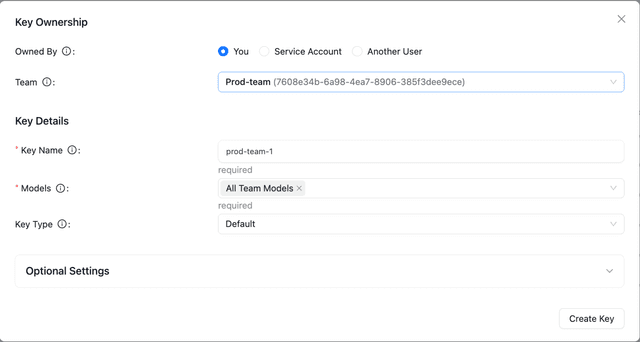
2. 為團隊建立金鑰
- UI
- API
- 前往 Keys → Create Key
- 從下拉選單中選取 Team
curl -X POST "http://localhost:4000/key/generate" \
  -H "Authorization: Bearer sk-master-key" \
  -H "Content-Type: application/json" \
  -d '{
    "team_id": "team-abc-123"
  }'
3. 測試存取
該金鑰會繼承團隊的代理程式權限。
允許的代理程式(成功):
curl -X POST "http://localhost:4000/a2a/agent-123" \
  -H "Authorization: Bearer sk-team-key" \
  -H "Content-Type: application/json" \
  -d '{"message": {"role": "user", "parts": [{"type": "text", "text": "Hello"}]}}'
被封鎖的代理程式(403 失敗):
curl -X POST "http://localhost:4000/a2a/agent-456" \
  -H "Authorization: Bearer sk-team-key" \
  -H "Content-Type: application/json" \
  -d '{"message": {"role": "user", "parts": [{"type": "text", "text": "Hello"}]}}'
代理程式存取群組
隨著 agent 目錄持續成長,為每個 key 或團隊逐一授予單一 agent 會變得難以管理。Agent 存取群組可讓您在儀表板中以邏輯標籤為 agent 加上標記,然後將群組授予某個 key 或團隊。將新的 agent 加入該群組後,該 agent 會自動對持有該群組的每個 key/團隊可用。
1. 將代理程式標記為一或多個群組
在 LiteLLM 儀表板中:
- 前往 Agents。
- 建立或編輯代理程式。
- 在 Access Groups 下方,輸入群組名稱(例如
clinical-tools)並按 Enter。
目前將代理程式標記為存取群組只能透過儀表板操作。POST /v1/agents body schema 不會將 agent_access_groups 暴露為頂層欄位;群組標籤會透過底層 DB 欄位保留,並在權限解析期間被使用。
2. 將群組授予金鑰或團隊
curl -X POST "http://localhost:4000/key/generate" \
  -H "Authorization: Bearer sk-master-key" \
  -H "Content-Type: application/json" \
  -d '{
    "object_permission": {
      "agent_access_groups": ["clinical-tools", "research-tools"]
    }
  }'
現在,該 key 可存取所有標記了任一群組的 agent,不需要逐一列出每個 agent。相同的 agent_access_groups 欄位也同樣適用於團隊的 object_permission。
當金鑰同時具有直接的 agents 清單與 agent_access_groups 時,會先計算聯集(透過任一路徑可到達的任何代理程式都被允許),然後再套用如下所述的團隊層級交集。
運作方式
A2A 權限解析會在兩個層級上運作:Key 與 Team。(MCP 的 權限階層 另外延伸至 End-user / Agent / Org;目前 agent 權限的模型較為狹義。)
| 金鑰權限 | 團隊權限 | 結果 | 備註 |
|---|---|---|---|
| 無 | 無 | 金鑰可存取所有代理程式 | 未設定限制時,預設為開放存取 |
["agent-1", "agent-2"] | 無 | 金鑰可存取 agent-1 與 agent-2 | 金鑰使用自己的權限 |
| 無 | ["agent-1", "agent-3"] | 金鑰可存取 agent-1 與 agent-3 | 金鑰繼承團隊的權限 |
["agent-1", "agent-2"] | ["agent-1", "agent-3"] | 金鑰只能存取 agent-1 | 兩個清單的交集(以限制最嚴格者為準) |
agent_access_groups: ["clinical"] | 無 | 金鑰可存取每個標記為 clinical 的代理程式 | 存取群組會解析為具體的代理程式 ID |
agent_access_groups: ["clinical"] | agents: ["agent-1"] | (每個標記為 clinical 的代理程式)與 ["agent-1"] 的交集 | 支援同時混用直接授權與群組授權 |
檢視權限
- UI
- API
- 前往 Keys 或 Teams
- 點進您要檢視的金鑰/團隊
- 代理程式權限會顯示在資訊檢視中
curl "http://localhost:4000/key/info?key=sk-your-key" \
  -H "Authorization: Bearer sk-master-key"

