使用向量儲存區(知識庫)
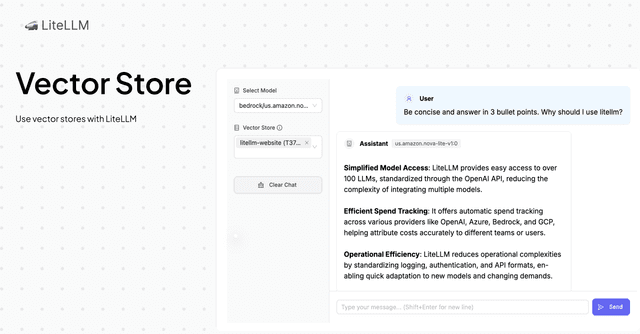
使用 LiteLLM 支援的任何模型搭配向量儲存
LiteLLM 與向量儲存區整合,讓您的模型能存取您組織的資料,以提供更準確且更符合情境的回應。
支援的向量儲存
- Bedrock Knowledge Bases
- OpenAI Vector Stores
- Azure Vector Stores(無法直接查詢。僅可在 Assistants 訊息中呼叫。)
- Azure AI Search(使用 Azure AI Search 索引進行向量搜尋)
- Vertex AI RAG API
- Gemini File Search
- MongoDB Vector Search (BETA)(使用現有的 Atlas 或自我管理的 MongoDB 索引作為聊天完成的內容)
- RAGFlow Datasets(僅支援資料集管理,不支援搜尋)
快速開始
若要將向量儲存與 LiteLLM 搭配使用,您需要
- 初始化 litellm.vector_store_registry
- 在 completion 請求中傳遞帶有 vector_store_ids 的 tools。此處
vector_store_ids是您在 litellm.vector_store_registry 中初始化的向量儲存區 ID 清單
LiteLLM Python SDK
LiteLLM 可讓您透過傳遞包含您要使用之 vector_store_ids 的 tool,在 OpenAI API 規格 中使用向量儲存區
import os
import litellm

from litellm.vector_stores.vector_store_registry import VectorStoreRegistry, LiteLLM_ManagedVectorStore

# Init vector store registry
litellm.vector_store_registry = VectorStoreRegistry(
    vector_stores=[
        LiteLLM_ManagedVectorStore(
            vector_store_id="T37J8R4WTM",
            custom_llm_provider="bedrock"
        )
    ]
)


# Make a completion request with vector_store_ids parameter
response = await litellm.acompletion(
    model="anthropic/claude-sonnet-5",
    messages=[{"role": "user", "content": "What is litellm?"}],
    tools=[
        {
            "type": "file_search",
            "vector_store_ids": ["T37J8R4WTM"]
        }
    ],
)

print(response.choices[0].message.content)
LiteLLM Proxy
1. 設定您的 vector_store_registry
若要將向量儲存與 LiteLLM 搭配使用,您需要設定您的 vector_store_registry。這會告訴 litellm 要使用哪些向量儲存,以及要為向量儲存使用哪個 api 提供者。
- config.yaml
- LiteLLM UI
model_list:
  - model_name: claude-sonnet-5
    litellm_params:
      model: anthropic/claude-sonnet-5
      api_key: os.environ/ANTHROPIC_API_KEY

vector_store_registry:
  - vector_store_name: "bedrock-litellm-website-knowledgebase"
    litellm_params:
      vector_store_id: "T37J8R4WTM"
      custom_llm_provider: "bedrock"
      vector_store_description: "Bedrock vector store for the Litellm website knowledgebase"
      vector_store_metadata:
        source: "https://www.litellm.com/docs"
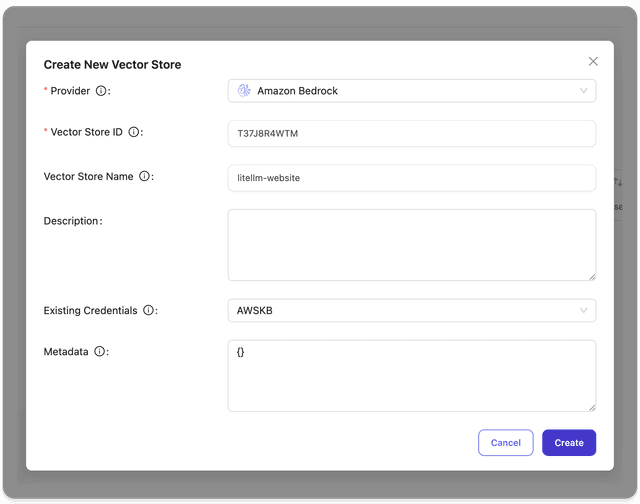
在 LiteLLM UI 上,請前往 Experimental > Vector Stores > Create Vector Store。您可以在此頁面建立包含名稱、向量儲存區 ID 和憑證的向量儲存區。
2. 使用 vector_store_ids 參數發出請求
- Curl
- OpenAI Python SDK
curl http://localhost:4000/v1/chat/completions \
  -H "Content-Type: application/json" \
  -H "Authorization: Bearer $LITELLM_API_KEY" \
  -d '{
    "model": "claude-sonnet-5",
    "messages": [{"role": "user", "content": "What is litellm?"}],
    "tools": [
        {
            "type": "file_search",
            "vector_store_ids": ["T37J8R4WTM"]
        }
    ]
  }'
from openai import OpenAI

# Initialize client with your LiteLLM proxy URL
client = OpenAI(
    base_url="http://localhost:4000",
    api_key="your-litellm-api-key"
)

# Make a completion request with vector_store_ids parameter
response = client.chat.completions.create(
    model="claude-sonnet-5",
    messages=[{"role": "user", "content": "What is litellm?"}],
    tools=[
        {
            "type": "file_search",
            "vector_store_ids": ["T37J8R4WTM"]
        }
    ]
)

print(response.choices[0].message.content)
提供者特定指南
本節說明如何將您的向量儲存區新增至 LiteLLM。若您想要支援新的提供者,請在此處提交 issue。
Bedrock Knowledge Bases
1. 設定您的 Bedrock Knowledge Base
請確保您已在 AWS 帳戶中建立 Bedrock Knowledge Base,並已設定適當的權限。
2. 新增至 LiteLLM UI
- 前往 Tools > Vector Stores > "Add new vector store"
- 將 "Bedrock" 選為提供者
- 在 "Vector Store ID" 欄位輸入您的 Bedrock Knowledge Base ID
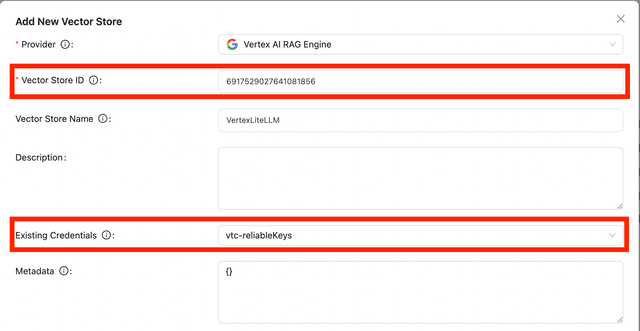
Vertex AI RAG Engine
1. 取得您的 Vertex AI RAG Engine ID
- 前往 Google Cloud Console 中的 RAG Engine Corpus
- 選取您要與 LiteLLM 整合的 RAG Engine
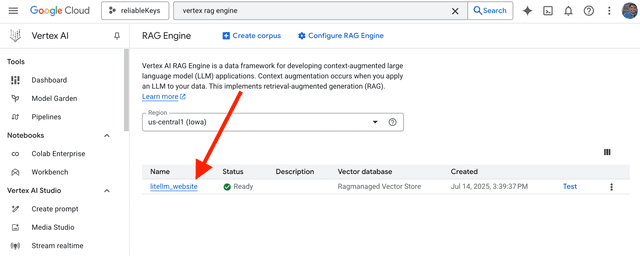
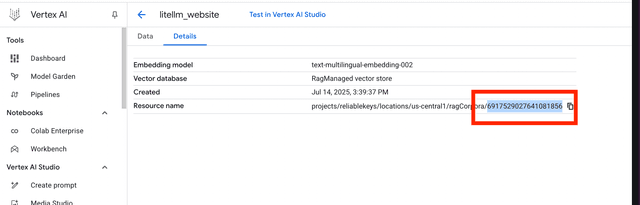
- 按一下 "Details" 按鈕並複製 RAG Engine 的 UUID
- ID 應如下所示:
6917529027641081856
2. 新增至 LiteLLM UI
- 前往 Tools > Vector Stores > "Add new vector store"
- 將 "Vertex AI RAG Engine" 選為提供者
- 在 "Vector Store ID" 欄位輸入您的 Vertex AI RAG Engine ID
PG Vector
1. 部署 litellm-pg-vector-store 連接器
LiteLLM 提供一個伺服器,為 PG Vector 提供相容 OpenAI 的 vector_store 端點。LiteLLM Proxy 伺服器會連接到您已部署的服務,並在查詢時將其用作向量儲存區。
- 請依照此處的 litellm-pg-vector-store 連接器部署說明[https://github.com/BerriAI/litellm-pgvector?tab=readme-ov-file#configuration]
- 如需詳細設定選項,請參閱設定指南
部署 litellm-pg-vector-store 的 .env 設定範例:
DATABASE_URL="postgresql://neondb_owner:xxxx"
SERVER_API_KEY="sk-<your-litellm-api-key>"
HOST="0.0.0.0"
PORT=8001
EMBEDDING__MODEL="text-embedding-ada-002"
EMBEDDING__BASE_URL="http://localhost:4000"
EMBEDDING__API_KEY="sk-<your-litellm-api-key>"
EMBEDDING__DIMENSIONS=1536
DB_FIELDS__ID_FIELD="id"
DB_FIELDS__CONTENT_FIELD="content"
DB_FIELDS__METADATA_FIELD="metadata"
DB_FIELDS__EMBEDDING_FIELD="embedding"
DB_FIELDS__VECTOR_STORE_ID_FIELD="vector_store_id"
DB_FIELDS__CREATED_AT_FIELD="created_at"
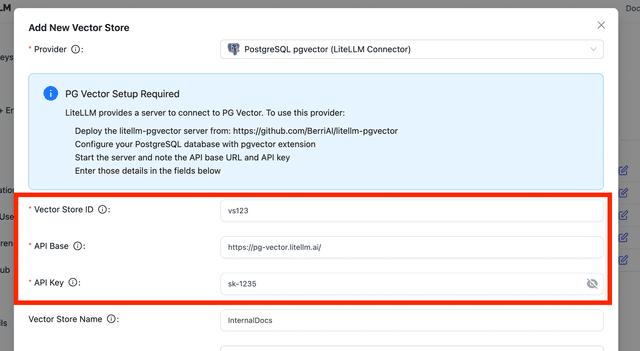
2. 新增至 LiteLLM UI
一旦您的 litellm-pg-vector-store 已部署:
- 前往 Tools > Vector Stores > "Add new vector store"
- 將 "PG Vector" 選為提供者
- 輸入您
litellm-pg-vector-store容器的 API Base URL 和 API Key- API Key 欄位對應於您 .env 設定中的
SERVER_API_KEY
- API Key 欄位對應於您 .env 設定中的
OpenAI Vector Stores
1. 設定您的 OpenAI Vector Store
- 在 OpenAI 平台 上建立您的 Vector Store
- 記下您的 Vector Store ID(格式:
vs_687ae3b2439881918b433cb99d10662e)
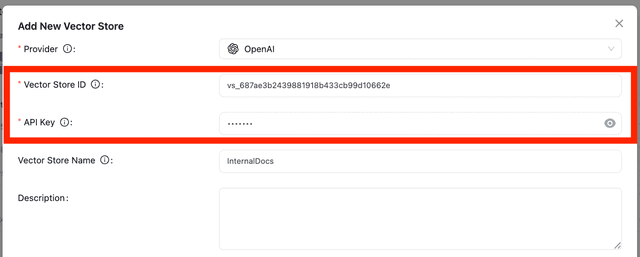
2. 新增至 LiteLLM UI
- 前往 Tools > Vector Stores > "Add new vector store"
- 將 "OpenAI" 選為提供者
- 在對應欄位輸入您的 Vector Store ID
- 在 API Key 欄位輸入您的 OpenAI API Key
進階
記錄向量儲存區使用情況
LiteLLM 可讓您在 LiteLLM UI 的 Logs 頁面查看向量儲存區使用情況。
完成帶有向量儲存區的請求後,請前往 LiteLLM 的 Logs 頁面。在此您應可看到傳送至向量儲存區的查詢,以及附帶分數的對應回應。
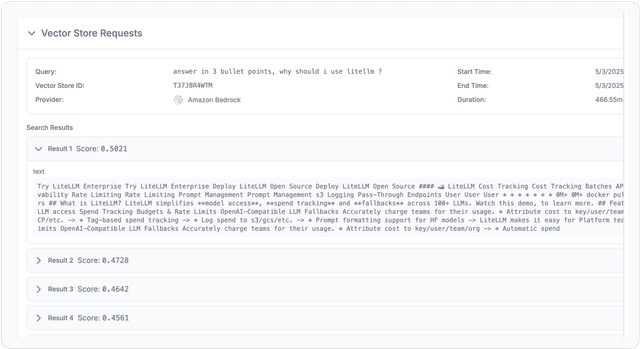
LiteLLM 記錄頁面:向量儲存使用情況
列出可用的向量儲存區
您可以使用 /vector_store/list 端點列出所有可用的向量儲存區
請求:
curl -X GET "http://localhost:4000/vector_store/list" \
  -H "Authorization: Bearer $LITELLM_API_KEY"
回應:
回應將是一份可供 LiteLLM 使用的所有向量儲存區清單。
{
  "object": "list",
  "data": [
    {
      "vector_store_id": "T37J8R4WTM",
      "custom_llm_provider": "bedrock",
      "vector_store_name": "bedrock-litellm-website-knowledgebase",
      "vector_store_description": "Bedrock vector store for the Litellm website knowledgebase",
      "vector_store_metadata": {
        "source": "https://www.litellm.com/docs"
      },
      "created_at": "2023-05-03T18:21:36.462Z",
      "updated_at": "2023-05-03T18:21:36.462Z",
      "litellm_credential_name": "bedrock_credentials"
    }
  ],
  "total_count": 1,
  "current_page": 1,
  "total_pages": 1
}
始終對某個模型啟用
如果您希望預設對特定模型使用向量儲存區,請使用此項。
在此設定中,我們將 vector_store_ids 新增至 claude-3-5-sonnet-with-vector-store 模型。這表示對 claude-3-5-sonnet-with-vector-store 模型的任何請求,都將一律使用在 T37J8R4WTM 中定義、ID 為 vector_store_registry 的向量儲存區。
model_list:
  - model_name: claude-3-5-sonnet-with-vector-store
    litellm_params:
      model: anthropic/claude-sonnet-5
      vector_store_ids: ["T37J8R4WTM"]

vector_store_registry:
  - vector_store_name: "bedrock-litellm-website-knowledgebase"
    litellm_params:
      vector_store_id: "T37J8R4WTM"
      custom_llm_provider: "bedrock"
      vector_store_description: "Bedrock vector store for the Litellm website knowledgebase"
      vector_store_metadata:
        source: "https://www.litellm.com/docs"
其運作方式
如果您的請求包含一個 vector_store_ids 參數,且任何向量儲存區 ID 都可在 vector_store_registry 中找到,LiteLLM 會自動在該請求中使用該向量儲存區。
- 您發出一個帶有
vector_store_ids參數的 completion 請求,且任何向量儲存區 ID 都可在litellm.vector_store_registry中找到 - LiteLLM 會自動:
- 使用您的最後一則訊息作為查詢,從 Knowledge Base 擷取相關資訊
- 將擷取到的上下文加入您的對話
- 將增強後的訊息傳送給模型
範例轉換
當您傳遞 vector_store_ids=["YOUR_KNOWLEDGE_BASE_ID"] 時,您的請求會經過以下步驟:
1. 原始請求到 LiteLLM:
{
    "model": "anthropic/claude-sonnet-5",
    "messages": [
        {"role": "user", "content": "What is litellm?"}
    ],
    "vector_store_ids": ["YOUR_KNOWLEDGE_BASE_ID"]
}
2. 請求到 AWS Bedrock Knowledge Base:
{
    "retrievalQuery": {
        "text": "What is litellm?"
    }
}
這會傳送到:https://bedrock-agent-runtime.{aws_region}.amazonaws.com/knowledgebases/YOUR_KNOWLEDGE_BASE_ID/retrieve
3. 傳回 LiteLLM 的最終請求:
{
    "model": "anthropic/claude-sonnet-5",
    "messages": [
        {"role": "user", "content": "What is litellm?"},
        {"role": "user", "content": "Context: \n\nLiteLLM is an open-source SDK to simplify LLM API calls across providers (OpenAI, Claude, etc). It provides a standardized interface with robust error handling, streaming, and observability tools."}
    ]
}
當您在請求中加入 vector_store_ids 參數時,這個流程會自動發生。
存取搜尋結果(引用)
使用向量儲存時,LiteLLM 會自動以 provider_specific_fields 傳回搜尋結果。這可讓您向使用者顯示 AI 回應的引用來源。
關鍵概念
搜尋結果一律位於:response.choices[0].message.provider_specific_fields["search_results"]
串流時:當 finish_reason == "stop" 時,結果會出現在最後一個 chunk中
非串流範例
含搜尋結果的非串流回應:
{
  "id": "chatcmpl-abc123",
  "choices": [{
    "index": 0,
    "message": {
      "role": "assistant",
      "content": "LiteLLM is a platform...",
      "provider_specific_fields": {
        "search_results": [{
          "search_query": "What is litellm?",
          "data": [{
            "score": 0.95,
            "content": [{"text": "...", "type": "text"}],
            "filename": "litellm-docs.md",
            "file_id": "doc-123"
          }]
        }]
      }
    },
    "finish_reason": "stop"
  }]
}
- Python SDK
- TypeScript SDK
from openai import OpenAI

client = OpenAI(
    base_url="http://localhost:4000",
    api_key="your-litellm-api-key"
)

response = client.chat.completions.create(
    model="claude-sonnet-5",
    messages=[{"role": "user", "content": "What is litellm?"}],
    tools=[{"type": "file_search", "vector_store_ids": ["T37J8R4WTM"]}]
)

# Get AI response
print(response.choices[0].message.content)

# Get search results (citations)
search_results = response.choices[0].message.provider_specific_fields.get("search_results", [])

for result_page in search_results:
    for idx, item in enumerate(result_page['data'], 1):
        print(f"[{idx}] {item.get('filename', 'Unknown')} (score: {item['score']:.2f})")
import OpenAI from 'openai';

const client = new OpenAI({
  baseURL: 'http://localhost:4000',
  apiKey: process.env.LITELLM_API_KEY
});

const response = await client.chat.completions.create({
  model: 'claude-sonnet-5',
  messages: [{ role: 'user', content: 'What is litellm?' }],
  tools: [{ type: 'file_search', vector_store_ids: ['T37J8R4WTM'] }]
});

// Get AI response
console.log(response.choices[0].message.content);

// Get search results (citations)
const message = response.choices[0].message as any;
const searchResults = message.provider_specific_fields?.search_results || [];

searchResults.forEach((page: any) => {
  page.data.forEach((item: any, idx: number) => {
    console.log(`[${idx + 1}] ${item.filename || 'Unknown'} (${item.score.toFixed(2)})`);
  });
});
串流範例
含搜尋結果的串流回應(最後一個 chunk):
{
  "id": "chatcmpl-abc123",
  "choices": [{
    "index": 0,
    "delta": {
      "provider_specific_fields": {
        "search_results": [{
          "search_query": "What is litellm?",
          "data": [{
            "score": 0.95,
            "content": [{"text": "...", "type": "text"}],
            "filename": "litellm-docs.md",
            "file_id": "doc-123"
          }]
        }]
      }
    },
    "finish_reason": "stop"
  }]
}
- Python SDK
- TypeScript SDK
from openai import OpenAI

client = OpenAI(
    base_url="http://localhost:4000",
    api_key="your-litellm-api-key"
)

stream = client.chat.completions.create(
    model="claude-sonnet-5",
    messages=[{"role": "user", "content": "What is litellm?"}],
    tools=[{"type": "file_search", "vector_store_ids": ["T37J8R4WTM"]}],
    stream=True
)

for chunk in stream:
    # Stream content
    if chunk.choices[0].delta.content:
        print(chunk.choices[0].delta.content, end="", flush=True)

    # Get citations in final chunk
    if chunk.choices[0].finish_reason == "stop":
        search_results = getattr(chunk.choices[0].delta, 'provider_specific_fields', {}).get('search_results', [])
        if search_results:
            print("\n\nSources:")
            for page in search_results:
                for idx, item in enumerate(page['data'], 1):
                    print(f"  [{idx}] {item.get('filename', 'Unknown')} ({item['score']:.2f})")
import OpenAI from 'openai';

const stream = await client.chat.completions.create({
  model: 'claude-sonnet-5',
  messages: [{ role: 'user', content: 'What is litellm?' }],
  tools: [{ type: 'file_search', vector_store_ids: ['T37J8R4WTM'] }],
  stream: true
});

for await (const chunk of stream) {
  // Stream content
  if (chunk.choices[0]?.delta?.content) {
    process.stdout.write(chunk.choices[0].delta.content);
  }

  // Get citations in final chunk
  if (chunk.choices[0]?.finish_reason === 'stop') {
    const searchResults = (chunk.choices[0].delta as any).provider_specific_fields?.search_results || [];
    if (searchResults.length > 0) {
      console.log('\n\nSources:');
      searchResults.forEach((page: any) => {
        page.data.forEach((item: any, idx: number) => {
          console.log(`  [${idx + 1}] ${item.filename || 'Unknown'} (${item.score.toFixed(2)})`);
        });
      });
    }
  }
}
搜尋結果欄位
| 欄位 | 類型 | 說明 |
|---|---|---|
search_query | string | 用於搜尋向量儲存的查詢 |
data | array | 搜尋結果陣列 |
data[].score | float | 相關性分數(0-1,越高越相關) |
data[].content | array | 含 text 與 type 的內容區塊 |
data[].filename | string | 來源檔案名稱(選用) |
data[].file_id | string | 來源檔案的識別碼(選用) |
data[].attributes | object | 提供者特定的中繼資料(選用) |
API 參考
LiteLLM Completion Knowledge Base 參數
使用 LiteLLM 的 Knowledge Base 整合時,您可以包含以下參數:
| 參數 | 類型 | 說明 |
|---|---|---|
vector_store_ids | List[str] | 要查詢的 Knowledge Base ID 清單 |
VectorStoreRegistry
VectorStoreRegistry 是 LiteLLM 中用於管理向量儲存的核心元件。它的作用類似註冊表,讓您可以設定與存取您的向量儲存。
什麼是 VectorStoreRegistry?
VectorStoreRegistry 是一個類別,會:
- 維護 LiteLLM 可使用的向量儲存集合
- 讓您可以用其憑證與中繼資料註冊向量儲存
- 透過完成請求中的 ID 讓向量儲存可被存取
在 Python 中使用 VectorStoreRegistry
from litellm.vector_stores.vector_store_registry import VectorStoreRegistry, LiteLLM_ManagedVectorStore

# Initialize the vector store registry with one or more vector stores
litellm.vector_store_registry = VectorStoreRegistry(
    vector_stores=[
        LiteLLM_ManagedVectorStore(
            vector_store_id="YOUR_VECTOR_STORE_ID",  # Required: Unique ID for referencing this store
            custom_llm_provider="bedrock"            # Required: Provider (e.g., "bedrock")
        )
    ]
)
LiteLLM_ManagedVectorStore 參數
註冊表中的每個向量儲存都會使用具有以下參數的 LiteLLM_ManagedVectorStore 物件進行設定:
| 參數 | 類型 | 必填 | 說明 |
|---|---|---|---|
vector_store_id | str | 是 | 向量儲存的唯一識別碼 |
custom_llm_provider | str | 是 | 向量儲存的提供者(例如「bedrock」) |
vector_store_name | str | 否 | 向量儲存的易讀名稱 |
vector_store_description | str | 否 | 向量儲存內容的說明 |
vector_store_metadata | dict or str | 否 | 關於向量儲存的其他中繼資料 |
litellm_credential_name | str | 否 | 要用於此向量儲存的憑證名稱 |
在 config.yaml 中設定 VectorStoreRegistry
對於 LiteLLM Proxy,您可以在您的 config.yaml 檔案中設定相同的註冊表:
vector_store_registry:
  - vector_store_name: "bedrock-litellm-website-knowledgebase"  # Optional friendly name
    litellm_params:
      vector_store_id: "T37J8R4WTM"                            # Required: Unique ID
      custom_llm_provider: "bedrock"                           # Required: Provider
      vector_store_description: "Bedrock vector store for the Litellm website knowledgebase"
      vector_store_metadata:
        source: "https://www.litellm.com/docs"
litellm_params 區段接受與 Python SDK 中 LiteLLM_ManagedVectorStore 建構子相同的所有參數。

