程式碼解譯器
使用 OpenAI 的 Code Interpreter 工具,在安全且隔離的環境中執行 Python 程式碼。
| 功能 | 支援 |
|---|---|
| LiteLLM Python SDK | ✅ |
| LiteLLM AI Gateway | ✅ |
| 支援的提供者 | openai |
將 code interpreter 路由到您自己的 sandbox
proxy 可以在 code_interpreter 攔截 /v1/responses,並在已設定的 sandbox(目前為 e2b)中執行程式碼,而不必使用 OpenAI 的 container,且不需變更 client request。回應格式保持完全一致(code_interpreter_call 在 message 旁邊)。請參閱 Code Interpreter Sandbox Interception。
LiteLLM AI Gateway
API(OpenAI SDK)
將 OpenAI SDK 指向您的 LiteLLM Gateway:
code_interpreter_gateway.py
from openai import OpenAI

client = OpenAI(
    api_key="sk-<your-litellm-api-key>",  # Your LiteLLM API key
    base_url="http://localhost:4000"
)

response = client.responses.create(
    model="openai/gpt-5.6-terra",
    tools=[{"type": "code_interpreter"}],
    input="Calculate the first 20 fibonacci numbers and plot them"
)

print(response)
串流
code_interpreter_streaming.py
from openai import OpenAI

client = OpenAI(
    api_key="sk-<your-litellm-api-key>",
    base_url="http://localhost:4000"
)

stream = client.responses.create(
    model="openai/gpt-5.6-terra",
    tools=[{"type": "code_interpreter"}],
    input="Generate sample sales data CSV and create a visualization",
    stream=True
)

for event in stream:
    print(event)
取得產生的檔案內容
get_file_content_gateway.py
from openai import OpenAI

client = OpenAI(
    api_key="sk-<your-litellm-api-key>",
    base_url="http://localhost:4000"
)

# 1. Run code interpreter
response = client.responses.create(
    model="openai/gpt-5.6-terra",
    tools=[{"type": "code_interpreter"}],
    input="Create a scatter plot and save as PNG"
)

# 2. Get container_id from response
container_id = response.output[0].container_id

# 3. List files
files = client.containers.files.list(container_id=container_id)

# 4. Download file content
for file in files.data:
    content = client.containers.files.content(
        container_id=container_id,
        file_id=file.id
    )

    with open(file.filename, "wb") as f:
        f.write(content.read())
    print(f"Downloaded: {file.filename}")
AI Gateway UI
LiteLLM Admin UI 內建支援 Code Interpreter。
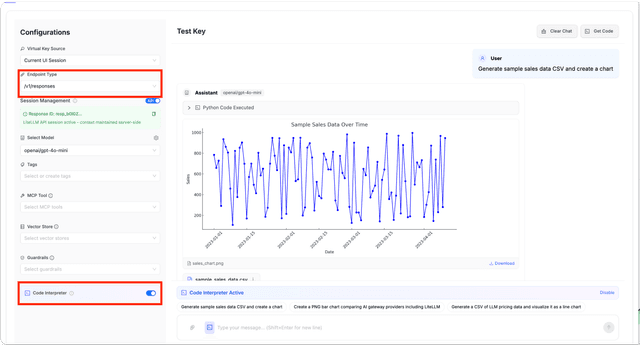
步驟:
- 前往 LiteLLM UI 中的 Playground
- 選取一個 OpenAI model(例如,
openai/gpt-5.6-terra) - 在 Endpoint Type 下方,將
/v1/responses選為 endpoint - 在左側面板切換 Code Interpreter
- 傳送要求執行程式碼或產生檔案的 prompt
UI 會顯示:
- 執行的 Python 程式碼(可收合)
- 內嵌顯示產生的圖片
- 檔案(CSV 等)的下載連結
LiteLLM Python SDK
執行 Code Interpreter
code_interpreter.py
import litellm

response = litellm.responses(
    model="openai/gpt-5.6-terra",
    input="Generate a bar chart of quarterly sales and save as PNG",
    tools=[{"type": "code_interpreter"}]
)

print(response)
取得產生的檔案內容
在 Code Interpreter 執行後,擷取產生的檔案:
get_file_content.py
import litellm

# 1. Run code interpreter
response = litellm.responses(
    model="openai/gpt-5.6-terra",
    input="Create a pie chart of market share and save as PNG",
    tools=[{"type": "code_interpreter"}]
)

# 2. Extract container_id from response
container_id = response.output[0].container_id  # e.g. "cntr_abc123..."

# 3. List files in container
files = litellm.list_container_files(
    container_id=container_id,
    custom_llm_provider="openai"
)

# 4. Download each file
for file in files.data:
    content = litellm.containers.retrieve_container_file_content(
        container_id=container_id,
        file_id=file.id,
        custom_llm_provider="openai"
    )

    with open(file.filename, "wb") as f:
        f.write(content)
    print(f"Downloaded: {file.filename}")
相關
- Containers API - 管理 containers
- Container Files API - 管理 containers 內的檔案
- OpenAI Code Interpreter Docs - OpenAI 官方文件

