從 OpenAPI 規格建立 MCP
LiteLLM 可以將任何 OpenAPI/Swagger 規格轉換為 MCP 伺服器,且無需任何自訂 MCP 伺服器程式碼。
步驟 1:新增 MCP 伺服器
將您的 OpenAPI 型伺服器新增至 config.yaml:
mcp_servers:
  petstore_mcp:
    url: "https://petstore.swagger.io/v2"
    spec_path: "/path/to/openapi.json"
    auth_type: "none"

  my_api_mcp:
    url: "http://0.0.0.0:8090"
    spec_path: "/path/to/openapi.json"
    auth_type: "api_key"
    auth_value: "your-api-key-here"

  secured_api_mcp:
    url: "https://api.example.com"
    spec_path: "/path/to/openapi.json"
    auth_type: "bearer_token"
    auth_value: "your-bearer-token"
或者從 UI:前往 MCP Servers → Add New MCP Server,填入 URL 與規格路徑,LiteLLM 會擷取規格並將所有端點載入為工具。
設定參數:
| 參數 | 必填 | 說明 |
|---|---|---|
url | 是 | 您的 API 基底 URL |
spec_path | 是 | OpenAPI 規格的路徑或 URL(JSON 或 YAML) |
auth_type | 否 | none、api_key、bearer_token、basic、authorization、oauth2 |
auth_value | 否 | 驗證值(若已設定 auth_type 則為必填) |
description | 否 | 可選說明 |
allowed_tools | 否 | 特定工具的允許清單 |
disallowed_tools | 否 | 特定工具的封鎖清單 |
支援的規格版本: OpenAPI 3.0.x、3.1.x、Swagger 2.0。每個操作的 operationId 會成為工具名稱,因此請確保它們是唯一的。
內部規格 URL(SSRF)
當 spec_path 是 http:// 或 https:// URL 時,LiteLLM proxy 預設會啟用 SSRF 保護 來擷取它:系統會解析主機名稱,且若任何解析出的位址不是全球可路由(例如 10.x、192.168.x、127.0.0.1),則請求會被 拒絕,除非您將 URL 中的主機名稱 加入允許清單(不是解析後的 IP)。
常見情況:
- 規格 URL 使用
https://api.example.com/...,但您網路內的 DNS 回傳私有 IP。請將api.example.com加入允許清單(如果您固定連接埠,則加入api.example.com:443)。 - 規格 URL 是
http://127.0.0.1:8080/openapi.json。請新增127.0.0.1或127.0.0.1:8080。
請在您的 proxy litellm_settings 中的 config.yaml 下進行設定(這 不是 從 general_settings 讀取):
litellm_settings:
  user_url_validation: true # default; set false only if you fully trust URL sources
  user_url_allowed_hosts:
    - "api.example.com"
    - "127.0.0.1"
    - "127.0.0.1:8080"
如需這些欄位的完整參考,請參閱 config settings: litellm_settings。
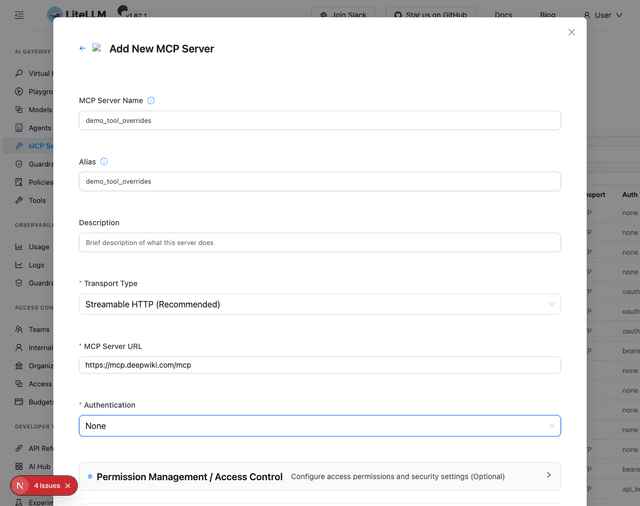
工具載入完成後,您會在工具設定區段看到它們:
步驟 2:選擇性覆寫工具名稱與說明
預設情況下,工具名稱和說明來自您規格中的 operationId 與 description 欄位。您可以重新命名或重寫它們,讓 MCP 用戶端看到更簡潔的內容,而不需變更上游規格。
從 UI
每個工具卡片都有一個鉛筆圖示。按一下即可開啟內嵌編輯器:
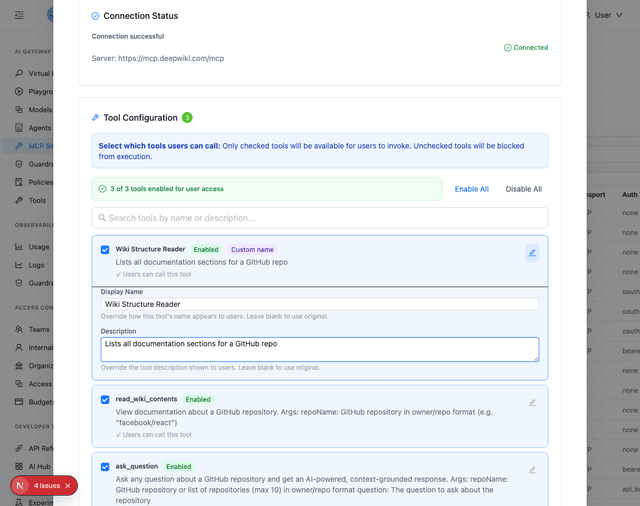
- 顯示名稱 — 覆寫 MCP 用戶端看到的名稱
- 說明 — 覆寫 MCP 用戶端看到的說明。它會經過與規格文字相同的 discovery guardrail 掃描,因此 guardrail 也可以將其遮罩或隱藏
- 將欄位留白可保留規格中的原始值
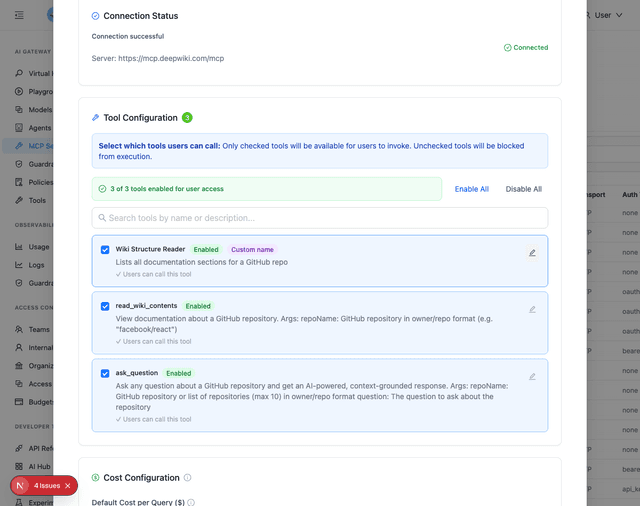
設定覆寫後,工具卡片上會出現紫色的 自訂名稱 徽章:
從 API
在建立或更新請求中傳遞 tool_name_to_display_name 和 tool_name_to_description:
curl -X POST http://localhost:4000/v1/mcp/server \
  -H "Authorization: Bearer $LITELLM_MASTER_KEY" \
  -H "Content-Type: application/json" \
  -d '{
    "name": "petstore_mcp",
    "url": "https://petstore.swagger.io/v2",
    "spec_path": "/path/to/openapi.json",
    "tool_name_to_display_name": {
      "getPetById": "Get Pet",
      "findPetsByStatus": "List Available Pets"
    },
    "tool_name_to_description": {
      "getPetById": "Look up a pet by its ID",
      "findPetsByStatus": "Returns all pets matching a given status (available, pending, sold)"
    }
  }'
curl -X PUT http://localhost:4000/v1/mcp/server \
  -H "Authorization: Bearer $LITELLM_MASTER_KEY" \
  -H "Content-Type: application/json" \
  -d '{
    "server_id": "<server-id>",
    "tool_name_to_display_name": {
      "getPetById": "Get Pet"
    },
    "tool_name_to_description": {
      "getPetById": "Look up a pet by its ID"
    }
  }'
對應鍵是規格中的原始 operationId,而不是加上前綴的工具名稱。LiteLLM 會在查找前先移除伺服器前綴。
例如,如果您的伺服器是 petstore_mcp,工具會以 petstore_mcp-getPetById 的形式公開。map key 仍然是 getPetById。
前後對照:
# Without overrides
Tool: "petstore_mcp-getPetById"
Description: "Returns a single pet"

Tool: "petstore_mcp-findPetsByStatus"
Description: "Finds Pets by status"

# After overrides
Tool: "Get Pet"
Description: "Look up a pet by its ID"

Tool: "List Available Pets"
Description: "Returns all pets matching a given status (available, pending, sold)"
使用伺服器
- Python FastMCP
- Cursor IDE
- OpenAI Responses API
from fastmcp import Client
import asyncio

config = {
    "mcpServers": {
        "petstore": {
            "url": "http://localhost:4000/petstore_mcp/mcp",
            "headers": {
                "x-litellm-api-key": "Bearer sk-<your-litellm-api-key>"
            }
        }
    }
}

client = Client(config)

async def main():
    async with client:
        tools = await client.list_tools()
        print(f"Available tools: {[tool.name for tool in tools]}")

        response = await client.call_tool(
            name="Get Pet",        # overridden name
            arguments={"petId": "1"}
        )
        print(f"Response: {response}")

if __name__ == "__main__":
    asyncio.run(main())
{
  "mcpServers": {
    "Petstore": {
      "url": "http://localhost:4000/petstore_mcp/mcp",
      "headers": {
        "x-litellm-api-key": "Bearer sk-<your-litellm-api-key>"
      }
    }
  }
}
curl --location 'https://api.openai.com/v1/responses' \
--header 'Content-Type: application/json' \
--header "Authorization: Bearer $OPENAI_API_KEY" \
--data '{
    "model": "gpt-5.6-terra",
    "tools": [
        {
            "type": "mcp",
            "server_label": "petstore",
            "server_url": "http://localhost:4000/petstore_mcp/mcp",
            "require_approval": "never",
            "headers": {
                "x-litellm-api-key": "Bearer YOUR_LITELLM_API_KEY"
            }
        }
    ],
    "input": "Find all available pets",
    "tool_choice": "required"
}'

