MCP 零信任驗證(JWT 簽署者)
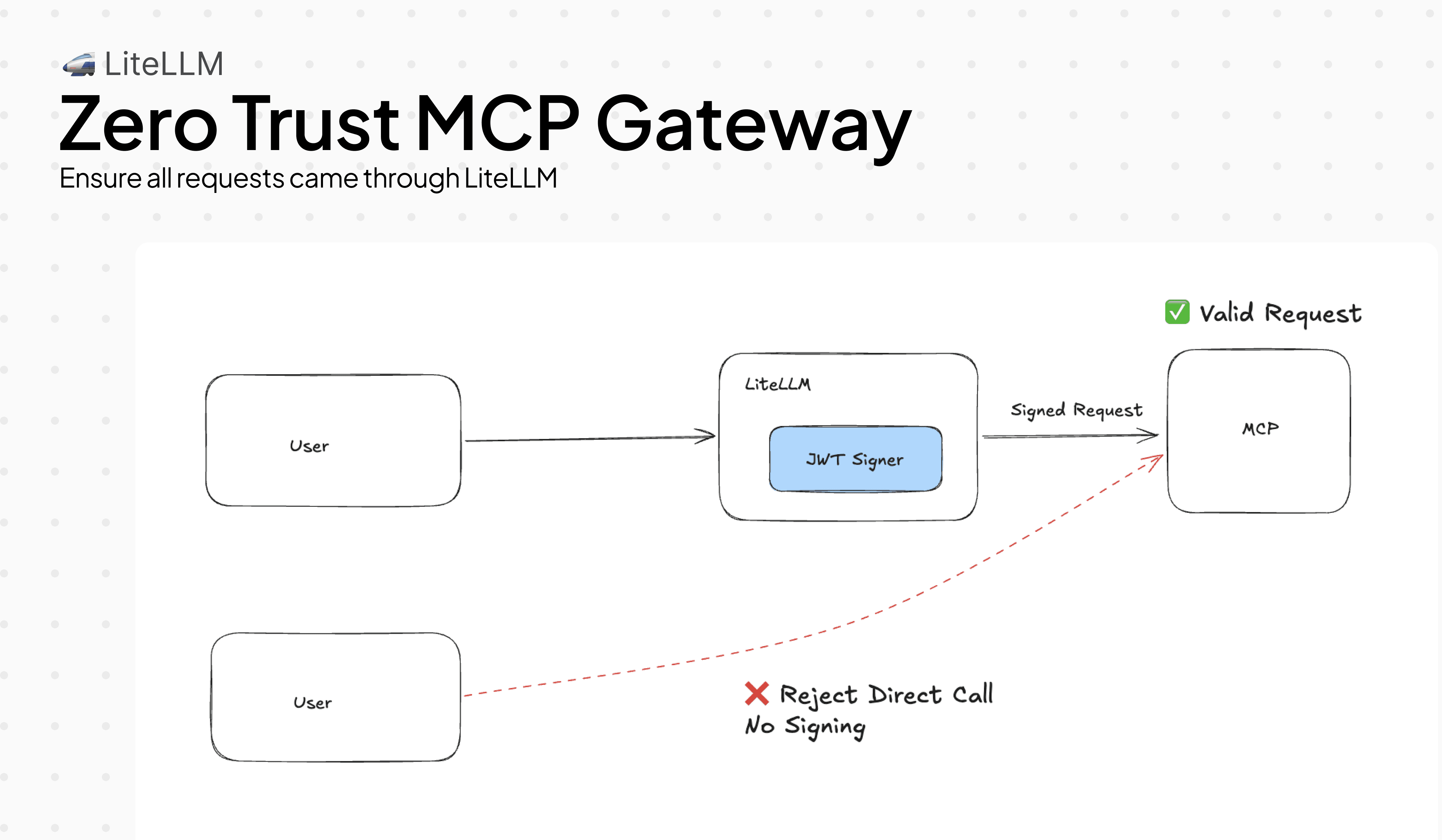
MCP 伺服器沒有內建方式可驗證請求是否 वास्तव際經由 LiteLLM 傳入。若沒有這道防護欄,任何能直接連到您的 MCP 伺服器的用戶端都可以呼叫工具,完全繞過您的存取控制。
MCPJWTSigner 修正了這個問題。它會用短效的 RS256 JWT 為每個對外工具呼叫簽署。您的 MCP 伺服器會以 LiteLLM 的公開金鑰驗證簽章。沒有經過 LiteLLM 的請求不會有有效簽章,因此會被拒絕。
基本設定
將防護欄加入您的設定,並將 MCP 伺服器指向 LiteLLM 的 JWKS 端點。每次工具呼叫都會自動取得已簽署的 JWT,用戶端端無需任何變更。
mcp_servers:
  - server_name: weather
    url: http://localhost:8000/mcp
    transport: http

guardrails:
  - guardrail_name: mcp-jwt-signer
    litellm_params:
      guardrail: mcp_jwt_signer
      mode: pre_mcp_call
      default_on: true
      issuer: "https://my-litellm.example.com"  # defaults to request base URL
      audience: "mcp"                            # default: "mcp"
      ttl_seconds: 300                           # default: 300
使用您自己的簽署金鑰。 建議用於正式環境,因為自動產生的金鑰會在重新啟動時遺失。
export MCP_JWT_SIGNING_KEY="-----BEGIN RSA PRIVATE KEY-----\n..."
# or point to a file
export MCP_JWT_SIGNING_KEY="file:///secrets/mcp-signing-key.pem"
使用 [FastMCP](https://gofastmcp.com 建置已驗證的 MCP 伺服器:
from fastmcp import FastMCP, Context
from fastmcp.server.auth.providers.jwt import JWTVerifier

auth = JWTVerifier(
    jwks_uri="https://my-litellm.example.com/.well-known/jwks.json",
    issuer="https://my-litellm.example.com",
    audience="mcp",
    algorithm="RS256",
)

mcp = FastMCP("weather-server", auth=auth)

@mcp.tool()
async def get_weather(city: str, ctx: Context) -> str:
    caller = ctx.client_id  # JWT `sub` — the verified user identity
    return f"Weather in {city}: sunny, 72°F (requested by {caller})"

if __name__ == "__main__":
    mcp.run(transport="http", host="0.0.0.0", port=8000)
FastMCP 會自動擷取 JWKS,並在簽署金鑰變更時重新擷取。
LiteLLM 會公開 OIDC discovery,因此 MCP 伺服器無需任何手動設定即可找到金鑰:
GET /.well-known/openid-configuration  →  { "jwks_uri": "https://<litellm>/.well-known/jwks.json" }
GET /.well-known/jwks.json             →  { "keys": [{ "kty": "RSA", "alg": "RS256", ... }] }
只有在您需要時才繼續閱讀: 將企業 IdP 身分串接進 JWT、在呼叫端強制特定 claims、新增自訂 metadata、使用 AWS Bedrock AgentCore Gateway,或除錯 JWT 拒絕。
將 IdP 身分串接進 MCP JWT
預設情況下,傳出的 JWT sub 是 LiteLLM 內部的 user_id。如果您的使用者透過 Okta、Azure AD,或其他 IdP 進行驗證,MCP 伺服器看到的會是 LiteLLM 內部 ID,而不是使用者的電子郵件或員工 ID。
使用 verify+re-sign 時,LiteLLM 會先驗證傳入的 IdP token,然後使用該 token 中的真實身分 claims 建立對外 JWT。MCP 伺服器可以取得使用者的實際身分,而無需直接信任原始 IdP。
guardrails:
  - guardrail_name: mcp-jwt-signer
    litellm_params:
      guardrail: mcp_jwt_signer
      mode: pre_mcp_call
      default_on: true
      issuer: "https://my-litellm.example.com"

      # Validate the incoming Bearer token against the IdP
      access_token_discovery_uri: "https://login.microsoftonline.com/{tenant}/v2.0/.well-known/openid-configuration"
      verify_issuer: "https://login.microsoftonline.com/{tenant}/v2.0"
      verify_audience: "api://my-app"

      # Which claim to use for `sub` in the outbound JWT — first non-empty value wins
      end_user_claim_sources:
        - "token:sub"       # from the verified incoming JWT
        - "token:email"     # fallback to email
        - "litellm:user_id" # last resort: LiteLLM's internal user_id
如果傳入的 token 是 opaque 而不是 JWT(有些 IdP 會發行這類 token),請新增一個 introspection 端點。LiteLLM 會將 token 以 POST 傳送到該端點(RFC 7662),並使用回傳的 claims:
token_introspection_endpoint: "https://idp.example.com/oauth2/introspect"
支援的 end_user_claim_sources 值:
| 來源 | 解析為 |
|---|---|
token:<claim> | 已驗證傳入 JWT 中的任何 claim(例如 token:sub、token:email、token:oid) |
litellm:user_id | LiteLLM 的內部使用者 ID |
litellm:email | LiteLLM 驗證內容中的使用者電子郵件 |
litellm:end_user_id | 若另行設定,則為終端使用者 ID |
litellm:team_id | LiteLLM 驗證內容中的團隊 ID |
封鎖缺少必要屬性的呼叫端
有些 MCP 伺服器會公開敏感操作,這些操作應只能由已驗證的員工存取,而不是服務帳號,也不是外部 API 金鑰。您可以在 LiteLLM 層級強制執行這項限制,讓 MCP 伺服器根本不會收到該請求。
required_claims 會在傳入 token 缺少任何列出的 claim 時以 403 拒絕。optional_claims 會轉送有用但非必要的 claims。
guardrails:
  - guardrail_name: mcp-jwt-signer
    litellm_params:
      guardrail: mcp_jwt_signer
      mode: pre_mcp_call
      default_on: true

      access_token_discovery_uri: "https://idp.example.com/.well-known/openid-configuration"

      # Service accounts without `employee_id` are blocked before the tool runs
      required_claims:
        - "sub"
        - "employee_id"

      # Forward these into the outbound JWT when present — skipped silently if absent
      optional_claims:
        - "groups"
        - "department"
被封鎖時用戶端會看到:
HTTP 403
{ "error": "MCPJWTSigner: incoming token is missing required claims: ['employee_id']. Configure the IdP to include these claims." }
將自訂 metadata 加入每個 JWT
您的 MCP 伺服器可能需要 LiteLLM 原生不攜帶的上下文:是哪個部署送出了請求、租戶 ID、環境標籤。請使用 claim 操作將 claims 注入、覆寫或移除自傳出的 JWT。
guardrails:
  - guardrail_name: mcp-jwt-signer
    litellm_params:
      guardrail: mcp_jwt_signer
      mode: pre_mcp_call
      default_on: true

      # add: insert only when the key is not already in the JWT
      add_claims:
        deployment_id: "prod-us-east-1"
        tenant_id: "acme-corp"

      # set: always override — even if the claim came from the incoming token
      set_claims:
        env: "production"

      # remove: strip claims the MCP server shouldn't see
      remove_claims:
        - "nbf"   # some validators reject nbf; remove it if yours does
操作會依序執行:add_claims → set_claims → remove_claims。set_claims 永遠優先於 add_claims;remove_claims 兩者皆勝出。
AWS Bedrock AgentCore Gateway
Bedrock AgentCore Gateway 使用兩個分開的 JWT:一個用於驗證傳輸連線,另一個用於授權工具呼叫。它們需要不同的 aud 值和 TTL,因此單一 JWT 無法同時適用。
LiteLLM 可以在一個 hook 中同時發出兩者,並將它們注入不同的標頭:
guardrails:
  - guardrail_name: mcp-jwt-signer
    litellm_params:
      guardrail: mcp_jwt_signer
      mode: pre_mcp_call
      default_on: true
      issuer: "https://my-litellm.example.com"
      audience: "mcp-resource"   # for the MCP resource layer
      ttl_seconds: 300

      # Second JWT for the transport channel — same sub/act/scope, different aud + TTL
      channel_token_audience: "bedrock-agentcore-gateway"
      channel_token_ttl: 60      # transport tokens should be short-lived
LiteLLM 會在每次工具呼叫時注入兩個標頭:
Authorization: Bearer <resource-token>— audiencemcp-resource,TTL 300sx-mcp-channel-token: Bearer <channel-token>— audiencebedrock-agentcore-gateway,TTL 60s
兩個 token 都使用相同的 LiteLLM 金鑰簽署,因此您的 MCP 伺服器只需要信任一個 JWKS 端點。
控制哪些 scopes 進入 JWT
預設情況下,LiteLLM 會為每個請求產生最小權限 scopes:
- 工具呼叫 →
mcp:tools/call mcp:tools/{name}:call - 列出工具 →
mcp:tools/call mcp:tools/list
如果您的 MCP 伺服器有自己的 scope 強制執行機制,且需要特定格式,請將 allowed_scopes 設定為完全取代自動產生:
guardrails:
  - guardrail_name: mcp-jwt-signer
    litellm_params:
      guardrail: mcp_jwt_signer
      mode: pre_mcp_call
      default_on: true

      allowed_scopes:
        - "mcp:tools/call"
        - "mcp:tools/list"
        - "mcp:admin"
每個 JWT 都會攜帶完全相同的 scopes,不論呼叫的是哪個工具。
除錯 JWT 拒絕
您的 MCP 伺服器回傳 401,而且您不確定 JWT 裡有哪些內容。啟用 debug_headers 後,LiteLLM 會新增一個 x-litellm-mcp-debug 回應標頭,內含已簽署的關鍵 claims:
guardrails:
  - guardrail_name: mcp-jwt-signer
    litellm_params:
      guardrail: mcp_jwt_signer
      mode: pre_mcp_call
      default_on: true
      debug_headers: true
回應標頭:
x-litellm-mcp-debug: v=1; kid=a3f1b2c4d5e6f708; sub=alice@corp.com; iss=https://my-litellm.example.com; exp=1712345678; scope=mcp:tools/call mcp:tools/get_weather:call
請檢查 kid 是否與 MCP 伺服器從 JWKS 取回的內容一致,iss/aud 是否與您的伺服器預期值相符,以及 exp 是否尚未到期。請在正式環境中停用,因為該標頭會洩漏 claim 中繼資料。
JWT claims 參考
| Claim | 值 |
|---|---|
iss | issuer 設定值(或請求 base URL) |
aud | audience 設定值(預設:"mcp") |
sub | 透過 end_user_claim_sources 解析(預設:user_id → api-key hash → "litellm-proxy") |
act.sub | team_id → org_id → "litellm-proxy"(RFC 8693 delegation) |
email | LiteLLM 驗證內容中的 user_email(可用時) |
scope | 每次工具呼叫自動產生,或在設定時為 allowed_scopes |
iat, exp, nbf | 標準時間 claim(RFC 7519) |
限制
- 以 OpenAPI 為基礎的 MCP 伺服器(已設定
spec_path)不支援 JWT 注入。LiteLLM 會記錄警告並略過標頭。請使用 SSE/HTTP 傳輸伺服器以獲得完整的 JWT 注入。 - 金鑰對預設為記憶體內,且除非設定
MCP_JWT_SIGNING_KEY,否則每次重新啟動都會輪換。FastMCP 的JWTVerifier會透過 JWKS key ID 比對透明處理金鑰輪換。
相關內容
- MCP 防護欄 — MCP 呼叫的 PII 遮罩與封鎖
- MCP OAuth — MCP 伺服器存取的上游 OAuth2
- MCP AWS SigV4 — 對 MCP 伺服器的 AWS 簽署請求

