Azure Sentinel
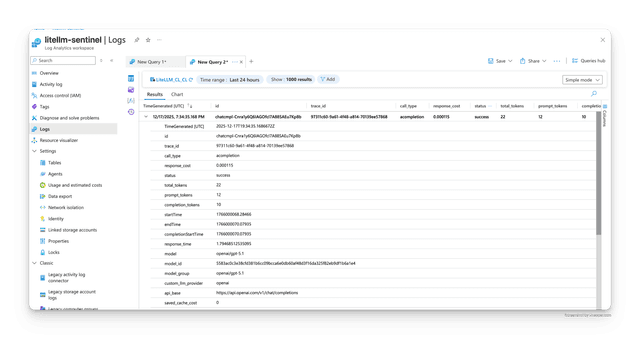
LiteLLM 支援透過 Azure Monitor Logs Ingestion API 記錄到 Azure Sentinel。Azure Sentinel 使用 Log Analytics 工作區進行資料儲存,因此傳送到工作區的記錄可在 Sentinel 中用於安全性監控與分析。
Azure Sentinel 整合
| 功能 | 詳細資訊 |
|---|---|
| 記錄內容 | StandardLoggingPayload |
| 事件 | 成功 + 失敗 |
| 產品連結 | Azure Sentinel |
| API 參考 | Logs Ingestion API |
我們將使用 --config 來設定 litellm.callbacks = ["azure_sentinel"],這會將所有成功與失敗的 LLM 呼叫記錄到 Azure Sentinel。
步驟 1:建立 config.yaml 檔案並設定 litellm_settings:callbacks
model_list:
  - model_name: gpt-5.6-luna
    litellm_params:
      model: gpt-5.6-luna
litellm_settings:
  callbacks: ["azure_sentinel"] # logs llm success + failure logs to Azure Sentinel
步驟 2:設定 Azure 資源
在使用 Logs Ingestion API 之前,您需要在 Azure 中設定以下項目:
- 建立 Log Analytics 工作區(如果您還沒有)
- 在您的 Log Analytics 工作區中建立自訂資料表(例如,
LiteLLM_CL) - 建立資料收集規則(DCR),包含:
- 與您的資料結構相符的串流宣告
- 將資料對應至您的自訂資料表的轉換
- 已授予您的應用程式註冊存取權
- 在 Microsoft Entra ID(Azure AD)中註冊應用程式,包含:
- Client ID
- Client Secret
- 寫入 DCR 的權限
如需詳細的設定說明,請參閱 Microsoft 關於 Logs Ingestion API 的文件。
步驟 3:設定必要的環境變數
使用您的 Azure 認證設定以下環境變數:
# Required: Data Collection Rule (DCR) configuration
AZURE_SENTINEL_DCR_IMMUTABLE_ID="dcr-xxxxxxxxxxxxxxxxxxxxxxxxxxxxx"  # DCR Immutable ID from Azure portal
AZURE_SENTINEL_STREAM_NAME="Custom-LiteLLM_CL_CL"                    # Stream name from your DCR
AZURE_SENTINEL_ENDPOINT="https://your-dcr-endpoint.eastus-1.ingest.monitor.azure.com"  # DCR logs ingestion endpoint (NOT the DCE endpoint)

# Required: OAuth2 Authentication (App Registration)
AZURE_SENTINEL_TENANT_ID="your-tenant-id"                            # Azure Tenant ID
AZURE_SENTINEL_CLIENT_ID="your-client-id"                            # Application (client) ID
AZURE_SENTINEL_CLIENT_SECRET="your-client-secret"                    # Client secret value
注意:AZURE_SENTINEL_ENDPOINT 應該是 DCR 的 logs ingestion endpoint(可在 DCR Overview 頁面找到),不是 Data Collection Endpoint(DCE)。DCR endpoint 會與您特定的 DCR 關聯,外觀如下:https://your-dcr-endpoint.{region}-1.ingest.monitor.azure.com
步驟 4:啟動 proxy 並發出測試請求
啟動 proxy
litellm --config config.yaml --debug
測試請求
curl --location 'http://0.0.0.0:4000/chat/completions' \
    --header 'Content-Type: application/json' \
    --data '{
    "model": "gpt-5.6-luna",
    "messages": [
        {
        "role": "user",
        "content": "what llm are you"
        }
    ],
    "metadata": {
        "your-custom-metadata": "custom-field",
    }
}'
步驟 5:在 Azure Sentinel 中檢視記錄
- 前往 Azure portal 中的 Azure Sentinel 工作區
- 進入「Logs」並查詢您的自訂資料表(例如,
LiteLLM_CL) - 執行如下查詢:
LiteLLM_CL
| where TimeGenerated > ago(1h)
| project TimeGenerated, model, status, total_tokens, response_cost
| order by TimeGenerated desc
您應該會在 Azure Workspace 中看到以下記錄。
環境變數
| 環境變數 | 說明 | 預設值 | 必填 |
|---|---|---|---|
AZURE_SENTINEL_DCR_IMMUTABLE_ID | Data Collection Rule(DCR)不可變 ID | 無 | ✅ 是 |
AZURE_SENTINEL_ENDPOINT | DCR 記錄擷取端點 URL(來自 DCR Overview 頁面) | 無 | ✅ 是 |
AZURE_SENTINEL_STREAM_NAME | 來自 DCR 的串流名稱(例如:"Custom-LiteLLM_CL_CL") | "Custom-LiteLLM" | ❌ 否 |
AZURE_SENTINEL_TENANT_ID | 用於 OAuth2 驗證的 Azure Tenant ID | 無(回退至 AZURE_TENANT_ID) | ✅ 是 |
AZURE_SENTINEL_CLIENT_ID | 用於 OAuth2 驗證的 Application(client)ID | 無(回退至 AZURE_CLIENT_ID) | ✅ 是 |
AZURE_SENTINEL_CLIENT_SECRET | 用於 OAuth2 驗證的 Client secret | 無(回退至 AZURE_CLIENT_SECRET) | ✅ 是 |
AZURE_SENTINEL_AUTHORITY_HOST | 發出 OAuth2 token 的 Microsoft Entra authority host | 無(回退至 AZURE_AUTHORITY_HOST,再回退至 https://login.microsoftonline.com) | ❌ 否 |
主權雲
Azure Government 使用其自己的 Entra authority 和自己的 Azure Monitor audience,因此僅將 AZURE_SENTINEL_ENDPOINT 指向主權擷取端點並不足夠。設定 authority host 後,LiteLLM 會推導出相符的 audience:
| 雲端 | Authority host | 推導出的 audience |
|---|---|---|
| Azure Public Cloud(預設) | https://login.microsoftonline.com | https://monitor.azure.com/.default |
| Azure Government | https://login.microsoftonline.us | https://monitor.azure.us/.default |
AZURE_AUTHORITY_HOST 與 azure_storage callback 和 Azure OpenAI OIDC 共用,因此設定它會讓這些項目切換到相同的雲端。當您的 Sentinel 工作區位於與其餘 Azure 資源不同的雲端時,請使用 AZURE_SENTINEL_AUTHORITY_HOST;它僅對 Sentinel 生效且具有優先權。這兩個值會在 callback 第一次使用時讀取,因此請重新啟動 proxy 以套用變更
運作方式
Azure Sentinel 整合使用 Azure Monitor Logs Ingestion API 將記錄傳送到您的 Log Analytics 工作區。此整合:
- 使用 OAuth2 client credentials flow 搭配您的應用程式註冊進行驗證
- 將記錄傳送到 Data Collection Rule (DCR) endpoint
- 批次處理記錄以提升傳輸效率
- 以 StandardLoggingPayload 格式傳送記錄
- 自動處理成功與失敗事件
- 快取 OAuth2 token 並自動重新整理
傳送到 Log Analytics 工作區的記錄會自動在 Azure Sentinel 中可用,以進行安全性監控、威脅偵測與分析。
Azure Sentinel 設定指南
依照此逐步指南,使用 LiteLLM 設定 Azure Sentinel。
步驟 1:建立 Log Analytics 工作區

- 搜尋「Log Analytics workspaces」並點選「Create」

- 為您的工作區輸入名稱(例如,「litellm-sentinel-prod」)

- 點選「Review + Create」

步驟 2:建立自訂資料表
- 前往您的 Log Analytics 工作區並點選「Tables」

- 點選「Create」→「New custom log (Direct Ingest)」

- 輸入資料表名稱(例如,「LITELLM_PROD_CL」)

步驟 3:建立資料收集規則(DCR)
- 點選「Create a new data collection rule」

- 為 DCR 輸入名稱(例如,「litellm-prod」)

- 選取 Data Collection Endpoint

- 上傳用於結構描述的範例 JSON 檔案(使用 example_standard_logging_payload.json 檔案)

- 點選「Next」,然後點選「Create」

步驟 4:取得 DCR 不可變 ID 與 Logs Ingestion Endpoint
- 前往「Data Collection Rules」並選取您的 DCR

- 複製 DCR 不可變 ID(以
dcr-開頭)

- 複製 Logs Ingestion Endpoint URL

步驟 5:取得串流名稱
- 在 DCR 中點選「JSON View」

- 在
streamDeclarations區段中找到 Stream Name(例如,「Custom-LITELLM_PROD_CL_CL」)

步驟 6:註冊應用程式並授予權限
- 前往 Microsoft Entra ID → App registrations → New registration
- 建立新的應用程式並記下 Client ID 與 Tenant ID
- 前往 Certificates & secrets → 建立新的 client secret 並複製 Secret Value
- 返回您的 DCR → Access Control (IAM) → Add role assignment
- 將 "Monitoring Metrics Publisher" 角色指派給您的應用程式註冊
摘要:各值的查找位置
| 環境變數 | 查找位置 |
|---|---|
AZURE_SENTINEL_DCR_IMMUTABLE_ID | DCR Overview 頁面 → Immutable ID(以 dcr- 開頭) |
AZURE_SENTINEL_ENDPOINT | DCR Overview 頁面 → Logs Ingestion Endpoint |
AZURE_SENTINEL_STREAM_NAME | DCR JSON View → streamDeclarations 區段 |
AZURE_SENTINEL_TENANT_ID | App Registration → Overview → Directory (tenant) ID |
AZURE_SENTINEL_CLIENT_ID | App Registration → Overview → Application (client) ID |
AZURE_SENTINEL_CLIENT_SECRET | App Registration → Certificates & secrets → Secret Value |
如需更多詳細資訊,請參閱 Microsoft Logs Ingestion API 文件。

