Google Cloud Storage
將 LLM 記錄寫入 Google Cloud Storage Buckets
使用方式
- 將
gcs_bucket加到 LiteLLM Config.yaml
model_list:
- litellm_params:
    api_base: https://openai-function-calling-workers.tasslexyz.workers.dev/
    api_key: my-fake-key
    model: openai/my-fake-model
  model_name: fake-openai-endpoint

litellm_settings:
  callbacks: ["gcs_bucket"] # 👈 KEY CHANGE # 👈 KEY CHANGE
- 設定必要的環境變數
GCS_BUCKET_NAME="<your-gcs-bucket-name>"
GCS_PATH_SERVICE_ACCOUNT="/Users/ishaanjaffer/Downloads/adroit-crow-413218-a956eef1a2a8.json" # Add path to service account.json
- 啟動 Proxy
litellm --config /path/to/config.yaml
- 測試看看!
curl --location 'http://0.0.0.0:4000/chat/completions' \
--header 'Content-Type: application/json' \
--data ' {
      "model": "fake-openai-endpoint",
      "messages": [
        {
          "role": "user",
          "content": "what llm are you"
        }
      ],
    }
'
GCS Bucket 上預期的記錄
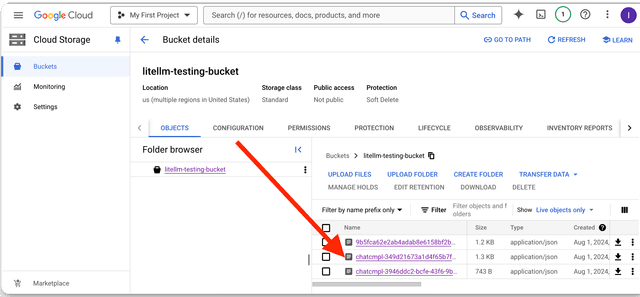
GCS Bucket 上記錄的欄位
標準的 logging object 會記錄到 GCS Bucket
從 Google Cloud Console 取得 service_account.json
- 前往 Google Cloud Console
- 搜尋 IAM 與管理員
- 點選 Service Accounts
- 選取一個 Service Account
- 點選 'Keys' -> Add Key -> Create New Key -> JSON
- 儲存 JSON 檔案,並將路徑加到
GCS_PATH_SERVICE_ACCOUNT
支援與創辦人交流
- 預約 Demo 👋
- 社群 Discord 💭
- 我們的電子郵件 ✉️ ishaan@berri.ai / krrish@berri.ai

