Langfuse
Langfuse 是什麼?
Langfuse(GitHub)是一個開源的 LLM 工程平台,用於模型 tracing、prompt 管理 與應用程式 評估。Langfuse 協助團隊協同除錯、分析與反覆迭代 LLM 應用程式。
使用 LiteLLM 透過多個模型在 Langfuse 中的範例 trace:
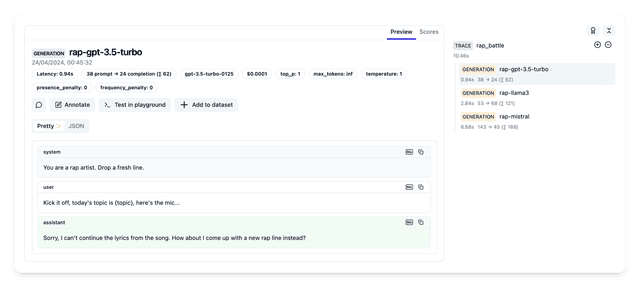
對於 Langfuse v3 和 v4,我們建議使用 OpenTelemetry v2 指南 中的 langfuse_otel 預設設定。這能提供更好的 span 品質、更低的延遲,以及原生 OpenTelemetry 語意。
以下 SDK 回呼(langfuse)需要 Langfuse Python SDK v4(langfuse>=4.7,<5)。它會透過 LiteLLM 自己的 OpenTelemetry 管線將追蹤傳送至 Langfuse 的 OTLP 端點,因此追蹤幾乎即時顯示,並且只使用該 SDK 的 REST 用戶端來進行提示管理與憑證檢查。批次大小與提示快取 TTL 會透過 LANGFUSE_FLUSH_AT 和 LANGFUSE_PROMPT_CACHE_DEFAULT_TTL_SECONDS 調整(請參閱 config settings)。
自架的 Langfuse 必須是 3.63.0 或更新的伺服器版本才能使用 SDK v4,依據 Langfuse 相容性矩陣;OSS v2 伺服器不會提供回呼匯出到的 /api/public/otel/v1/traces 路由,因此追蹤會被以 404 拒絕,而 proxy 會記錄該拒絕。請先升級伺服器,再升級 LiteLLM,或在此之前先維持先前的 LiteLLM 版本。Langfuse 前方的 ingress 或反向 proxy 若有 request body 大小限制,對於過大的批次會回應 413;此回呼會將該批次切成兩半後重新傳送,而只有單一 span 自身就超過限制時才會被捨棄,並記錄錯誤。
與 LiteLLM Proxy(LLM 閘道)搭配使用
👉 請透過此連結開始使用 LiteLLM Proxy server 將記錄傳送到 langfuse
若要將不同團隊或虛擬金鑰路由到不同的 Langfuse 專案,請參閱 依 Team/Key 的記錄。Team 預設值位於受信任的 config.yaml(其中 os.environ/... 參照會由 gateway 解析),而每個 key 的回呼則透過 /key/generate 或 /key/update 以解析後的憑證值佈建;這些是 key 上儲存的設定,而非每次請求的憑證。
與 LiteLLM Python SDK 搭配使用
本節涵蓋 langfuse 回呼,它使用 Langfuse Python SDK v4。或者,您也可以直接使用 OpenTelemetry v2 整合。
先決條件
請先執行 uv add langfuse 以完成此整合
uv add "langfuse>=4.7,<5" litellm
快速開始
只需 2 行程式碼,即可透過 Langfuse 立即記錄您的回應,涵蓋所有提供者:

請從 https://cloud.langfuse.com/ 取得您的 Langfuse API 金鑰
litellm.success_callback = ["langfuse"]
litellm.failure_callback = ["langfuse"] # logs errors to langfuse
# uv add langfuse
import litellm
import os

# from https://cloud.langfuse.com/
os.environ["LANGFUSE_PUBLIC_KEY"] = ""
os.environ["LANGFUSE_SECRET_KEY"] = ""
# Optional, defaults to https://cloud.langfuse.com
os.environ["LANGFUSE_HOST"] # optional

# LLM API Keys
os.environ['OPENAI_API_KEY']=""

# set langfuse as a callback, litellm will send the data to langfuse
litellm.success_callback = ["langfuse"]

# openai call
response = litellm.completion(
  model="gpt-5.6-luna",
  messages=[
    {"role": "user", "content": "Hi 👋 - i'm openai"}
  ]
)
進階
設定自訂生成名稱、傳遞中繼資料
在 generation_name 中傳遞 metadata
import litellm
from litellm import completion
import os

# from https://cloud.langfuse.com/
os.environ["LANGFUSE_PUBLIC_KEY"] = "pk-..."
os.environ["LANGFUSE_SECRET_KEY"] = "sk-..."


# OpenAI and Cohere keys
# You can use any of the litellm supported providers: https://docs.litellm.ai/docs/providers
os.environ['OPENAI_API_KEY']="sk-..."

# set langfuse as a callback, litellm will send the data to langfuse
litellm.success_callback = ["langfuse"]

# openai call
response = completion(
  model="gpt-5.6-luna",
  messages=[
    {"role": "user", "content": "Hi 👋 - i'm openai"}
  ],
  metadata = {
    "generation_name": "litellm-ishaan-gen", # set langfuse generation name
    # custom metadata fields
    "project": "litellm-proxy"
  }
)

print(response)
設定自訂 Trace ID、Trace User ID、Trace Metadata、Trace Version、Trace Release 與 Tags
在 trace_id 中傳遞 trace_user_id、trace_metadata、trace_version、trace_release、tags、metadata
import litellm
from litellm import completion
import os

# from https://cloud.langfuse.com/
os.environ["LANGFUSE_PUBLIC_KEY"] = "pk-..."
os.environ["LANGFUSE_SECRET_KEY"] = "sk-..."

os.environ['OPENAI_API_KEY']="sk-..."

# set langfuse as a callback, litellm will send the data to langfuse
litellm.success_callback = ["langfuse"]

# set custom langfuse trace params and generation params
response = completion(
  model="gpt-5.6-luna",
  messages=[
    {"role": "user", "content": "Hi 👋 - i'm openai"}
  ],
  metadata={
      "generation_name": "ishaan-test-generation",  # set langfuse Generation Name
      "generation_id": "gen-id22",                  # set langfuse Generation ID
      "parent_observation_id": "obs-id9",           # set langfuse Parent Observation ID
      "version":  "test-generation-version",        # set langfuse Generation Version
      "trace_user_id": "user-id2",                  # set langfuse Trace User ID
      "session_id": "session-1",                    # set langfuse Session ID
      "tags": ["tag1", "tag2"],                     # set langfuse Tags
      "trace_name": "new-trace-name",               # set langfuse Trace Name
      "trace_id": "trace-id22",                     # set langfuse Trace ID (non-hex IDs are deterministically hashed, see note below)
      "trace_metadata": {"key": "value"},           # set langfuse Trace Metadata
      "trace_version": "test-trace-version",        # set langfuse Version. v4 has a single version attribute - on a new trace, trace_version takes precedence over version
      "trace_release": "test-trace-release",        # set langfuse Trace Release
      ### OR ###
      "existing_trace_id": "trace-id22",            # if generation is continuation of past trace. This prevents default behaviour of setting a trace name
      ### OR enforce that certain fields are trace overwritten in the trace during the continuation ###
      "existing_trace_id": "trace-id22",
      "trace_metadata": {"key": "updated_trace_value"},            # The new value to use for the langfuse Trace Metadata
      "update_trace_keys": ["input", "output", "trace_metadata"],  # Updates the trace input & output to be this generations input & output (written via observation fields in v4) and updates the Trace Metadata to match the passed in value. Requires `langfuse_enable_update_trace_keys: true`
      "debug_langfuse": True,                                      # Will log the scalar metadata sent to litellm for the trace/generation as `metadata_passed_to_litellm`
  },
)

print(response)
- 自訂
trace_id:Langfuse v4 需要 W3C trace ID(32 個小寫十六進位字元)。LiteLLM 會先將您的trace_id轉為小寫並移除連字號,因此像01234567-89AB-CDEF-0123-456789ABCDEF這樣的 UUID 會變成0123456789abcdef0123456789abcdef,並直接使用。任何仍然不是 32 個十六進位字元的值,都會以決定性方式雜湊成一個值(透過Langfuse.create_trace_id(seed=<your id>))。相同的trace_id永遠會對應到同一個 Langfuse trace,但在 Langfuse 中可見的 ID 是標準化或雜湊後的形式,而不是您原本的字串。 version/trace_version:Langfuse v4 只有單一version屬性。對於新的 trace,trace_version的優先順序高於version;在existing_trace_id延續中,version仍會套用到 generation。- 延續的 traces:v4 伺服器會從 trace 中最新的 root observation 推導出 trace 的名稱/input/output。使用
update_trace_keys搭配input/output仍會被採用——這些值會透過 observation 欄位寫入。
您也可以將 metadata 作為請求標頭的一部分傳入,並加上 langfuse_* 前綴:
curl --location --request POST 'http://0.0.0.0:4000/chat/completions' \
    --header 'Content-Type: application/json' \
    --header "Authorization: Bearer $LITELLM_API_KEY" \
    --header 'langfuse_trace_id: trace-id2' \
    --header 'langfuse_trace_user_id: user-id2' \
    --header 'langfuse_trace_metadata: {"key":"value"}' \
    --data '{
    "model": "gpt-5.6-luna",
    "messages": [
        {
        "role": "user",
        "content": "what llm are you"
        }
    ]
}'
Trace 與生成參數
Trace 特定參數
trace_id- trace 的識別碼;若這是既有 trace,必須使用existing_trace_id而非trace_id;預設為自動產生。ID 會轉為小寫並移除連字號;任何仍然不是 32 個十六進位字元的值,都會以決定性方式雜湊成 32 位十六進位的 W3C trace ID(請參閱上方註解)trace_name- trace 的名稱,預設為自動產生session_id- trace 的 session 識別碼,預設為Nonetrace_version- trace 的版本,預設為version的值。Langfuse v4 只有單一version屬性:在新的 trace 中,trace_version具有優先權trace_release- trace 的 release,預設為Nonetrace_metadata- trace 的 metadata,預設為Nonetrace_user_id- trace 的使用者識別碼,預設為 completion 參數usertags- trace 的標籤,預設為None
生成特定參數
generation_id- 生成的識別碼;預設為自動產生generation_name- 生成的識別碼;預設為自動產生parent_observation_id- 上層觀測的識別碼;預設為Noneprompt- 生成所使用的 Langfuse prompt 物件;預設為None
傳入 metadata 的任何其他 key-value 配對都會以 requester_metadata 的形式記錄在 generation 上。在 proxy 上,您在 request body 中傳送的任何內容都會自動發生這種情況。從 SDK 端,請將它們巢狀包裹,以便被擷取:
response = litellm.completion(
    model="gpt-5.6-terra",
    messages=[{"role": "user", "content": "Hi"}],
    metadata={"metadata": {"my_key": "my_value"}},   # arrives as requester_metadata
)
多個 Langfuse 專案(每次請求的憑證)
您可以透過直接傳遞憑證給 completion() 或 acompletion(),將 trace 依每次請求傳送到不同的 Langfuse 專案。這可與全域環境變數一起使用(或取而代之),當不同團隊或業務流程使用不同的 Langfuse 專案時特別有用。
將 langfuse_public_key、langfuse_secret_key(或 langfuse_secret),以及可選的 langfuse_host 作為關鍵字引數傳遞:
import litellm
from litellm import completion

# Optional: set a default via env for requests that don't pass credentials
# os.environ["LANGFUSE_PUBLIC_KEY"] = "pk-default..."
# os.environ["LANGFUSE_SECRET_KEY"] = "sk-default..."

litellm.success_callback = ["langfuse"]
litellm.failure_callback = ["langfuse"]

# Request 1 → Langfuse Project A
response_a = completion(
    model="gpt-5.6-luna",
    messages=[{"role": "user", "content": "Hello from team A"}],
    langfuse_public_key="pk-lf-project-a...",
    langfuse_secret_key="sk-lf-project-a...",
    langfuse_host="https://us.cloud.langfuse.com",  # optional
)

# Request 2 → Langfuse Project B (different project)
response_b = completion(
    model="gpt-5.6-luna",
    messages=[{"role": "user", "content": "Hello from team B"}],
    langfuse_public_key="pk-lf-project-b...",
    langfuse_secret_key="sk-lf-project-b...",
    langfuse_host="https://eu.cloud.langfuse.com",  # optional, can differ per project
)
使用每次請求憑證的非同步用法:
import litellm
from litellm import acompletion

litellm.success_callback = ["langfuse"]
litellm.failure_callback = ["langfuse"]

response = await acompletion(
    model="gpt-5.6-luna",
    messages=[{"role": "user", "content": "Hi"}],
    langfuse_public_key="pk-lf-...",
    langfuse_secret_key="sk-lf-...",
    langfuse_host="https://us.cloud.langfuse.com",  # optional
)
langfuse_public_key– Langfuse 專案公開金鑰(每次請求覆寫所需)。langfuse_secret_key或langfuse_secret– Langfuse 私密金鑰(兩種名稱皆可接受)。langfuse_host– Langfuse 主機 URL(例如https://us.cloud.langfuse.com);可選,預設為環境變數或 Langfuse cloud。
當傳入這些值時,該請求會使用此專案(以及主機)進行 Langfuse callback;若未提供,callback 會使用全域 Langfuse client(若已設定,則來自環境變數)。LiteLLM 會針對每組憑證快取一個 Langfuse client,以避免每次請求都建立新的 client。
停用記錄 - 特定呼叫
若要停用特定呼叫的記錄,請使用 no-log 標記。
completion(messages = ..., model = ..., **{"no-log": True})
搭配使用 LangChain ChatLiteLLM + Langfuse
在 model_kwargs 中傳遞 trace_user_id、session_id
import os
from langchain.chat_models import ChatLiteLLM
from langchain.schema import HumanMessage
import litellm

# from https://cloud.langfuse.com/
os.environ["LANGFUSE_PUBLIC_KEY"] = "pk-..."
os.environ["LANGFUSE_SECRET_KEY"] = "sk-..."

os.environ['OPENAI_API_KEY']="sk-..."

# set langfuse as a callback, litellm will send the data to langfuse
litellm.success_callback = ["langfuse"]

chat = ChatLiteLLM(
  model="gpt-5.6-luna",
  model_kwargs={
      "metadata": {
        "trace_user_id": "user-id2", # set langfuse Trace User ID
        "session_id": "session-1" ,  # set langfuse Session ID
        "tags": ["tag1", "tag2"]
      }
    }
  )
messages = [
    HumanMessage(
        content="what model are you"
    )
]
chat(messages)
從 Langfuse 記錄中遮罩訊息、回應內容
從所有 Langfuse 記錄中遮罩訊息與回應
設定 litellm.turn_off_message_logging=True 這將防止訊息與回應被記錄到 langfuse,但請求中繼資料仍會被記錄。
從特定 Langfuse 記錄中遮罩訊息與回應
在通常為文字 completion 或 embedding 呼叫所傳遞的中繼資料中,您可以設定特定鍵值來遮罩此呼叫的訊息與回應。
將 mask_input 設為 True,會遮罩此呼叫的輸入不被記錄
將 mask_output 設為 True,會使此呼叫的輸出不被記錄。
請注意,如果您正在延續既有 trace,且將 update_trace_keys 設定為包含 input 或 output,同時您也設定了對應的 mask_input 或 mask_output,那麼該 trace 既有的 input 和/或 output 將會被替換成一則已遮蔽的訊息。這僅適用於 langfuse_enable_update_trace_keys 開啟時。
疑難排解與錯誤
資料沒有被記錄到 Langfuse?
- 請確認您使用的是最新版本的 langfuse
uv add langfuse -U。最新版本可讓 litellm 將 JSON 輸入/輸出記錄到 langfuse - 如果您在 langfuse 中看不到任何 trace,請遵循 此檢查清單。
支援與創辦人交流
- 預約 Demo 👋
- 社群 Discord 💭
- 我們的電子郵件 ✉️ ishaan@berri.ai / krrish@berri.ai

