LangSmith
一站式開發者平台,涵蓋應用程式生命週期的每個步驟 https://smith.langchain.com/
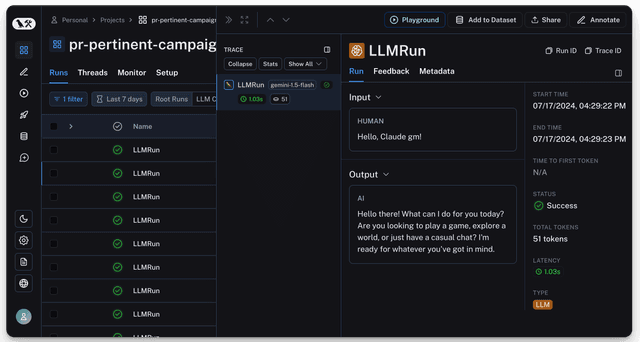
前置需求
uv add litellm
快速開始
只要 2 行程式碼,就能立即透過 Langsmith 記錄您的回應,適用於所有提供者
- SDK
- LiteLLM Proxy
litellm.callbacks = ["langsmith"]
import litellm
import os

os.environ["LANGSMITH_API_KEY"] = ""
os.environ["LANGSMITH_PROJECT"] = "" # defaults to litellm-completion
os.environ["LANGSMITH_DEFAULT_RUN_NAME"] = "" # defaults to LLMRun
# LLM API Keys
os.environ['OPENAI_API_KEY']=""

# set langsmith as a callback, litellm will send the data to langsmith
litellm.callbacks = ["langsmith"]

# openai call
response = litellm.completion(
  model="gpt-5.6-luna",
  messages=[
    {"role": "user", "content": "Hi 👋 - i'm openai"}
  ]
)
- 設定 config.yaml
model_list:
  - model_name: gpt-5.6-luna
    litellm_params:
      model: openai/gpt-5.6-luna
      api_key: os.environ/OPENAI_API_KEY

litellm_settings:
  callbacks: ["langsmith"]
- 啟動 LiteLLM Proxy
litellm --config /path/to/config.yaml
- 測試看看!
curl -L -X POST 'http://0.0.0.0:4000/v1/chat/completions' \
-H 'Content-Type: application/json' \
-H 'Authorization: Bearer sk-eWkpOhYaHiuIZV-29JDeTQ' \
-d '{
  "model": "gpt-5.6-luna",
  "messages": [
    {
      "role": "user",
      "content": "Hey, how are you?"
    }
  ],
  "max_completion_tokens": 250
}'
進階
本機測試 - 控制批次大小
設定 Langsmith 一次處理的批次大小,預設為 512。
在本機測試時設定 langsmith_batch_size=1,以便更快看到記錄送達。
- SDK
- LiteLLM Proxy
import litellm
import os

os.environ["LANGSMITH_API_KEY"] = ""
# LLM API Keys
os.environ['OPENAI_API_KEY']=""

# set langsmith as a callback, litellm will send the data to langsmith
litellm.callbacks = ["langsmith"]
litellm.langsmith_batch_size = 1 # 👈 KEY CHANGE

response = litellm.completion(
    model="gpt-5.6-luna",
     messages=[
        {"role": "user", "content": "Hi 👋 - i'm openai"}
    ]
)
print(response)
- 設定 config.yaml
model_list:
  - model_name: gpt-5.6-luna
    litellm_params:
      model: openai/gpt-5.6-luna
      api_key: os.environ/OPENAI_API_KEY

litellm_settings:
  langsmith_batch_size: 1
  callbacks: ["langsmith"]
- 啟動 LiteLLM Proxy
litellm --config /path/to/config.yaml
- 測試看看!
curl -L -X POST 'http://0.0.0.0:4000/v1/chat/completions' \
-H 'Content-Type: application/json' \
-H 'Authorization: Bearer sk-eWkpOhYaHiuIZV-29JDeTQ' \
-d '{
  "model": "gpt-5.6-luna",
  "messages": [
    {
      "role": "user",
      "content": "Hey, how are you?"
    }
  ],
  "max_completion_tokens": 250
}'
設定 Langsmith 欄位
import litellm
import os

os.environ["LANGSMITH_API_KEY"] = ""
# LLM API Keys
os.environ['OPENAI_API_KEY']=""

# set langsmith as a callback, litellm will send the data to langsmith
litellm.success_callback = ["langsmith"]

response = litellm.completion(
    model="gpt-5.6-luna",
     messages=[
        {"role": "user", "content": "Hi 👋 - i'm openai"}
    ],
    metadata={
        "run_name": "litellmRUN",                                   # langsmith run name
        "project_name": "litellm-completion",                       # langsmith project name
        "run_id": "497f6eca-6276-4993-bfeb-53cbbbba6f08",           # langsmith run id
        "parent_run_id": "f8faf8c1-9778-49a4-9004-628cdb0047e5",    # langsmith run parent run id
        "trace_id": "df570c03-5a03-4cea-8df0-c162d05127ac",         # langsmith run trace id (root runs override this, see note below)
        "session_id": "1ffd059c-17ea-40a8-8aef-70fd0307db82",       # langsmith run session id (must be an existing tracer session)
        "tags": ["model1", "prod-2"],                               # langsmith run tags
        "metadata": {                                               # langsmith run metadata
            "key1": "value1"
        },
        "dotted_order": "20240429T004912090000Z497f6eca-6276-4993-bfeb-53cbbbba6f08"
    }
)
print(response)
以 root 發送的 run,表示它既不帶有 parent_run_id 也不帶有 dotted_order,其 trace_id 會設為 run id,讓批次通過 LangSmith 的 dotted_order 驗證。提供 parent_run_id 或 dotted_order 可保留您自己的 trace_id。session_id 必須參照 LangSmith 中已存在的 tracer session,且當其等於 trace_id 時會被忽略,因為該形狀是由 proxy 的 request-header fan-out 所產生,而非刻意的 session
讓 LiteLLM Proxy 使用自訂 LANGSMITH_BASE_URL
如果您使用自訂的 LangSmith 執行個體,可以設定
LANGSMITH_BASE_URL 環境變數,指向您的執行個體。
例如,您可以透過這個設定,讓 LiteLLM Proxy 將記錄送到本機的 LangSmith 執行個體:
litellm_settings:
  success_callback: ["langsmith"]

environment_variables:
  LANGSMITH_BASE_URL: "http://localhost:1984"
  LANGSMITH_PROJECT: "litellm-proxy"
支援與創辦人交流
- 預約示範 👋
- 社群 Discord 💭
- 我們的電子郵件 ✉️ ishaan@berri.ai / krrish@berri.ai

