Literal AI
Literal AI 是一個協作式可觀測性、評估與分析平台,用於建構可供正式環境使用的 LLM 應用程式。
先決條件
請確認您已安裝 literalai 套件:
uv add literalai litellm
快速開始
import litellm
import os

os.environ["LITERAL_API_KEY"] = ""
os.environ['OPENAI_API_KEY']= ""
os.environ['LITERAL_BATCH_SIZE'] = "1" # You won't see logs appear until the batch is full and sent

litellm.success_callback = ["literalai"] # Log Input/Output to LiteralAI
litellm.failure_callback = ["literalai"] # Log Errors to LiteralAI

# openai call
response = litellm.completion(
  model="gpt-5.6-luna",
  messages=[
    {"role": "user", "content": "Hi 👋 - i'm openai"}
  ]
)
多步驟追蹤
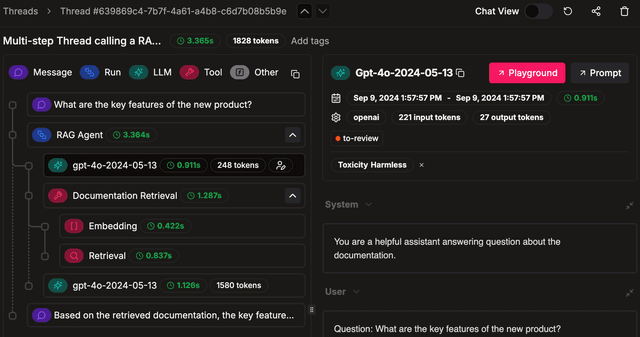
此整合與 Literal AI SDK 裝飾器相容,可啟用對話與代理程式追蹤
import litellm
from literalai import LiteralClient
import os

os.environ["LITERAL_API_KEY"] = ""
os.environ['OPENAI_API_KEY']= ""
os.environ['LITERAL_BATCH_SIZE'] = "1" # You won't see logs appear until the batch is full and sent

litellm.input_callback = ["literalai"] # Support other Literal AI decorators and prompt templates
litellm.success_callback = ["literalai"] # Log Input/Output to LiteralAI
litellm.failure_callback = ["literalai"] # Log Errors to LiteralAI

literalai_client = LiteralClient()

@literalai_client.run
def my_agent(question: str):
    # agent logic here
    response = litellm.completion(
        model="gpt-5.6-luna",
        messages=[
            {"role": "user", "content": question}
        ],
        metadata={"literalai_parent_id": literalai_client.get_current_step().id}
    )
    return response

my_agent("Hello world")

# Waiting to send all logs before exiting, not needed in a production server
literalai_client.flush()
深入了解 Literal AI 記錄功能。
將生成內容綁定至其提示範本
此整合可直接與在 Literal AI 上管理的提示搭配使用。這表示特定的 LLM 生成內容會綁定到其範本。
深入了解 Literal AI 上的 提示管理。
OpenAI Proxy 使用方式
如果您使用的是 Lite LLM proxy,您可以使用 Literal AI OpenAI instrumentation 來記錄您的請求。
from literalai import LiteralClient
from openai import OpenAI

client = OpenAI(
    api_key="anything",            # litellm proxy virtual key
    base_url="http://0.0.0.0:4000" # litellm proxy base_url
)

literalai_client = LiteralClient(api_key="")

# Instrument the OpenAI client
literalai_client.instrument_openai()

settings = {
    "model": "gpt-5.6-luna", # model you want to send litellm proxy
    "temperature": 0,
    # ... more settings
}

response = client.chat.completions.create(
        messages=[
            {
                "content": "You are a helpful bot, you always reply in Spanish",
                "role": "system"
            },
            {
                "content": message.content,
                "role": "user"
            }
        ],
        **settings
    )

