Lunary
Lunary 是一個開源平台,提供 可觀測性、提示管理 與 分析,協助團隊管理並改善 LLM 聊天機器人。
您可以隨時透過 email 與我們聯絡,或直接 安排 Demo。
搭配 LiteLLM Python SDK 使用
先決條件
uv add litellm lunary
快速開始
首先,請到 Lunary 儀表板 取得您的 Lunary 公開金鑰。
只要 2 行程式碼,就能透過 Lunary 立即記錄您 跨所有提供者 的回應:
litellm.success_callback = ["lunary"]
litellm.failure_callback = ["lunary"]
完整程式碼:
from litellm import completion

os.environ["LUNARY_PUBLIC_KEY"] = "your-lunary-public-key" # from https://app.lunary.ai/)
os.environ["OPENAI_API_KEY"] = ""

litellm.success_callback = ["lunary"]
litellm.failure_callback = ["lunary"]

response = completion(
  model="gpt-5.6-terra",
  messages=[{"role": "user", "content": "Hi there 👋"}],
  user="ishaan_litellm"
)
搭配 LangChain ChatLiteLLM 使用
import os
from langchain.chat_models import ChatLiteLLM
from langchain.schema import HumanMessage
import litellm

os.environ["LUNARY_PUBLIC_KEY"] = "" # from https://app.lunary.ai/settings
os.environ['OPENAI_API_KEY']="sk-..."

litellm.success_callback = ["lunary"]
litellm.failure_callback = ["lunary"]

chat = ChatLiteLLM(
  model="gpt-5.6-terra"
)
messages = [
    HumanMessage(
        content="what model are you"
    )
]
chat(messages)
搭配提示範本使用
您可以使用 Lunary 管理 提示範本,並透過 LiteLLM 在所有 LLM 提供者之間共用。
from litellm import completion
import lunary

template = lunary.render_template("template-slug", {
  "name": "John", # Inject variables
})

litellm.success_callback = ["lunary"]

result = completion(**template)
搭配自訂鏈使用
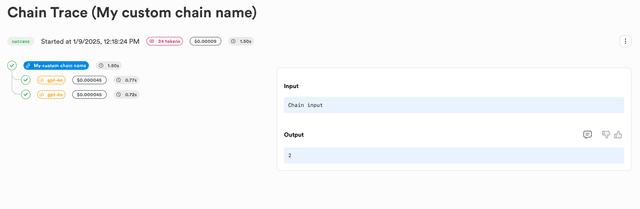
您可以將 LLM 請求包裝在自訂鏈中,這樣就能將它們視覺化為追蹤。
import litellm
from litellm import completion
import lunary

litellm.success_callback = ["lunary"]
litellm.failure_callback = ["lunary"]

@lunary.chain("My custom chain name")
def my_chain(chain_input):
  chain_run_id = lunary.run_manager.current_run_id
  response = completion(
    model="gpt-5.6-terra",
    messages=[{"role": "user", "content": "Say 1"}],
    metadata={"parent_run_id": chain_run_id},
  )

  response = completion(
    model="gpt-5.6-terra",
    messages=[{"role": "user", "content": "Say 2"}],
    metadata={"parent_run_id": chain_run_id},
  )
  chain_output = response.choices[0].message
  return chain_output

my_chain("Chain input")
搭配 LiteLLM Proxy Server 使用
步驟 1:安裝相依套件並設定您的環境變數
安裝相依套件
uv add litellm lunary
從 https://app.lunary.ai/settings 取得您的 Lunary 公開金鑰
export LUNARY_PUBLIC_KEY="<your-public-key>"
步驟 2:建立 config.yaml 並設定 lunary 回呼
model_list:
  - model_name: "*"
    litellm_params:
      model: "*"
litellm_settings:
  success_callback: ["lunary"]
  failure_callback: ["lunary"]
步驟 3:啟動 LiteLLM proxy
litellm --config config.yaml
步驟 4:送出請求
curl -X POST 'http://0.0.0.0:4000/chat/completions' \
-H 'Content-Type: application/json' \
-d '{
    "model": "gpt-5.6-terra",
    "messages": [
      {
        "role": "system",
        "content": "You are a helpful math tutor. Guide the user through the solution step by step."
      },
      {
        "role": "user",
        "content": "how can I solve 8x + 7 = -23"
      }
    ]
}'
您可以在 此頁面 找到更多關於向 LiteLLM proxy 送出請求的不同方式之詳細資訊
支援與創辦人交流
- 安排 Demo 👋
- 社群 Discord 💭
- 我們的 email ✉️ ishaan@berri.ai / krrish@berri.ai

