MLflow
什麼是 MLflow?
MLflow 是一個端到端的開源 MLOps 平台,用於 實驗追蹤、模型管理、評估、可觀測性(追蹤),以及部署。MLflow 協助團隊共同開發並精進 LLM 應用程式。
MLflow 與 LiteLLM 的整合支援與 OpenTelemetry 相容的進階可觀測性。
開始使用
安裝 MLflow:
uv add "litellm[mlflow]"
要為 LiteLLM 啟用 MLflow 自動追蹤:
import mlflow

mlflow.litellm.autolog()

# Alternative, you can set the callback manually in LiteLLM
# litellm.callbacks = ["mlflow"]
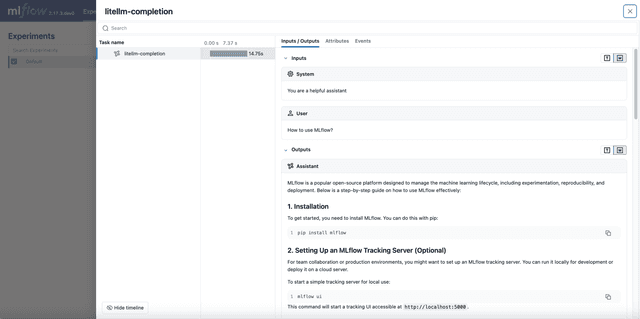
由於 MLflow 是開源且免費的,記錄追蹤時不需要註冊或 API 金鑰!
import litellm
import os

# Set your LLM provider's API key
os.environ["OPENAI_API_KEY"] = ""

# Call LiteLLM as usual
response = litellm.completion(
    model="gpt-5.6-luna",
    messages=[
      {"role": "user", "content": "Hi 👋 - i'm openai"}
    ]
)
開啟 MLflow UI,然後前往 Traces 分頁以檢視已記錄的追蹤:
mlflow ui
追蹤工具呼叫
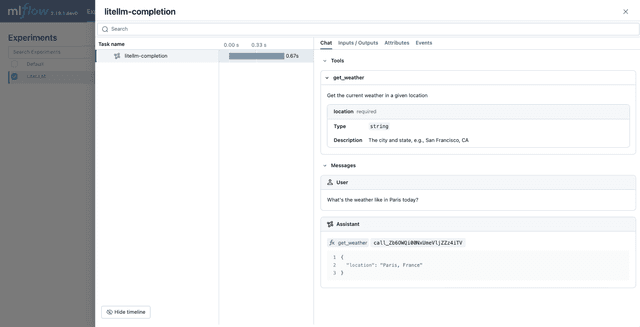
LiteLLM 與 MLflow 的整合除了訊息之外,也支援追蹤工具呼叫。
import mlflow

# Enable MLflow auto-tracing for LiteLLM
mlflow.litellm.autolog()

# Define the tool function.
def get_weather(location: str) -> str:
    if location == "Tokyo":
        return "sunny"
    elif location == "Paris":
        return "rainy"
    return "unknown"

# Define function spec
get_weather_tool = {
    "type": "function",
    "function": {
        "name": "get_weather",
        "description": "Get the current weather in a given location",
        "parameters": {
            "properties": {
                "location": {
                    "description": "The city and state, e.g., San Francisco, CA",
                    "type": "string",
                },
            },
            "required": ["location"],
            "type": "object",
        },
    },
}

# Call LiteLLM as usual
response = litellm.completion(
    model="gpt-5.6-luna",
    messages=[
      {"role": "user", "content": "What's the weather like in Paris today?"}
    ],
    tools=[get_weather_tool]
)
評估
MLflow LiteLLM 整合可讓您對 LLM 執行定性評估,以評估和/或監控您的 GenAI 應用程式。
請造訪 Evaluate LLMs 教學 以取得如何搭配 LiteLLM 和 MLflow 執行評估套件的完整指南。
匯出追蹤至 OpenTelemetry 收集器
MLflow 追蹤與 OpenTelemetry 相容。您可以透過在環境變數中設定端點 URL,將追蹤匯出到任何 OpenTelemetry 收集器(例如 Jaeger、Zipkin、Datadog、New Relic)。
# Set the endpoint of the OpenTelemetry Collector
os.environ["OTEL_EXPORTER_OTLP_TRACES_ENDPOINT"] = "http://localhost:4317/v1/traces"
# Optionally, set the service name to group traces
os.environ["OTEL_SERVICE_NAME"] = "<your-service-name>"
請參閱 MLflow 文件 以取得更多詳細資訊。
將 LiteLLM 追蹤與您的應用程式追蹤合併
LiteLLM 通常是較大型 LLM 應用程式的一部分,例如 agentic models。MLflow Tracing 讓您可以為自訂 Python 程式碼加上儀表化,之後可與 LiteLLM 追蹤合併。
import litellm
import mlflow
from mlflow.entities import SpanType

# Enable MLflow auto-tracing for LiteLLM
mlflow.litellm.autolog()


class CustomAgent:
    # Use @mlflow.trace to instrument Python functions.
    @mlflow.trace(span_type=SpanType.AGENT)
    def run(self, query: str):
        # do something

        while i < self.max_turns:
            response = litellm.completion(
                model="gpt-5.6-luna",
                messages=messages,
            )

            action = self.get_action(response)
            ...

    @mlflow.trace
    def get_action(llm_response):
        ...
這種做法會產生一個統一的追蹤,將您的自訂 Python 程式碼與 LiteLLM 呼叫合併在一起。
LiteLLM 代理伺服器
依賴項
若要在 LiteLLM Proxy Server 上使用 mlflow,您需要在 docker 容器上安裝 mlflow 套件。
uv add "mlflow>=3.1.4"
設定
在您的 LiteLLM proxy 設定檔中設定 MLflow:
model_list:
  - model_name: openai/*
    litellm_params:
      model: openai/*

litellm_settings:
  success_callback: ["mlflow"]
  failure_callback: ["mlflow"]
環境變數
若要在 Databricks 服務上使用 MLflow,請設定以下必要的環境變數:
DATABRICKS_TOKEN="dapixxxxx"
DATABRICKS_HOST="https://dbc-xxxx.cloud.databricks.com"
MLFLOW_TRACKING_URI="databricks"
MLFLOW_REGISTRY_URI="databricks-uc"
MLFLOW_EXPERIMENT_ID="xxxx"
新增標籤以進行更好的追蹤
您可以為您的請求新增自訂標籤,以改善 MLflow 中的追蹤組織與篩選。標籤可協助您依作業 ID、任務名稱或任何自訂中繼資料來分類並搜尋您的追蹤。
- curl
- OpenAI Python SDK
curl --location 'http://0.0.0.0:4000/chat/completions' \
    --header 'Content-Type: application/json' \
    --header "Authorization: Bearer $LITELLM_API_KEY" \
    --data '{
    "model": "gemini-3.8-flash",
    "messages": [
        {
        "role": "user",
        "content": "what llm are you"
        }
    ],
    "litellm_metadata": {
        "tags": ["jobID:214590dsff09fds", "taskName:run_page_classification"]
    }
}'
from openai import OpenAI

# Initialize the OpenAI client pointing to your LiteLLM proxy
client = OpenAI(
    api_key="sk-<your-litellm-api-key>",  # Your LiteLLM proxy API key
    base_url="http://0.0.0.0:4000"  # Your LiteLLM proxy URL
)

# Make a request with tags in metadata
response = client.chat.completions.create(
    model="gemini-3.8-flash",
    messages=[
        {
            "role": "user",
            "content": "what llm are you"
        }
    ],
    extra_body={
        "litellm_metadata": {
            "tags": ["jobID:214590dsff09fds", "taskName:run_page_classification"]
        }
    }
)
支援
- 如需追蹤的進階用法與整合,請造訪 MLflow Tracing 文件。
- 如對此整合有任何問題或疑問,請在我們的 Github 儲存庫中 提交 issue!

