Slack
先決條件
步驟 1
uv add litellm
步驟 2
從 https://api.slack.com/messaging/webhooks 取得 slack webhook url
快速開始
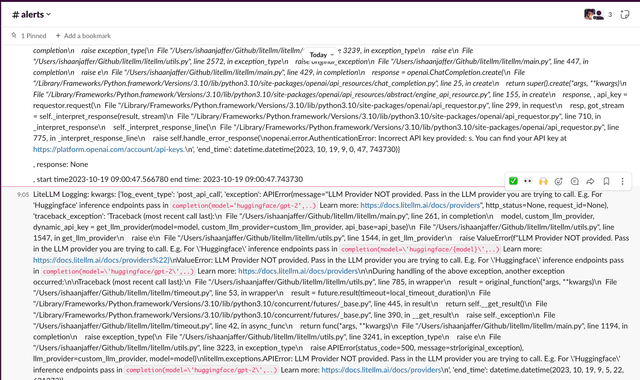
建立自訂回呼以記錄到 slack
我們建立一個自訂回呼來記錄到 slack webhooks,請參閱 litellm 上的自訂回呼
def send_slack_alert(
        kwargs,
        completion_response,
        start_time,
        end_time,
):
    print(
        "in custom slack callback func"
    )
    import requests
    import json

    # Define the Slack webhook URL
    # get it from https://api.slack.com/messaging/webhooks
    slack_webhook_url = os.environ['SLACK_WEBHOOK_URL']   # "https://hooks.slack.com/services/<>/<>/<>"

    # Remove api_key from kwargs under litellm_params
    if kwargs.get('litellm_params'):
        kwargs['litellm_params'].pop('api_key', None)
        if kwargs['litellm_params'].get('metadata'):
            kwargs['litellm_params']['metadata'].pop('deployment', None)
    # Remove deployment under metadata
    if kwargs.get('metadata'):
        kwargs['metadata'].pop('deployment', None)
    # Prevent api_key from being logged
    if kwargs.get('api_key'):
        kwargs.pop('api_key', None)

    # Define the text payload, send data available in litellm custom_callbacks
    text_payload = f"""LiteLLM Logging: kwargs: {str(kwargs)}\n\n, response: {str(completion_response)}\n\n, start time{str(start_time)} end time: {str(end_time)}
    """
    payload = {
        "text": text_payload
    }

    # Set the headers
    headers = {
        "Content-type": "application/json"
    }

    # Make the POST request
    response = requests.post(slack_webhook_url, json=payload, headers=headers)

    # Check the response status
    if response.status_code == 200:
        print("Message sent successfully to Slack!")
    else:
        print(f"Failed to send message to Slack. Status code: {response.status_code}")
        print(response.json())
將回呼傳遞給 LiteLLM
litellm.success_callback = [send_slack_alert]
import litellm
litellm.success_callback = [send_slack_alert] # log success
litellm.failure_callback = [send_slack_alert] # log exceptions

# this will raise an exception
response = litellm.completion(
    model="gpt-2",
    messages=[
        {
            "role": "user",
            "content": "Hi 👋 - i'm openai"
        }
    ]
)
支援與創辦人交流
- 安排示範 👋
- 社群 Discord 💭
- 我們的電子郵件 ✉️ ishaan@berri.ai / krrish@berri.ai

