Gemini - Google AI Studio
| 屬性 | 詳細資訊 |
|---|---|
| 說明 | Google AI Studio 是一個全代管的 AI 開發平台,用於建置與使用生成式 AI。 |
| LiteLLM 提供者路由 | gemini/ |
| 提供者文件 | Google AI Studio ↗ |
| 提供者 API 端點 | https://generativelanguage.googleapis.com |
| 支援的 OpenAI 端點 | /chat/completions, /embeddings, /completions, /videos, /images/edits |
| Lyria (music) | Cost map & notes |
| 直通端點 | Supported |
| 模型格式 | 提供者 | Auth Required |
|---|---|---|
gemini/gemini-2.0-flash | Gemini API | GEMINI_API_KEY(簡易 API 金鑰) |
vertex_ai/gemini-2.0-flash | Vertex AI | GCP 憑證 + 專案 |
gemini-2.0-flash(no prefix) | Vertex AI | GCP 憑證 + 專案 |
如果您只是想使用 API 金鑰(像 OpenAI 一樣),請使用 gemini/ 前綴。
沒有前綴的模型預設為 Vertex AI,且需要完整的 GCP 驗證。
API 金鑰
import os
os.environ["GEMINI_API_KEY"] = "your-api-key"
範例用法
from litellm import completion
import os

os.environ['GEMINI_API_KEY'] = ""
response = completion(
    model="gemini/gemini-3.8-flash",
    messages=[{"role": "user", "content": "write code for saying hi from LiteLLM"}]
)
支援的 OpenAI 參數
- temperature
- top_p
- max_tokens
- max_completion_tokens
- stream
- tools
- tool_choice
- include_server_side_tool_invocations
- functions
- response_format
- n
- stop
- logprobs
- frequency_penalty
- modalities
- reasoning_content
- audio(僅適用於 TTS 模型)
- service_tier
Anthropic 參數
- thinking(用於在 anthropic/gemini 模型之間設定最大 budget tokens)
用法 - Thinking / reasoning_content
LiteLLM 會將 OpenAI 的 reasoning_effort 轉換為 Gemini 的 thinking 參數。程式碼
**成本最佳化:**使用 reasoning_effort="none"(OpenAI 標準)可大幅節省成本——最多便宜 96%。Google 的文件
注意:在 Gemini 2.5 Pro 模型上無法關閉 Reasoning。
對於 Gemini 3+ 模型(例如,gemini-3.1-pro-preview),當您設定 reasoning_effort 時,LiteLLM 會將其對應到 thinking_level 欄位,而不是 thinking_budget。支援的等級取決於模型:Flash 系列模型也支援 medium,而 minimal 可支援到 3.6 Flash。3.7 和 3.8 Flash 會拒絕 minimal,因此 LiteLLM 會對這些模型傳送 low,適用於 minimal、none 和 disable,並由其 cost-map 項目上的 supports_minimal_reasoning_effort: false 驅動。如果您省略 reasoning_effort,LiteLLM 不會 傳送預設 thinking_level,因此請求會使用 Gemini API 預設值(Gemini 3 Flash 在 API 上預設為 high)。
Gemini 圖片模型(例如 gemini-3-pro-image-preview、gemini-2.0-flash-exp-image-generation)不支援 thinking_level 參數。LiteLLM 會自動將圖片模型排除在接收 thinking 設定之外,以避免 API 錯誤。
Gemini 2.5 及更早模型的對應
| reasoning_effort | thinking | 備註 |
|---|---|---|
| "none" | "budget_tokens": 0, "includeThoughts": false | 💰 建議用於成本最佳化 - 相容 OpenAI,永遠為 0 |
| "disable" | "budget_tokens": DEFAULT (0), "includeThoughts": false | LiteLLM 特定,可透過環境變數設定 |
| "low" | "budget_tokens": 1024 | |
| "medium" | "budget_tokens": 2048 | |
| "high" | "budget_tokens": 4096 |
Gemini 3+ 模型的對應
| reasoning_effort | thinking_level | 備註 |
|---|---|---|
| "minimal" | "minimal"(Flash 到 3.6 / 部分 3.1)或 "low" | Flash 系列 ID 會使用 minimal,除非其 cost-map 項目設定了 supports_minimal_reasoning_effort: false(3.7 和 3.8 Flash),此時會對應到 low |
| "low" | "low" | 最適合簡單的指令遵循或聊天 |
| "medium" | "medium" 或 "high" | 在 API 支援時使用 "medium";否則使用 "high" |
| "high" | "high" | 將推理深度最大化 |
| "disable" | "minimal"(Flash 到 3.6)或 "low" | 無法在 Gemini 3 中完全停用 thinking;3.7 和 3.8 Flash 會拒絕 minimal,因此會取得 low |
| "none" | "minimal"(Flash 到 3.6)或 "low" | 無法在 Gemini 3 中完全停用 thinking;3.7 和 3.8 Flash 會拒絕 minimal,因此會取得 low |
- SDK
- PROXY
from litellm import completion

# Cost-optimized: Use reasoning_effort="none" for best pricing
resp = completion(
    model="gemini/gemini-3.8-flash",
    messages=[{"role": "user", "content": "What is the capital of France?"}],
    reasoning_effort="none",  # Up to 96% cheaper!
)

# Or use other levels: "low", "medium", "high"
resp = completion(
    model="gemini/gemini-3.8-flash",
    messages=[{"role": "user", "content": "What is the capital of France?"}],
    reasoning_effort="low",
)
- 設定 config.yaml
- model_name: gemini-3.8-flash
  litellm_params:
    model: gemini/gemini-3.8-flash
    api_key: os.environ/GEMINI_API_KEY
- 啟動 proxy
litellm --config /path/to/config.yaml
- 測試它!
curl http://0.0.0.0:4000/v1/chat/completions \
  -H "Content-Type: application/json" \
  -H "Authorization: Bearer <YOUR-LITELLM-KEY>" \
  -d '{
    "model": "gemini-3.8-flash",
    "messages": [{"role": "user", "content": "What is the capital of France?"}],
    "reasoning_effort": "low"
  }'
Gemini 3+ 模型 - thinking_level 參數
對於 Gemini 3+ 模型(例如 gemini-3.1-pro-preview),您可以直接使用新的 thinking_level 參數:
- SDK
- PROXY
from litellm import completion

# Use thinking_level for Gemini 3 models
resp = completion(
    model="gemini/gemini-3.1-pro-preview",
    messages=[{"role": "user", "content": "Solve this complex math problem step by step."}],
    reasoning_effort="high",  # Options: "low" or "high"
)

# Low thinking level for faster, simpler tasks
resp = completion(
    model="gemini/gemini-3.1-pro-preview",
    messages=[{"role": "user", "content": "What is the weather today?"}],
    reasoning_effort="low",  # Minimizes latency and cost
)
curl http://0.0.0.0:4000/v1/chat/completions \
  -H "Content-Type: application/json" \
  -H "Authorization: Bearer <YOUR-LITELLM-KEY>" \
  -d '{
    "model": "gemini-3.1-pro-preview",
    "messages": [{"role": "user", "content": "Solve this complex problem."}],
    "reasoning_effort": "high"
  }'
Gemini 3 模型的 Temperature 建議
對於 Gemini 3 模型,LiteLLM 預設將 temperature 設為 1.0,並強烈建議維持此預設值。將 temperature < 1.0 設為其他值可能導致:
- 無限迴圈
- 推理效能下降
- 複雜任務失敗
若未為 Gemini 3+ 模型指定,LiteLLM 會自動設定 temperature=1.0。
預期回應
ModelResponse(
    id='chatcmpl-c542d76d-f675-4e87-8e5f-05855f5d0f5e',
    created=1740470510,
    model='gemini-3.8-flash',
    object='chat.completion',
    system_fingerprint=None,
    choices=[
        Choices(
            finish_reason='stop',
            index=0,
            message=Message(
                content="The capital of France is Paris.",
                role='assistant',
                tool_calls=None,
                function_call=None,
                reasoning_content='The capital of France is Paris. This is a very straightforward factual question.'
            ),
        )
    ],
    usage=Usage(
        completion_tokens=68,
        prompt_tokens=42,
        total_tokens=110,
        completion_tokens_details=None,
        prompt_tokens_details=PromptTokensDetailsWrapper(
            audio_tokens=None,
            cached_tokens=0,
            text_tokens=None,
            image_tokens=None
        ),
        cache_creation_input_tokens=0,
        cache_read_input_tokens=0
    )
)
將 thinking 傳遞給 Gemini 模型
您也可以將 thinking 參數傳遞給 Gemini 模型。
這會轉換為 Gemini 的 thinkingConfig 參數。
- SDK
- PROXY
response = litellm.completion(
  model="gemini/gemini-3.8-flash",
  messages=[{"role": "user", "content": "What is the capital of France?"}],
  thinking={"type": "enabled", "budget_tokens": 1024},
)
curl http://0.0.0.0:4000/v1/chat/completions \
  -H "Content-Type: application/json" \
  -H "Authorization: Bearer $LITELLM_KEY" \
  -d '{
    "model": "gemini/gemini-3.8-flash",
    "messages": [{"role": "user", "content": "What is the capital of France?"}],
    "thinking": {"type": "enabled", "budget_tokens": 1024}
  }'
對於 Gemini 3+ 模型,LiteLLM 現在預設遵循提供者預設值,當您傳遞 Anthropic 風格的 thinkingLevel 時,不會強制 thinking={"type":"enabled","budget_tokens":...}。
如果您想要舊版 LiteLLM 行為(對 Pro 強制 thinkingLevel="low",對 Flash 強制 thinkingLevel="minimal"),請啟用:
import litellm

litellm.enable_gemini_default_thinking_level_low = True
用法 - service_tier
LiteLLM 會將 OpenAI 的 service_tier 參數傳遞給 Gemini,並且也會將其從回應標頭(x-gemini-service-tier)擷取到 model_response.service_tier。
OpenAI service_tier | Gemini service_tier | 備註 |
|---|---|---|
"auto" | "priority" | LiteLLM 會將 OpenAI 的 "auto" 對應到 Gemini 的 "priority" 階層,因為 priority 會在 Gemini 上回退。 |
"flex" | "flex" | 直接對應。 |
"priority" | "priority" | 直接對應。 |
"default" | "standard" | LiteLLM 會將 "default" 對應到 "standard"。 |
| Any other value | Passed as-is (lowercased) | 值不區分大小寫,並會正規化為小寫。 |
在回應中,LiteLLM 會將 "standard" 對應回 Gemini API 的 "default"。
文字轉語音(TTS)音訊輸出
LiteLLM 支援 Gemini TTS 模型,可使用相容 OpenAI 的 audio 參數格式產生音訊回應。
支援的模型
LiteLLM 支援具有音訊功能的 Gemini TTS 模型(例如 gemini-2.5-flash-preview-tts 和 gemini-2.5-pro-preview-tts)。如需可用 TTS 模型與語音的完整清單,請參閱 官方 Gemini TTS 文件。
限制
重要限制:
- Gemini TTS 模型只支援
pcm16音訊格式 - 尚未加入串流支援 到 TTS 模型
- TTS 請求必須將
modalities參數設為['audio']
快速開始
- SDK
- PROXY
from litellm import completion
import os

os.environ['GEMINI_API_KEY'] = "your-api-key"

response = completion(
    model="gemini/gemini-2.5-flash-preview-tts",
    messages=[{"role": "user", "content": "Say hello in a friendly voice"}],
    modalities=["audio"],  # Required for TTS models
    audio={
        "voice": "Kore",
        "format": "pcm16"  # Required: must be "pcm16"
    }
)

print(response)
- 設定 config.yaml
model_list:
  - model_name: gemini-tts-flash
    litellm_params:
      model: gemini/gemini-2.5-flash-preview-tts
      api_key: os.environ/GEMINI_API_KEY
  - model_name: gemini-tts-pro
    litellm_params:
      model: gemini/gemini-2.5-pro-preview-tts
      api_key: os.environ/GEMINI_API_KEY
- 啟動 proxy
litellm --config /path/to/config.yaml
- 發出 TTS 請求
curl http://0.0.0.0:4000/v1/chat/completions \
  -H "Content-Type: application/json" \
  -H "Authorization: Bearer <YOUR-LITELLM-KEY>" \
  -d '{
    "model": "gemini-tts-flash",
    "messages": [{"role": "user", "content": "Say hello in a friendly voice"}],
    "modalities": ["audio"],
    "audio": {
      "voice": "Kore",
      "format": "pcm16"
    }
  }'
進階用法
您可以將 TTS 與其他 Gemini 功能結合:
response = completion(
    model="gemini/gemini-2.5-pro-preview-tts",
    messages=[
        {"role": "system", "content": "You are a helpful assistant that speaks clearly."},
        {"role": "user", "content": "Explain quantum computing in simple terms"}
    ],
    modalities=["audio"],
    audio={
        "voice": "Charon",
        "format": "pcm16"
    },
    temperature=0.7,
    max_tokens=150
)
如需更多關於 Gemini 的 TTS 功能與可用語音資訊,請參閱 Gemini 官方 TTS 文件。
音訊轉錄(語音轉文字)
LiteLLM 支援 gemini-3.5-transcribe 於 /v1/audio/transcriptions 上,以及 gemini-3.5-transcribe-live 於 /v1/realtime 上。使用 Vertex AI 而不是 API 金鑰嗎?請參閱 Vertex AI Audio Transcription。
快速開始
- SDK
- PROXY
from litellm import transcription
import os

os.environ["GEMINI_API_KEY"] = "your-api-key"

audio_file = open("speech.wav", "rb")
response = transcription(
    model="gemini/gemini-3.5-transcribe",
    file=audio_file,
    response_format="verbose_json",
    timestamp_granularities=["word"],
)
print(response.text)
print(response.words)  # word-level timestamps
- 將模型加入您的設定
model_list:
  - model_name: gemini-3.5-transcribe
    litellm_params:
      model: gemini/gemini-3.5-transcribe
      api_key: os.environ/GEMINI_API_KEY
- 啟動 proxy
litellm --config config.yaml
- 測試它
curl http://0.0.0.0:4000/v1/audio/transcriptions \
  -H "Authorization: Bearer $LITELLM_API_KEY" \
  -F file=@speech.wav \
  -F model=gemini-3.5-transcribe \
  -F response_format=verbose_json \
  -F "timestamp_granularities[]=word"
支援的參數
language、response_format 和 timestamp_granularities 都受支援。請求字級時間戳記也會在底層 Interactions API 呼叫上啟用說話者分離。srt 和 vtt 回應格式是 LiteLLM 根據 Gemini 的字級時間戳記合成的,因此 text 會保存字幕文件;當 Gemini 沒有回傳時間戳記時,text 會回退為純文字逐字稿。
透過 /v1/realtime 的即時轉錄
gemini-3.5-transcribe-live 是透過 Realtime websocket 運作。使用 input_audio_buffer.append 串流 pcm16 音訊,並從 conversation.item.input_audio_transcription.completed 事件讀取逐字稿。Gemini Live API 不會回報轉錄工作階段的 token 使用量,因此 LiteLLM 會根據串流音訊長度,使用 Google 公布的估算費率來估算使用量(以及花費)。
import asyncio
import json
import websockets

async def main():
    async with websockets.connect(
        "ws://0.0.0.0:4000/v1/realtime?model=gemini-3.5-transcribe-live",
        additional_headers={"Authorization": "Bearer sk-<your-litellm-api-key>"},
    ) as ws:
        await ws.send(json.dumps({"type": "input_audio_buffer.append", "audio": "<base64 pcm16 audio>"}))
        async for message in ws:
            event = json.loads(message)
            if event.get("type") == "conversation.item.input_audio_transcription.completed":
                print(event["transcript"], event.get("usage"))

asyncio.run(main())
傳遞 Gemini 特定參數
回應 schema
LiteLLM 支援將 response_schema 作為 Gemini 模型在 Google AI Studio 上的參數傳送(例如 gemini-3.1-pro-preview)。
回應結構
- SDK
- PROXY
from litellm import completion
import json
import os

os.environ['GEMINI_API_KEY'] = ""

messages = [
    {
        "role": "user",
        "content": "List 5 popular cookie recipes."
    }
]

response_schema = {
        "type": "array",
        "items": {
            "type": "object",
            "properties": {
                "recipe_name": {
                    "type": "string",
                },
            },
            "required": ["recipe_name"],
        },
    }


completion(
    model="gemini/gemini-3.1-pro-preview",
    messages=messages,
    response_format={"type": "json_object", "response_schema": response_schema} # 👈 KEY CHANGE
    )

print(json.loads(completion.choices[0].message.content))
- 將模型加入 config.yaml
model_list:
  - model_name: gemini-3.1-pro-preview
    litellm_params:
      model: gemini/gemini-3.1-pro-preview
      api_key: os.environ/GEMINI_API_KEY
- 啟動 Proxy
$ litellm --config /path/to/config.yaml
- 發出請求!
curl -X POST 'http://0.0.0.0:4000/chat/completions' \
-H 'Content-Type: application/json' \
-H "Authorization: Bearer $LITELLM_API_KEY" \
-d '{
  "model": "gemini-3.1-pro-preview",
  "messages": [
        {"role": "user", "content": "List 5 popular cookie recipes."}
    ],
  "response_format": {"type": "json_object", "response_schema": {
        "type": "array",
        "items": {
            "type": "object",
            "properties": {
                "recipe_name": {
                    "type": "string",
                },
            },
            "required": ["recipe_name"],
        },
    }}
}
'
驗證結構
若要驗證 response_schema,請設定 enforce_validation: true。
- SDK
- PROXY
from litellm import completion, JSONSchemaValidationError
try:
	completion(
    model="gemini/gemini-3.1-pro-preview",
    messages=messages,
    response_format={
        "type": "json_object",
        "response_schema": response_schema,
        "enforce_validation": true # 👈 KEY CHANGE
    }
	)
except JSONSchemaValidationError as e:
	print("Raw Response: {}".format(e.raw_response))
	raise e
- 將模型加入 config.yaml
model_list:
  - model_name: gemini-3.1-pro-preview
    litellm_params:
      model: gemini/gemini-3.1-pro-preview
      api_key: os.environ/GEMINI_API_KEY
- 啟動 Proxy
$ litellm --config /path/to/config.yaml
- 發出請求!
curl -X POST 'http://0.0.0.0:4000/chat/completions' \
-H 'Content-Type: application/json' \
-H "Authorization: Bearer $LITELLM_API_KEY" \
-d '{
  "model": "gemini-3.1-pro-preview",
  "messages": [
        {"role": "user", "content": "List 5 popular cookie recipes."}
    ],
  "response_format": {"type": "json_object", "response_schema": {
        "type": "array",
        "items": {
            "type": "object",
            "properties": {
                "recipe_name": {
                    "type": "string",
                },
            },
            "required": ["recipe_name"],
        },
    },
    "enforce_validation": true
    }
}
'
LiteLLM 會根據結構驗證回應,若回應不符合結構,則會拋出 JSONSchemaValidationError。
JSONSchemaValidationError 繼承自 openai.APIError
使用 e.raw_response 存取原始回應
GenerationConfig 參數
若要傳遞額外的 GenerationConfig 參數 - 例如 topK,只要將其傳入該呼叫的 request body,LiteLLM 就會將其直接以鍵值組的形式傳遞到 request body 中。
查看 Gemini GenerationConfigParams
- SDK
- PROXY
from litellm import completion
import json
import os

os.environ['GEMINI_API_KEY'] = ""

messages = [
    {
        "role": "user",
        "content": "List 5 popular cookie recipes."
    }
]

completion(
    model="gemini/gemini-3.1-pro-preview",
    messages=messages,
    topK=1 # 👈 KEY CHANGE
)

print(json.loads(completion.choices[0].message.content))
- 將模型加入 config.yaml
model_list:
  - model_name: gemini-3.1-pro-preview
    litellm_params:
      model: gemini/gemini-3.1-pro-preview
      api_key: os.environ/GEMINI_API_KEY
- 啟動 Proxy
$ litellm --config /path/to/config.yaml
- 發出請求!
curl -X POST 'http://0.0.0.0:4000/chat/completions' \
-H 'Content-Type: application/json' \
-H "Authorization: Bearer $LITELLM_API_KEY" \
-d '{
  "model": "gemini-3.1-pro-preview",
  "messages": [
        {"role": "user", "content": "List 5 popular cookie recipes."}
    ],
  "topK": 1 # 👈 KEY CHANGE
}
'
驗證結構
若要驗證 response_schema,請設定 enforce_validation: true。
- SDK
- PROXY
from litellm import completion, JSONSchemaValidationError
try:
	completion(
    model="gemini/gemini-3.1-pro-preview",
    messages=messages,
    response_format={
        "type": "json_object",
        "response_schema": response_schema,
        "enforce_validation": true # 👈 KEY CHANGE
    }
	)
except JSONSchemaValidationError as e:
	print("Raw Response: {}".format(e.raw_response))
	raise e
- 將模型加入 config.yaml
model_list:
  - model_name: gemini-3.1-pro-preview
    litellm_params:
      model: gemini/gemini-3.1-pro-preview
      api_key: os.environ/GEMINI_API_KEY
- 啟動 Proxy
$ litellm --config /path/to/config.yaml
- 發出請求!
curl -X POST 'http://0.0.0.0:4000/chat/completions' \
-H 'Content-Type: application/json' \
-H "Authorization: Bearer $LITELLM_API_KEY" \
-d '{
  "model": "gemini-3.1-pro-preview",
  "messages": [
        {"role": "user", "content": "List 5 popular cookie recipes."}
    ],
  "response_format": {"type": "json_object", "response_schema": {
        "type": "array",
        "items": {
            "type": "object",
            "properties": {
                "recipe_name": {
                    "type": "string",
                },
            },
            "required": ["recipe_name"],
        },
    },
    "enforce_validation": true
    }
}
'
指定安全設定
在某些使用情境中,您可能需要呼叫模型並傳入不同於預設值的safety settings。若要這麼做,直接將 safety_settings 引數傳給 completion 或 acompletion 即可。範例如下:
response = completion(
    model="gemini/gemini-3.8-flash",
    messages=[{"role": "user", "content": "write code for saying hi from LiteLLM"}],
    safety_settings=[
        {
            "category": "HARM_CATEGORY_HARASSMENT",
            "threshold": "BLOCK_NONE",
        },
        {
            "category": "HARM_CATEGORY_HATE_SPEECH",
            "threshold": "BLOCK_NONE",
        },
        {
            "category": "HARM_CATEGORY_SEXUALLY_EXPLICIT",
            "threshold": "BLOCK_NONE",
        },
        {
            "category": "HARM_CATEGORY_DANGEROUS_CONTENT",
            "threshold": "BLOCK_NONE",
        },
    ]
)
工具呼叫
from litellm import completion
import os
# set env
os.environ["GEMINI_API_KEY"] = ".."

tools = [
    {
        "type": "function",
        "function": {
            "name": "get_current_weather",
            "description": "Get the current weather in a given location",
            "parameters": {
                "type": "object",
                "properties": {
                    "location": {
                        "type": "string",
                        "description": "The city and state, e.g. San Francisco, CA",
                    },
                    "unit": {"type": "string", "enum": ["celsius", "fahrenheit"]},
                },
                "required": ["location"],
            },
        },
    }
]
messages = [{"role": "user", "content": "What's the weather like in Boston today?"}]

response = completion(
    model="gemini/gemini-3.8-flash",
    messages=messages,
    tools=tools,
)
# Add any assertions, here to check response args
print(response)
assert isinstance(response.choices[0].message.tool_calls[0].function.name, str)
assert isinstance(
    response.choices[0].message.tool_calls[0].function.arguments, str
)
Google Search 工具
- SDK
- PROXY
from litellm import completion
import os

os.environ["GEMINI_API_KEY"] = ".."

tools = [{"googleSearch": {}}] # 👈 ADD GOOGLE SEARCH

response = completion(
    model="gemini/gemini-3.8-flash",
    messages=[{"role": "user", "content": "What is the weather in San Francisco?"}],
    tools=tools,
)

print(response)
- 設定 config.yaml
model_list:
  - model_name: gemini-3.8-flash
    litellm_params:
      model: gemini/gemini-3.8-flash
      api_key: os.environ/GEMINI_API_KEY
- 啟動 Proxy
$ litellm --config /path/to/config.yaml
- 發出請求!
curl -X POST 'http://0.0.0.0:4000/chat/completions' \
-H 'Content-Type: application/json' \
-H "Authorization: Bearer $LITELLM_API_KEY" \
-d '{
  "model": "gemini-3.8-flash",
  "messages": [{"role": "user", "content": "What is the weather in San Francisco?"}],
  "tools": [{"googleSearch": {}}]
}
'
上下文循環(伺服器端工具組合)
上下文循環可讓 Gemini 3+ 模型在同一個請求中結合內建工具(例如 Google Search)與您自訂的函式。若未啟用,當您嘗試同時使用兩者時,Gemini 會回傳錯誤。
啟用後,Gemini 可以在伺服器端執行 Google Search,利用這些結果判斷是否要呼叫您的自訂函式,並回傳完整的推理鏈。
運作方式:
- 您將
include_server_side_tool_invocations=True與 Google Search 及您的 function tools 一併傳入 - Gemini 在伺服器端內部執行工具,並連同任何
functionCallparts 一起回傳toolCall/toolResponseparts - LiteLLM 會將伺服器端呼叫擷取到
provider_specific_fields["server_side_tool_invocations"]中 - 在後續回合中,請在您的對話歷史中包含完整的 assistant 訊息;LiteLLM 會自動重新注入伺服器端 parts
- SDK
- PROXY
from litellm import completion

response = completion(
    model="gemini/gemini-3.8-flash",
    messages=[{"role": "user", "content": "What's the weather in Buenos Aires? If it's raining, schedule a meeting."}],
    tools=[
        {"type": "web_search_preview"},  # Google Search (server-side)
        {
            "type": "function",
            "function": {
                "name": "schedule_meeting",
                "description": "Schedule a meeting",
                "parameters": {
                    "type": "object",
                    "properties": {"reason": {"type": "string"}},
                    "required": ["reason"],
                },
            },
        },
    ],
    include_server_side_tool_invocations=True,
)

msg = response.choices[0].message

# Server-side tool results are in provider_specific_fields
psf = msg.provider_specific_fields or {}
for invocation in psf.get("server_side_tool_invocations", []):
    print(invocation["tool_type"])  # e.g. "GOOGLE_SEARCH_WEB"
    print(invocation["id"])
    print(invocation["args"])       # e.g. {"queries": ["weather Buenos Aires"]}
    print(invocation["response"])   # Search results from Google

# For multi-turn: just append the full message to history
messages.append(msg)
messages.append({"role": "user", "content": "Thanks!"})
# LiteLLM automatically re-injects the server-side parts + thought signatures
response2 = completion(
    model="gemini/gemini-3.8-flash",
    messages=messages,
    tools=tools,
    include_server_side_tool_invocations=True,
)
- 設定 config.yaml
model_list:
  - model_name: gemini-3.8-flash
    litellm_params:
      model: gemini/gemini-3.8-flash
      api_key: os.environ/GEMINI_API_KEY
- 啟動 Proxy
$ litellm --config /path/to/config.yaml
- 發出請求
curl -X POST 'http://0.0.0.0:4000/chat/completions' \
-H 'Content-Type: application/json' \
-H "Authorization: Bearer $LITELLM_API_KEY" \
-d '{
  "model": "gemini-3.8-flash",
  "messages": [{"role": "user", "content": "What is the weather in Buenos Aires?"}],
  "tools": [
    {"type": "web_search_preview"},
    {"type": "function", "function": {"name": "schedule_meeting", "description": "Schedule a meeting", "parameters": {"type": "object", "properties": {"reason": {"type": "string"}}}}}
  ],
  "include_server_side_tool_invocations": true
}'
- 上下文循環需要 Gemini 3+ 模型
- 伺服器端工具呼叫(
toolCall/toolResponse)不會 包含在tool_calls中。它們會在provider_specific_fields["server_side_tool_invocations"]中,因為它們已經由 Google 執行,而不是由您的程式碼執行 thought_signatures會與伺服器端呼叫一起自動保留,以維持多回合一致性
URL Context
- SDK
- PROXY
from litellm import completion
import os

os.environ["GEMINI_API_KEY"] = ".."

# 👇 ADD URL CONTEXT
tools = [{"urlContext": {}}]

response = completion(
    model="gemini/gemini-3.8-flash",
    messages=[{"role": "user", "content": "Summarize this document: https://ai.google.dev/gemini-api/docs/models"}],
    tools=tools,
)

print(response)

# Access URL context metadata
url_context_metadata = response.model_extra['vertex_ai_url_context_metadata']
urlMetadata = url_context_metadata[0]['urlMetadata'][0]
print(f"Retrieved URL: {urlMetadata['retrievedUrl']}")
print(f"Retrieval Status: {urlMetadata['urlRetrievalStatus']}")
- 設定 config.yaml
model_list:
  - model_name: gemini-3.8-flash
    litellm_params:
      model: gemini/gemini-3.8-flash
      api_key: os.environ/GEMINI_API_KEY
- 啟動 Proxy
$ litellm --config /path/to/config.yaml
- 發出請求!
curl -X POST 'http://0.0.0.0:4000/chat/completions' \
  -H "Content-Type: application/json" \
  -H "Authorization: Bearer <YOUR-LITELLM-KEY>" \
  -d '{
    "model": "gemini-3.8-flash",
    "messages": [{"role": "user", "content": "Summarize this document: https://ai.google.dev/gemini-api/docs/models"}],
    "tools": [{"urlContext": {}}]
  }'
Google Search 擷取
- SDK
- PROXY
from litellm import completion
import os

os.environ["GEMINI_API_KEY"] = ".."

tools = [{"googleSearch": {}}] # 👈 ADD GOOGLE SEARCH

response = completion(
    model="gemini/gemini-3.8-flash",
    messages=[{"role": "user", "content": "What is the weather in San Francisco?"}],
    tools=tools,
)

print(response)
- 設定 config.yaml
model_list:
  - model_name: gemini-3.8-flash
    litellm_params:
      model: gemini/gemini-3.8-flash
      api_key: os.environ/GEMINI_API_KEY
- 啟動 Proxy
$ litellm --config /path/to/config.yaml
- 發出請求!
curl -X POST 'http://0.0.0.0:4000/chat/completions' \
-H 'Content-Type: application/json' \
-H "Authorization: Bearer $LITELLM_API_KEY" \
-d '{
  "model": "gemini-3.8-flash",
  "messages": [{"role": "user", "content": "What is the weather in San Francisco?"}],
  "tools": [{"googleSearch": {}}]
}
'
程式碼執行工具
- SDK
- PROXY
from litellm import completion
import os

os.environ["GEMINI_API_KEY"] = ".."

tools = [{"codeExecution": {}}] # 👈 ADD GOOGLE SEARCH

response = completion(
    model="gemini/gemini-3.8-flash",
    messages=[{"role": "user", "content": "What is the weather in San Francisco?"}],
    tools=tools,
)

print(response)
- 設定 config.yaml
model_list:
  - model_name: gemini-3.8-flash
    litellm_params:
      model: gemini/gemini-3.8-flash
      api_key: os.environ/GEMINI_API_KEY
- 啟動 Proxy
$ litellm --config /path/to/config.yaml
- 發出請求!
curl -X POST 'http://0.0.0.0:4000/chat/completions' \
-H 'Content-Type: application/json' \
-H "Authorization: Bearer $LITELLM_API_KEY" \
-d '{
  "model": "gemini-3.8-flash",
  "messages": [{"role": "user", "content": "What is the weather in San Francisco?"}],
  "tools": [{"codeExecution": {}}]
}
'
電腦使用工具
- LiteLLM Python SDK
- LiteLLM Proxy Server
from litellm import completion
import os

os.environ["GEMINI_API_KEY"] = "your-api-key"

# Computer Use tool with browser environment
tools = [
    {
        "type": "computer_use",
        "environment": "browser",  # optional: "browser" or "unspecified"
        "excluded_predefined_functions": ["drag_and_drop"]  # optional
    }
]

messages = [
    {
        "role": "user",
        "content": [
            {
                "type": "text",
                "text": "Navigate to google.com and search for 'LiteLLM'"
            },
            {
                "type": "image_url",
                "image_url": {
                    "url": "data:image/png;base64,..."  # screenshot of current browser state
                }
            }
        ]
    }
]

response = completion(
    model="gemini/gemini-2.5-computer-use-preview-10-2025",
    messages=messages,
    tools=tools,
)

print(response)

# Handling tool responses with screenshots
# When the model makes a tool call, send the response back with a screenshot:
if response.choices[0].message.tool_calls:
    tool_call = response.choices[0].message.tool_calls[0]

    # Add assistant message with tool call
    messages.append(response.choices[0].message.model_dump())

    # Add tool response with screenshot
    messages.append({
        "role": "tool",
        "tool_call_id": tool_call.id,
        "content": [
            {
                "type": "text",
                "text": '{"url": "https://example.com", "status": "completed"}'
            },
            {
                "type": "input_image",
                "image_url": "data:image/png;base64,..."  # New screenshot after action (Can send an image url as well, litellm handles the conversion)
            }
        ]
    })

    # Continue conversation with updated screenshot
    response = completion(
        model="gemini/gemini-2.5-computer-use-preview-10-2025",
        messages=messages,
        tools=tools,
    )
- 將模型加入 config.yaml
model_list:
  - model_name: gemini-computer-use
    litellm_params:
      model: gemini/gemini-2.5-computer-use-preview-10-2025
      api_key: os.environ/GEMINI_API_KEY
- 啟動 proxy
litellm --config /path/to/config.yaml
- 發出請求
curl http://0.0.0.0:4000/v1/chat/completions \
  -H "Content-Type: application/json" \
  -H "Authorization: Bearer $LITELLM_API_KEY" \
  -d '{
    "model": "gemini-computer-use",
    "messages": [
      {
        "role": "user",
        "content": [
          {
            "type": "text",
            "text": "Click on the search button"
          },
          {
            "type": "image_url",
            "image_url": {
              "url": "data:image/png;base64,..."
            }
          }
        ]
      }
    ],
    "tools": [
      {
        "type": "computer_use",
        "environment": "browser"
      }
    ]
  }'
工具回應格式:
回應 Computer Use 工具呼叫時,請包含 URL 與螢幕截圖:
{
  "role": "tool",
  "tool_call_id": "call_abc123",
  "content": [
    {
      "type": "text",
      "text": "{\"url\": \"https://example.com\", \"status\": \"completed\"}"
    },
    {
      "type": "input_image",
      "image_url": "data:image/png;base64,..."
    }
  ]
}
環境對應
| LiteLLM 輸入 | Gemini API 值 |
|---|---|
"browser" | ENVIRONMENT_BROWSER |
"unspecified" | ENVIRONMENT_UNSPECIFIED |
ENVIRONMENT_BROWSER | ENVIRONMENT_BROWSER (原樣傳遞) |
ENVIRONMENT_UNSPECIFIED | ENVIRONMENT_UNSPECIFIED (原樣傳遞) |
思考簽章
思考簽章是模型在對話中某一回合內部推理流程的加密表示。透過在後續請求中將思考簽章回傳給模型,您可以讓模型取得先前思考的上下文,使其能夠建立在既有推理之上,並維持一致的探究脈絡。
思考簽章對於多輪函式呼叫情境特別重要,因為模型需要在多次工具呼叫之間維持上下文。
思考簽章如何運作
- 帶有簽章的函式呼叫:當 Gemini 回傳函式呼叫時,會在回應中包含
thought_signature - 保留:LiteLLM 會自動擷取並將思考簽章儲存在工具呼叫的
provider_specific_fields中 - 在對話歷史中回傳:當您在後續請求中包含帶有工具呼叫的 assistant 訊息時,LiteLLM 會自動保留並將思考簽章回傳給 Gemini
- 平行函式呼叫:在平行的一組呼叫中,只有第一個函式呼叫具有思考簽章
- 序列式函式呼叫:多步驟序列中的每個函式呼叫都有自己的簽章
啟用思考簽章
若要啟用思考簽章,您需要啟用 thinking/reasoning:
- SDK
- PROXY
from litellm import completion

response = completion(
    model="gemini/gemini-3.8-flash",
    messages=[{"role": "user", "content": "What's the weather in Tokyo?"}],
    tools=[...],
    reasoning_effort="low",  # Enable thinking to get thought signatures
)
curl http://localhost:4000/v1/chat/completions \
  -H "Content-Type: application/json" \
  -H "Authorization: Bearer $LITELLM_API_KEY" \
  -d '{
    "model": "gemini-3.8-flash",
    "messages": [{"role": "user", "content": "What'\''s the weather in Tokyo?"}],
    "tools": [...],
    "reasoning_effort": "low"
  }'
使用思考簽章進行多輪函式呼叫
在為多輪 function calling 建立對話歷史時,您必須包含前一個回應中的 thought signatures。當您將完整的 assistant 訊息附加到對話歷史時,LiteLLM 會自動處理這件事。
- OpenAI 用戶端
- cURL
from openai import OpenAI
import json

client = OpenAI(api_key="sk-<your-litellm-api-key>", base_url="http://localhost:4000")

def get_current_temperature(location: str) -> dict:
    """Gets the current weather temperature for a given location."""
    return {"temperature": 30, "unit": "celsius"}

def set_thermostat_temperature(temperature: int) -> dict:
    """Sets the thermostat to a desired temperature."""
    return {"status": "success"}

get_weather_declaration = {
    "name": "get_current_temperature",
    "description": "Gets the current weather temperature for a given location.",
    "parameters": {
        "type": "object",
        "properties": {"location": {"type": "string"}},
        "required": ["location"],
    },
}

set_thermostat_declaration = {
    "name": "set_thermostat_temperature",
    "description": "Sets the thermostat to a desired temperature.",
    "parameters": {
        "type": "object",
        "properties": {"temperature": {"type": "integer"}},
        "required": ["temperature"],
    },
}

# Initial request
messages = [
    {"role": "user", "content": "If it's too hot or too cold in London, set the thermostat to a comfortable level."}
]

response = client.chat.completions.create(
    model="gemini-3.8-flash",
    messages=messages,
    tools=[get_weather_declaration, set_thermostat_declaration],
    reasoning_effort="low"
)

# Append the assistant's message (includes thought signatures automatically)
messages.append(response.choices[0].message)

# Execute tool calls and append results
for tool_call in response.choices[0].message.tool_calls:
    if tool_call.function.name == "get_current_temperature":
        result = get_current_temperature(**json.loads(tool_call.function.arguments))
        messages.append({
            "role": "tool",
            "content": json.dumps(result),
            "tool_call_id": tool_call.id
        })

# Second request - thought signatures are automatically preserved
response2 = client.chat.completions.create(
    model="gemini-3.8-flash",
    messages=messages,
    tools=[get_weather_declaration, set_thermostat_declaration],
    reasoning_effort="low"
)

print(response2.choices[0].message.content)
# Step 1: Initial request
curl --location 'http://localhost:4000/v1/chat/completions' \
  --header 'Content-Type: application/json' \
  --header "Authorization: Bearer $LITELLM_API_KEY" \
  --data '{
    "model": "gemini-3.8-flash",
    "messages": [
      {
        "role": "user",
        "content": "If it'\''s too hot or too cold in London, set the thermostat to a comfortable level."
      }
    ],
    "tools": [
      {
        "type": "function",
        "function": {
          "name": "get_current_temperature",
          "description": "Gets the current weather temperature for a given location.",
          "parameters": {
            "type": "object",
            "properties": {
              "location": {"type": "string"}
            },
            "required": ["location"]
          }
        }
      },
      {
        "type": "function",
        "function": {
          "name": "set_thermostat_temperature",
          "description": "Sets the thermostat to a desired temperature.",
          "parameters": {
            "type": "object",
            "properties": {
              "temperature": {"type": "integer"}
            },
            "required": ["temperature"]
          }
        }
      }
    ],
    "tool_choice": "auto",
    "reasoning_effort": "low"
  }'
回應將包含帶有 provider_specific_fields 中 thought signatures 的工具呼叫:
{
  "choices": [{
    "message": {
      "role": "assistant",
      "tool_calls": [{
        "id": "call_abc123",
        "type": "function",
        "function": {
          "name": "get_current_temperature",
          "arguments": "{\"location\": \"London\"}"
        },
        "index": 0,
        "provider_specific_fields": {
          "thought_signature": "CpcHAdHtim9+q4rstcbvQC0ic4x1/vqQlCJWgE+UZ6dTLYGHMMBkF/AxqL5UmP6SY46uYC8t4BTFiXG5zkw6EMJ...=="
        }
      }]
    }
  }]
}
# Step 2: Follow-up request with tool response
# Include the assistant message from Step 1 (with thought signatures in provider_specific_fields)
curl --location 'http://localhost:4000/v1/chat/completions' \
  --header 'Content-Type: application/json' \
  --header "Authorization: Bearer $LITELLM_API_KEY" \
  --data '{
    "model": "gemini-3.8-flash",
    "messages": [
      {
        "role": "user",
        "content": "If it'\''s too hot or too cold in London, set the thermostat to a comfortable level."
      },
      {
        "role": "assistant",
        "content": null,
        "tool_calls": [
          {
            "id": "call_c130b9f8c2c042e9b65e39a88245",
            "type": "function",
            "function": {
              "name": "get_current_temperature",
              "arguments": "{\"location\": \"London\"}"
            },
            "index": 0,
            "provider_specific_fields": {
              "thought_signature": "CpcHAdHtim9+q4rstcbvQC0ic4x1/vqQlCJWgE+UZ6dTLYGHMMBkF/AxqL5UmP6SY46uYC8t4BTFiXG5zkw6EMJ...=="
            }
          }
        ]
      },
      {
        "role": "tool",
        "content": "{\"temperature\": 30, \"unit\": \"celsius\"}",
        "tool_call_id": "call_c130b9f8c2c042e9b65e39a88245"
      }
    ],
    "tools": [
      {
        "type": "function",
        "function": {
          "name": "get_current_temperature",
          "description": "Gets the current weather temperature for a given location.",
          "parameters": {
            "type": "object",
            "properties": {
              "location": {"type": "string"}
            },
            "required": ["location"]
          }
        }
      },
      {
        "type": "function",
        "function": {
          "name": "set_thermostat_temperature",
          "description": "Sets the thermostat to a desired temperature.",
          "parameters": {
            "type": "object",
            "properties": {
              "temperature": {"type": "integer"}
            },
            "required": ["temperature"]
          }
        }
      }
    ],
    "tool_choice": "auto",
    "reasoning_effort": "low"
  }'
重要說明
-
自動處理:LiteLLM 會自動從 Gemini 回應中擷取 thought signatures,並在您將 assistant 訊息包含到對話歷史時予以保留。您不需要手動擷取或管理它們。
-
平行 Function Calls:當模型進行平行 function calls 時,只有第一個 function call 會有 thought signature。後續的平行呼叫不會有 signatures。
-
序列化 Function Calls:在多步驟 function calling 情境中,每個步驟的第一個 function call 都會有自己的 thought signature,且必須保留。
-
上下文所需:thought signatures 對於在多輪、搭配 function calling 的對話中維持推理上下文至關重要。沒有它們,模型可能會失去先前推理的上下文。
-
格式:thought signatures 會儲存在回應中工具呼叫的
provider_specific_fields.thought_signature中,並在您將 assistant 訊息附加到對話歷史時自動包含。 -
Chat Completions 用戶端:對於您無法控制前一個 assistant 訊息是否原樣包含的 chat completions 用戶端(例如 langchain 的 ChatOpenAI),LiteLLM 也會透過將 thought signature 附加到工具呼叫 id(
call_123__thought__<thought-signature>)來保留它,並在將外發請求送往 Gemini 之前將其再次擷取出來。
JSON 模式
- SDK
- PROXY
from litellm import completion
import json
import os

os.environ['GEMINI_API_KEY'] = ""

messages = [
    {
        "role": "user",
        "content": "List 5 popular cookie recipes."
    }
]


completion(
    model="gemini/gemini-3.1-pro-preview",
    messages=messages,
    response_format={"type": "json_object"} # 👈 KEY CHANGE
)

print(json.loads(completion.choices[0].message.content))
- 將模型加入 config.yaml
model_list:
  - model_name: gemini-3.1-pro-preview
    litellm_params:
      model: gemini/gemini-3.1-pro-preview
      api_key: os.environ/GEMINI_API_KEY
- 啟動 Proxy
$ litellm --config /path/to/config.yaml
- 發送請求!
curl -X POST 'http://0.0.0.0:4000/chat/completions' \
-H 'Content-Type: application/json' \
-H "Authorization: Bearer $LITELLM_API_KEY" \
-d '{
  "model": "gemini-3.1-pro-preview",
  "messages": [
        {"role": "user", "content": "List 5 popular cookie recipes."}
    ],
  "response_format": {"type": "json_object"}
}
'
Gemini-Pro-Vision
LiteLLM 支援以下透過 url 傳入的影像類型
- 具有直接連結的影像 - https://storage.googleapis.com/github-repo/img/gemini/intro/landmark3.jpg
- 本機儲存中的影像 - ./localimage.jpeg
媒體解析度控制(圖片與影片)
LiteLLM 支援 OpenAI 的 detail 參數,用於在使用 Gemini 模型時指定圖片解析度。其行為會因 Gemini 版本而異:
| Gemini 版本 | 解析度控制 | 行為 |
|---|---|---|
| Gemini 3+ | 逐部分 | 每個圖片/影片都可以有自己的 detail 設定 |
| Gemini 2.x (2.0, 2.5) | 全域 | 所有圖片中最高的 detail 會透過 mediaResolution 套用到 generationConfig 中 |
支援的 detail 值:
"low"- 對應至MEDIA_RESOLUTION_LOW(圖片 280 個 token,影片每幀 70 個 token)"medium"- 對應至MEDIA_RESOLUTION_MEDIUM"high"- 對應至MEDIA_RESOLUTION_HIGH(圖片 1120 個 token)"ultra_high"- 對應至MEDIA_RESOLUTION_ULTRA_HIGH"auto"或None- 模型決定最佳解析度(未設定media_resolution)
使用範例:
- 圖片
- 含檔案的影片
from litellm import completion

messages = [
    {
        "role": "user",
        "content": [
            {
                "type": "image_url",
                "image_url": {
                    "url": "https://example.com/chart.png",
                    "detail": "high"  # High resolution for detailed chart analysis
                }
            },
            {
                "type": "text",
                "text": "Analyze this chart"
            },
            {
                "type": "image_url",
                "image_url": {
                    "url": "https://example.com/icon.png",
                    "detail": "low"  # Low resolution for simple icon
                }
            }
        ]
    }
]

# Works with both Gemini 2.x and 3+
response = completion(
    model="gemini/gemini-3.8-flash",  # or gemini-3.1-pro-preview
    messages=messages,
)
from litellm import completion

messages = [
    {
        "role": "user",
        "content": [
            {
                "type": "text",
                "text": "Analyze this video"
            },
            {
                "type": "file",
                "file": {
                    "file_id": "gs://my-bucket/video.mp4",
                    "format": "video/mp4",
                    "detail": "high"  # High resolution for detailed video analysis
                }
            }
        ]
    }
]

response = completion(
    model="gemini/gemini-3.1-pro-preview",
    messages=messages,
)
Gemini 3+ 逐部分解析度: 每個圖片或影片都可以有自己的 detail 設定,讓您能夠混合解析度請求(例如,高解析度圖表搭配低解析度圖示)。這同時適用於 image_url 和 file 內容類型。
Gemini 2.x 全域解析度: 當多張圖片具有不同的 detail 值時,LiteLLM 會採用找到的最高解析度,並透過 mediaResolution 套用到 generationConfig 中(例如,如果一張圖片是 "low",另一張是 "high",所有圖片都會使用 "high")。
影片中繼資料控制
LiteLLM 透過每個 Gemini 模型(2.x 和 3+)上的 video_metadata 欄位,支援細緻的影片處理控制。這可讓您為影片分析指定影格擷取速率與時間範圍。只有透過 detail 設定的每個 part 的 media_resolution 會限制為 Gemini 3+
支援的 video_metadata 參數:
| 參數 | 類型 | 說明 | 範例 |
|---|---|---|---|
fps | 數值 | 影格擷取速率(每秒影格數) | 5 |
start_offset | 字串 | 影片片段處理的開始時間 | "10s" |
end_offset | 字串 | 影片片段處理的結束時間 | "60s" |
欄位名稱轉換: LiteLLM 會自動將 snake_case 欄位名稱轉換為 Gemini API 使用的 camelCase:
start_offset→startOffsetend_offset→endOffsetfps保持不變
- 建議使用影片檔案: 雖然
video_metadata是為影片檔案設計,但其他媒體類型的錯誤處理由 Vertex AI API 負責 - 支援的檔案格式: 可用於
gs://、https://以及 base64 編碼的影片檔案
使用範例:
- 基本影片中繼資料
- 與詳細程度結合
- PROXY
from litellm import completion

response = completion(
    model="gemini/gemini-3.1-pro-preview",
    messages=[
        {
            "role": "user",
            "content": [
                {"type": "text", "text": "Analyze this video clip"},
                {
                    "type": "file",
                    "file": {
                        "file_id": "gs://my-bucket/video.mp4",
                        "format": "video/mp4",
                        "video_metadata": {
                            "fps": 5,               # Extract 5 frames per second
                            "start_offset": "10s",  # Start from 10 seconds
                            "end_offset": "60s"     # End at 60 seconds
                        }
                    }
                }
            ]
        }
    ]
)

print(response.choices[0].message.content)
from litellm import completion

response = completion(
    model="gemini/gemini-3.1-pro-preview",
    messages=[
        {
            "role": "user",
            "content": [
                {"type": "text", "text": "Provide detailed analysis of this video segment"},
                {
                    "type": "file",
                    "file": {
                        "file_id": "https://example.com/presentation.mp4",
                        "format": "video/mp4",
                        "detail": "high",  # High resolution for detailed analysis
                        "video_metadata": {
                            "fps": 10,              # Extract 10 frames per second
                            "start_offset": "30s",  # Start from 30 seconds
                            "end_offset": "90s"     # End at 90 seconds
                        }
                    }
                }
            ]
        }
    ]
)

print(response.choices[0].message.content)
- 設定 config.yaml
model_list:
  - model_name: gemini-3.1-pro-preview
    litellm_params:
      model: gemini/gemini-3.1-pro-preview
      api_key: os.environ/GEMINI_API_KEY
- 啟動 proxy
litellm --config /path/to/config.yaml
- 發出請求
curl http://0.0.0.0:4000/v1/chat/completions \
  -H "Content-Type: application/json" \
  -H "Authorization: Bearer <YOUR-LITELLM-KEY>" \
  -d '{
    "model": "gemini-3.1-pro-preview",
    "messages": [
      {
        "role": "user",
        "content": [
          {"type": "text", "text": "Analyze this video clip"},
          {
            "type": "file",
            "file": {
              "file_id": "gs://my-bucket/video.mp4",
              "format": "video/mp4",
              "detail": "high",
              "video_metadata": {
                "fps": 5,
                "start_offset": "10s",
                "end_offset": "60s"
              }
            }
          }
        ]
      }
    ]
  }'
範例用法
import os
import litellm
from dotenv import load_dotenv

# Load the environment variables from .env file
load_dotenv()
os.environ["GEMINI_API_KEY"] = os.getenv('GEMINI_API_KEY')

prompt = 'Describe the image in a few sentences.'
# Note: You can pass here the URL or Path of image directly.
image_url = 'https://storage.googleapis.com/github-repo/img/gemini/intro/landmark3.jpg'

# Create the messages payload according to the documentation
messages = [
    {
        "role": "user",
        "content": [
            {
                "type": "text",
                "text": prompt
            },
            {
                "type": "image_url",
                "image_url": {"url": image_url}
            }
        ]
    }
]

# Make the API call to Gemini model
response = litellm.completion(
    model="gemini/gemini-3.1-pro-preview",
    messages=messages,
)

# Extract the response content
content = response.get('choices', [{}])[0].get('message', {}).get('content')

# Print the result
print(content)
gemini-robotics-er-1.5-preview 用法
from litellm import api_base
from openai import OpenAI
import os
import base64

client = OpenAI(base_url="http://0.0.0.0:4000", api_key="sk-<your-litellm-api-key>")
base64_image = base64.b64encode(open("closeup-object-on-table-many-260nw-1216144471.webp", "rb").read()).decode()

import json
import re
tools = [{"codeExecution": {}}]
response = client.chat.completions.create(
    model="gemini/gemini-robotics-er-1.5-preview",
    messages=[
        {
            "role": "user",
            "content": [
                {
                    "type": "text",
                    "text": "Point to no more than 10 items in the image. The label returned should be an identifying name for the object detected. The answer should follow the json format: [{\"point\": [y, x], \"label\": <label1>}, ...]. The points are in [y, x] format normalized to 0-1000."
                },
                {
                    "type": "image_url",
                    "image_url": {"url": f"data:image/jpeg;base64,{base64_image}"}
                }
            ]
        }
    ],
    tools=tools
)

# Extract JSON from markdown code block if present
content = response.choices[0].message.content
# Look for triple-backtick JSON block
match = re.search(r'```json\s*(.*?)\s*```', content, re.DOTALL)
if match:
    json_str = match.group(1)
else:
    json_str = content

try:
    data = json.loads(json_str)
    print(json.dumps(data, indent=2))
except Exception as e:
    print("Error parsing response as JSON:", e)
    print("Response content:", content)
用法 - PDF / 影片 / 等等檔案
內嵌資料(例如音訊串流)
LiteLLM 遵循 OpenAI 格式,並接受將內嵌資料以編碼後的 base64 字串形式傳送。
應遵循的格式如下
data:<mime_type>;base64,<encoded_data>
** LITELLM CALL **
import litellm
from pathlib import Path
import base64
import os

os.environ["GEMINI_API_KEY"] = ""

litellm.set_verbose = True # 👈 See Raw call

audio_bytes = Path("speech_vertex.mp3").read_bytes()
encoded_data = base64.b64encode(audio_bytes).decode("utf-8")
print("Audio Bytes = {}".format(audio_bytes))
model = "gemini/gemini-3.8-flash"
response = litellm.completion(
    model=model,
    messages=[
        {
            "role": "user",
            "content": [
                {"type": "text", "text": "Please summarize the audio."},
                {
                    "type": "file",
                    "file": {
                        "file_data": "data:audio/mp3;base64,{}".format(encoded_data), # 👈 SET MIME_TYPE + DATA
                    }
                },
            ],
        }
    ],
)
** 等效的 GOOGLE API CALL **
# Initialize a Gemini model appropriate for your use case.
model = genai.GenerativeModel('models/gemini-3.8-flash')

# Create the prompt.
prompt = "Please summarize the audio."

# Load the samplesmall.mp3 file into a Python Blob object containing the audio
# file's bytes and then pass the prompt and the audio to Gemini.
response = model.generate_content([
    prompt,
    {
        "mime_type": "audio/mp3",
        "data": pathlib.Path('samplesmall.mp3').read_bytes()
    }
])

# Output Gemini's response to the prompt and the inline audio.
print(response.text)
https:// 檔案
import litellm
import os

os.environ["GEMINI_API_KEY"] = ""

litellm.set_verbose = True # 👈 See Raw call

model = "gemini/gemini-3.8-flash"
response = litellm.completion(
    model=model,
    messages=[
        {
            "role": "user",
            "content": [
                {"type": "text", "text": "Please summarize the file."},
                {
                    "type": "file",
                    "file": {
                        "file_id": "https://storage...", # 👈 SET THE IMG URL
                        "format": "application/pdf" # OPTIONAL
                    }
                },
            ],
        }
    ],
)
gs:// 檔案
import litellm
import os

os.environ["GEMINI_API_KEY"] = ""

litellm.set_verbose = True # 👈 See Raw call

model = "gemini/gemini-3.8-flash"
response = litellm.completion(
    model=model,
    messages=[
        {
            "role": "user",
            "content": [
                {"type": "text", "text": "Please summarize the file."},
                {
                    "type": "file",
                    "file": {
                        "file_id": "gs://storage...", # 👈 SET THE IMG URL
                        "format": "application/pdf" # OPTIONAL
                    }
                },
            ],
        }
    ],
)
聊天模型
我們支援所有 Gemini 模型,只要在傳送 litellm 請求時將 model=gemini/<any-model-on-gemini> 設為前綴即可
| 模型名稱 | 函式呼叫 | 必要 OS 變數 |
|---|---|---|
| gemini-pro | completion(model='gemini/gemini-pro', messages) | os.environ['GEMINI_API_KEY'] |
| gemini-1.5-pro-latest | completion(model='gemini/gemini-1.5-pro-latest', messages) | os.environ['GEMINI_API_KEY'] |
| gemini-2.0-flash | completion(model='gemini/gemini-2.0-flash', messages) | os.environ['GEMINI_API_KEY'] |
| gemini-2.0-flash-exp | completion(model='gemini/gemini-2.0-flash-exp', messages) | os.environ['GEMINI_API_KEY'] |
| gemini-2.0-flash-lite-preview-02-05 | completion(model='gemini/gemini-2.0-flash-lite-preview-02-05', messages) | os.environ['GEMINI_API_KEY'] |
| gemini-2.5-flash-preview-09-2025 | completion(model='gemini/gemini-2.5-flash-preview-09-2025', messages) | os.environ['GEMINI_API_KEY'] |
| gemini-2.5-flash-lite-preview-09-2025 | completion(model='gemini/gemini-2.5-flash-lite-preview-09-2025', messages) | os.environ['GEMINI_API_KEY'] |
| gemini-3.1-flash-lite-preview | completion(model='gemini/gemini-3.1-flash-lite-preview', messages) | os.environ['GEMINI_API_KEY'] |
| gemini-flash-latest | completion(model='gemini/gemini-flash-latest', messages) | os.environ['GEMINI_API_KEY'] |
| gemini-flash-lite-latest | completion(model='gemini/gemini-flash-lite-latest', messages) | os.environ['GEMINI_API_KEY'] |
快取上下文
使用 Google AI Studio 快取上下文的支援方式如下:
{
    {
        "role": "system",
        "content": ...,
        "cache_control": {"type": "ephemeral"} # 👈 KEY CHANGE
    },
    ...
}
在您的訊息內容區塊中。
自訂 TTL 支援
您現在可以使用 ttl 參數,為您快取的內容指定自訂存留時間(TTL):
{
    {
        "role": "system",
        "content": ...,
        "cache_control": {
            "type": "ephemeral",
            "ttl": "3600s"  # 👈 Cache for 1 hour
        }
    },
    ...
}
TTL 格式需求:
- 必須是以 's' 結尾表示秒數的字串
- 必須包含正數(可為小數)
- 範例:
"3600s"(1 小時)、"7200s"(2 小時)、"1800s"(30 分鐘)、"1.5s"(1.5 秒)
TTL 行為:
- 如果多個快取訊息具有不同的 TTL,將使用遇到的第一個有效 TTL
- 無效的 TTL 格式會被忽略,快取將使用 Google 的預設到期時間
- 如果未指定 TTL,則適用 Google 的預設快取到期時間(約 1 小時)
架構圖
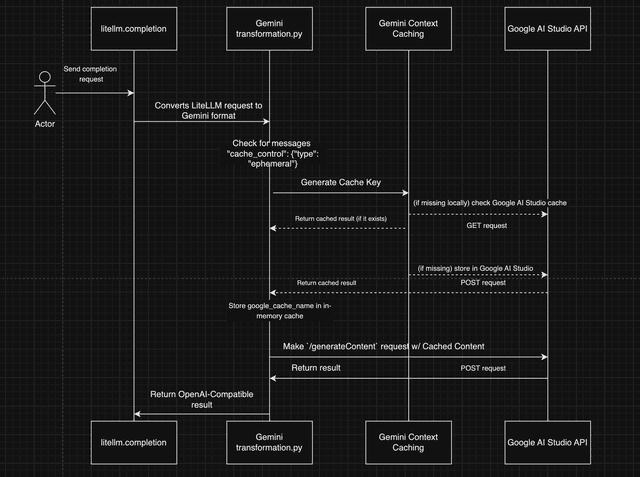
注意:
-
Gemini Context Caching 只允許快取 1 個連續訊息區塊。
-
如果多個非連續區塊包含
cache_control- 將使用第一個連續區塊。(以 Gemini 格式 傳送至/cachedContent) -
傳送到 Gemini 的
/generateContent端點的原始請求如下:
curl -X POST "https://generativelanguage.googleapis.com/v1beta/models/gemini-3.8-flash:generateContent?key=$GOOGLE_API_KEY" \
-H 'Content-Type: application/json' \
-d '{
      "contents": [
        {
          "parts":[{
            "text": "Please summarize this transcript"
          }],
          "role": "user"
        },
      ],
      "cachedContent": "'$CACHE_NAME'"
    }'
使用範例
- SDK
- 具有自訂 TTL 的 SDK
- PROXY
from litellm import completion

for _ in range(2):
    resp = completion(
        model="gemini/gemini-3.1-pro-preview",
        messages=[
        # System Message
            {
                "role": "system",
                "content": [
                    {
                        "type": "text",
                        "text": "Here is the full text of a complex legal agreement" * 4000,
                        "cache_control": {"type": "ephemeral"}, # 👈 KEY CHANGE
                    }
                ],
            },
            # marked for caching with the cache_control parameter, so that this checkpoint can read from the previous cache.
            {
                "role": "user",
                "content": [
                    {
                        "type": "text",
                        "text": "What are the key terms and conditions in this agreement?",
                        "cache_control": {"type": "ephemeral"},
                    }
                ],
            }]
    )

    print(resp.usage) # 👈 2nd usage block will be less, since cached tokens used
from litellm import completion

# Cache for 2 hours (7200 seconds)
resp = completion(
    model="gemini/gemini-3.1-pro-preview",
    messages=[
        {
            "role": "system",
            "content": [
                {
                    "type": "text",
                    "text": "Here is the full text of a complex legal agreement" * 4000,
                    "cache_control": {
                        "type": "ephemeral",
                        "ttl": "7200s"  # 👈 Cache for 2 hours
                    },
                }
            ],
        },
        {
            "role": "user",
            "content": [
                {
                    "type": "text",
                    "text": "What are the key terms and conditions in this agreement?",
                    "cache_control": {
                        "type": "ephemeral",
                        "ttl": "3600s"  # 👈 This TTL will be ignored (first one is used)
                    },
                }
            ],
        }
    ]
)

print(resp.usage)
- 設定 config.yaml
model_list:
    - model_name: gemini-3.1-pro-preview
      litellm_params:
        model: gemini/gemini-3.1-pro-preview
        api_key: os.environ/GEMINI_API_KEY
- 啟動 proxy
litellm --config /path/to/config.yaml
- 測試!
查看 Langchain、OpenAI JS、Llamaindex 等範例
- Curl
- 具有自訂 TTL 的 Curl
- OpenAI Python SDK
- 具有 TTL 的 OpenAI Python SDK
curl --location 'http://0.0.0.0:4000/chat/completions' \
    --header 'Content-Type: application/json' \
    --data '{
    "model": "gemini-3.1-pro-preview",
    "messages": [
        # System Message
            {
                "role": "system",
                "content": [
                    {
                        "type": "text",
                        "text": "Here is the full text of a complex legal agreement" * 4000,
                        "cache_control": {"type": "ephemeral"}, # 👈 KEY CHANGE
                    }
                ],
            },
            # marked for caching with the cache_control parameter, so that this checkpoint can read from the previous cache.
            {
                "role": "user",
                "content": [
                    {
                        "type": "text",
                        "text": "What are the key terms and conditions in this agreement?",
                        "cache_control": {"type": "ephemeral"},
                    }
                ],
            }],
}'
curl --location 'http://0.0.0.0:4000/chat/completions' \
    --header 'Content-Type: application/json' \
    --data '{
    "model": "gemini-3.1-pro-preview",
    "messages": [
        {
            "role": "system",
            "content": [
                {
                    "type": "text",
                    "text": "Here is the full text of a complex legal agreement" * 4000,
                    "cache_control": {
                        "type": "ephemeral",
                        "ttl": "7200s"
                    }
                }
            ]
        },
        {
            "role": "user",
            "content": [
                {
                    "type": "text",
                    "text": "What are the key terms and conditions in this agreement?",
                    "cache_control": {
                        "type": "ephemeral",
                        "ttl": "3600s"
                    }
                }
            ]
        }
    ]
}'
import openai
client = openai.AsyncOpenAI(
    api_key="anything",            # litellm proxy api key
    base_url="http://0.0.0.0:4000" # litellm proxy base url
)


response = await client.chat.completions.create(
    model="gemini-3.1-pro-preview",
    messages=[
        {
            "role": "system",
            "content": [
                    {
                        "type": "text",
                        "text": "Here is the full text of a complex legal agreement" * 4000,
                        "cache_control": {"type": "ephemeral"}, # 👈 KEY CHANGE
                    }
            ],
        },
        {
            "role": "user",
            "content": "what are the key terms and conditions in this agreement?",
        },
    ]
)
import openai
client = openai.AsyncOpenAI(
    api_key="anything",            # litellm proxy api key
    base_url="http://0.0.0.0:4000" # litellm proxy base url
)

response = await client.chat.completions.create(
    model="gemini-3.1-pro-preview",
    messages=[
        {
            "role": "system",
            "content": [
                {
                    "type": "text",
                    "text": "Here is the full text of a complex legal agreement" * 4000,
                    "cache_control": {
                        "type": "ephemeral",
                        "ttl": "7200s"  # Cache for 2 hours
                    }
                }
            ],
        },
        {
            "role": "user",
            "content": "what are the key terms and conditions in this agreement?",
        },
    ]
)
影像生成
- SDK
- PROXY
from litellm import completion

response = completion(
    model="gemini/gemini-2.0-flash-exp-image-generation",
    messages=[{"role": "user", "content": "Generate an image of a cat"}],
    modalities=["image", "text"],
)
assert response.choices[0].message.content is not None # "data:image/png;base64,e4rr.."
- 設定 config.yaml
model_list:
  - model_name: gemini-2.0-flash-exp-image-generation
    litellm_params:
      model: gemini/gemini-2.0-flash-exp-image-generation
      api_key: os.environ/GEMINI_API_KEY
- 啟動 proxy
litellm --config /path/to/config.yaml
- 測試!
curl -L -X POST 'http://localhost:4000/v1/chat/completions' \
-H 'Content-Type: application/json' \
-H "Authorization: Bearer $LITELLM_API_KEY" \
-d '{
    "model": "gemini-2.0-flash-exp-image-generation",
    "messages": [{"role": "user", "content": "Generate an image of a cat"}],
    "modalities": ["image", "text"]
}'
影像生成定價
Gemini 影像生成模型(例如 gemini-3-pro-image-preview)會在回應用量中回傳 image_tokens。這些 tokens 的計價方式與文字 tokens 不同:
| Token 類型 | 每 1M tokens 價格 | 每個 token 價格 |
|---|---|---|
| 文字輸出 | $12 | $0.000012 |
| 影像輸出 | $120 | $0.00012 |
影像 tokens 的數量取決於輸出解析度:
| 解析度 | 每張影像的 tokens | 每張影像成本 |
|---|---|---|
| 1K-2K(1024x1024 到 2048x2048) | 1,120 | $0.134 |
| 4K(4096x4096) | 2,000 | $0.24 |
LiteLLM 會使用模型定價設定中的 output_cost_per_image_token 自動計算成本。
範例回應用量:
{
    "completion_tokens_details": {
        "reasoning_tokens": 225,
        "text_tokens": 0,
        "image_tokens": 1120
    }
}
更多詳細資訊,請參閱 Google 的 Gemini 定價文件。

