Hugging Face
LiteLLM 支援在 Hugging Face Hub 上託管的模型,跨多個服務執行推論。
- 無伺服器推論提供者 - Hugging Face 提供透過多個推論提供者進行無伺服器 AI 推論的簡單且統一的存取,例如 Together AI 和 Sambanova。這是將 AI 整合到您產品中的最快方式,採用免維護且可擴充的解決方案。更多詳細資訊請參閱 推論提供者文件。
- 專用推論端點 - 這是一項可輕鬆將模型部署到正式環境的產品。推論由 Hugging Face 在您選擇的雲端提供者上的專用、全代管基礎架構中執行。您可以依照 這些步驟 在 Hugging Face Inference Endpoints 上部署您的模型。
支援的模型
無伺服器推論提供者
您可以前往 huggingface.co/models,點擊「Other」篩選分頁,並選取您想要的提供者,以查看推論提供者可用的模型:
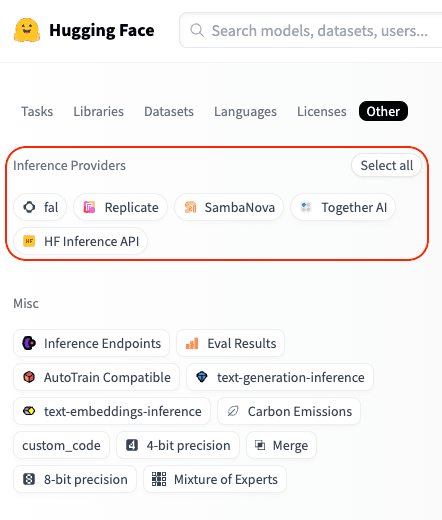
例如,您可以在 這裡 找到所有支援 Fireworks 的模型。
專用推論端點
請參閱 Inference Endpoints 目錄 以取得可用模型清單。
使用方式
- 無伺服器推論提供者
- Inference Endpoints
驗證
只要使用單一 Hugging Face token,您就可以透過多個提供者存取推論。您的請求會經由 Hugging Face 路由,且用量會以標準提供者 API 費率直接向您的 Hugging Face 帳戶計費。
只需將 HF_TOKEN 環境變數設定為您的 Hugging Face token,您可以在這裡建立一個:https://huggingface.co/settings/tokens.
export HF_TOKEN="hf_xxxxxx"
或者,您也可以將您的 Hugging Face token 作為參數傳入:
completion(..., api_key="hf_xxxxxx")
快速開始
若要使用 Hugging Face 模型,請以以下格式同時指定您要使用的提供者與模型:
huggingface/<provider>/<hf_org_or_user>/<hf_model>
其中 <hf_org_or_user>/<hf_model> 是 Hugging Face 模型 ID,而 <provider> 是推論提供者。
預設情況下,如果您未指定提供者,LiteLLM 會使用 HF Inference API。
範例:
# Run DeepSeek-R1 inference through Together AI
completion(model="huggingface/together/deepseek-ai/DeepSeek-R1", messages=messages)

# Run Qwen2.5-72B-Instruct inference through Sambanova
completion(model="huggingface/sambanova/Qwen/Qwen2.5-72B-Instruct", messages=messages)

# Run Llama-3.3-70B-Instruct inference through HF Inference API
completion(model="huggingface/meta-llama/Llama-3.3-70B-Instruct", messages=messages)

基本完成
以下是透過 Together AI 使用 DeepSeek-R1 模型進行聊天完成的範例:
import os
from litellm import completion

os.environ["HF_TOKEN"] = "hf_xxxxxx"

response = completion(
    model="huggingface/together/deepseek-ai/DeepSeek-R1",
    messages=[
        {
            "role": "user",
            "content": "How many r's are in the word 'strawberry'?",
        }
    ],
)
print(response)
串流
現在,讓我們看看串流請求會長什麼樣子。
import os
from litellm import completion

os.environ["HF_TOKEN"] = "hf_xxxxxx"

response = completion(
    model="huggingface/together/deepseek-ai/DeepSeek-R1",
    messages=[
        {
            "role": "user",
            "content": "How many r's are in the word `strawberry`?",

        }
    ],
    stream=True,
)

for chunk in response:
    print(chunk)
圖片輸入
當模型支援時,您也可以傳入圖片。以下是使用 Llama-3.2-11B-Vision-Instruct 模型透過 Sambanova 的範例。
from litellm import completion

# Set your Hugging Face Token
os.environ["HF_TOKEN"] = "hf_xxxxxx"

messages=[
        {
            "role": "user",
            "content": [
                {"type": "text", "text": "What's in this image?"},
                {
                    "type": "image_url",
                    "image_url": {
                        "url": "https://awsmp-logos.s3.amazonaws.com/seller-xw5kijmvmzasy/c233c9ade2ccb5491072ae232c814942.png",
                    }
                },
            ],
        }
    ]

response = completion(
    model="huggingface/sambanova/meta-llama/Llama-3.2-11B-Vision-Instruct",
    messages=messages,
)
print(response.choices[0])
函式呼叫
您可以透過讓模型存取工具來擴充其能力。以下是使用 Qwen2.5-72B-Instruct 模型透過 Sambanova 的函式呼叫範例。
import os
from litellm import completion

# Set your Hugging Face Token
os.environ["HF_TOKEN"] = "hf_xxxxxx"

tools = [
  {
    "type": "function",
    "function": {
      "name": "get_current_weather",
      "description": "Get the current weather in a given location",
      "parameters": {
        "type": "object",
        "properties": {
          "location": {
            "type": "string",
            "description": "The city and state, e.g. San Francisco, CA",
          },
          "unit": {"type": "string", "enum": ["celsius", "fahrenheit"]},
        },
        "required": ["location"],
      },
    }
  }
]
messages = [
    {
        "role": "user",
        "content": "What's the weather like in Boston today?",
    }
]

response = completion(
    model="huggingface/sambanova/meta-llama/Llama-3.3-70B-Instruct",
    messages=messages,
    tools=tools,
    tool_choice="auto"
)
print(response)
基本完成
在您已於專用基礎架構上部署 Hugging Face Inference Endpoint之後,您可以透過在 api_base 中提供端點基礎 URL,並將 huggingface/tgi 指定為模型名稱,來對其執行推論。
import os
from litellm import completion

os.environ["HF_TOKEN"] = "hf_xxxxxx"

response = completion(
    model="huggingface/tgi",
    messages=[{"content": "Hello, how are you?", "role": "user"}],
    api_base="https://my-endpoint.endpoints.huggingface.cloud/v1/"
)
print(response)
串流
import os
from litellm import completion

os.environ["HF_TOKEN"] = "hf_xxxxxx"

response = completion(
    model="huggingface/tgi",
    messages=[{"content": "Hello, how are you?", "role": "user"}],
    api_base="https://my-endpoint.endpoints.huggingface.cloud/v1/",
    stream=True
)

for chunk in response:
    print(chunk)
圖片輸入
import os
from litellm import completion

os.environ["HF_TOKEN"] = "hf_xxxxxx"

messages=[
        {
            "role": "user",
            "content": [
                {"type": "text", "text": "What's in this image?"},
                {
                    "type": "image_url",
                    "image_url": {
                        "url": "https://awsmp-logos.s3.amazonaws.com/seller-xw5kijmvmzasy/c233c9ade2ccb5491072ae232c814942.png",
                    }
                },
            ],
        }
    ]
response = completion(
    model="huggingface/tgi",
    messages=messages,
    api_base="https://my-endpoint.endpoints.huggingface.cloud/v1/"
)
print(response.choices[0])
函式呼叫
import os
from litellm import completion

os.environ["HF_TOKEN"] = "hf_xxxxxx"

functions = [{
    "name": "get_weather",
    "description": "Get the weather in a given location",
    "parameters": {
        "type": "object",
        "properties": {
            "location": {
                "type": "string",
                "description": "The location to get weather for"
            }
        },
        "required": ["location"]
    }
}]

response = completion(
    model="huggingface/tgi",
    messages=[{"content": "What's the weather like in San Francisco?", "role": "user"}],
    api_base="https://my-endpoint.endpoints.huggingface.cloud/v1/",
    functions=functions
)
print(response)
搭配 Hugging Face 模型的 LiteLLM Proxy Server
您可以設定 LiteLLM Proxy Server,透過任何支援的 Inference Provider 提供 Hugging Face 模型服務。做法如下:
步驟 1. 設定 config 檔案
在此情況下,我們正在設定一個 proxy,使用 Together AI 作為後端 Inference Provider,來提供來自 Hugging Face 的 DeepSeek R1 服務。
model_list:
  - model_name: my-r1-model
    litellm_params:
      model: huggingface/together/deepseek-ai/DeepSeek-R1
      api_key: os.environ/HF_TOKEN # ensure you have `HF_TOKEN` in your .env
步驟 2. 啟動伺服器
litellm --config /path/to/config.yaml
步驟 3. 向伺服器發出請求
- curl
- python
curl --location 'http://0.0.0.0:4000/chat/completions' \
    --header 'Content-Type: application/json' \
    --data '{
    "model": "my-r1-model",
    "messages": [
        {
            "role": "user",
            "content": "Hello, how are you?"
        }
    ]
}'
# uv add openai
from openai import OpenAI

client = OpenAI(
    base_url="http://0.0.0.0:4000",
    api_key="anything",
)

response = client.chat.completions.create(
    model="my-r1-model",
    messages=[
        {"role": "user", "content": "Hello, how are you?"}
    ]
)
print(response)
嵌入
LiteLLM 也支援 Hugging Face 的 text-embedding-inference 模型。
from litellm import embedding
import os
os.environ['HF_TOKEN'] = "hf_xxxxxx"
response = embedding(
    model='huggingface/microsoft/codebert-base',
    input=["good morning from litellm"]
)
常見問答
Hugging Face Inference Providers 的計費方式是什麼?
計費會集中在您的 Hugging Face 帳戶上,無論您使用哪個提供者。系統會以標準提供者 API 費率向您收費,不會額外加價 - Hugging Face 只是代為轉付提供者成本。請注意,Hugging Face PRO 用戶每個月可獲得價值 2 美元的 Inference 點數,可跨提供者使用。
我需要為每個 Inference Provider 建立一個帳戶嗎?
不,您不需要建立個別帳戶。所有請求都會經由 Hugging Face 路由,因此您只需要 HF token。這讓您可以輕鬆比較不同提供者的效能,並選擇最符合您需求的方案。
Hugging Face 未來會支援更多推論提供者嗎?
會!新的推論提供者(以及模型)正在逐步加入。
我們歡迎任何能改善 Hugging Face 整合的建議 - 建立一個 issue/加入 Discord!

