警示 / Webhooks
取得以下項目的警示:
| 類別 | 警示類型 |
|---|---|
| LLM 效能 | 卡住的 API 請求、緩慢的 API 請求、失敗的 API 請求、模型故障警示 |
| 預算與支出 | 每個金鑰/使用者的預算追蹤、軟性預算警示、每個團隊/標籤的每週與每月支出報表 |
| 系統健康狀態 | 資料庫讀取/寫入失敗 |
| 每日報表 | 最慢的 5 個 LLM 部署、失敗請求最多的 5 個 LLM 部署、每個團隊/標籤的每週與每月支出 |
適用於:
快速開始
設定 Slack 警示頻道以接收來自 proxy 的警示。
步驟 1:將 Slack Webhook URL 加入 env
從 https://api.slack.com/messaging/webhooks 取得 Slack webhook URL
您也可以使用 Discord Webhooks,請參閱此處
在 proxy env 中設定 SLACK_WEBHOOK_URL,以啟用 Slack 警示。
export SLACK_WEBHOOK_URL="https://hooks.slack.com/services/<>/<>/<>"
如果 SLACK_WEBHOOK_URL 未設定,ALERTING_WEBHOOK_URL 會被讀取為提供者無關的備援。可用它將相同的 Slack 格式警報傳送到任何相容 Slack 的傳入 webhook,例如 Rocket.Chat 或 Mattermost
步驟 2:設定 Proxy
general_settings:
    alerting: ["slack"]
    alerting_threshold: 300 # sends alerts if requests hang for 5min+ and responses take 5min+
    spend_report_frequency: "1d" # [Optional] set as 1d, 2d, 30d .... Specify how often you want a Spend Report to be sent

    # [OPTIONAL ALERTING ARGS]
    alerting_args:
        daily_report_frequency: 43200  # 12 hours in seconds
        report_check_interval: 300     # 5 minutes in seconds
        budget_alert_ttl: 86400        # 24 hours in seconds
        outage_alert_ttl: 60           # 1 minute in seconds
        region_outage_alert_ttl: 60    # 1 minute in seconds
        minor_outage_alert_threshold: 5
        major_outage_alert_threshold: 10
        max_outage_alert_list_size: 10
        log_to_console: false
啟動 proxy
$ litellm --config /path/to/config.yaml
步驟 3:測試!
curl -X GET 'http://0.0.0.0:4000/health/services?service=slack' \
-H "Authorization: Bearer $LITELLM_API_KEY"
進階
自警示中移除訊息內容
預設情況下,警示會顯示傳遞給 LLM 的 messages/input。如果您想從 Slack 警示中移除此內容,請在設定中設定以下項目
general_settings:
  alerting: ["slack"]
  alert_types: ["spend_reports"]

litellm_settings:
  redact_messages_in_exceptions: True
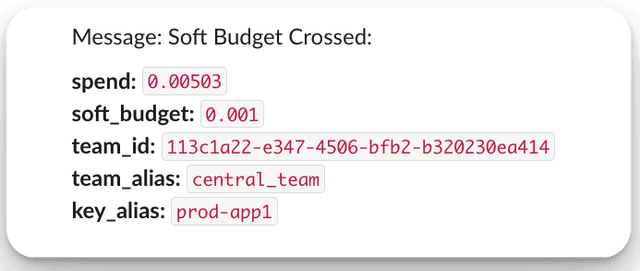
虛擬金鑰的軟性預算警示
用於在金鑰/團隊即將耗盡預算時傳送警示
步驟 1. 建立具有軟性預算的虛擬金鑰
將 soft_budget 設為 0.001
curl -X 'POST' \
  'http://localhost:4000/key/generate' \
  -H 'accept: application/json' \
  -H 'x-goog-api-key: sk-<your-litellm-api-key>' \
  -H 'Content-Type: application/json' \
  -d '{
  "key_alias": "prod-app1",
  "team_id": "113c1a22-e347-4506-bfb2-b320230ea414",
  "soft_budget": 0.001
}'
步驟 2. 使用該虛擬金鑰向 proxy 發送請求
curl http://0.0.0.0:4000/chat/completions \
-H "Content-Type: application/json" \
-H "Authorization: Bearer sk-Nb5eCf427iewOlbxXIH4Ow" \
-d '{
  "model": "openai/gpt-5.6-terra",
  "messages": [
    {
      "role": "user",
      "content": "this is a test request, write a short poem"
    }
  ]
}'
步驟 3. 在 Slack 中查看預期警示
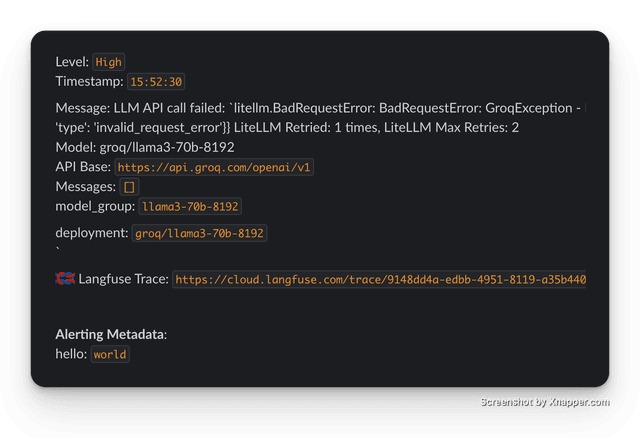
將中繼資料加入警示
為 proxy 請求加入警示中繼資料以便除錯。
import openai
client = openai.OpenAI(
    api_key="anything",
    base_url="http://0.0.0.0:4000"
)

# request sent to model set on litellm proxy, `litellm --model`
response = client.chat.completions.create(
    model="gpt-5.6-terra",
    messages = [],
    extra_body={
        "metadata": {
            "alerting_metadata": {
                "hello": "world"
            }
        }
    }
)
預期回應
選取特定警示類型
如果您只想採用特定警示類型,請設定 alert_types。當未設定 alert_types 時,所有預設警示類型都會啟用。
general_settings:
  alerting: ["slack"]
  alert_types: [
    "llm_exceptions",
    "llm_too_slow",
    "llm_requests_hanging",
    "budget_alerts",
    "spend_reports",
    "db_exceptions",
    "daily_reports",
    "cooldown_deployment",
    "new_model_added",
  ]
將 Slack 頻道對應到警示類型
如果您想為每種警示類型設定特定頻道,請使用此功能
這可讓您執行以下操作
llm_exceptions -> go to slack channel #llm-exceptions
spend_reports -> go to slack channel #llm-spend-reports
在您的 config.yaml 中設定 alert_to_webhook_url
- 每個警示 1 個頻道
- 每個警示多個頻道
model_list:
  - model_name: gpt-5.6-terra
    litellm_params:
      model: openai/fake
      api_key: fake-key
      api_base: https://exampleopenaiendpoint-production.up.railway.app/

general_settings:
  master_key: os.environ/LITELLM_MASTER_KEY
  alerting: ["slack"]
  alerting_threshold: 0.0001 # (Seconds) set an artificially low threshold for testing alerting
  alert_to_webhook_url: {
    "llm_exceptions": "example-slack-webhook-url",
    "llm_too_slow": "example-slack-webhook-url",
    "llm_requests_hanging": "example-slack-webhook-url",
    "budget_alerts": "example-slack-webhook-url",
    "db_exceptions": "example-slack-webhook-url",
    "daily_reports": "example-slack-webhook-url",
    "spend_reports": "example-slack-webhook-url",
    "cooldown_deployment": "example-slack-webhook-url",
    "new_model_added": "example-slack-webhook-url",
    "outage_alerts": "example-slack-webhook-url",
  }

litellm_settings:
  success_callback: ["langfuse"]
為給定的警示類型提供多個 Slack 頻道
model_list:
  - model_name: gpt-5.6-terra
    litellm_params:
      model: openai/fake
      api_key: fake-key
      api_base: https://exampleopenaiendpoint-production.up.railway.app/

general_settings:
  master_key: os.environ/LITELLM_MASTER_KEY
  alerting: ["slack"]
  alerting_threshold: 0.0001 # (Seconds) set an artificially low threshold for testing alerting
  alert_to_webhook_url: {
    "llm_exceptions": ["os.environ/SLACK_WEBHOOK_URL", "os.environ/SLACK_WEBHOOK_URL_2"],
    "llm_too_slow": ["https://webhook.site/7843a980-a494-4967-80fb-d502dbc16886", "https://webhook.site/28cfb179-f4fb-4408-8129-729ff55cf213"],
    "llm_requests_hanging": ["os.environ/SLACK_WEBHOOK_URL_5", "os.environ/SLACK_WEBHOOK_URL_6"],
    "budget_alerts": ["os.environ/SLACK_WEBHOOK_URL_7", "os.environ/SLACK_WEBHOOK_URL_8"],
    "db_exceptions": ["os.environ/SLACK_WEBHOOK_URL_9", "os.environ/SLACK_WEBHOOK_URL_10"],
    "daily_reports": ["os.environ/SLACK_WEBHOOK_URL_11", "os.environ/SLACK_WEBHOOK_URL_12"],
    "spend_reports": ["os.environ/SLACK_WEBHOOK_URL_13", "os.environ/SLACK_WEBHOOK_URL_14"],
    "cooldown_deployment": ["os.environ/SLACK_WEBHOOK_URL_15", "os.environ/SLACK_WEBHOOK_URL_16"],
    "new_model_added": ["os.environ/SLACK_WEBHOOK_URL_17", "os.environ/SLACK_WEBHOOK_URL_18"],
    "outage_alerts": ["os.environ/SLACK_WEBHOOK_URL_19", "os.environ/SLACK_WEBHOOK_URL_20"],
  }

litellm_settings:
  success_callback: ["langfuse"]
測試一下 - 傳送一個有效的 llm 請求 - 預期會在其自己的 Slack 頻道中看到一則 llm_too_slow 警示
curl -i http://localhost:4000/v1/chat/completions \
  -H "Content-Type: application/json" \
  -H "Authorization: Bearer $LITELLM_API_KEY" \
  -d '{
    "model": "gpt-5.6-terra",
    "messages": [
      {"role": "user", "content": "Hello, Claude gm!"}
    ]
}'
MS Teams Webhooks
LiteLLM 會透過 ms_teams 警報目的地原生向 Microsoft Teams 傳送警報,自 v1.100.0 起可用。每則警報都會以 Adaptive Card 形式張貼,而 Teams Workflows webhooks 與舊版傳入 webhook 連接器都可接受
快速開始
-
建立傳入 webhook 供您的 Microsoft Teams 頻道使用
-
將其加入您的 .env
MS_TEAMS_WEBHOOK_URL="https://<your-tenant>.webhook.office.com/webhookb2/<...>/IncomingWebhook/<...>"
- 將
ms_teams新增到您的 litellm 設定中的alerting。它可與其他目的地並列,例如slack或email
model_list:
    model_name: "azure-model"
    litellm_params:
        model: "azure/gpt-5.6-luna"
        api_key: "my-bad-key" # 👈 bad key

general_settings:
    alerting: ["ms_teams"]
    alerting_threshold: 300 # sends alerts if requests hang for 5min+ and responses take 5min+
- 執行健康檢查!
以 /health/services 端點搭配 service=ms_teams 呼叫 proxy,以向您的頻道傳送測試警報
curl --location 'http://0.0.0.0:4000/health/services?service=ms_teams' \
--header "Authorization: Bearer $LITELLM_API_KEY"
預期回應
{
  "status": "success",
  "message": "Mock MS Teams Alert sent, verify MS Teams Alert Received in your channel"
}
您也可以在 Admin UI 的 Logging & Alerts 頁面下 MS Teams Alerts 分頁中設定 webhook URL,這會為您儲存 MS_TEAMS_WEBHOOK_URL,並將 ms_teams 新增到 alerting
alert_types 對 Teams 的適用方式與對 Slack 相同。alert_to_webhook_url 與 digest mode 只會路由 Slack 警報;Teams 警報一律會傳送到 MS_TEAMS_WEBHOOK_URL,並且會逐一傳送,而非彙整
Discord Webhooks
Discord 提供與 Slack 相容的 webhook URL,您可以用來進行警示
快速開始
-
取得 Discord 頻道的 webhook URL
-
在您的 Discord webhook 後附加
/slack- 它應該看起來像這樣
"https://discord.com/api/webhooks/1240030362193760286/cTLWt5ATn1gKmcy_982rl5xmYHsrM1IWJdmCL1AyOmU9JdQXazrp8L1_PYgUtgxj8x4f/slack"
- 將其加入您的 litellm 設定
model_list:
    model_name: "azure-model"
    litellm_params:
        model: "azure/gpt-5.6-luna"
        api_key: "my-bad-key" # 👈 bad key

general_settings:
    alerting: ["slack"]
    alerting_threshold: 300 # sends alerts if requests hang for 5min+ and responses take 5min+

environment_variables:
    SLACK_WEBHOOK_URL: "https://discord.com/api/webhooks/1240030362193760286/cTLWt5ATn1gKmcy_982rl5xmYHsrM1IWJdmCL1AyOmU9JdQXazrp8L1_PYgUtgxj8x4f/slack"
[BETA] 用於預算警示的 Webhooks
注意:這是 beta 功能,因此規格可能會變更。
設定 webhook 以接收預算警示通知。
- 設定 config.yaml
將 URL 加入您的環境,測試時您可以使用此處的連結
export WEBHOOK_URL="https://webhook.site/6ab090e8-c55f-4a23-b075-3209f5c57906"
在 config.yaml 中加入 'webhook'
general_settings:
  alerting: ["webhook"] # 👈 KEY CHANGE
- 啟動 proxy
litellm --config /path/to/config.yaml

# RUNNING on http://0.0.0.0:4000
- 測試它!
curl -X GET --location 'http://0.0.0.0:4000/health/services?service=webhook' \
--header "Authorization: Bearer $LITELLM_API_KEY"
預期回應
{
  "spend": 1, # the spend for the 'event_group'
  "max_budget": 0, # the 'max_budget' set for the 'event_group'
  "token": "example-api-key-123",
  "user_id": "default_user_id",
  "team_id": null,
  "user_email": null,
  "key_alias": null,
  "projected_exceeded_date": null,
  "projected_spend": null,
  "event": "budget_crossed", # see the `event` spec below for all values
  "event_group": "user",
  "event_message": "User Budget: Budget Crossed"
}
Webhook Event 的 API 規格
-
spendfloat:'event_group' 的目前支出金額。 -
max_budgetfloat or null:'event_group' 允許的最大預算。若未設定則為 null。 -
soft_budgetfloat or null:為 'event_group' 設定的軟性預算。若未設定則為 null。 -
tokenstr:金鑰的雜湊值,用於驗證或識別用途。 -
customer_idstr or null:與事件相關聯的客戶 ID(選用)。 -
user_idstr or null:與事件相關聯的內部使用者 ID(選用)。 -
team_idstr or null:與事件相關聯的團隊 ID(選用)。 -
team_aliasstr or null:與事件相關聯的團隊別名(選用)。 -
organization_idstr or null:與事件相關聯的組織 ID(選用)。 -
user_emailstr or null:與事件相關聯的內部使用者電子郵件(選用)。 -
key_aliasstr or null:與事件相關聯的金鑰別名(選用)。 -
projected_exceeded_datestr or null:預估預算將超過的日期,在 key 設定了 'soft_budget' 時回傳(選用)。 -
projected_spendfloat or null:預估支出金額,在 key 設定了 'soft_budget' 時回傳(選用)。 -
eventLiteral["budget_crossed", "max_budget_alert", "soft_budget_crossed", "threshold_crossed", "projected_limit_exceeded", "key_created", "key_rotated", "internal_user_created", "spend_tracked"]:觸發 webhook 的事件類型。key_created、key_rotated、internal_user_created和max_budget_alert與電子郵件警報共用。預算 webhook 值如下:- "spend_tracked":每當為某個客戶 ID 追蹤支出時發出。
- "budget_crossed":表示支出已超過最大預算。
- "soft_budget_crossed":表示支出已超過軟性預算。
- "threshold_crossed":表示支出已跨過門檻(目前在達到預算的 85% 和 95% 時送出)。
- "projected_limit_exceeded":僅適用於 "key" - 表示預估支出預計會超過軟性預算門檻。
-
event_groupLiteral["customer", "internal_user", "key", "team", "proxy"]:與事件相關聯的群組。可能值如下:- "customer":事件與特定客戶相關
- "internal_user":事件與特定內部使用者相關。
- "key":事件與特定金鑰相關。
- "team":事件與團隊相關。
- "proxy":事件與 proxy 相關。
-
event_messagestr:事件的人類可讀描述。
彙總模式(減少警示雜訊)
預設情況下,LiteLLM 會為每一個警示事件各自傳送一則 Slack 訊息。對於像 llm_requests_hanging 或 llm_too_slow 這類高頻率警示類型,這可能每天產生數百則重複訊息。
彙總模式會在可設定的時間視窗內彙整重複警示,並輸出一則包含總數與時間範圍的摘要訊息。
設定
使用 alert_type_config 在 general_settings 中,為每種警示類型啟用彙總模式:
general_settings:
  alerting: ["slack"]
  alert_type_config:
    llm_requests_hanging:
      digest: true
      digest_interval: 86400  # 24 hours (default)
    llm_too_slow:
      digest: true
      digest_interval: 3600   # 1 hour
    llm_exceptions:
      digest: true
      # uses default interval (86400 seconds / 24 hours)
| 參數 | 類型 | 預設值 | 說明 |
|---|---|---|---|
digest | bool | false | 為此警示類型啟用彙總模式 |
digest_interval | int | 86400 (24h) | 以秒為單位的時間視窗。警示會在此間隔內彙整。 |
運作方式
- 當某個已啟用彙總的類型觸發警示時,系統會依
(alert_type, request_model, api_base)分組,而不是立即傳送 - 計數器會追蹤該間隔內警示觸發的次數
- 當間隔到期時,會傳送一則單一摘要訊息:
Alert type: `llm_requests_hanging` (Digest)
Level: `Medium`
Start: `2026-02-19 03:27:39`
End: `2026-02-20 03:27:39`
Count: `847`

Message: `Requests are hanging - 600s+ request time`
Request Model: `gemini-3.8-flash`
API Base: `None`
限制
- 每個執行個體:彙總狀態會以記憶體方式保留於每個 proxy 執行個體中。如果您執行多個執行個體(例如,Cloud Run 搭配自動擴縮),每個執行個體都會維護自己的彙總並輸出自己的摘要。
- 非持久化:如果某個執行個體在彙總間隔到期前終止,該執行個體彙整的警示將會遺失。
區域故障警示(✨ 企業功能)
如果提供者區域發生中斷,請設定警示。
general_settings:
    alerting: ["slack"]
    alert_types: ["region_outage_alerts"]
預設情況下,若某區域中的多個模型在 1 分鐘內失敗 5 次以上請求,便會觸發此項。'400' 狀態碼錯誤不計入(亦即 BadRequestErrors)。
可透過以下方式控制門檻:
general_settings:
    alerting: ["slack"]
    alert_types: ["region_outage_alerts"]
    alerting_args:
        region_outage_alert_ttl: 60 # time-window in seconds
        minor_outage_alert_threshold: 5 # number of errors to trigger a minor alert
        major_outage_alert_threshold: 10 # number of errors to trigger a major alert
所有可能的警示類型
與 LLM 相關的警示
| 警示類型 | 說明 | 預設啟用 |
|---|---|---|
llm_exceptions | LLM API 例外的警示 | ✅ |
llm_too_slow | 針對慢於所設定門檻的 LLM 回應的通知 | ✅ |
llm_requests_hanging | 針對未完成的 LLM 請求的警示 | ✅ |
cooldown_deployment | 部署進入冷卻時間時的警示 | ✅ |
new_model_added | 透過 /model/new 將新模型新增至 litellm proxy 時的通知 | ✅ |
outage_alerts | 某個特定 LLM 部署發生中斷時的警示 | ✅ |
region_outage_alerts | 某個特定 LLM 區域發生中斷時的警示。範例如 us-east-1 | ✅ |
預算與支出警示
| 警示類型 | 說明 | 預設啟用 |
|---|---|---|
budget_alerts | 與預算上限或門檻相關的通知 | ✅ |
spend_reports | 針對團隊或標籤支出的週期性報告 | ✅ |
failed_tracking_spend | 支出追蹤失敗時的警示 | ✅ |
daily_reports | 每日支出報告 | ✅ |
fallback_reports | LLM 備援發生情況的每週報告 | ✅ |
資料庫警示
| 警示類型 | 說明 | 預設啟用 |
|---|---|---|
db_exceptions | 與資料庫相關例外的通知 | ✅ |
MCP 閘道警報
| 警報類型 | 描述 | 預設開啟 |
|---|---|---|
mcp_tool_description_blocked | 一個 pre_mcp_call 防護欄封鎖了上游 MCP 工具的描述,因此該工具對 tools/list 隱藏。請參閱 MCP 防護欄 | ✅ |
mcp_pinned_tools_changed | 已固定的 MCP 伺服器之上游工具列表、描述或輸入 schema 與固定值產生偏移。請參閱 固定伺服器的工具列表 | ✅ |
管理端點警示 - 虛擬金鑰、團隊、內部使用者
| 警示類型 | 說明 | 預設啟用 |
|---|---|---|
new_virtual_key_created | 建立新虛擬金鑰時的通知 | ❌ |
virtual_key_updated | 虛擬金鑰被修改時的警示 | ❌ |
virtual_key_deleted | 虛擬金鑰被移除時的通知 | ❌ |
new_team_created | 建立新團隊時的警示 | ❌ |
team_updated | 團隊詳細資料被修改時的通知 | ❌ |
team_deleted | 團隊被刪除時的警示 | ❌ |
new_internal_user_created | 新內部使用者帳號的通知 | ❌ |
internal_user_updated | 內部使用者詳細資料變更時的警示 | ❌ |
internal_user_deleted | 內部使用者帳號被移除時的通知 | ❌ |
alerting_args 規格
| 參數 | 預設值 | 描述 |
|---|---|---|
daily_report_frequency | 43200(12 小時) | 接收部署延遲/失敗報告的頻率,以秒為單位 |
report_check_interval | 300(5 分鐘) | 檢查是否應送出報告的頻率(背景程序),以秒為單位 |
budget_alert_ttl | 86400(24 小時) | 預算警報的快取 TTL,用於在預算被跨越時防止洗版 |
outage_alert_ttl | 60(1 分鐘) | 收集模型中斷錯誤的時間窗口,以秒為單位 |
region_outage_alert_ttl | 60(1 分鐘) | 收集按區域分類的中斷錯誤的時間窗口,以秒為單位 |
minor_outage_alert_threshold | 5 | 觸發輕微中斷警報的錯誤數量(不計入 400 錯誤) |
major_outage_alert_threshold | 10 | 觸發重大中斷警報的錯誤數量(不計入 400 錯誤) |
max_outage_alert_list_size | 10 | 每個模型/區域在快取中儲存的最大錯誤數量 |
log_to_console | false | 若為 true,會將警報 payload 以 .warning 記錄列印到主控台。 |

