修改/拒絕傳入請求
- 在 proxy 上進行 llm api 呼叫前修改資料
- 在進行 llm api 呼叫之前 / 在回傳回應之前拒絕資料
- 強制所有 openai endpoint 呼叫都要有 'user' 參數
- 依呼叫者隱藏模型列表中的模型
了解回呼掛鉤? 請查看我們的 回呼指南,了解像 async_pre_call_hook 這類 proxy 專用掛鉤與像 async_log_success_event 這類一般記錄掛鉤之間的差異。
我該使用哪個掛鉤?
| Hook | 使用情境 | 執行時機 |
|---|---|---|
async_pre_call_hook | 在傳送至模型前修改傳入請求 | 在 LLM API 呼叫之前執行 |
async_moderation_hook | 與 LLM API 呼叫並行執行輸入檢查 | 與 LLM API 呼叫同時執行 |
async_post_call_success_hook | 修改傳出的回應(非串流) | 在成功的 LLM API 呼叫之後,針對非串流回應 |
async_post_call_failure_hook | 轉換傳送給用戶端的錯誤回應 | 在失敗的 LLM API 呼叫之後 |
async_post_call_streaming_hook | 修改傳出的回應(串流) | 在成功的 LLM API 呼叫之後,針對串流回應 |
async_post_call_response_headers_hook | 注入自訂 HTTP 回應標頭 | 在 LLM API 呼叫之後(成功與失敗皆然) |
async_filter_listed_models | 依呼叫者隱藏模型列表中的模型 | 在模型列表路由上、回應建立之前 |
請參閱我們的 平行請求速率限制器 完整範例
快速開始
- 在您的自訂處理器中新增一個
async_pre_call_hook函式
這個函式會在 litellm completion 呼叫即將發出之前被呼叫,並允許您修改傳入 litellm 呼叫的資料 查看程式碼
from litellm.integrations.custom_logger import CustomLogger
import litellm
from litellm.proxy.proxy_server import UserAPIKeyAuth, DualCache
from litellm.types.utils import ModelResponseStream
from typing import Any, AsyncGenerator, Optional, Literal

# This file includes the custom callbacks for LiteLLM Proxy
# Once defined, these can be passed in proxy_config.yaml
class MyCustomHandler(CustomLogger): # https://docs.litellm.ai/docs/observability/custom_callback#callback-class
    # Class variables or attributes
    def __init__(self):
        pass

    #### CALL HOOKS - proxy only ####

    async def async_pre_call_hook(self, user_api_key_dict: UserAPIKeyAuth, cache: DualCache, data: dict, call_type: Literal[
            "completion",
            "text_completion",
            "embeddings",
            "image_generation",
            "moderation",
            "audio_transcription",
        ]):
        data["model"] = "my-new-model"
        return data

    async def async_post_call_failure_hook(
        self,
        request_data: dict,
        original_exception: Exception,
        user_api_key_dict: UserAPIKeyAuth,
        traceback_str: Optional[str] = None,
    ) -> Optional[HTTPException]:
        """
        Transform error responses sent to clients.

        Return an HTTPException to replace the original error with a user-friendly message.
        Return None to use the original exception.

        Example:
            if isinstance(original_exception, litellm.ContextWindowExceededError):
                return HTTPException(
                    status_code=400,
                    detail="Your prompt is too long. Please reduce the length and try again."
                )
            return None  # Use original exception
        """
        pass

    async def async_post_call_success_hook(
        self,
        data: dict,
        user_api_key_dict: UserAPIKeyAuth,
        response,
    ):
        pass

    async def async_moderation_hook( # call made in parallel to llm api call
        self,
        data: dict,
        user_api_key_dict: UserAPIKeyAuth,
        call_type: Literal["completion", "embeddings", "image_generation", "moderation", "audio_transcription"],
    ):
        pass

    async def async_post_call_streaming_hook(
        self,
        user_api_key_dict: UserAPIKeyAuth,
        response: str,
    ):
        pass

    async def async_post_call_streaming_iterator_hook(
        self,
        user_api_key_dict: UserAPIKeyAuth,
        response: Any,
        request_data: dict,
    ) -> AsyncGenerator[ModelResponseStream, None]:
        """
        Passes the entire stream to the guardrail

        This is useful for plugins that need to see the entire stream.
        """
        async for item in response:
            yield item

    async def async_post_call_response_headers_hook(
        self,
        data: dict,
        user_api_key_dict: UserAPIKeyAuth,
        response: Any,
        request_headers: Optional[Dict[str, str]] = None,
    ) -> Optional[Dict[str, str]]:
        """
        Inject custom headers into HTTP response (runs for both success and failure).
        """
        return {"x-custom-header": "custom-value"}

proxy_handler_instance = MyCustomHandler()
最後一行很重要:callbacks 取得的是實例的 dotted path,所以該檔案必須建立一個實例
- 將此檔案加入您的 proxy 設定
model_list:
  - model_name: gpt-5.6-luna
    litellm_params:
      model: gpt-5.6-luna

litellm_settings:
  callbacks: custom_callbacks.proxy_handler_instance # sets litellm.callbacks = [proxy_handler_instance]
將 callbacks 指向類別(custom_callbacks.MyCustomHandler)而不是實例,proxy 會在載入組態時失敗,並以錯誤說明該項目及其解析結果。proxy 只會分派 CustomLogger 實例,因此在該檢查之前的版本會乾淨地啟動、提供流量,卻從未執行您的 hooks,且沒有任何錯誤或記錄行
- 啟動伺服器 + 測試請求
$ litellm --config /path/to/config.yaml
curl --location 'http://0.0.0.0:4000/chat/completions' \
    --data ' {
    "model": "gpt-5.6-luna",
    "messages": [
        {
        "role": "user",
        "content": "good morning good sir"
        }
    ],
    "user": "ishaan-app",
    "temperature": 0.2
    }'
[BETA] 全新 async_moderation_hook
平行於實際的 LLM API 呼叫執行審核檢查。
繼承 CustomGuardrail 並定義一個 async_moderation_hook 函式
- 透過
guardrails:與mode: during_call註冊 guardrail。此 hook 必須接受data、user_api_key_dict和call_type;舊的雙參數簽章會在每次請求時失敗,並拋出TypeError。 - 此函式會與實際的 LLM API 呼叫並行執行。
- 如果您的
async_moderation_hook拋出 Exception,我們會將其回傳給使用者。
請參閱我們的 Llama Guard 內容審核 hook 與 自訂 guardrail 文件 的完整範例
from litellm.integrations.custom_guardrail import CustomGuardrail
from litellm.proxy._types import UserAPIKeyAuth
from litellm.types.utils import CallTypesLiteral
from fastapi import HTTPException

class MyCustomGuardrail(CustomGuardrail):
    def __init__(self, **kwargs):
        super().__init__(**kwargs)

    async def async_moderation_hook( ### 👈 KEY CHANGE ###
        self,
        data: dict,
        user_api_key_dict: UserAPIKeyAuth,
        call_type: CallTypesLiteral,
    ):
        messages = data["messages"]
        print(messages)
        if messages[0]["content"] == "hello world":
            raise HTTPException(
                    status_code=400, detail={"error": "Violated content safety policy"}
                )
- 將此檔案加入您的 proxy 設定
model_list:
  - model_name: gpt-5.6-luna
    litellm_params:
      model: gpt-5.6-luna

guardrails:
  - guardrail_name: "my-moderation-guardrail"
    litellm_params:
      guardrail: custom_guardrail.MyCustomGuardrail # {file_name}.{class_name}
      mode: "during_call"
      default_on: true
- 啟動伺服器 + 測試請求
$ litellm --config /path/to/config.yaml
curl --location 'http://0.0.0.0:4000/chat/completions' \
    --data ' {
    "model": "gpt-5.6-luna",
    "messages": [
        {
        "role": "user",
        "content": "Hello world"
        }
    ],
    }'
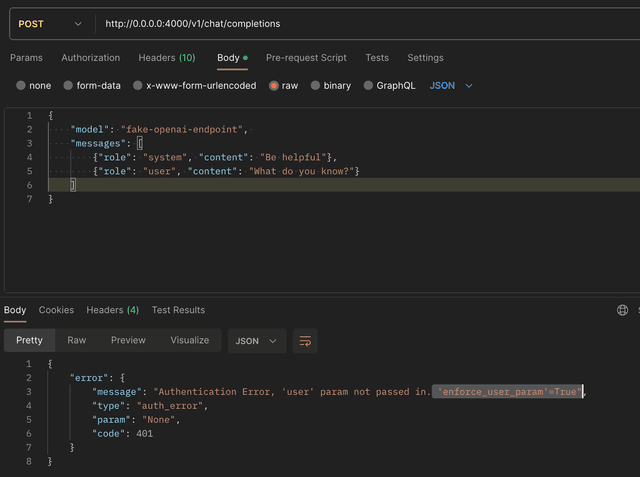
進階 - 強制 'user' 參數
將 enforce_user_param 設為 true,以要求所有對 openai 端點的呼叫都必須帶有 'user' 參數。
general_settings:
  enforce_user_param: True
結果
進階 - 將拒絕訊息作為回應返回
對於 chat completions 與 text completion 呼叫,您可以將拒絕訊息作為使用者回應返回。
做法是回傳一個字串。LiteLLM 會負責依據端點以及是否為串流/非串流,以正確格式返回回應。
對於非 chat/text completion 端點,此回應會以 400 狀態碼例外返回。
1. 建立自訂處理器
from litellm.integrations.custom_logger import CustomLogger
import litellm
from litellm.utils import get_formatted_prompt

# This file includes the custom callbacks for LiteLLM Proxy
# Once defined, these can be passed in proxy_config.yaml
class MyCustomHandler(CustomLogger):
    def __init__(self):
        pass

    #### CALL HOOKS - proxy only ####

    async def async_pre_call_hook(self, user_api_key_dict: UserAPIKeyAuth, cache: DualCache, data: dict, call_type: Literal[
            "completion",
            "text_completion",
            "embeddings",
            "image_generation",
            "moderation",
            "audio_transcription",
        ]) -> Optional[dict, str, Exception]:
        formatted_prompt = get_formatted_prompt(data=data, call_type=call_type)

        if "Hello world" in formatted_prompt:
            return "This is an invalid response"

        return data

proxy_handler_instance = MyCustomHandler()
2. 更新 config.yaml
model_list:
  - model_name: gpt-5.6-luna
    litellm_params:
      model: gpt-5.6-luna

litellm_settings:
  callbacks: custom_callbacks.proxy_handler_instance # sets litellm.callbacks = [proxy_handler_instance]
3. 測試它!
$ litellm --config /path/to/config.yaml
curl --location 'http://0.0.0.0:4000/chat/completions' \
    --data ' {
    "model": "gpt-5.6-luna",
    "messages": [
        {
        "role": "user",
        "content": "Hello world"
        }
    ],
    }'
預期回應
{
    "id": "chatcmpl-d00bbede-2d90-4618-bf7b-11a1c23cf360",
    "choices": [
        {
            "finish_reason": "stop",
            "index": 0,
            "message": {
                "content": "This is an invalid response.", # 👈 REJECTED RESPONSE
                "role": "assistant"
            }
        }
    ],
    "created": 1716234198,
    "model": null,
    "object": "chat.completion",
    "system_fingerprint": null,
    "usage": {}
}
進階 - 轉換錯誤回應
使用 async_post_call_failure_hook 將技術性的 API 錯誤轉換為對使用者友善的訊息。回傳一個 HTTPException 以取代原始錯誤,或回傳 None 以使用原始例外。
from litellm.integrations.custom_logger import CustomLogger
from fastapi import HTTPException
from typing import Optional
import litellm

class MyErrorTransformer(CustomLogger):
    async def async_post_call_failure_hook(
        self,
        request_data: dict,
        original_exception: Exception,
        user_api_key_dict: UserAPIKeyAuth,
        traceback_str: Optional[str] = None,
    ) -> Optional[HTTPException]:
        if isinstance(original_exception, litellm.ContextWindowExceededError):
            return HTTPException(
                status_code=400,
                detail="Your prompt is too long. Please reduce the length and try again."
            )
        if isinstance(original_exception, litellm.RateLimitError):
            return HTTPException(
                status_code=429,
                detail="Rate limit exceeded. Please try again in a moment."
            )
        return None  # Use original exception

proxy_handler_instance = MyErrorTransformer()
結果: 用戶端會收到 "Your prompt is too long...",而不是 "ContextWindowExceededError: Prompt exceeds context window"。
進階 - 注入自訂 HTTP 回應標頭
使用 async_post_call_response_headers_hook 將自訂 HTTP 標頭注入回應中。此掛鉤會在 成功與失敗 的 LLM API 呼叫時執行。
from litellm.integrations.custom_logger import CustomLogger
from litellm.proxy.proxy_server import UserAPIKeyAuth
from typing import Any, Dict, Optional

class CustomHeaderLogger(CustomLogger):
    def __init__(self):
        super().__init__()

    async def async_post_call_response_headers_hook(
        self,
        data: dict,
        user_api_key_dict: UserAPIKeyAuth,
        response: Any,
        request_headers: Optional[Dict[str, str]] = None,
    ) -> Optional[Dict[str, str]]:
        """
        Inject custom headers into all responses (success and failure).
        """
        return {"x-custom-header": "custom-value"}

proxy_handler_instance = CustomHeaderLogger()
進階 - 依呼叫者隱藏模型列表中的模型
async_pre_call_hook 可以在請求時拒絕某個模型,但該模型仍會顯示在 GET /v1/models 中,因此用戶端的模型選擇器會列出之後才以 403 失敗的項目。async_filter_listed_models 補上了這個缺口。它會在模型列表路由上執行,使用呼叫者原本會看到的模型名稱,並回傳要保留的子集合。隨附於 PR #43027
async def async_filter_listed_models(
    self,
    user_api_key_dict: UserAPIKeyAuth,
    model_names: Sequence[str],
) -> Sequence[str]:
    return model_names
回傳值中省略的名稱會從每個列表中消失,而查詢單一模型的路由會回應得像它不存在一樣
| 路由 | 隱藏的模型 |
|---|---|
GET /v1/models, GET /models | 省略 |
GET /v1/models/{model_id}, GET /models/{model_id} | 404,與未知模型相同 |
GET /model/info, GET /v1/model/info | 省略 |
GET /model/info?litellm_model_id=<id> | 400,與未知的 deployment id 相同 |
GET /model_group/info | 省略,包含 a2a/<agent> groups |
/v1/models 篩選同樣適用於 OpenAI 與 Anthropic 的回應格式,也適用於 ?scope=expand。/v2/model/info 和 auto-router 路由不受影響,inference 也是如此。知道隱藏名稱的呼叫者仍可呼叫它,除非 async_pre_call_hook 拒絕它,因此請像下面的範例一樣將這兩個 hooks 搭配使用
此 hook 會提供給呼叫者可見的公開模型名稱,因此 team model 會以其公開名稱而非內部路由名稱傳入。Key 與 team aliases 絕不會被提供;它們會在篩選後加入,且只會解析到篩選器保留下來的目標。目標是隱藏項目的 router model_group_alias 也會被隱藏。回傳值中未被提供的名稱會被忽略,且會保留已提供的順序,因此 callback 只能縮小列表,不能擴大列表
此 hook 會對每位呼叫者執行,包括 proxy 管理員。user_api_key_dict 會告訴 callback 是誰在請求(user_role、team_id、user_id 等等),因此若管理員應該繼續看到全部內容,請在 callback 中將其排除在外。當多個已註冊的 callbacks 覆寫此 hook 時,它們會依註冊順序執行,每個都會看到前一個保留下來的內容,因此名稱必須通過所有 callback。未覆寫此 hook 的 callback 絕不會被呼叫,而在沒有這類 callback 時,列表路由的行為與以往完全相同
回傳值必須是字串序列。單獨的字串、None 或任何其他內容,都會讓 proxy 拋出一個 TypeError,並以 callback 類別命名,而不是悄悄將列表清空(否則單獨的字串會逐字元遍歷)。在 hook 內部拋出的例外會向上傳遞給呼叫者,因此有問題的權限服務會明確失敗,而不是洩漏完整列表。每個 callback 會在每個列表請求中 await 一次,因此緩慢的權限查詢會同等地拖慢列表;若查詢成本高,請在 callback 內快取答案
1. 建立自訂處理器
gate.py 將請求時的拒絕與列表篩選配對,因此被隱藏的模型既不會列出,也不會可供呼叫
from collections.abc import Sequence

from fastapi import HTTPException
from litellm.integrations.custom_logger import CustomLogger
from litellm.proxy._types import UserAPIKeyAuth

RESTRICTED = {"restricted-model"}


class Gate(CustomLogger):
    async def async_pre_call_hook(self, user_api_key_dict, cache, data, call_type):
        if data.get("model") in RESTRICTED:
            raise HTTPException(status_code=403, detail="not entitled to this model")
        return data

    async def async_filter_listed_models(
        self, user_api_key_dict: UserAPIKeyAuth, model_names: Sequence[str]
    ) -> Sequence[str]:
        return [name for name in model_names if name not in RESTRICTED]


gate = Gate()
2. 更新 config.yaml
model_list:
  - model_name: open-model
    litellm_params:
      model: gpt-5.6-luna
      api_key: os.environ/OPENAI_API_KEY
  - model_name: restricted-model
    litellm_params:
      model: gpt-5.6-luna
      api_key: os.environ/OPENAI_API_KEY

litellm_settings:
  callbacks: gate.gate # sets litellm.callbacks = [gate]

general_settings:
  master_key: os.environ/LITELLM_MASTER_KEY
3. 測試它!
$ litellm --config /path/to/config.yaml
主金鑰就是 proxy 管理員,而範例也會對其隱藏 restricted-model,因為此 hook 會對每位呼叫者執行
curl -s http://0.0.0.0:4000/v1/models \
    -H "Authorization: Bearer $LITELLM_MASTER_KEY" | jq "[.data[].id]"
預期回應
["open-model"]
依 id 取得隱藏的模型會回應 404,與不存在的模型相同
curl -s http://0.0.0.0:4000/v1/models/restricted-model \
    -H "Authorization: Bearer $LITELLM_MASTER_KEY"
{"detail":"The model `restricted-model` does not exist or is not accessible"}

