支出追蹤
追蹤跨越 100+ LLM 的金鑰、使用者與團隊支出。
LiteLLM 會自動追蹤所有已知模型的支出。請參閱我們的 模型成本對照表
當回應包含分級中繼資料時,會自動套用特定提供者的成本追蹤(例如 Vertex AI PayGo / priority pricing、Bedrock service tiers、Azure base model mapping)。
從 GitHub 同步模型定價資料,以確保成本追蹤準確。
請使用 Debugging a cost discrepancy 中的逐步流程:對齊時間範圍、比較 token 類別(包含快取),然後判定差異是來自 ingestion、公式,還是 model-map 定價。
如何使用 LiteLLM 追蹤支出
步驟 1
步驟2 傳送 /chat/completions 請求
- OpenAI Python v1.0.0+
- Curl Request
- Langchain
import openai
client = openai.OpenAI(
    api_key="sk-<your-litellm-api-key>",
    base_url="http://0.0.0.0:4000"
)

response = client.chat.completions.create(
    model="llama3",
    messages = [
        {
            "role": "user",
            "content": "this is a test request, write a short poem"
        }
    ],
    user="palantir", # OPTIONAL: pass user to track spend by user
    extra_body={
        "metadata": {
            "tags": ["jobID:214590dsff09fds", "taskName:run_page_classification"] # ENTERPRISE: pass tags to track spend by tags
        }
    }
)

print(response)
將 metadata 作為請求本文的一部分傳入
curl --location 'http://0.0.0.0:4000/chat/completions' \
    --header 'Content-Type: application/json' \
    --header "Authorization: Bearer $LITELLM_API_KEY" \
    --data '{
    "model": "llama3",
    "messages": [
        {
        "role": "user",
        "content": "what llm are you"
        }
    ],
    "user": "palantir", # OPTIONAL: pass user to track spend by user
    "metadata": {
        "tags": ["jobID:214590dsff09fds", "taskName:run_page_classification"] # ENTERPRISE: pass tags to track spend by tags
    }
}'
from langchain.chat_models import ChatOpenAI
from langchain.prompts.chat import (
    ChatPromptTemplate,
    HumanMessagePromptTemplate,
    SystemMessagePromptTemplate,
)
from langchain.schema import HumanMessage, SystemMessage
import os

os.environ["OPENAI_API_KEY"] = "sk-<your-api-key>"

chat = ChatOpenAI(
    openai_api_base="http://0.0.0.0:4000",
    model = "llama3",
    user="palantir",
    extra_body={
        "metadata": {
            "tags": ["jobID:214590dsff09fds", "taskName:run_page_classification"] # ENTERPRISE: pass tags to track spend by tags
        }
    }
)

messages = [
    SystemMessage(
        content="You are a helpful assistant that im using to make a test request to."
    ),
    HumanMessage(
        content="test from litellm. tell me why it's amazing in 1 sentence"
    ),
]
response = chat(messages)

print(response)
步驟3 - 驗證支出已被追蹤 就是這樣。現在請驗證您的支出是否已被追蹤
- Response Headers
- DB + UI
預期會在回應標頭中看到 x-litellm-response-cost,以及計算出的成本
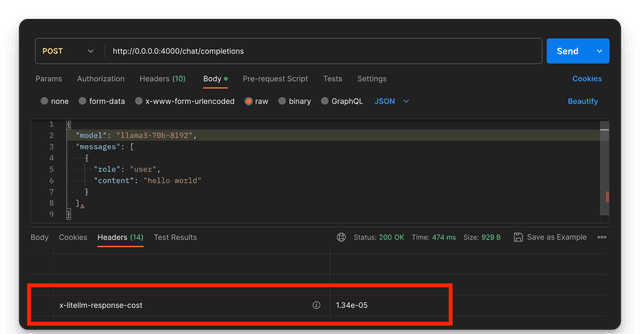
以下支出會被追蹤到表 LiteLLM_SpendLogs 中
{
  "api_key": "fe6b0cab4ff5a5a8df823196cc8a450*****",                            # Hash of API Key used
  "user": "default_user",                                                       # Internal User (LiteLLM_UserTable) that owns `api_key=sk-<your-litellm-api-key>`.
  "team_id": "e8d1460f-846c-45d7-9b43-55f3cc52ac32",                            # Team (LiteLLM_TeamTable) that owns `api_key=sk-<your-litellm-api-key>`
  "request_tags": ["jobID:214590dsff09fds", "taskName:run_page_classification"],# Tags sent in request
  "end_user": "palantir",                                                       # Customer - the `user` sent in the request
  "model_group": "llama3",                                                      # "model" passed to LiteLLM
  "api_base": "https://api.groq.com/openai/v1/",                                # "api_base" of model used by LiteLLM
  "spend": 0.000002,                                                            # Spend in $
  "total_tokens": 100,
  "completion_tokens": 80,
  "prompt_tokens": 20,
  "metadata": {
    "attempted_fallbacks": 0,                                                    # 0 = requested model group served the request
    "original_model_group": "llama3"                                             # Model group originally requested
  }

}
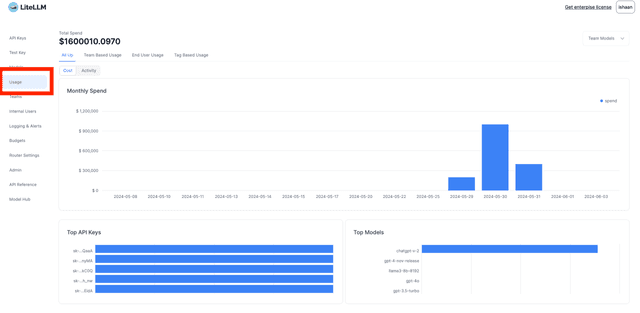
前往 LiteLLM UI 上的 Usage 分頁(位於 https://your-proxy-endpoint/ui Usage
請求費用為 $0 的請求
帶有用量但在定價項目有非零費率的模型上定價為 $0 的請求,仍會以 LiteLLM_SpendLogs 和 spend = 0 寫入,LiteLLM 會在兩個位置標記它,因此差異是可見的,而不是默默地少計費
- 一則
WARNING記錄,在 proxy log 中列出 model group、該 deployment 的定價項目,以及它缺少的定價鍵,例如pricing entry '<model_id>' has no input_cost_per_token, output_cost_per_token - Prometheus 計數器
litellm_zero_cost_requests_total,以requested_model、model、model_id、api_provider和reason(missing_pricing_key、pricing_not_applied或cost_calculation_error)標註,因此您可以對其設警報(請參閱 Prometheus 指標)
免費模型(請求使用的每個費率都設為 0)以及沒有帶有用量的請求不會被標記。若要修正 missing_pricing_key,請在 deployment 的 model_info 或 model cost map 中設定缺少的費率,或將每個費率都設為 0 以將模型標記為免費
允許非 Proxy 管理員存取 /spend 端點
當您希望非 proxy 管理員可存取 /spend 端點時使用此功能
安排與我們會議以取得您的 Enterprise License 與我們安排會議以取得您的 Enterprise License
建立金鑰
使用 permissions={"get_spend_routes": true} 建立金鑰
curl --location 'http://0.0.0.0:4000/key/generate' \
        --header "Authorization: Bearer $LITELLM_API_KEY" \
        --header 'Content-Type: application/json' \
        --data '{
            "permissions": {"get_spend_routes": true}
    }'
在 /spend 端點使用產生的金鑰
使用新產生的金鑰存取支出路由
curl -X GET 'http://localhost:4000/global/spend/report?start_date=2024-04-01&end_date=2024-06-30' \
  -H 'Authorization: Bearer sk-H16BKvrSNConSsBYLGc_7A'
重設團隊、API 金鑰支出 - 僅限 MASTER KEY
若您想要,請使用 /global/spend/reset:
-
重設所有 API 金鑰、團隊的支出。所有團隊與金鑰在
spend與LiteLLM_TeamTable中的LiteLLM_VerificationToken將被設為spend=0 -
LiteLLM 會保留
LiteLLMSpendLogs中的所有記錄以供稽核
請求
只有您設定的 LITELLM_MASTER_KEY 可以存取此路由
curl -X POST \
  'http://localhost:4000/global/spend/reset' \
  -H "Authorization: Bearer $LITELLM_API_KEY" \
  -H 'Content-Type: application/json'
預期回應
{"message":"Spend for all API Keys and Teams reset successfully","status":"success"}
每位使用者的總支出
假設您已為終端使用者發放金鑰,並在金鑰上設定其 user_id,您可以查看他們的用量。
curl -L -X GET 'http://localhost:4000/user/info?user_id=jane_smith' \
-H 'Authorization: Bearer sk-...'
{
  "user_id": "jane_smith",
  "user_info": {
    "spend": 0.1
  },
  "keys": [
    {
      "token": "6e952b0efcafbb6350240db25ed534b4ec6011b3e1ba1006eb4f903461fd36f6",
      "key_name": "sk-...KE_A",
      "key_alias": "user-01882d6b-e090-776a-a587-21c63e502670-01983ddb-872f-71a3-8b3a-f9452c705483",
      "soft_budget_cooldown": false,
      "spend": 0.1,
      "expires": "2025-07-31T19:14:13.968000+00:00",
      "models": [],
      "aliases": {},
      "config": {},
      "user_id": "01982d6b-e090-776a-a587-21c63e502660",
      "team_id": "f2044fde-2293-482f-bf35-a8dab4e85c5f",
      "permissions": {},
      "max_parallel_requests": null,
      "metadata": {},
      "blocked": null,
      "tpm_limit": null,
      "rpm_limit": null,
      "max_budget": null,
      "budget_duration": null,
      "budget_reset_at": null,
      "allowed_cache_controls": [],
      "allowed_routes": [],
      "model_spend": {},
      "model_max_budget": {},
      "budget_id": null,
      "organization_id": null,
      "object_permission_id": null,
      "created_at": "2025-07-24T19:14:13.970000Z",
      "created_by": "582b168f-fc11-4e14-ad6a-cf4bb3656ddc",
      "updated_at": "2025-07-24T19:14:13.970000Z",
      "updated_by": "582b168f-fc11-4e14-ad6a-cf4bb3656ddc",
      "litellm_budget_table": null,
      "litellm_organization_table": null,
      "object_permission": null,
      "team_alias": null
    }
  ],
  "teams": []
}
警告
終端使用者可以在其請求本文中提供 user 參數;如此一來,透過 /customer/info?end_user_id=self-declared-user 報告的成本會增加到該參數所指定的使用者,而不是該 API 所回報的金鑰擁有者。這表示使用者可能會透過他們的方法「避免」其支出被追蹤。
這表示如果您需要追蹤使用者支出,且有發放 API 金鑰給終端使用者,您必須在建立其 API 金鑰時一律設定 user_id,並且每次代表他們在後端服務中進行 LLM 呼叫時,都使用為該使用者發放的金鑰。這樣才能追蹤他們的支出。
支出清單端點(/spend/keys 與 /spend/users)
這些端點會列出 verification-token 與 user 表中的資料列(依支出排序)。它們包含在 spend_tracking_routes 中,供內部使用者使用。
存取控制(預設)
預設情況下,非管理員呼叫者會限定在自己的資料範圍內:
| 呼叫者角色 | /spend/keys | /spend/users |
|---|---|---|
proxy_admin / proxy_admin_viewer | 所有金鑰 | 所有使用者(或單一資料列的 ?user_id=) |
internal_user / internal_user_view_only | user_id 與呼叫者相符的金鑰 | 只有呼叫者自己的資料列 |
未在金鑰上設定 user_id 的非管理員 | 空清單 [] | 空清單 [] |
內部使用者若為另一位使用者傳遞 ?user_id=,會收到 HTTP 403(而不是被靜默過濾的清單)。
curl -X GET 'http://localhost:4000/spend/keys' \
  -H 'Authorization: Bearer <proxy-admin-key>'
curl -X GET 'http://localhost:4000/spend/keys' \
  -H 'Authorization: Bearer <internal-user-key>'
無法停用範圍限制
/spend/keys 和 /spend/users 上的呼叫者範圍限制是無條件啟用的。沒有任何 general_settings 金鑰或環境變數可以還原到範圍限制前的行為,也就是任何已驗證金鑰都能列出完整的 key 和 user 表。需要完整表格的自動化必須使用 proxy_admin 或 proxy_admin_viewer 金鑰。
針對每位使用者的支出分析,請優先使用 /user/info?user_id=... 或 /global/spend/report。這些清單端點是為管理員儀表板與已限定範圍的自助式檢視而設計。
每日支出明細 API
透過單一端點擷取使用者的細粒度每日用量資料(按模型、提供者與 API 金鑰)。
範例請求:
curl -L -X GET 'http://localhost:4000/user/daily/activity?start_date=2025-03-20&end_date=2025-03-27' \
-H 'Authorization: Bearer sk-...'
{
    "results": [
        {
            "date": "2025-03-27",
            "metrics": {
                "spend": 0.0177072,
                "prompt_tokens": 111,
                "completion_tokens": 1711,
                "total_tokens": 1822,
                "api_requests": 11
            },
            "breakdown": {
                "models": {
                    "gpt-5.6-luna": {
                        "spend": 1.82e-05,
                        "prompt_tokens": 37,
                        "completion_tokens": 9,
                        "total_tokens": 46,
                        "api_requests": 1
                    }
                },
                "providers": { "openai": { ... }, "azure_ai": { ... } },
                "api_keys": { "3126b6eaf1...": { ... } }
            }
        }
    ],
    "metadata": {
        "total_spend": 0.7274667,
        "total_prompt_tokens": 280990,
        "total_completion_tokens": 376674,
        "total_api_requests": 14
    }
}
API 參考
請參閱我們的 Swagger API 以取得關於 /user/daily/activity 端點的更多詳細資訊
此端點上的請求計數是從 spend logs 推導而來,因此只涵蓋已記錄的請求,且會分別記錄每次上游嘗試。若要取得閘道實際回應的計數,包括在 key 或 model 尚未解析前就被拒絕的請求,請使用 /gateway/daily/activity。這兩者預期不會相符
自訂標籤
如需包含 x-litellm-tags header、request body tags 以及基於設定的標籤在內的所有標籤選項完整文件,請參閱專用的 Request Tags 頁面。
需求:
- Virtual Keys 與資料庫應已設定,請參閱 virtual keys
注意: 預設情況下,LiteLLM 會將 User-Agent 作為支出追蹤的自訂標籤進行追蹤。這可讓您檢視 Claude Code、Gemini CLI 等工具的用量。
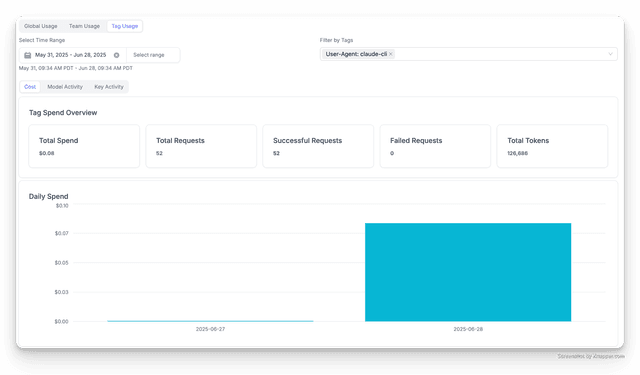
用戶端支出標籤
- 設定於金鑰
- 設定於團隊
- OpenAI Python v1.0.0+
- OpenAI JS
- Curl Request
- Langchain
curl -L -X POST 'http://0.0.0.0:4000/key/generate' \
-H "Authorization: Bearer $LITELLM_API_KEY" \
-H 'Content-Type: application/json' \
-d '{
    "metadata": {
        "tags": ["tag1", "tag2", "tag3"]
    }
}

'
curl -L -X POST 'http://0.0.0.0:4000/team/new' \
-H "Authorization: Bearer $LITELLM_API_KEY" \
-H 'Content-Type: application/json' \
-d '{
    "metadata": {
        "tags": ["tag1", "tag2", "tag3"]
    }
}

'
將您想要傳遞的 extra_body={"metadata": { }} 設為 metadata
import openai
client = openai.OpenAI(
    api_key="anything",
    base_url="http://0.0.0.0:4000"
)


response = client.chat.completions.create(
    model="gpt-5.6-luna",
    messages = [
        {
            "role": "user",
            "content": "this is a test request, write a short poem"
        }
    ],
    extra_body={
        "metadata": {
            "tags": ["model-anthropic-claude-v2.1", "app-ishaan-prod"] # 👈 Key Change
        }
    }
)

print(response)
const openai = require("openai");

async function runOpenAI() {
  const client = new openai.OpenAI({
    apiKey: "sk-<your-api-key>",
    baseURL: "http://0.0.0.0:4000",
  });

  try {
    const response = await client.chat.completions.create({
      model: "gpt-5.6-luna",
      messages: [
        {
          role: "user",
          content: "this is a test request, write a short poem",
        },
      ],
      metadata: {
        tags: ["model-anthropic-claude-v2.1", "app-ishaan-prod"], // 👈 Key Change
      },
    });
    console.log(response);
  } catch (error) {
    console.log("got this exception from server");
    console.error(error);
  }
}

// Call the asynchronous function
runOpenAI();
將 metadata 作為請求本文的一部分傳入
curl --location 'http://0.0.0.0:4000/chat/completions' \
    --header 'Content-Type: application/json' \
    --data '{
    "model": "gpt-5.6-luna",
    "messages": [
        {
        "role": "user",
        "content": "what llm are you"
        }
    ],
    "metadata": {"tags": ["model-anthropic-claude-v2.1", "app-ishaan-prod"]}
}'
from langchain.chat_models import ChatOpenAI
from langchain.prompts.chat import (
    ChatPromptTemplate,
    HumanMessagePromptTemplate,
    SystemMessagePromptTemplate,
)
from langchain.schema import HumanMessage, SystemMessage

chat = ChatOpenAI(
    openai_api_base="http://0.0.0.0:4000",
    model = "gpt-5.6-luna",
    temperature=0.1,
    extra_body={
        "metadata": {
            "tags": ["model-anthropic-claude-v2.1", "app-ishaan-prod"]
        }
    }
)

messages = [
    SystemMessage(
        content="You are a helpful assistant that im using to make a test request to."
    ),
    HumanMessage(
        content="test from litellm. tell me why it's amazing in 1 sentence"
    ),
]
response = chat(messages)

print(response)
新增自訂標頭以進行支出追蹤
您可以在請求中新增自訂標頭,以追蹤支出與用量。
litellm_settings:
  extra_spend_tag_headers:
    - "x-custom-header"
停用 user-agent 追蹤
您可以將 litellm_settings.disable_add_user_agent_to_request_tags 設為 true 來停用 user-agent 追蹤。
litellm_settings:
  disable_add_user_agent_to_request_tags: true
✨(Enterprise)產生支出報告
用於向其他團隊、客戶、使用者收費
使用 /global/spend/report 端點取得支出報告
- 每個團隊的支出
- 每位客戶的支出
- 特定 API 金鑰的支出
- 內部使用者(金鑰擁有者)的支出
範例請求
👉 金鑰變更:指定 group_by=team
curl -X GET 'http://localhost:4000/global/spend/report?start_date=2024-04-01&end_date=2024-06-30&group_by=team' \
  -H "Authorization: Bearer $LITELLM_API_KEY"
範例回應
- 預期回應
- 剖析回應的腳本(Python)
[
    {
        "group_by_day": "2024-04-30T00:00:00+00:00",
        "teams": [
            {
                "team_name": "Prod Team",
                "total_spend": 0.0015265,
                "metadata": [ # see the spend by unique(key + model)
                    {
                        "model": "gpt-5.6-terra",
                        "spend": 0.00123,
                        "total_tokens": 28,
                        "api_key": "88dc28.." # the hashed api key
                    },
                    {
                        "model": "gpt-5.6-terra",
                        "spend": 0.00123,
                        "total_tokens": 28,
                        "api_key": "a73dc2.." # the hashed api key
                    },
                    {
                        "model": "chatgpt-v-2",
                        "spend": 0.000214,
                        "total_tokens": 122,
                        "api_key": "898c28.." # the hashed api key
                    },
                    {
                        "model": "gpt-5.6-luna",
                        "spend": 0.0000825,
                        "total_tokens": 85,
                        "api_key": "84dc28.." # the hashed api key
                    }
                ]
            }
        ]
    }
]
import requests
url = 'http://localhost:4000/global/spend/report'
params = {
    'start_date': '2023-04-01',
    'end_date': '2024-06-30'
}

headers = {
    'Authorization': 'Bearer sk-<your-litellm-api-key>'
}

# Make the GET request
response = requests.get(url, headers=headers, params=params)
spend_report = response.json()

for row in spend_report:
  date = row["group_by_day"]
  teams = row["teams"]
  for team in teams:
      team_name = team["team_name"]
      total_spend = team["total_spend"]
      metadata = team["metadata"]

      print(f"Date: {date}")
      print(f"Team: {team_name}")
      print(f"Total Spend: {total_spend}")
      print("Metadata: ", metadata)
      print()
腳本輸出
# Date: 2024-05-11T00:00:00+00:00
# Team: local_test_team
# Total Spend: 0.003675099999999999
# Metadata:  [{'model': 'gpt-5.6-luna', 'spend': 0.003675099999999999, 'api_key': 'b94d5e0bc3a71a573917fe1335dc0c14728c7016337451af9714924ff3a729db', 'total_tokens': 3105}]

# Date: 2024-05-13T00:00:00+00:00
# Team: Unassigned Team
# Total Spend: 3.4e-05
# Metadata:  [{'model': 'gpt-5.6-luna', 'spend': 3.4e-05, 'api_key': '9569d13c9777dba68096dea49b0b03e0aaf4d2b65d4030eda9e8a2733c3cd6e0', 'total_tokens': 50}]

# Date: 2024-05-13T00:00:00+00:00
# Team: central
# Total Spend: 0.000684
# Metadata:  [{'model': 'gpt-5.6-luna', 'spend': 0.000684, 'api_key': '0323facdf3af551594017b9ef162434a9b9a8ca1bbd9ccbd9d6ce173b1015605', 'total_tokens': 498}]

# Date: 2024-05-13T00:00:00+00:00
# Team: local_test_team
# Total Spend: 0.0005715000000000001
# Metadata:  [{'model': 'gpt-5.6-luna', 'spend': 0.0005715000000000001, 'api_key': 'b94d5e0bc3a71a573917fe1335dc0c14728c7016337451af9714924ff3a729db', 'total_tokens': 423}]
範例請求
👉 主要變更:指定 group_by=customer
curl -X GET 'http://localhost:4000/global/spend/report?start_date=2024-04-01&end_date=2024-06-30&group_by=customer' \
  -H "Authorization: Bearer $LITELLM_API_KEY"
範例回應
[
    {
        "group_by_day": "2024-04-30T00:00:00+00:00",
        "customers": [
            {
                "customer": "palantir",
                "total_spend": 0.0015265,
                "metadata": [ # see the spend by unique(key + model)
                    {
                        "model": "gpt-5.6-terra",
                        "spend": 0.00123,
                        "total_tokens": 28,
                        "api_key": "88dc28.." # the hashed api key
                    },
                    {
                        "model": "gpt-5.6-terra",
                        "spend": 0.00123,
                        "total_tokens": 28,
                        "api_key": "a73dc2.." # the hashed api key
                    },
                    {
                        "model": "chatgpt-v-2",
                        "spend": 0.000214,
                        "total_tokens": 122,
                        "api_key": "898c28.." # the hashed api key
                    },
                    {
                        "model": "gpt-5.6-luna",
                        "spend": 0.0000825,
                        "total_tokens": 85,
                        "api_key": "84dc28.." # the hashed api key
                    }
                ]
            }
        ]
    }
]
👉 主要變更:指定 api_key=sk-<your-litellm-api-key>
curl -X GET 'http://localhost:4000/global/spend/report?start_date=2024-04-01&end_date=2024-06-30&api_key=sk-<your-litellm-api-key>' \
  -H "Authorization: Bearer $LITELLM_API_KEY"
範例回應
[
  {
    "api_key": "example-api-key-123",
    "total_cost": 0.3201286305151999,
    "total_input_tokens": 36.0,
    "total_output_tokens": 1593.0,
    "model_details": [
      {
        "model": "dall-e-3",
        "total_cost": 0.31999939051519993,
        "total_input_tokens": 0,
        "total_output_tokens": 0
      },
      {
        "model": "llama3-8b-8192",
        "total_cost": 0.00012924,
        "total_input_tokens": 36,
        "total_output_tokens": 1593
      }
    ]
  }
]
內部使用者(金鑰擁有者):這是呼叫 user_id 時傳入的 /key/generate 值
👉 主要變更:指定 internal_user_id=ishaan
curl -X GET 'http://localhost:4000/global/spend/report?start_date=2024-04-01&end_date=2024-12-30&internal_user_id=ishaan' \
  -H "Authorization: Bearer $LITELLM_API_KEY"
範例回應
[
  {
    "api_key": "example-api-key-123",
    "total_cost": 0.00013132,
    "total_input_tokens": 105.0,
    "total_output_tokens": 872.0,
    "model_details": [
      {
        "model": "gpt-3.5-turbo-instruct",
        "total_cost": 5.85e-05,
        "total_input_tokens": 15,
        "total_output_tokens": 18
      },
      {
        "model": "llama3-8b-8192",
        "total_cost": 7.282000000000001e-05,
        "total_input_tokens": 90,
        "total_output_tokens": 854
      }
    ]
  },
  {
    "api_key": "151e85e46ab8c9c7fad090793e3fe87940213f6ae665b543ca633b0b85ba6dc6",
    "total_cost": 5.2699999999999993e-05,
    "total_input_tokens": 26.0,
    "total_output_tokens": 27.0,
    "model_details": [
      {
        "model": "gpt-5.6-luna",
        "total_cost": 5.2499999999999995e-05,
        "total_input_tokens": 24,
        "total_output_tokens": 27
      },
      {
        "model": "text-embedding-ada-002",
        "total_cost": 2e-07,
        "total_input_tokens": 2,
        "total_output_tokens": 0
      }
    ]
  },
  {
    "api_key": "60cb83a2dcbf13531bd27a25f83546ecdb25a1a6deebe62d007999dc00e1e32a",
    "total_cost": 9.42e-06,
    "total_input_tokens": 30.0,
    "total_output_tokens": 99.0,
    "model_details": [
      {
        "model": "llama3-8b-8192",
        "total_cost": 9.42e-06,
        "total_input_tokens": 30,
        "total_output_tokens": 99
      }
    ]
  }
]
📊 支出記錄 API - 個別交易記錄
/spend/logs 端點現在支援 summarize 參數,以在使用日期篩選器時控制資料格式。
主要參數
| 參數 | 說明 |
|---|---|
summarize | 新參數:true(預設)= 彙總資料,false = 個別交易記錄 |
範例
取得個別交易記錄:
curl -X GET "http://localhost:4000/spend/logs?start_date=2024-01-01&end_date=2024-01-02&summarize=false" \
-H "Authorization: Bearer $LITELLM_API_KEY"
取得彙總資料(預設):
curl -X GET "http://localhost:4000/spend/logs?start_date=2024-01-01&end_date=2024-01-02" \
-H "Authorization: Bearer $LITELLM_API_KEY"
使用情境:
summarize=false:分析儀表板、ETL 處理流程、詳細稽核軌跡summarize=true:每日支出報告、高層級成本追蹤(舊行為)
分頁式 Spend Logs - /spend/logs/v2
請使用 /spend/logs/v2 以程式化方式存取具有以頁面為基礎分頁的個別 spend logs。上方的舊版 /spend/logs 端點會將結果截斷為最近 10,000 筆符合條件的列(回應接著會帶有 x-litellm-spend-logs-truncated: true 標頭),因此 /spend/logs/v2 是匯出與整合的建議端點。
curl -X GET "http://localhost:4000/spend/logs/v2?start_date=2024-01-01%2000:00:00&end_date=2024-01-02%2023:59:59&page=1&page_size=100" \
-H "Authorization: Bearer $LITELLM_API_KEY"
start_date 和 end_date 採用 YYYY-MM-DD HH:MM:SS 時間戳記。page 從 1 開始,而 page_size 每頁最多接受 1000 筆資料。此端點也接受 api_key、user_id、team_id、model、status_filter、min_spend 和 max_spend 等篩選條件;完整清單位於您的 proxy Swagger 頁面(/docs)中的 /spend/logs/v2。
{
  "data": ["..."],
  "total": 10000,
  "page": 1,
  "page_size": 100,
  "total_pages": 100,
  "total_is_capped": true
}
total 計數上限為 10,000
在大型時間範圍內計算每一筆符合條件的列,會讓 spend logs 資料表產生昂貴的全表掃描,因此自 v1.93.0 起,此端點背後的 count 查詢上限為 10,000 列。當符合的列更多時,total 會準確回報 10000,total_pages 會根據這個上限值推導,而 total_is_capped 則是 true。只有公告的計數會受上限限制。資料本身絕不會被截斷,因此超過公告 total_pages 的頁面會持續回傳資料列,直到結果取完為止。
有兩種方式可讀取每一筆符合條件的列。當 total_is_capped 為 true 時,請忽略 total_pages,並持續請求頁面,直到收到空的 data 陣列。或者,將查詢切分為較小的時間範圍,使每個時間範圍符合少於 10,000 筆資料列;此時每個時間範圍都會回報精確的 total。對於大型匯出,請優先使用時間範圍切分方式,因為這也可避免深層 offset 分頁,而 offset 越往後效能越慢。
使用 group_by_session=true 時,分頁同樣受限於相同的 10,000 列視窗,而從超出該視窗的位置開始的頁面不會回傳任何資料列,因此請切分時間範圍,而不要在超過上限後繼續翻頁。
✨ 自訂支出記錄中繼資料
將特定 key,value 配對作為支出記錄中繼資料的一部分進行記錄
需求:
- 需要先設定 Virtual Keys 與資料庫,請參閱 virtual keys
用法 - 具有特殊支出記錄中繼資料的 /chat/completions 請求
- 設定於金鑰
- 設定於團隊
- OpenAI Python v1.0.0+
- OpenAI JS
- Curl 請求
- 使用標頭
- Langchain
curl -L -X POST 'http://0.0.0.0:4000/key/generate' \
-H "Authorization: Bearer $LITELLM_API_KEY" \
-H 'Content-Type: application/json' \
-d '{
    "metadata": {
      "spend_logs_metadata": {
          "hello": "world"
      }
    }
}

'
curl -L -X POST 'http://0.0.0.0:4000/team/new' \
-H "Authorization: Bearer $LITELLM_API_KEY" \
-H 'Content-Type: application/json' \
-d '{
    "metadata": {
      "spend_logs_metadata": {
          "hello": "world"
      }
    }
}

'
將 extra_body={"metadata": { }} 設為您要傳入的 metadata
import openai
client = openai.OpenAI(
    api_key="anything",
    base_url="http://0.0.0.0:4000"
)

# request sent to model set on litellm proxy, `litellm --model`
response = client.chat.completions.create(
    model="gpt-5.6-luna",
    messages = [
        {
            "role": "user",
            "content": "this is a test request, write a short poem"
        }
    ],
    extra_body={
        "metadata": {
            "spend_logs_metadata": {
                "hello": "world"
            }
        }
    }
)

print(response)
使用標頭:
import openai
client = openai.OpenAI(
    api_key="sk-<your-litellm-api-key>",
    base_url="http://0.0.0.0:4000"
)

# Pass spend logs metadata via headers
response = client.chat.completions.create(
    model="gpt-5.6-luna",
    messages = [
        {
            "role": "user",
            "content": "this is a test request, write a short poem"
        }
    ],
    extra_headers={
        "x-litellm-spend-logs-metadata": '{"user_id": "12345", "project_id": "proj_abc", "request_type": "chat_completion"}'
    }
)

print(response)
const openai = require('openai');

async function runOpenAI() {
  const client = new openai.OpenAI({
    apiKey: 'sk-<your-api-key>',
    baseURL: 'http://0.0.0.0:4000'
  });

  try {
    const response = await client.chat.completions.create({
      model: 'gpt-5.6-luna',
      messages: [
        {
          role: 'user',
          content: "this is a test request, write a short poem"
        },
      ],
      metadata: {
        spend_logs_metadata: { // 👈 Key Change
            hello: "world"
        }
      }
    });
    console.log(response);
  } catch (error) {
    console.log("got this exception from server");
    console.error(error);
  }
}

// Call the asynchronous function
runOpenAI();
使用標頭:
const openai = require('openai');

async function runOpenAI() {
  const client = new openai.OpenAI({
    apiKey: 'sk-<your-api-key>',
    baseURL: 'http://0.0.0.0:4000'
  });

  try {
    const response = await client.chat.completions.create({
      model: 'gpt-5.6-luna',
      messages: [
        {
          role: 'user',
          content: "this is a test request, write a short poem"
        },
      ]
    }, {
      headers: {
        'x-litellm-spend-logs-metadata': '{"user_id": "12345", "project_id": "proj_abc", "request_type": "chat_completion"}'
      }
    });
    console.log(response);
  } catch (error) {
    console.log("got this exception from server");
    console.error(error);
  }
}

// Call the asynchronous function
runOpenAI();
將 metadata 作為請求主體的一部分傳入
curl --location 'http://0.0.0.0:4000/chat/completions' \
    --header 'Content-Type: application/json' \
    --data '{
    "model": "gpt-5.6-luna",
    "messages": [
        {
        "role": "user",
        "content": "what llm are you"
        }
    ],
    "metadata": {
        "spend_logs_metadata": {
            "hello": "world"
        }
    }
}'
將 x-litellm-spend-logs-metadata 以 JSON 字串作為請求標頭傳入
curl --location 'http://0.0.0.0:4000/chat/completions' \
    --header 'Content-Type: application/json' \
    --header "Authorization: Bearer $LITELLM_API_KEY" \
    --header 'x-litellm-spend-logs-metadata: {"user_id": "12345", "project_id": "proj_abc", "request_type": "chat_completion"}' \
    --data '{
    "model": "gpt-5.6-luna",
    "messages": [
        {
        "role": "user",
        "content": "what llm are you"
        }
    ]
}'
from langchain.chat_models import ChatOpenAI
from langchain.prompts.chat import (
    ChatPromptTemplate,
    HumanMessagePromptTemplate,
    SystemMessagePromptTemplate,
)
from langchain.schema import HumanMessage, SystemMessage

chat = ChatOpenAI(
    openai_api_base="http://0.0.0.0:4000",
    model = "gpt-5.6-luna",
    temperature=0.1,
    extra_body={
        "metadata": {
            "spend_logs_metadata": {
                "hello": "world"
            }
        }
    }
)

messages = [
    SystemMessage(
        content="You are a helpful assistant that im using to make a test request to."
    ),
    HumanMessage(
        content="test from litellm. tell me why it's amazing in 1 sentence"
    ),
]
response = chat(messages)

print(response)
檢視含自訂中繼資料的支出
/spend/logs 請求格式
# request_id: e.g.: chatcmpl-9ZKMURhVYSi9D6r6PJ9vLcayIK0Vm
curl -X GET "http://0.0.0.0:4000/spend/logs?request_id=<your-call-id" \
-H "Authorization: Bearer $LITELLM_API_KEY"
/spend/logs 回應格式
[
    {
        "request_id": "chatcmpl-9ZKMURhVYSi9D6r6PJ9vLcayIK0Vm",
        "call_type": "acompletion",
        "metadata": {
            "user_api_key": "example-api-key-123",
            "user_api_key_alias": null,
            "spend_logs_metadata": { # 👈 LOGGED CUSTOM METADATA
                "hello": "world"
            },
            "user_api_key_team_id": null,
            "user_api_key_user_id": "116544810872468347480",
            "user_api_key_team_alias": null
        },
    }
]

