Aporia
使用 Aporia 來偵測請求中的 PII 與回應中的髒話
1. 在 Aporia 上設定防護欄
建立 Aporia 專案
在 Aporia 上建立兩個專案
- Pre LLM API Call - 設定您想要在 pre LLM API call 前執行的所有政策
- Post LLM API Call - 設定您想要在 post LLM API call 後執行的所有政策
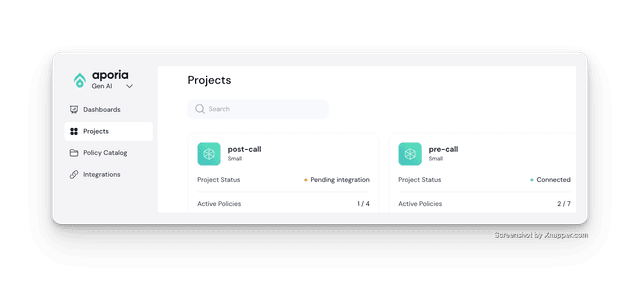
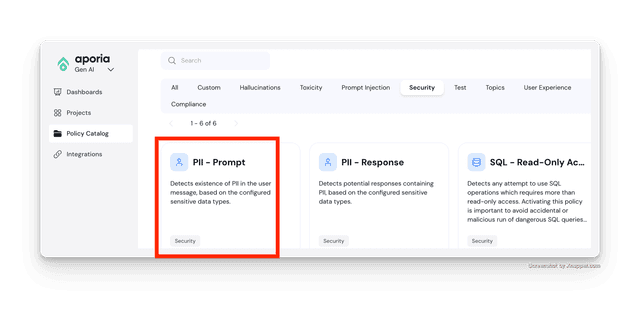
Pre-Call:偵測 PII
將 PII - Prompt 加入您的 Pre LLM API Call 專案
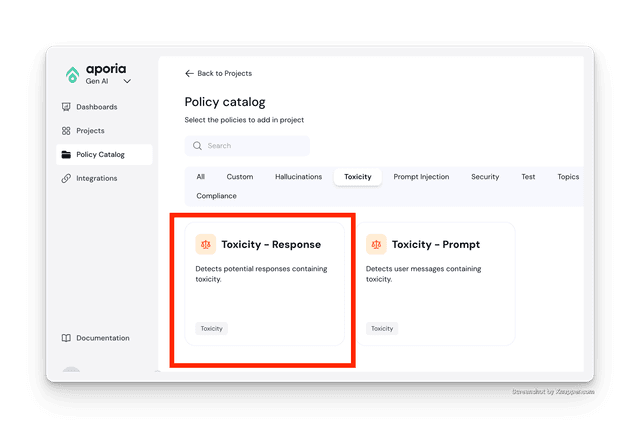
Post-Call:偵測回應中的髒話
將 Toxicity - Response 加入您的 Post LLM API Call 專案
2. 在您的 LiteLLM config.yaml 中定義防護欄
- 在
guardrails區段下定義您的防護欄
model_list:
  - model_name: gpt-5.6-luna
    litellm_params:
      model: openai/gpt-5.6-luna
      api_key: os.environ/OPENAI_API_KEY

guardrails:
  - guardrail_name: "aporia-pre-guard"
    litellm_params:
      guardrail: aporia  # supported values: "aporia", "lakera"
      mode: "during_call"
      api_key: os.environ/APORIA_API_KEY_1
      api_base: os.environ/APORIA_API_BASE_1
  - guardrail_name: "aporia-post-guard"
    litellm_params:
      guardrail: aporia  # supported values: "aporia", "lakera"
      mode: "post_call"
      api_key: os.environ/APORIA_API_KEY_2
      api_base: os.environ/APORIA_API_BASE_2
mode 的支援值
pre_call在 LLM 呼叫前執行,作用於輸入post_call在 LLM 呼叫後執行,作用於輸入與輸出during_call在 LLM 呼叫期間執行,作用於輸入。與pre_call相同,但會與 LLM 呼叫平行執行。防護欄檢查完成前不會回傳回應
3. 啟動 LiteLLM 閘道
litellm --config config.yaml --detailed_debug
4. 測試請求
- 失敗的呼叫
- 成功的呼叫
預期這會失敗,因為請求中的 ishaan@berri.ai 是 PII
curl -i http://localhost:4000/v1/chat/completions \
  -H "Content-Type: application/json" \
  -H "Authorization: Bearer sk-npnwjPQciVRok5yNZgKmFQ" \
  -d '{
    "model": "gpt-5.6-luna",
    "messages": [
      {"role": "user", "content": "hi my email is ishaan@berri.ai"}
    ],
    "guardrails": ["aporia-pre-guard", "aporia-post-guard"]
  }'
失敗時的預期回應
{
  "error": {
    "message": {
      "error": "Violated guardrail policy",
      "aporia_ai_response": {
        "action": "block",
        "revised_prompt": null,
        "revised_response": "Aporia detected and blocked PII",
        "explain_log": null
      }
    },
    "type": "None",
    "param": "None",
    "code": "400"
  }
}
curl -i http://localhost:4000/v1/chat/completions \
  -H "Content-Type: application/json" \
  -H "Authorization: Bearer sk-npnwjPQciVRok5yNZgKmFQ" \
  -d '{
    "model": "gpt-5.6-luna",
    "messages": [
      {"role": "user", "content": "hi what is the weather"}
    ],
    "guardrails": ["aporia-pre-guard", "aporia-post-guard"]
  }'
5. ✨ 依專案(API 金鑰)控制防護欄
使用這個功能來控制每個專案要執行哪些防護欄。在本教學中,我們只希望以下防護欄對 1 個專案(API 金鑰)執行
guardrails: ["aporia-pre-guard", "aporia-post-guard"]
步驟 1 建立具有防護欄設定的金鑰
- /key/generate
- /key/update
curl -X POST 'http://0.0.0.0:4000/key/generate' \
    -H "Authorization: Bearer $LITELLM_API_KEY" \
    -H 'Content-Type: application/json' \
    -d '{
            "guardrails": ["aporia-pre-guard", "aporia-post-guard"]
        }'
curl --location 'http://0.0.0.0:4000/key/update' \
    --header "Authorization: Bearer $LITELLM_API_KEY" \
    --header 'Content-Type: application/json' \
    --data '{
        "key": "sk-jNm1Zar7XfNdZXp49Z1kSQ",
        "guardrails": ["aporia-pre-guard", "aporia-post-guard"]
    }'
步驟 2 使用新金鑰進行測試
curl --location 'http://0.0.0.0:4000/chat/completions' \
    --header 'Authorization: Bearer sk-jNm1Zar7XfNdZXp49Z1kSQ' \
    --header 'Content-Type: application/json' \
    --data '{
    "model": "gpt-5.6-luna",
    "messages": [
        {
        "role": "user",
        "content": "my email is ishaan@berri.ai"
        }
    ]
}'

