LiteLLM 內容篩選器(內建防護欄)
內建防護欄,使用 regex 模式與關鍵字比對來偵測並篩選敏感資訊。無需外部依賴。
何時使用? 適用於不需要 ML 模型來偵測敏感資訊的情況。
總覽
| 屬性 | 詳細資訊 |
|---|---|
| 說明 | 用於偵測並篩選敏感資訊的裝置端防護欄,使用 regex 模式與關鍵字比對。內建於 LiteLLM,無外部依賴。 |
| 防護欄名稱 | litellm_content_filter |
| 偵測方法 | 預先建置的 regex 模式、自訂 regex、關鍵字比對 |
| 動作 | BLOCK(拒絕請求)、MASK(將內容去識別化) |
| 支援模式 | pre_call、post_call、during_call(串流) |
| 效能 | 快速 - 在本地執行,不會呼叫外部 API |
快速開始
LiteLLM 使用者介面
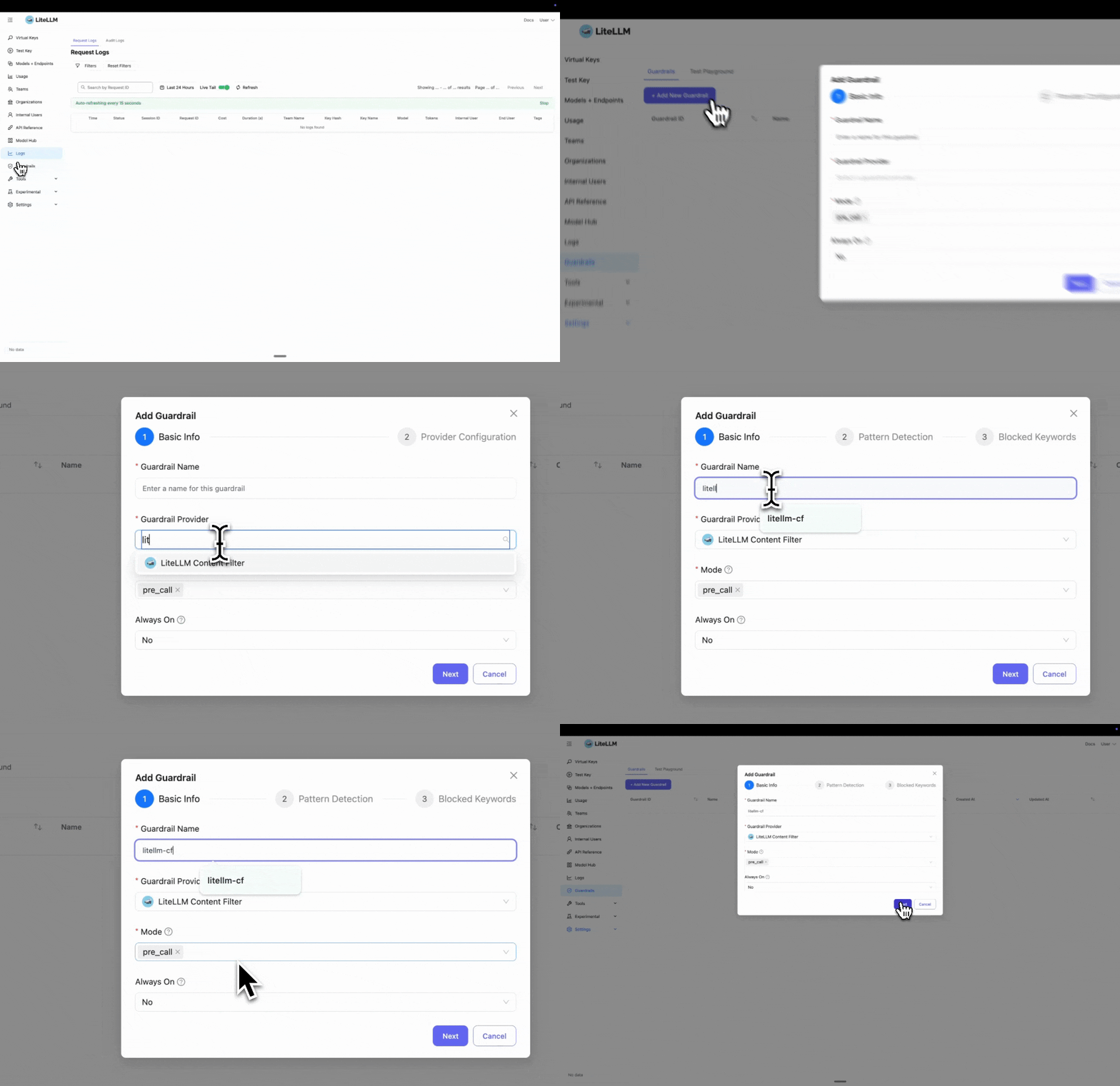
步驟 1:選取 LiteLLM 內容篩選器
點擊「新增防護欄」並選擇「LiteLLM Content Filter」作為您的防護欄提供者。
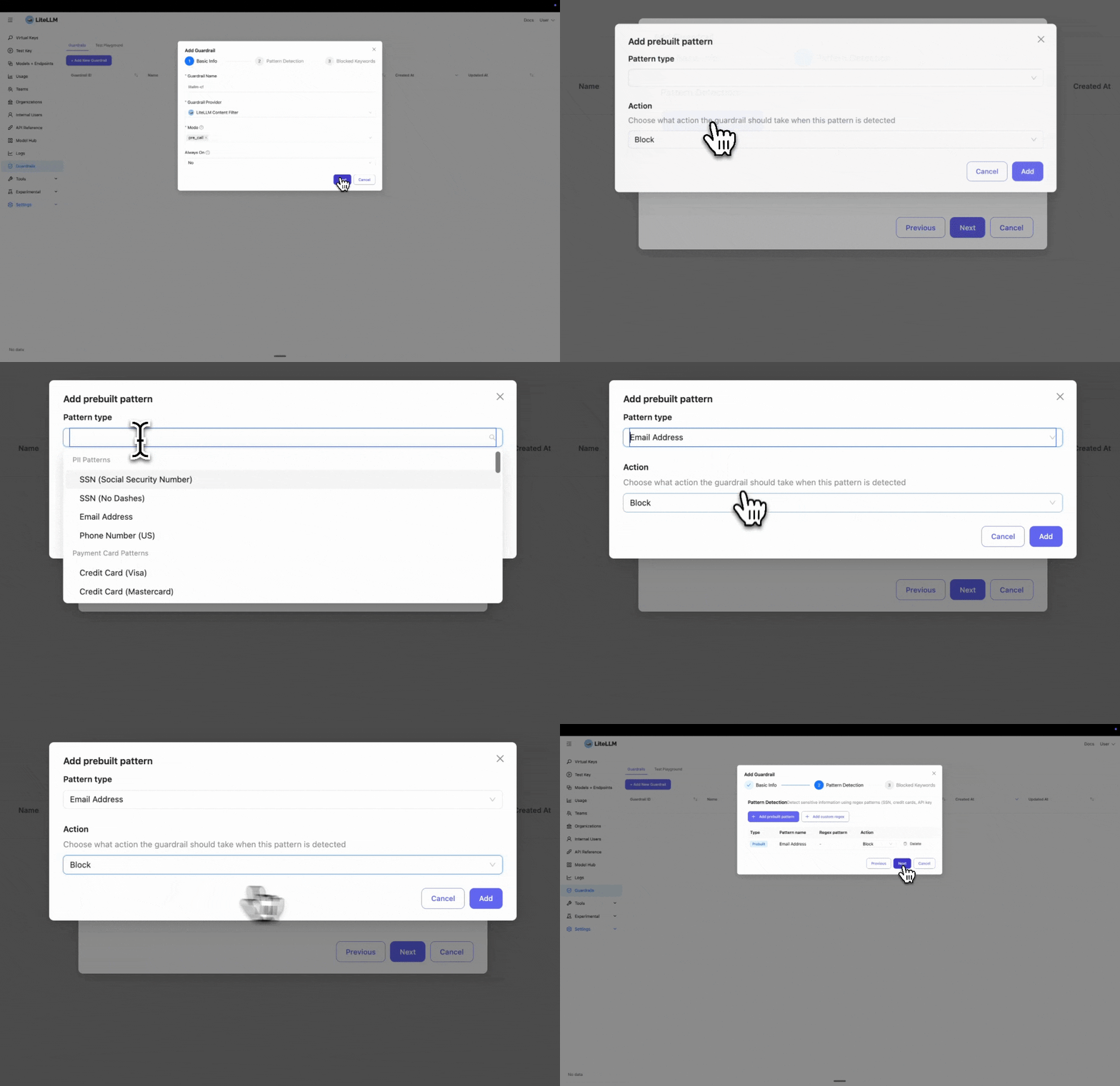
步驟 2:設定模式偵測
選取您要封鎖或遮罩的預先建置實體。在此範例中,我們選取「Email」來偵測並封鎖電子郵件地址。
如果您需要封鎖自訂實體,可以按一下「Add custom regex」來新增自訂 regex 模式。
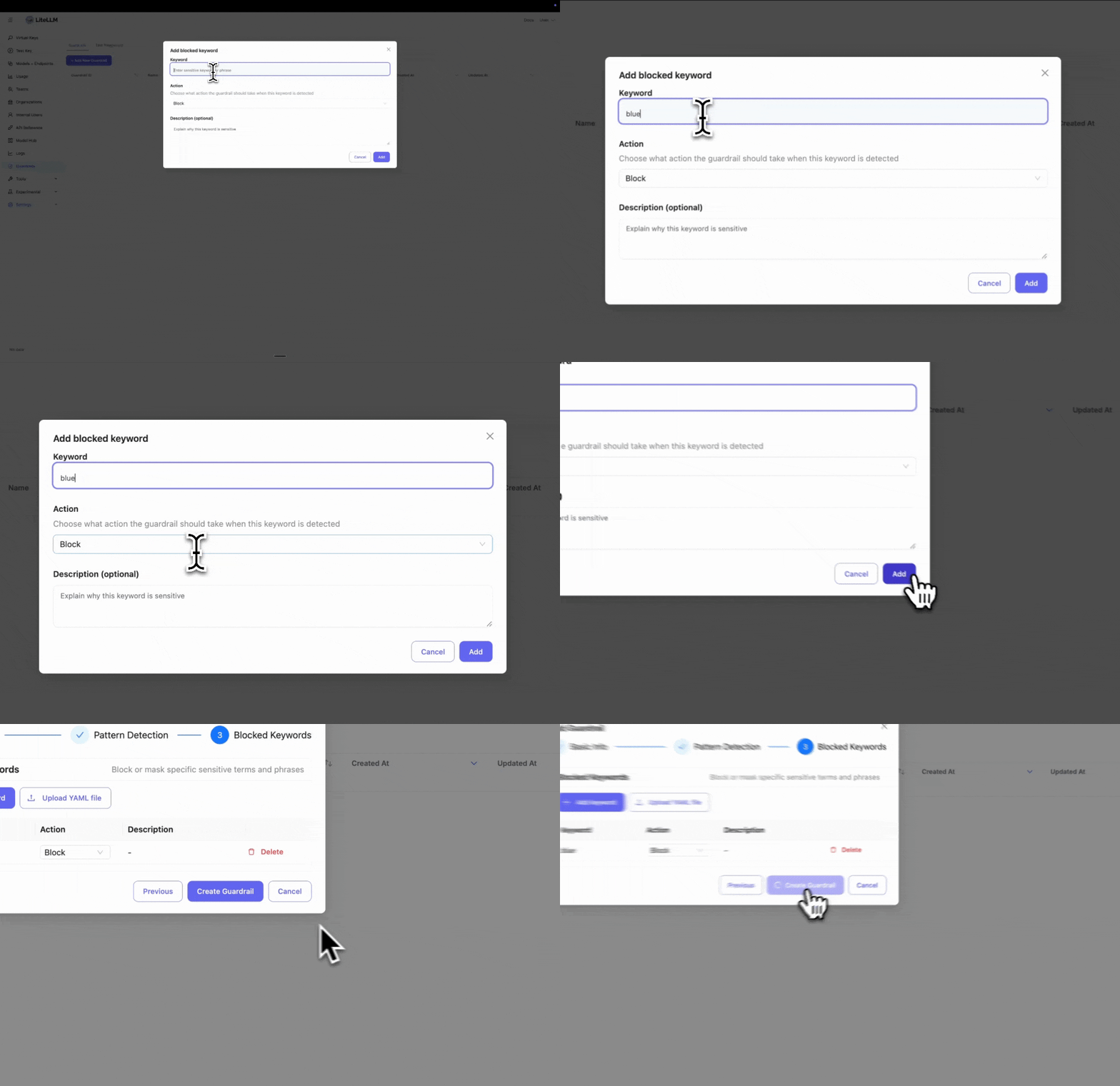
步驟 3:新增被封鎖的關鍵字
輸入您要封鎖的特定關鍵字。若您有封鎖某些字詞或片語的政策,這會很有用。
步驟 4:測試您的防護欄
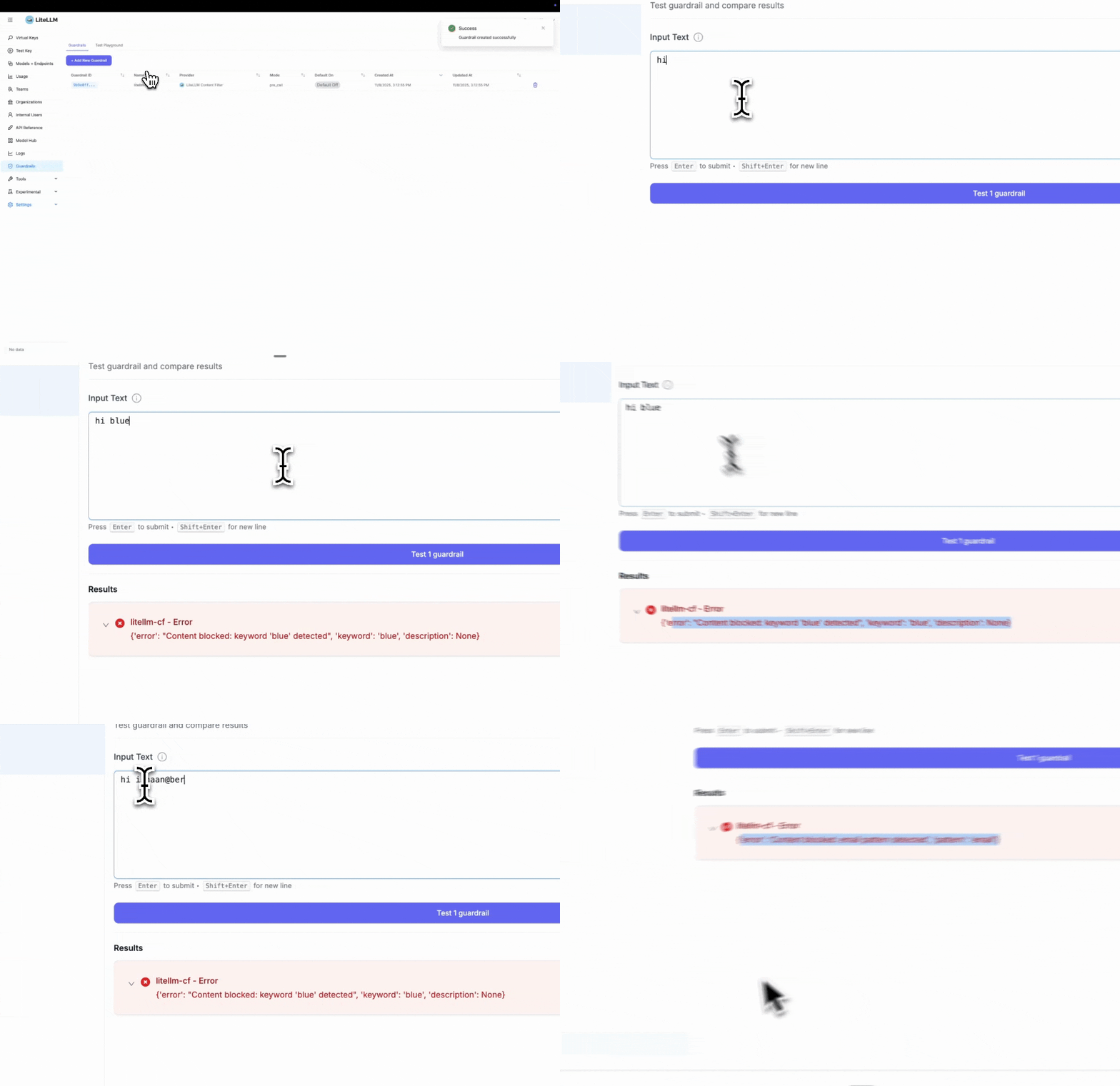
建立防護欄後,請前往「Test Playground」進行測試。選取您剛建立的防護欄。
測試範例:
- 被封鎖關鍵字測試:輸入「hi blue」會觸發封鎖,因為我們將「blue」設定為被封鎖關鍵字
- 模式偵測測試:輸入「Hi ishaan@berri.ai」會觸發電子郵件模式偵測器
LiteLLM Config.yaml 設定
步驟 1:在 config.yaml 中定義防護欄
- 有害內容偵測
- PII 保護
- 組合
model_list:
  - model_name: gpt-5.6-luna
    litellm_params:
      model: openai/gpt-5.6-luna
      api_key: os.environ/OPENAI_API_KEY

guardrails:
  - guardrail_name: "harmful-content-filter"
    litellm_params:
      guardrail: litellm_content_filter
      mode: "pre_call"

      # Enable harmful content categories
      categories:
        - category: "harmful_self_harm"
          enabled: true
          action: "BLOCK"
          severity_threshold: "medium"

        - category: "harmful_violence"
          enabled: true
          action: "BLOCK"
          severity_threshold: "medium"

        - category: "harmful_illegal_weapons"
          enabled: true
          action: "BLOCK"
          severity_threshold: "medium"
model_list:
  - model_name: gpt-5.6-luna
    litellm_params:
      model: openai/gpt-5.6-luna
      api_key: os.environ/OPENAI_API_KEY

guardrails:
  - guardrail_name: "content-filter-pre"
    litellm_params:
      guardrail: litellm_content_filter
      mode: "pre_call"

      # Prebuilt patterns for common PII
      patterns:
        - pattern_type: "prebuilt"
          pattern_name: "us_ssn"
          action: "BLOCK"

        - pattern_type: "prebuilt"
          pattern_name: "email"
          action: "MASK"

      # Custom blocked keywords
      blocked_words:
        - keyword: "confidential"
          action: "BLOCK"
          description: "Sensitive internal information"
model_list:
  - model_name: gpt-5.6-luna
    litellm_params:
      model: openai/gpt-5.6-luna
      api_key: os.environ/OPENAI_API_KEY

guardrails:
  - guardrail_name: "comprehensive-filter"
    litellm_params:
      guardrail: litellm_content_filter
      mode: "pre_call"

      # Harmful content categories
      categories:
        - category: "harmful_violence"
          enabled: true
          action: "BLOCK"
          severity_threshold: "high"

      # PII patterns
      patterns:
        - pattern_type: "prebuilt"
          pattern_name: "us_ssn"
          action: "BLOCK"
        - pattern_type: "prebuilt"
          pattern_name: "email"
          action: "MASK"

      # Custom keywords
      blocked_words:
        - keyword: "confidential"
          action: "BLOCK"
步驟 2:啟動 LiteLLM Gateway
litellm --config config.yaml
步驟 3:測試請求
- SSN 已封鎖
- Email 已遮罩
curl -i http://localhost:4000/v1/chat/completions \
  -H "Content-Type: application/json" \
  -H "Authorization: Bearer $LITELLM_API_KEY" \
  -d '{
    "model": "gpt-5.6-luna",
    "messages": [
      {"role": "user", "content": "My SSN is 123-45-6789"}
    ],
    "guardrails": ["content-filter-pre"]
  }'
回應:HTTP 400 錯誤
{
  "error": {
    "message": {
      "error": "Content blocked: us_ssn pattern detected",
      "pattern": "us_ssn"
    },
    "code": "400"
  }
}
curl -i http://localhost:4000/v1/chat/completions \
  -H "Content-Type: application/json" \
  -H "Authorization: Bearer $LITELLM_API_KEY" \
  -d '{
    "model": "gpt-5.6-luna",
    "messages": [
      {"role": "user", "content": "Contact me at john@example.com"}
    ],
    "guardrails": ["content-filter-pre"]
  }'
請求會在 email 已遮罩的情況下傳送到 LLM:
Contact me at [EMAIL_REDACTED]
設定
支援模式
pre_call- 在 LLM 呼叫前執行,篩選輸入訊息post_call- 在 LLM 呼叫後執行,篩選輸出回應during_call- 在串流期間執行,即時篩選每個區塊
動作
BLOCK- 以 HTTP 400 錯誤拒絕請求MASK- 以去識別化標記取代敏感內容(例如,[EMAIL_REDACTED])
預先建置的模式
可用模式
| 模式名稱 | 說明 | 範例 |
|---|---|---|
us_ssn | 美國社會安全號碼 | 123-45-6789 |
email | 電子郵件地址 | user@example.com |
us_phone | 美國電話號碼 | +1-555-123-4567 |
visa | Visa 信用卡 | 4532-1234-5678-9010 |
mastercard | Mastercard 信用卡 | 5425-2334-3010-9903 |
amex | American Express 卡 | 3782-822463-10005 |
aws_access_key | AWS 存取金鑰 | AKIAIOSFODNN7EXAMPLE |
aws_secret_key | AWS 秘密金鑰 | wJalrXUtnFEMI/K7MDENG/bPxRfi... |
github_token | GitHub 權杖 | example-github-token-123 |
使用預先建置的模式
guardrails:
  - guardrail_name: "pii-filter"
    litellm_params:
      guardrail: litellm_content_filter
      mode: "pre_call"
      patterns:
        - pattern_type: "prebuilt"
          pattern_name: "us_ssn"
          action: "BLOCK"

        - pattern_type: "prebuilt"
          pattern_name: "email"
          action: "MASK"

        - pattern_type: "prebuilt"
          pattern_name: "aws_access_key"
          action: "BLOCK"
自訂 Regex 模式
定義您自己的 regex 模式以處理特定領域的敏感資料:
guardrails:
  - guardrail_name: "custom-patterns"
    litellm_params:
      guardrail: litellm_content_filter
      mode: "pre_call"
      patterns:
        # Custom employee ID format
        - pattern_type: "regex"
          pattern: '\b[A-Z]{3}-\d{4}\b'
          name: "employee_id"
          action: "MASK"

        # Custom project code format
        - pattern_type: "regex"
          pattern: 'PROJECT-\d{6}'
          name: "project_code"
          action: "BLOCK"
關鍵字篩選
封鎖或遮罩特定關鍵字:
guardrails:
  - guardrail_name: "keyword-filter"
    litellm_params:
      guardrail: litellm_content_filter
      mode: "pre_call"
      blocked_words:
        - keyword: "confidential"
          action: "BLOCK"
          description: "Internal confidential information"

        - keyword: "proprietary"
          action: "MASK"
          description: "Proprietary company data"

        - keyword: "secret_project"
          action: "BLOCK"
從檔案載入關鍵字
若關鍵字清單很大,請使用 YAML 檔案:
guardrails:
  - guardrail_name: "keyword-file-filter"
    litellm_params:
      guardrail: litellm_content_filter
      mode: "pre_call"
      blocked_words_file: "/path/to/sensitive_keywords.yaml"
blocked_words:
  - keyword: "project_apollo"
    action: "BLOCK"
    description: "Confidential project codename"

  - keyword: "internal_api"
    action: "MASK"
    description: "Internal API references"

  - keyword: "customer_database"
    action: "BLOCK"
    description: "Protected database name"
串流支援
內容篩選器會透過檢查每個區塊來處理串流回應:
guardrails:
  - guardrail_name: "streaming-filter"
    litellm_params:
      guardrail: litellm_content_filter
      mode: "during_call"  # Check each streaming chunk
      patterns:
        - pattern_type: "prebuilt"
          pattern_name: "email"
          action: "MASK"
import openai

client = openai.OpenAI(
    api_key="sk-<your-litellm-api-key>",
    base_url="http://localhost:4000"
)

response = client.chat.completions.create(
    model="gpt-5.6-luna",
    messages=[{"role": "user", "content": "Tell me about yourself"}],
    stream=True,
    extra_body={"guardrails": ["streaming-filter"]}
)

for chunk in response:
    print(chunk.choices[0].delta.content)
    # Emails automatically masked in real-time
圖片內容篩選
內容篩選器可以透過產生描述並將篩選套用到文字描述上來分析圖片。
這可能會為請求帶來顯著延遲——取決於具備視覺能力的模型速度。
原因是,每個包含圖片的請求都會傳送到具備視覺能力的模型以產生描述。
設定
model_list:
  - model_name: gpt-4-vision
    litellm_params:
      model: openai/gpt-5.6-terra
      api_key: os.environ/OPENAI_API_KEY

guardrails:
  - guardrail_name: "image-filter"
    litellm_params:
      guardrail: litellm_content_filter
      mode: "pre_call"
      image_model: "gpt-4-vision"  # value is `model_name` of the vision-capable model

      # Apply same filters to image descriptions
      categories:
        - category: "harmful_violence"
          enabled: true
          action: "BLOCK"
          severity_threshold: "medium"

      patterns:
        - pattern_type: "prebuilt"
          pattern_name: "email"
          action: "MASK"
運作方式
- 圖片會傳送到視覺模型以產生文字描述
- 內容篩選會套用到描述上
- 如果偵測到有害內容,請求會連同圖片的上下文一起被封鎖
範例:
import openai

client = openai.OpenAI(
    api_key="sk-<your-litellm-api-key>",
    base_url="http://localhost:4000"
)

response = client.chat.completions.create(
    model="gpt-4-vision",
    messages=[{
        "role": "user",
        "content": [
            {"type": "text", "text": "What's in this image?"},
            {"type": "image_url", "image_url": {"url": "https://example.com/image.jpg"}}
        ]
    }],
    extra_body={"guardrails": ["image-filter"]}
)
如果圖片描述包含被篩選的內容,您會得到:
{
  "error": "Content blocked: harmful_violence category keyword 'weapon' detected (severity: high) (Image description): The image shows..."
}
自訂去識別化標記
使用 MASK 動作時,敏感內容會以去識別化標記取代。您可以自訂這些標記的顯示方式。
預設行為
模式: 每種模式類型都會依據模式名稱取得自己的標記
Input:  "My email is john@example.com and SSN is 123-45-6789"
Output: "My email is [EMAIL_REDACTED] and SSN is [US_SSN_REDACTED]"
關鍵字: 所有關鍵字都使用相同的通用標記
Input:  "This is confidential and proprietary information"
Output: "This is [KEYWORD_REDACTED] and [KEYWORD_REDACTED] information"
自訂標記
使用 pattern_redaction_format 和 keyword_redaction_tag 來變更去識別化格式:
guardrails:
  - guardrail_name: "custom-redaction"
    litellm_params:
      guardrail: litellm_content_filter
      mode: "pre_call"
      pattern_redaction_format: "***{pattern_name}***"  # Use {pattern_name} placeholder
      keyword_redaction_tag: "***REDACTED***"
      patterns:
        - pattern_type: "prebuilt"
          pattern_name: "email"
          action: "MASK"
        - pattern_type: "prebuilt"
          pattern_name: "us_ssn"
          action: "MASK"
      blocked_words:
        - keyword: "confidential"
          action: "MASK"
輸出:
Input:  "Email john@example.com, SSN 123-45-6789, confidential data"
Output: "Email ***EMAIL***, SSN ***US_SSN***, ***REDACTED*** data"
重點:
pattern_redaction_format必須包含{pattern_name}佔位符- 模式名稱會自動轉為大寫(例如,
email→EMAIL) keyword_redaction_tag是固定字串(沒有佔位符)
內容類別
預先建置的類別使用關鍵字比對來偵測有害內容、偏見與不當建議。關鍵字會以字邊界(單字)或作為子字串(多字片語)進行比對,且不區分大小寫。
可用類別
可依名稱參考下列任一類別;不需要 category_file:
| 類別 | 描述 |
|---|---|
| 有害內容 | |
harmful_self_harm | 自我傷害、自殺、飲食失調 |
harmful_violence | 暴力、犯罪規劃、攻擊 |
harmful_illegal_weapons | 非法武器、爆裂物、危險材料 |
harmful_child_safety | 涉及未成年人的不當內容 |
| 偏見 / 就業歧視 | |
bias_gender | 基於性別的歧視、刻板印象 |
bias_sexual_orientation | LGBTQ+ 歧視、恐同、跨性別恐懼 |
bias_racial | 基於種族/族裔的歧視、仇恨言論 |
bias_religious | 基於宗教的歧視、刻板印象 |
age_discrimination | 基於年齡的就業歧視 |
disability | 對身心障礙者的就業歧視 |
gender_sexual_orientation | 基於性別、性別認同或性取向的就業歧視 |
military_status | 對退伍軍人/軍事人員的就業歧視 |
religion | 基於宗教或宗教信仰的就業歧視 |
| 拒絕提供建議 | |
denied_financial_advice | 個人化財務建議、投資建議 |
denied_medical_advice | 醫療建議、診斷、治療建議 |
denied_legal_advice | 法律建議、代理、法律策略 |
denied_insults | 侮辱、罵名、人身攻擊 |
| 提示注入 | |
prompt_injection_jailbreak | 越獄嘗試(DAN、角色扮演攻擊、安全繞過) |
prompt_injection_system_prompt | 嘗試擷取、揭露或覆寫系統提示 |
prompt_injection_sql | 嵌入於提示中的 SQL 注入 |
prompt_injection_malicious_code | 透過提示進行的惡意程式碼注入 |
prompt_injection_data_exfiltration | 嘗試擷取訓練資料或內部資訊 |
| 濫用聲明 | |
claims_fraud_coaching | 詐欺性保險理賠的操作指導 |
claims_medical_advice | 理賠情境中的醫療建議 |
claims_phi_disclosure | 未經授權的 PHI 揭露/HIPAA 違規 |
claims_prior_auth_gaming | 事前授權規避嘗試 |
claims_system_override | 理賠系統覆寫/角色冒充嘗試 |
偏見偵測是複雜且依賴情境的。基於規則的系統可以捕捉明確的歧視性語言,但在合法討論中可能產生誤判。請從高嚴重性閾值開始,並徹底測試。若需執行關鍵任務級的偏見偵測,請考慮結合 AI 型防護欄(例如 HiddenLayer、Lakera)。
設定
guardrails:
  - guardrail_name: "content-filter"
    litellm_params:
      guardrail: litellm_content_filter
      mode: "pre_call"

      categories:
        - category: "harmful_self_harm"
          enabled: true
          action: "BLOCK"
          severity_threshold: "medium"  # Blocks medium+ severity

        - category: "bias_gender"
          enabled: true
          action: "BLOCK"
          severity_threshold: "high"  # Only explicit discrimination

        - category: "denied_financial_advice"
          enabled: true
          action: "BLOCK"
          severity_threshold: "medium"
嚴重性閾值:
"high"- 僅封鎖高嚴重性項目"medium"- 封鎖中與高嚴重性(預設)"low"- 封鎖所有嚴重性等級
自訂類別檔案
使用您自己的關鍵字清單來覆寫內建類別,或新增全新的類別
categories:
  - category: "<your-category-name>"
    enabled: true
    action: "BLOCK"
    severity_threshold: "medium"
    category_file: "<your-category-name>.yaml"
category_name: "<your-category-name>"
description: "Short description of what this category detects"
default_action: "BLOCK"

keywords:
  - keyword: "example keyword"
    severity: "high"

exceptions:
  - "example exception phrase"
檔案放置位置
請將您的 YAML 放在以下兩個位置之一:
選項 A:放在內建的 categories/ 目錄中(建議)
將檔案掛載到 <site-packages>/litellm/proxy/guardrails/guardrail_hooks/litellm_content_filter/categories/<your-category-name>.yaml,並省略 category_file: 欄位。載入器會依類別名稱將其載入
extraVolumeMounts:
  - name: content-filter-categories
    mountPath: /usr/local/lib/python3.13/site-packages/litellm/proxy/guardrails/guardrail_hooks/litellm_content_filter/categories/<your-category-name>.yaml
    subPath: <your-category-name>.yaml
    readOnly: true

extraVolumes:
  - name: content-filter-categories
    configMap:
      name: <your-configmap-name>
guardrails:
  - guardrail_name: "<your-guardrail-name>"
    litellm_params:
      guardrail: litellm_content_filter
      mode: pre_call
      default_on: true
      categories:
        - category: "<your-category-name>"
          enabled: true
          action: "BLOCK"
          severity_threshold: "high"
如果您升級到以不同 Python 次要版本建置的 litellm 映像檔,請更新 mountPath
選項 B:任何其他路徑,搭配 env var 明確啟用
設定
LITELLM_CONTENT_FILTER_ALLOW_EXTERNAL_PATHS=true
在 proxy pod 上,然後以絕對路徑參照該檔案
categories:
  - category: "<your-category-name>"
    enabled: true
    action: "BLOCK"
    severity_threshold: "high"
    category_file: "/absolute/path/to/<your-category-name>.yaml"
僅在所有能寫入 category_file(proxy 設定、DB、Admin UI、team 範圍設定)的人都可信任時才使用;啟用此旗標後,category_file 可以指向 pod 上任何可被 YAML 解析的檔案
驗證是否已載入
檢查 proxy 啟動記錄中是否有以下任一項
content_filter.py: Loaded category <name>: N keywords, M always-block keywords ...
或
content_filter.py: Category <name>: invalid category_file path, skipping. ...
第二行表示該檔案被拒絕,而此類別正以零規則執行;請使用上述兩個選項之一修正
使用案例
1. 有害內容偵測
封鎖或偵測包含有害、非法或危險內容的請求:
categories:
  - category: "harmful_self_harm"
    enabled: true
    action: "BLOCK"
    severity_threshold: "medium"
  - category: "harmful_violence"
    enabled: true
    action: "BLOCK"
    severity_threshold: "high"
  - category: "harmful_illegal_weapons"
    enabled: true
    action: "BLOCK"
    severity_threshold: "medium"
2. 偏見與歧視偵測
偵測並封鎖跨多個面向的偏頗、歧視性或仇恨內容:
categories:
  # Gender-based discrimination
  - category: "bias_gender"
    enabled: true
    action: "BLOCK"
    severity_threshold: "medium"

  # LGBTQ+ discrimination
  - category: "bias_sexual_orientation"
    enabled: true
    action: "BLOCK"
    severity_threshold: "medium"

  # Racial/ethnic discrimination
  - category: "bias_racial"
    enabled: true
    action: "BLOCK"
    severity_threshold: "high"  # Only explicit to reduce false positives

  # Religious discrimination
  - category: "bias_religious"
    enabled: true
    action: "BLOCK"
    severity_threshold: "medium"
敏感度調整:
對於偏見偵測,嚴重性閾值對於平衡安全性與合法論述至關重要:
# Conservative (low false positives, may miss subtle bias)
categories:
  - category: "bias_racial"
    severity_threshold: "high"  # Only blocks explicit discriminatory language

# Balanced (recommended)
categories:
  - category: "bias_gender"
    severity_threshold: "medium"  # Blocks stereotypes and explicit discrimination

# Strict (high safety, may have more false positives)
categories:
  - category: "bias_sexual_orientation"
    severity_threshold: "low"  # Blocks all potentially problematic content
3. PII 保護
在傳送給 LLM 之前封鎖或遮罩個人可識別資訊:
patterns:
  - pattern_type: "prebuilt"
    pattern_name: "us_ssn"
    action: "BLOCK"
  - pattern_type: "prebuilt"
    pattern_name: "email"
    action: "MASK"
2. 憑證偵測
防止 API 金鑰與密鑰外洩:
patterns:
  - pattern_type: "prebuilt"
    pattern_name: "aws_access_key"
    action: "BLOCK"
  - pattern_type: "prebuilt"
    pattern_name: "github_token"
    action: "BLOCK"
3. 敏感內部資料保護
封鎖或遮罩對機密內部專案、代號或專有資訊的提及:
blocked_words:
  - keyword: "project_titan"
    action: "BLOCK"
    description: "Confidential project codename"
  - keyword: "internal_api"
    action: "MASK"
    description: "Internal system references"
若有大量敏感詞彙清單,請使用檔案:
blocked_words_file: "/path/to/sensitive_terms.yaml"
4. 面向消費者應用程式的安全 AI
結合有害內容與偏見偵測,適用於面向消費者的 AI:
guardrails:
  - guardrail_name: "safe-consumer-ai"
    litellm_params:
      guardrail: litellm_content_filter
      mode: "pre_call"

      categories:
        # Harmful content - strict
        - category: "harmful_self_harm"
          enabled: true
          action: "BLOCK"
          severity_threshold: "medium"

        - category: "harmful_violence"
          enabled: true
          action: "BLOCK"
          severity_threshold: "medium"

        # Bias detection - balanced
        - category: "bias_gender"
          enabled: true
          action: "BLOCK"
          severity_threshold: "high"  # Avoid blocking legitimate gender discussions

        - category: "bias_sexual_orientation"
          enabled: true
          action: "BLOCK"
          severity_threshold: "medium"

        - category: "bias_racial"
          enabled: true
          action: "BLOCK"
          severity_threshold: "high"  # Education and news may discuss race
非常適合:
- 聊天機器人與虛擬助理
- 教育 AI 工具
- 客戶服務 AI
- 內容生成平台
- 面向大眾的 AI 應用程式
5. 合規性
透過過濾敏感資料類型來確保符合法規要求:
# Categories checked first (high priority)
# Category keywords are matched first
categories:
  - category: "harmful_self_harm"
    severity_threshold: "high"

# Then regex patterns
patterns:
  - pattern_type: "prebuilt"
    pattern_name: "visa"
    action: "BLOCK"
  - pattern_type: "prebuilt"
    pattern_name: "us_ssn"
    action: "BLOCK"

