PII、PHI 遮罩 - Presidio
總覽
| 屬性 | 詳細資訊 |
|---|---|
| 說明 | 使用此防護欄來遮罩 PII(Personally Identifiable Information,個人識別資訊)、PHI(Protected Health Information,受保護健康資訊)及其他敏感資料。 |
| 提供者 | Microsoft Presidio |
| 支援的實體類型 | 所有 Presidio 實體類型 |
| 支援的動作 | MASK, BLOCK |
| 支援的模式 | pre_call, during_call, post_call, logging_only, pre_mcp_call |
| 語言支援 | 可透過 presidio_language 參數設定(支援多種語言,包括英文、西班牙文、德文等) |
部署選項
此防護欄需要已部署的 Presidio Analyzer 和 Presido Anonymizer 容器。
| 部署選項 | 詳細資訊 |
|---|---|
| 部署 Presidio Docker 容器 | - Presidio Analyzer Docker Container - Presidio Anonymizer Docker Container |
快速開始
- LiteLLM UI
- Config.yaml
1. 建立 PII、PHI 遮罩防護欄
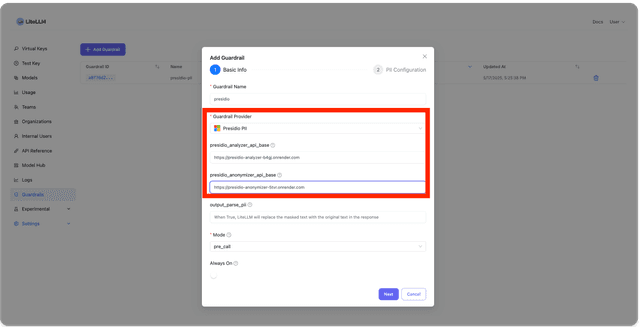
在 LiteLLM UI 中,前往 Guardrails。點擊「Add Guardrail」。在此下拉選單中選擇「Presidio PII」,並輸入您的 presidio analyzer 與 anonymizer 端點。
1.2 設定實體類型
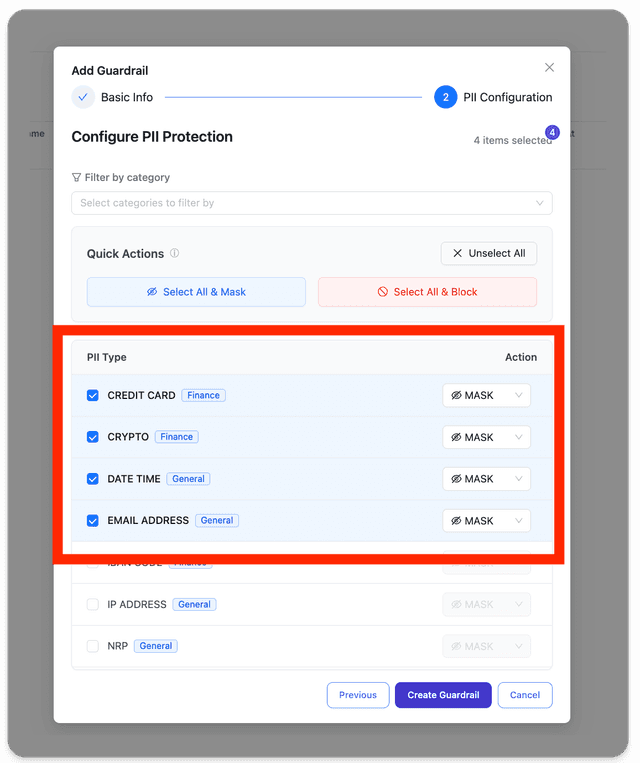
現在選擇您要遮罩的實體類型。請參閱支援的動作此處
1.3 設定預設語言(選填)
您也可以在 UI 中使用 presidio_language 欄位,為 PII 分析設定預設語言。這會設定所有請求預設使用的語言,除非由每個請求的語言設定覆寫。
支援的語言代碼包括:
en- 英文(預設)es- 西班牙文de- 德文
若未指定,將使用英文(en)作為預設語言。
在 guardrails 區段下定義您的防護欄
model_list:
  - model_name: gpt-5.6-luna
    litellm_params:
      model: openai/gpt-5.6-luna
      api_key: os.environ/OPENAI_API_KEY

guardrails:
  - guardrail_name: "presidio-pii"
    litellm_params:
      guardrail: presidio  # supported values: "aporia", "bedrock", "lakera", "presidio"
      mode: "pre_call"
      presidio_language: "en"  # optional: set default language for PII analysis
設定以下 env vars
export PRESIDIO_ANALYZER_API_BASE="http://localhost:5002"
export PRESIDIO_ANONYMIZER_API_BASE="http://localhost:5001"
mode 的支援值
pre_call在 LLM 呼叫前執行,於 輸入post_call在 LLM 呼叫後執行,於 輸入與輸出logging_only在 LLM 呼叫後執行,僅在記錄到 Langfuse 等之前套用 PII 遮罩。不套用於實際的 llm api request / response。
2. 啟動 LiteLLM 閘道
litellm --config config.yaml --detailed_debug
3. 測試看看!
3.1 LiteLLM UI
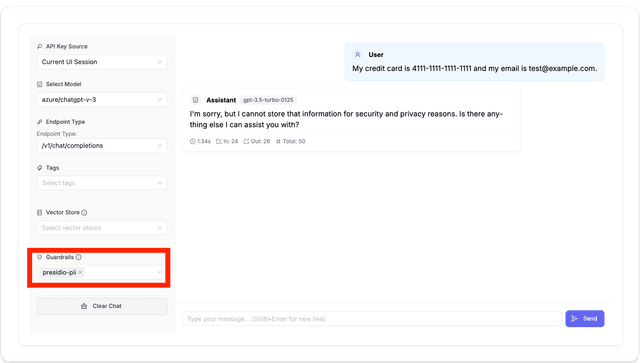
在 litellm UI 中,前往「Test Keys」頁面,選取您建立的防護欄,並傳送以下包含 PII 資料的訊息。
My credit card is 4111-1111-1111-1111 and my email is test@example.com.
3.2 在程式碼中測試
若要將防護欄套用到請求,請在請求主體中傳送 guardrails=["presidio-pii"]。
- Masked PII call
- No PII Call
預期這會遮罩 Jane Doe,因為它是 PII
curl http://localhost:4000/chat/completions \
  -H "Content-Type: application/json" \
  -H "Authorization: Bearer $LITELLM_API_KEY" \
  -d '{
    "model": "gpt-5.6-luna",
    "messages": [
      {"role": "user", "content": "Hello my name is Jane Doe"}
    ],
    "guardrails": ["presidio-pii"],
  }'
失敗時的預期回應
{
 "id": "chatcmpl-A3qSC39K7imjGbZ8xCDacGJZBoTJQ",
 "choices": [
   {
     "finish_reason": "stop",
     "index": 0,
     "message": {
       "content": "Hello, <PERSON>! How can I assist you today?",
       "role": "assistant",
       "tool_calls": null,
       "function_call": null
     }
   }
 ],
 "created": 1725479980,
 "model": "gpt-5.6-luna",
 "object": "chat.completion",
 "system_fingerprint": "fp_5bd87c427a",
 "usage": {
   "completion_tokens": 13,
   "prompt_tokens": 14,
   "total_tokens": 27
 },
 "service_tier": null
}
curl http://localhost:4000/chat/completions \
  -H "Content-Type: application/json" \
  -H "Authorization: Bearer $LITELLM_API_KEY" \
  -d '{
    "model": "gpt-5.6-luna",
    "messages": [
      {"role": "user", "content": "Hello good morning"}
    ],
    "guardrails": ["presidio-pii"],
  }'
追蹤防護欄請求
一旦您的防護欄在正式環境中啟用,您也可以在 LiteLLM Logs、Langfuse、Arize Phoenix 等所有 LiteLLM 記錄整合中追蹤您的防護欄。
LiteLLM UI
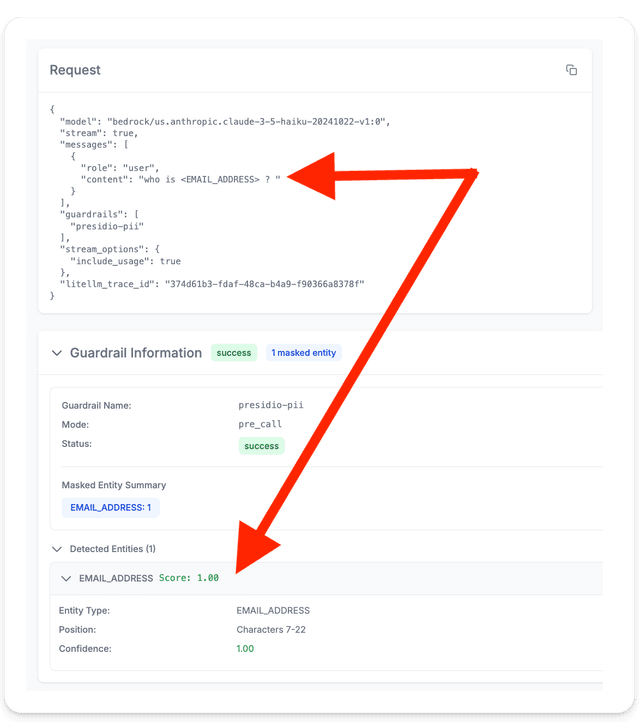
在 LiteLLM logs 頁面中,您可以看到此特定請求的 PII 內容已被遮罩。您也可以看到防護欄的詳細追蹤資訊。這可讓您監控被遮罩的實體類型、其對應的信心分數,以及防護欄執行時間。
Langfuse
將 Litellm 連接至 Langfuse 時,您可以在 Langfuse Trace 中看到防護欄資訊。
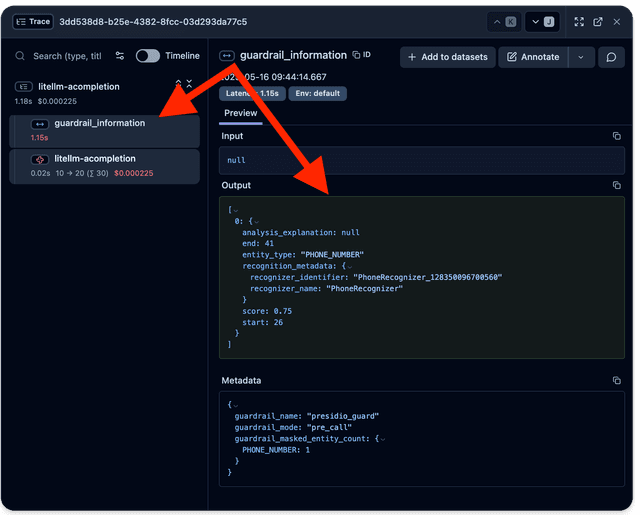
實體類型、偵測信心分數閾值與範圍設定
- 實體類型
- 您可以設定用於 PII 偵測的特定實體類型,並決定如何處理每個實體類型(遮罩或阻擋)。
- 偵測信心分數閾值
- 您也可以提供可選的信心分數閾值,讓偵測結果在達到該值時傳送到 anonymizer。
presidio_score_thresholds中沒有項目的實體會保留所有偵測結果(無最低分數)。
- 您也可以提供可選的信心分數閾值,讓偵測結果在達到該值時傳送到 anonymizer。
- 範圍
-
使用可選的
presidio_filter_scope來選擇檢查執行的位置:input:僅掃描 user → model 內容output:僅掃描 model → user 內容both(預設):雙向都掃描
那
output_parse_pii呢?
此旗標只會在 model call 之後將 token 還原回原始值;它不會對輸出執行 Presidio 偵測。當您希望 Presidio 在模型回應到達使用者前主動掃描並遮罩該回應時,請使用presidio_filter_scope: output(或both)。何時選擇 input 與 output:
input:保護上游提供者;在 PII 離開您的邊界前將其移除。output:攔截模型可能生成或回傳給使用者的 PII。both:雙向端到端保護。
-
在 config.yaml 中設定實體類型、偵測信心分數閾值與範圍
使用特定的實體類型設定來定義您的防護欄:
model_list:
  - model_name: gpt-5.6-luna
    litellm_params:
      model: openai/gpt-5.6-luna
      api_key: os.environ/OPENAI_API_KEY

guardrails:
  - guardrail_name: "presidio-mask-guard"
    litellm_params:
      guardrail: presidio
      mode: "pre_mcp_call"  # Use this mode for MCP requests
      presidio_filter_scope: both  # input | output | both, optional
      presidio_score_thresholds: # Optional
        ALL: 0.7            # Default confidence threshold applied to all entities
        CREDIT_CARD: 0.8    # Override for credit cards
        EMAIL_ADDRESS: 0.6  # Override for emails
      pii_entities_config:
        CREDIT_CARD: "MASK"  # Will mask credit card numbers
        EMAIL_ADDRESS: "MASK"  # Will mask email addresses

  - guardrail_name: "presidio-block-guard"
    litellm_params:
      guardrail: presidio
      mode: "pre_call"  # Use this mode for regular LLM requests
      presidio_filter_scope: both  # input | output | both, optional
      presidio_score_thresholds: # Optional
        CREDIT_CARD: 0.8  # Only keep credit card detections scoring 0.8+
      pii_entities_config:
        CREDIT_CARD: "BLOCK"  # Will block requests containing credit card numbers
信心閾值行為:
- 無
presidio_score_thresholds:保留所有偵測結果(不套用閾值) presidio_score_thresholds.ALL:將此信心閾值套用至每個偵測結果presidio_score_thresholds.<ENTITY>:僅套用於該實體- 若同時存在
ALL與實體覆寫,則ALL會全域套用,而該實體則以實體覆寫為優先
大型內容區塊分割
Presidio analyzer 部署通常會將 /analyze 的請求主體大小設為上限(例如 1 MB),而且 analyzer 延遲會隨負載大小增加。LiteLLM 會自動將任何單一內容區塊中,其序列化後的 /analyze 主體會超過 presidio_analyze_chunk_size_bytes(預設:500000 位元組,以 analyzer 接收的 JSON 跳脫形式計量)的內容分割為重疊區塊,使用有上限的 fan-out 分析這些區塊,並將偵測結果合併回原始文字,因此大型內容區塊會正確地被遮罩,而不是因 HTTP 413 而失敗。
guardrails:
  - guardrail_name: "presidio-pii"
    litellm_params:
      guardrail: presidio
      mode: "pre_call"
      presidio_analyze_chunk_size_bytes: 500000 # optional, default 500000
將其設定為低於您的 analyzer 部署的請求主體限制,並為其餘分析負載(entities 清單、即席 recognizers)保留餘裕。
支援的實體類型
LiteLLM 支援所有 Presidio 實體類型。請參閱完整的 presidio 實體類型清單此處。
支援的動作
對於每個實體類型,您可以指定以下其中一個動作:
MASK:將實體替換為預留位置(例如,<PERSON>)BLOCK:若偵測到此實體類型,則完全阻擋請求
具有實體類型設定的測試請求
- 遮罩 PII 實體
- 阻擋 PII 實體
使用遮罩設定時,實體會被預留位置取代:
curl http://localhost:4000/chat/completions \
  -H "Content-Type: application/json" \
  -H "Authorization: Bearer $LITELLM_API_KEY" \
  -d '{
    "model": "gpt-5.6-luna",
    "messages": [
      {"role": "user", "content": "My credit card is 4111-1111-1111-1111 and my email is test@example.com"}
    ],
    "guardrails": ["presidio-mask-guard"]
  }'
含遮罩後實體的範例回應:
{
  "id": "chatcmpl-123abc",
  "choices": [
    {
      "message": {
        "content": "I can see you provided a <CREDIT_CARD> and an <EMAIL_ADDRESS>. For security reasons, I recommend not sharing this sensitive information.",
        "role": "assistant"
      },
      "index": 0,
      "finish_reason": "stop"
    }
  ]
  // ... other response fields
}
使用阻擋設定時,包含已設定實體類型的請求將以例外狀況完全被阻擋:
curl http://localhost:4000/chat/completions \
  -H "Content-Type: application/json" \
  -H "Authorization: Bearer $LITELLM_API_KEY" \
  -d '{
    "model": "gpt-5.6-luna",
    "messages": [
      {"role": "user", "content": "My credit card is 4111-1111-1111-1111"}
    ],
    "guardrails": ["presidio-block-guard"]
  }'
執行此請求時,proxy 將引發 BlockedPiiEntityError 例外狀況。
{
  "error": {
    "message": "Blocked PII entity detected: CREDIT_CARD by Guardrail: presidio-block-guard."
  }
}
此例外狀況包含被阻擋的實體類型(此案例中的 CREDIT_CARD)以及導致阻擋的防護欄名稱。
進階
支援的模式
Presidio 防護欄支援以下模式:
pre_call:在 LLM 請求之前 執行,作用於 輸入post_call:在 LLM 請求之後 執行,作用於 輸入與輸出logging_only:在 LLM 請求之後 執行,只在記錄到 Langfuse 等之前套用 PII 遮罩。不作用於實際的 llm api 請求 / 回應pre_mcp_call:在 MCP 請求之前 執行,作用於 輸入。當您想要對 MCP 請求套用 PII 遮罩/阻擋時,使用此模式
MCP 使用範例
以下說明如何將 Presidio guardrails 與 MCP 搭配使用:
guardrails:
  - guardrail_name: "presidio-mcp-guard"
    litellm_params:
      guardrail: presidio
      mode: "pre_mcp_call"
      presidio_filter_scope: both  # input | output | both
      presidio_score_thresholds:
        CREDIT_CARD: 0.8  # Only keep credit card detections scoring 0.8+
        EMAIL_ADDRESS: 0.6  # Only keep email detections scoring 0.6+
      pii_entities_config:
        CREDIT_CARD: "MASK"  # Will mask credit card numbers
        EMAIL_ADDRESS: "BLOCK"  # Will block email addresses
        PHONE_NUMBER: "MASK"  # Will mask phone numbers
        MEDICAL_LICENSE: "BLOCK"  # Will block medical license numbers
      default_on: true
使用請求測試 MCP guardrail:
curl http://localhost:4000/chat/completions \
  -H "Content-Type: application/json" \
  -H "Authorization: Bearer $LITELLM_API_KEY" \
  -d '{
    "model": "gpt-5.6-luna",
    "messages": [
      {"role": "user", "content": "My credit card is 4111-1111-1111-1111 and my medical license is ABC123"}
    ],
    "guardrails": ["presidio-mcp-guard"]
  }'
請求將如下處理:
- 信用卡號碼會被遮罩(例如,取代為
<CREDIT_CARD>) - 如果偵測到醫療執照,該請求將被以
BlockedPiiEntityError阻擋
依每個請求設定 language
Presidio API 支援傳遞 language 參數。以下是如何為每個請求設定 language
- curl
- OpenAI Python SDK
curl http://localhost:4000/chat/completions \
  -H "Content-Type: application/json" \
  -H "Authorization: Bearer $LITELLM_API_KEY" \
  -d '{
    "model": "gpt-5.6-luna",
    "messages": [
      {"role": "user", "content": "is this credit card number 9283833 correct?"}
    ],
    "guardrails": ["presidio-pre-guard"],
    "guardrail_config": {"language": "es"}
  }'
import openai
client = openai.OpenAI(
    api_key="anything",
    base_url="http://0.0.0.0:4000"
)

# request sent to model set on litellm proxy, `litellm --model`
response = client.chat.completions.create(
    model="gpt-5.6-luna",
    messages = [
        {
            "role": "user",
            "content": "this is a test request, write a short poem"
        }
    ],
    extra_body={
        "metadata": {
            "guardrails": ["presidio-pre-guard"],
            "guardrail_config": {"language": "es"}
        }
    }
)
print(response)
在 config.yaml 中設定預設 language
您可以在 YAML 設定中使用 presidio_language 參數,為 PII 分析設定預設語言。除非透過每個請求的語言設定覆寫,否則此語言將用於所有請求。
model_list:
  - model_name: gpt-5.6-luna
    litellm_params:
      model: openai/gpt-5.6-luna
      api_key: os.environ/OPENAI_API_KEY

guardrails:
  - guardrail_name: "presidio-german"
    litellm_params:
      guardrail: presidio
      mode: "pre_call"
      presidio_language: "de"  # Default to German for PII analysis
      pii_entities_config:
        CREDIT_CARD: "MASK"
        EMAIL_ADDRESS: "MASK"
        PERSON: "MASK"

  - guardrail_name: "presidio-spanish"
    litellm_params:
      guardrail: presidio
      mode: "pre_call"
      presidio_language: "es"  # Default to Spanish for PII analysis
      pii_entities_config:
        CREDIT_CARD: "MASK"
        PHONE_NUMBER: "MASK"
支援的語言代碼
Presidio 支援多種語言進行 PII 偵測。常見的語言代碼包括:
en- 英文(預設)es- 西班牙文de- 德文
如需完整的支援語言清單,請參閱 Presidio 文件。
語言優先順序
語言設定遵循以下優先順序:
- 每個請求的語言(透過
guardrail_config.language)- 最高優先順序 - YAML 設定語言(透過
presidio_language)- 中等優先順序 - 預設語言(
en)- 最低優先順序
混合語言範例:
guardrails:
  - guardrail_name: "presidio-multilingual"
    litellm_params:
      guardrail: presidio
      mode: "pre_call"
      presidio_language: "de"  # Default to German
      pii_entities_config:
        CREDIT_CARD: "MASK"
        PERSON: "MASK"
curl http://localhost:4000/chat/completions \
  -H "Content-Type: application/json" \
  -H "Authorization: Bearer $LITELLM_API_KEY" \
  -d '{
    "model": "gpt-5.6-luna",
    "messages": [
      {"role": "user", "content": "Mi tarjeta de crédito es 4111-1111-1111-1111"}
    ],
    "guardrails": ["presidio-multilingual"],
    "guardrail_config": {"language": "es"}
  }'
在此範例中,儘管 guardrail 的預設語言設定為德文(es),請求仍會使用西班牙文(de)進行 PII 偵測。
輸出解析
LLM 回應有時可能包含已遮罩的 token。
對於 presidio 的 'replace' 操作,LiteLLM 可以檢查 LLM 回應,並將已遮罩的 token 以使用者提交的值取代。
請在 guardrails 區段下定義您的 guardrails
model_list:
  - model_name: gpt-5.6-luna
    litellm_params:
      model: openai/gpt-5.6-luna
      api_key: os.environ/OPENAI_API_KEY

guardrails:
  - guardrail_name: "presidio-pre-guard"
    litellm_params:
      guardrail: presidio  # supported values: "aporia", "bedrock", "lakera", "presidio"
      mode: "pre_call"
      output_parse_pii: True
**預期流程: **
-
使用者輸入:"hello world, my name is Jane Doe. My number is: 034453334"
-
LLM 輸入:"hello world, my name is [PERSON]. My number is: [PHONE_NUMBER]"
-
LLM 回應:"Hey [PERSON], nice to meet you!"
-
使用者回應:"Hey Jane Doe, nice to meet you!"
臨時識別器
透過將 json 檔案傳遞給 proxy,將臨時識別器傳送至 presidio /analyze
在您的 LiteLLM config.yaml 上定義臨時識別器
請在 guardrails 區段下定義您的 guardrails
model_list:
  - model_name: gpt-5.6-luna
    litellm_params:
      model: openai/gpt-5.6-luna
      api_key: os.environ/OPENAI_API_KEY

guardrails:
  - guardrail_name: "presidio-pre-guard"
    litellm_params:
      guardrail: presidio  # supported values: "aporia", "bedrock", "lakera", "presidio"
      mode: "pre_call"
      presidio_ad_hoc_recognizers: "./hooks/example_presidio_ad_hoc_recognizer.json"
設定以下 env vars
export PRESIDIO_ANALYZER_API_BASE="http://localhost:5002"
export PRESIDIO_ANONYMIZER_API_BASE="http://localhost:5001"
當您執行 proxy 時,可以看到這項功能運作:
litellm --config /path/to/config.yaml --debug
發出一個 chat completions 請求,範例:
{
  "model": "gpt-5.6-luna",
  "messages": [{"role": "user", "content": "John Smith AHV number is 756.3026.0705.92. Zip code: 1334023"}]
}
並搜尋任何以 Presidio PII Masking 開頭的記錄,範例:
Presidio PII Masking: Redacted pii message: <PERSON> AHV number is <AHV_NUMBER>. Zip code: <US_DRIVER_LICENSE>
僅記錄
只在記錄到 Langfuse 等之前套用 PII 遮罩。
不適用於實際的 llm api 請求 / 回應。
這目前僅適用於
/chat/completion請求- 以及 'success' 記錄
- 定義模式:在您的 LiteLLM config.yaml 上使用
logging_only
請在 guardrails 區段下定義您的 guardrails
model_list:
  - model_name: gpt-5.6-luna
    litellm_params:
      model: openai/gpt-5.6-luna
      api_key: os.environ/OPENAI_API_KEY

guardrails:
  - guardrail_name: "presidio-pre-guard"
    litellm_params:
      guardrail: presidio  # supported values: "aporia", "bedrock", "lakera", "presidio"
      mode: "logging_only"
設定以下 env vars
export PRESIDIO_ANALYZER_API_BASE="http://localhost:5002"
export PRESIDIO_ANONYMIZER_API_BASE="http://localhost:5001"
- 啟動 proxy
litellm --config /path/to/config.yaml
- 測試它!
curl -X POST 'http://0.0.0.0:4000/chat/completions' \
-H 'Content-Type: application/json' \
-H "Authorization: Bearer $LITELLM_API_KEY" \
-D '{
  "model": "gpt-5.6-luna",
  "messages": [
    {
      "role": "user",
      "content": "Hi, my name is Jane!"
    }
  ]
  }'
預期記錄的回應
Hi, my name is <PERSON>!

