護欄 - 快速入門
在 LiteLLM Proxy(AI 閘道)上設定提示注入偵測、PII 遮罩
若要查看 guardrails 與其餘閘道相較於 OWASP Top 10 for LLM Applications 2026 的表現,請閱讀 OWASP LLM Top 10 對照。
1. 在您的 LiteLLM config.yaml 定義護欄
將您的護欄設定在 guardrails 區段下
model_list:
  - model_name: gpt-5.6-luna
    litellm_params:
      model: openai/gpt-5.6-luna
      api_key: os.environ/OPENAI_API_KEY

guardrails:
  - guardrail_name: general-guard
    litellm_params:
      guardrail: cato_networks
      mode: [pre_call, post_call]
      api_key: os.environ/CATO_API_KEY
      api_base: os.environ/CATO_API_BASE
      default_on: true # Optional

  - guardrail_name: "aporia-pre-guard"
    litellm_params:
      guardrail: aporia  # supported values: "aporia", "lakera"
      mode: "during_call"
      api_key: os.environ/APORIA_API_KEY_1
      api_base: os.environ/APORIA_API_BASE_1
  - guardrail_name: "aporia-post-guard"
    litellm_params:
      guardrail: aporia  # supported values: "aporia", "lakera"
      mode: "post_call"
      api_key: os.environ/APORIA_API_KEY_2
      api_base: os.environ/APORIA_API_BASE_2
    guardrail_info: # Optional field, info is returned on GET /guardrails/list
      # you can enter any fields under info for consumers of your guardrail
      params:
        - name: "toxicity_score"
          type: "float"
          description: "Score between 0-1 indicating content toxicity level"
        - name: "pii_detection"
          type: "boolean"

# Example Presidio guardrail config with entity actions + confidence score thresholds
  - guardrail_name: "presidio-pii"
    litellm_params:
      guardrail: presidio
      mode: "pre_call"
      presidio_language: "en"
      pii_entities_config:
        CREDIT_CARD: "MASK"
        EMAIL_ADDRESS: "MASK"
        US_SSN: "MASK"
      presidio_score_thresholds:  # minimum confidence scores for keeping detections
        CREDIT_CARD: 0.8
        EMAIL_ADDRESS: 0.6

# Example Pillar Security config via Generic Guardrail API
  - guardrail_name: "pillar-security"
    litellm_params:
      guardrail: generic_guardrail_api
      mode: [pre_call, post_call]
      api_base: https://api.pillar.security/api/v1/integrations/litellm
      api_key: os.environ/PILLAR_API_KEY
      additional_provider_specific_params:
        plr_mask: true
        plr_evidence: true
        plr_scanners: true
對於通用護欄 API,您也可以設定靜態標頭(headers:每個請求都會送出的 key/value)以及動態標頭(extra_headers:要轉送的用戶端標頭名稱清單)。請參閱通用護欄 API - 靜態與動態標頭。
mode(事件掛鉤)的支援值
pre_call在 LLM 呼叫之前執行,針對輸入post_call在 LLM 呼叫之後執行,針對輸入與輸出during_call在 LLM 呼叫期間執行,針對輸入。與pre_call相同,但會與 LLM 呼叫平行執行。回應會在 guardrail 檢查完成之前不會傳回logging_only掃描已記錄的輸入與輸出,不會變更用戶端回應。支援情況取決於 guardrail 整合- 可搭配多種模式執行的支援值清單,例如
mode: [pre_call, post_call]
在護欄評估中略過系統訊息
您可以阻止 guardrails 掃描 role: system 內容,同時仍將完整的 messages 清單傳送給模型。
全域,在 litellm_settings 中:
litellm_settings:
  skip_system_message_in_guardrail: true
每個 guardrail,在該 guardrail 的 litellm_params 下:設定 skip_system_message_in_guardrail: true 或 false。若省略,會使用全域 litellm_settings 值;每個 guardrail 的 false 會強制包含系統訊息,即使全域旗標為 true。
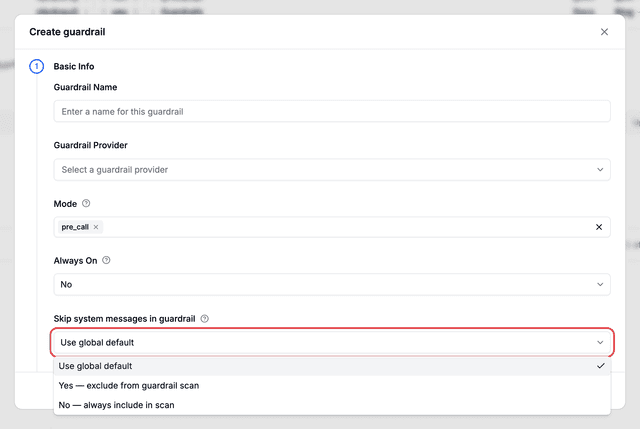
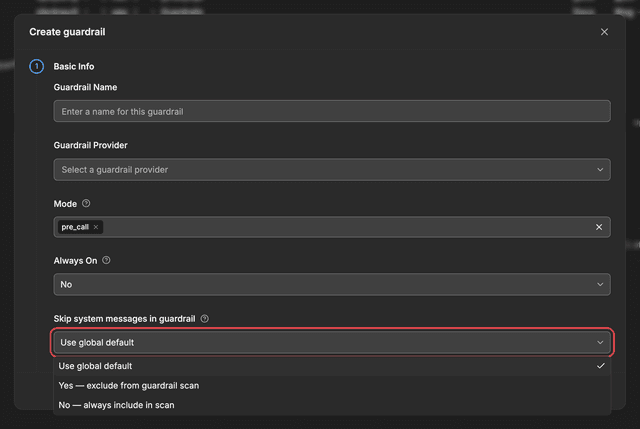
透過 LiteLLM UI,在 LiteLLM Admin Dashboard 中建立或編輯 guardrail 時,設定 Skip system messages in guardrail(在建立時的 Basic Info 下,或在編輯/guardrail 設定流程中):
| UI 選項 | 效果 |
|---|---|
| 使用全域預設值 | 使用您的 proxy 設定中的 litellm_settings.skip_system_message_in_guardrail |
| 是 — 從護欄掃描中排除 | 設定每個護欄的 skip_system_message_in_guardrail: true |
| 否 — 一律包含在掃描中 | 設定每個護欄的 skip_system_message_in_guardrail: false(覆寫全域略過設定) |
在 guardrail 評估中略過 tool 訊息
同樣的概念,針對 role: tool 內容:阻止 guardrails 掃描 tool call 結果,同時仍將完整的 messages 清單傳送給模型。
全域(在 litellm_settings 中):
litellm_settings:
  skip_tool_message_in_guardrail: true
每個 guardrail:在該 guardrail 的 litellm_params 下,設定 skip_tool_message_in_guardrail: true 或 false,其全域/每個 guardrail 的優先順序與上方的系統訊息旗標相同。
透過 LiteLLM UI:以相同方式設定 Skip tool messages in guardrail,就在上方所述的系統訊息下拉式選單正下方,並具有相同的三個選項(Use global default、Yes, exclude from guardrail scan、No, always include in scan)。
略過旗標適用於何處
這些適用於哪裡: 統一 guardrail 路徑(實作 apply_guardrail 並透過 LiteLLM 的訊息轉譯層執行的提供者),適用於 OpenAI Chat Completions(/v1/chat/completions)與 Anthropic Messages(/v1/messages)。範例包括 Presidio、Bedrock guardrails、litellm_content_filter、OpenAI Moderation、Generic Guardrail API,以及定義 apply_guardrail 的自訂程式碼 guardrails。Lakera v2 也支援這兩個旗標,儘管其是透過直接 hook 而非統一路徑執行;請參閱 Lakera AI。
這些不適用於哪裡: 其他僅透過原始請求上的直接 hook 執行的 guardrails(例如 Aporia、DynamoAI、Javelin、Lasso、Pangea、Model Armor、Azure Content Safety hooks、Guardrails AI、AIM、Cato Networks、tool permission、MCP security)。在其他路由也使用相同轉譯層之前,這些旗標也不適用於其他路由(例如 Responses API、embeddings、speech)。
負載平衡護欄
需要在多個帳戶或區域之間分配護欄請求嗎?請參閱護欄負載平衡,了解以下內容:
- 在多個 AWS Bedrock 帳戶之間進行負載平衡(對於速率限制管理很有用)
- 在護欄執行個體之間進行加權分配
- 多區域護欄部署
2. 啟動 LiteLLM Gateway
litellm --config config.yaml --detailed_debug
3. 測試請求
預期這會失敗,因為請求中的 ishaan@berri.ai 是 PII
curl -i http://localhost:4000/v1/chat/completions \
  -H "Content-Type: application/json" \
  -H "Authorization: Bearer sk-npnwjPQciVRok5yNZgKmFQ" \
  -d '{
    "model": "gpt-5.6-luna",
    "messages": [
      {"role": "user", "content": "hi my email is ishaan@berri.ai"}
    ],
    "guardrails": ["aporia-pre-guard", "aporia-post-guard"]
  }'
失敗時的預期回應
{
  "error": {
    "message": {
      "error": "Violated guardrail policy",
      "aporia_ai_response": {
        "action": "block",
        "revised_prompt": null,
        "revised_response": "Aporia detected and blocked PII",
        "explain_log": null
      }
    },
    "type": "None",
    "param": "None",
    "code": "400"
  }
}
curl -i http://localhost:4000/v1/chat/completions \
  -H "Content-Type: application/json" \
  -H "Authorization: Bearer sk-npnwjPQciVRok5yNZgKmFQ" \
  -d '{
    "model": "gpt-5.6-luna",
    "messages": [
      {"role": "user", "content": "hi what is the weather"}
    ],
    "guardrails": ["aporia-pre-guard", "aporia-post-guard"]
  }'
預設開啟的護欄
在您的護欄設定中設定 default_on: true,即可在每個請求上執行護欄。如果您希望在每個請求上執行護欄,而不需要使用者指定,這會很有用。
注意: 即使使用者指定不同的護欄或空的護欄陣列,這些也會執行。
guardrails:
  - guardrail_name: "aporia-pre-guard"
    litellm_params:
      guardrail: aporia
      mode: "pre_call"
      default_on: true
測試請求
在此請求中,護欄 aporia-pre-guard 會在每個請求上執行,因為已設定 default_on: true。
curl -i http://localhost:4000/v1/chat/completions \
  -H "Content-Type: application/json" \
  -H "Authorization: Bearer sk-npnwjPQciVRok5yNZgKmFQ" \
  -d '{
    "model": "gpt-5.6-luna",
    "messages": [
      {"role": "user", "content": "hi my email is ishaan@berri.ai"}
    ]
  }'
預期回應
您的回應標頭將包含套用護欄的 x-litellm-applied-guardrails
x-litellm-applied-guardrails: aporia-pre-guard
護欄政策
需要更多控制嗎?使用護欄政策來:
- 將護欄分組為可重複使用的政策
- 為特定團隊、金鑰或模型啟用/停用護欄
- 從現有政策繼承並覆寫特定護欄
在用戶端使用護欄
自行測試 (OSS)
將 guardrails 傳遞到您的請求主體以進行測試
curl -i http://localhost:4000/v1/chat/completions \
  -H "Content-Type: application/json" \
  -H "Authorization: Bearer sk-npnwjPQciVRok5yNZgKmFQ" \
  -d '{
    "model": "gpt-5.6-luna",
    "messages": [
      {"role": "user", "content": "hi my email is ishaan@berri.ai"}
    ],
    "guardrails": ["aporia-pre-guard", "aporia-post-guard"]
  }'
在回應中檢查 guardrail 結果 (OSS)
在請求本文中設定 include_guardrail_response: true,即可在回應中取得 guardrail 執行記錄,作為頂層 guardrail_information 清單。若不設定,回應本文將維持不變,因此既有用戶端不受影響。此旗標會在請求送達提供者之前被移除
curl -i http://localhost:4000/v1/chat/completions \
  -H "Content-Type: application/json" \
  -H "Authorization: Bearer $LITELLM_API_KEY" \
  -d '{
    "model": "gpt-5.6-luna",
    "messages": [{"role": "user", "content": "Reply OK"}],
    "guardrails": ["aporia-pre-guard"],
    "include_guardrail_response": true
  }'
預期回應(省略其他欄位)
{
  "id": "chatcmpl-EQjb0XEZzNUUGhbbYLfB2FApCuPJc",
  "choices": [{"message": {"role": "assistant", "content": "OK"}}],
  "guardrail_information": [
    {
      "guardrail_name": "aporia-pre-guard",
      "guardrail_provider": "aporia",
      "guardrail_mode": "pre_call",
      "guardrail_status": "success",
      "guardrail_response": [],
      "start_time": 1790040506.278482,
      "end_time": 1790040506.278695,
      "duration": 0.000214,
      "masked_entity_count": {}
    }
  ]
}
每個項目的結構與 StandardLoggingPayload 中的 guardrail_information 相同。當此請求沒有 guardrail 執行時,guardrail_information 會是 []。只有精確的 JSON 布林值 true 才會啟用它;"true" 或 1 會被視為關閉。串流回應不會帶有此欄位。keyword、snippet、match 或 regex 值中出現的任何 guardrail_response 都會以 "[REDACTED]" 傳回,因此遮罩內容絕不會回傳給呼叫端
向您的使用者公開 (Enterprise)
依照這個簡單流程來實作並調整護欄:
1. 查看可用的護欄
首先,確認有哪些護欄可用及其參數:
呼叫 /guardrails/list 以查看可用的護欄及護欄資訊(支援的參數、描述等)
curl -X GET 'http://0.0.0.0:4000/guardrails/list'
預期回應
{
    "guardrails": [
        {
        "guardrail_name": "aporia-post-guard",
        "guardrail_info": {
            "params": [
            {
                "name": "toxicity_score",
                "type": "float",
                "description": "Score between 0-1 indicating content toxicity level"
            },
            {
                "name": "pii_detection",
                "type": "boolean"
            }
            ]
        }
        }
    ]
}
此設定將回傳上方的 /guardrails/list 回應。guardrail_info 欄位為選填,您可以在 info 下方為護欄的使用者新增任何欄位
- guardrail_name: "aporia-post-guard"
  litellm_params:
      guardrail: aporia  # supported values: "aporia", "lakera"
      mode: "post_call"
      api_key: os.environ/APORIA_API_KEY_2
      api_base: os.environ/APORIA_API_BASE_2
  guardrail_info: # Optional field, info is returned on GET /guardrails/list
      # you can enter any fields under info for consumers of your guardrail
      params:
        - name: "toxicity_score"
          type: "float"
          description: "Score between 0-1 indicating content toxicity level"
        - name: "pii_detection"
          type: "boolean"
2. 套用護欄
將選定的護欄新增至您的聊天完成請求:
curl -i http://localhost:4000/v1/chat/completions \
  -H "Content-Type: application/json" \
  -d '{
    "model": "gpt-5.6-luna",
    "messages": [{"role": "user", "content": "your message"}],
    "guardrails": ["aporia-pre-guard", "aporia-post-guard"]
  }'
3. 使用 Mock LLM completions 測試
傳送 mock_response,即可在不呼叫 LLM 的情況下測試護欄。更多關於 mock_response 的資訊請見此處
curl -i http://localhost:4000/v1/chat/completions \
  -H "Content-Type: application/json" \
  -H "Authorization: Bearer sk-npnwjPQciVRok5yNZgKmFQ" \
  -d '{
    "model": "gpt-5.6-luna",
    "messages": [
      {"role": "user", "content": "hi my email is ishaan@berri.ai"}
    ],
    "mock_response": "This is a mock response",
    "guardrails": ["aporia-pre-guard", "aporia-post-guard"]
  }'
4. ✨ 將動態參數傳遞給護欄
可用來將額外參數傳遞給護欄 API 呼叫,例如成功閾值之類的項目。請參閱 guardrails 規格以了解更多細節
設定 guardrails={"aporia-pre-guard": {"extra_body": {"success_threshold": 0.9}}} 以傳遞額外參數給護欄
在此範例中,success_threshold=0.9 會被傳遞到 aporia-pre-guard 護欄請求主體
import openai
client = openai.OpenAI(
    api_key="anything",
    base_url="http://0.0.0.0:4000"
)

response = client.chat.completions.create(
    model="gpt-5.6-luna",
    messages = [
        {
            "role": "user",
            "content": "this is a test request, write a short poem"
        }
    ],
    extra_body={
      "guardrails": {
        "aporia-pre-guard": {
          "extra_body": {
            "success_threshold": 0.9
          }
        }
      }
    }

)

print(response)
curl --location 'http://0.0.0.0:4000/chat/completions' \
    --header 'Content-Type: application/json' \
    --data '{
    "model": "gpt-5.6-luna",
    "messages": [
        {
        "role": "user",
        "content": "what llm are you"
        }
    ],
    "guardrails": {
      "aporia-pre-guard": {
        "extra_body": {
          "success_threshold": 0.9
        }
      }
    }
}'
Proxy 管理控制項
監控護欄
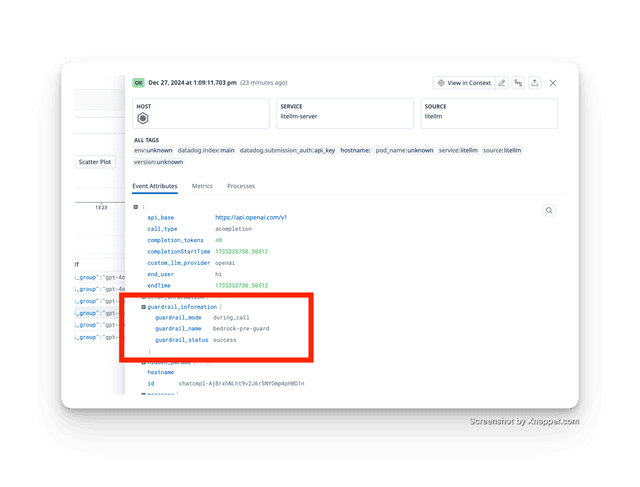
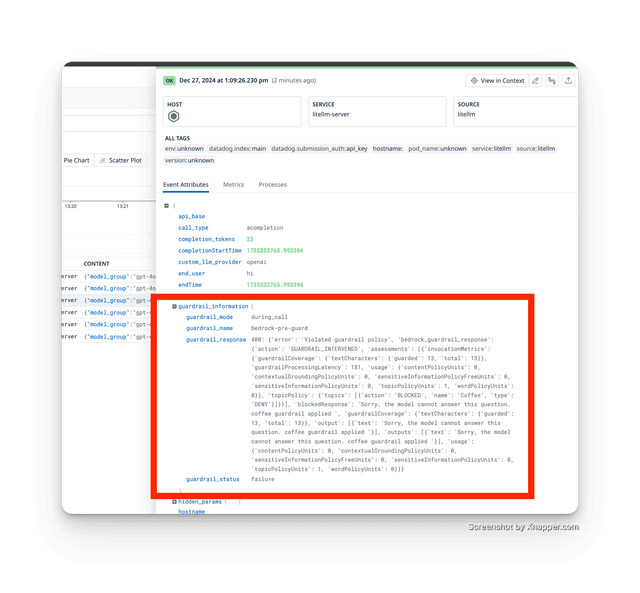
監控哪些護欄已執行,以及它們是通過還是失敗。例如,護欄失控並使我們不打算失敗的請求失敗
:::
設定
- 將 LiteLLM 連接到支援的記錄提供者
- 使用
guardrails參數發出請求 - 在您的記錄提供者中檢查護欄追蹤
已追蹤的護欄成功
已追蹤的護欄失敗
✨ 依 API 金鑰控制護欄
可用來依 API Key 控制執行哪些護欄。在本教學中,我們只希望以下護欄為 1 個 API Key 執行
guardrails: ["aporia-pre-guard", "aporia-post-guard"]
步驟 1 使用護欄設定建立金鑰
curl -X POST 'http://0.0.0.0:4000/key/generate' \
    -H "Authorization: Bearer $LITELLM_API_KEY" \
    -H 'Content-Type: application/json' \
    -d '{
            "guardrails": ["aporia-pre-guard", "aporia-post-guard"]
    }'
curl --location 'http://0.0.0.0:4000/key/update' \
    --header "Authorization: Bearer $LITELLM_API_KEY" \
    --header 'Content-Type: application/json' \
    --data '{
        "key": "sk-jNm1Zar7XfNdZXp49Z1kSQ",
        "guardrails": ["aporia-pre-guard", "aporia-post-guard"]
}'
步驟 2 使用新金鑰測試
curl --location 'http://0.0.0.0:4000/chat/completions' \
    --header 'Authorization: Bearer sk-jNm1Zar7XfNdZXp49Z1kSQ' \
    --header 'Content-Type: application/json' \
    --data '{
    "model": "gpt-5.6-luna",
    "messages": [
        {
        "role": "user",
        "content": "my email is ishaan@berri.ai"
        }
    ]
}'
✨ 以標籤為基礎的護欄模式
根據 user-agent 標頭執行 guardrails。這對於在 OpenWebUI 上執行預先請求檢查,但在 Claude CLI 中僅在記錄中遮蔽時很有用。
default 和 tag 值都可以是單一 mode 字串或 mode 清單。
model_list:
  - model_name: gpt-5.6-luna
    litellm_params:
      model: gpt-5.6-luna
      api_key: os.environ/OPENAI_API_KEY

guardrails:
  - guardrail_name: "guardrails_ai-guard"
    litellm_params:
      guardrail: guardrails_ai
      guard_name: "pii_detect" # 👈 Guardrail AI guard name
      mode:
        tags:
            "User-Agent: claude-cli": "logging_only"                 # Claude CLI - only mask in logs
        default: "pre_call"               # Default mode when no tags match
      api_base: os.environ/GUARDRAILS_AI_API_BASE # 👈 Guardrails AI API Base. Defaults to "http://0.0.0.0:8000"
      default_on: true # run on every request
Per guardrailmodel_list:
  - model_name: gpt-5.6-luna
    litellm_params:
      model: gpt-5.6-luna
      api_key: os.environ/OPENAI_API_KEY

guardrails:
  - guardrail_name: "guardrails_ai-guard"
    litellm_params:
      guardrail: guardrails_ai
      guard_name: "pii_detect"
      mode:
        tags:
            "User-Agent: claude-cli": "logging_only"
        default: ["pre_call", "post_call"]  # Run on both pre and post call when no tags match
      api_base: os.environ/GUARDRAILS_AI_API_BASE
      default_on: true
model_list:
  - model_name: gpt-5.6-luna
    litellm_params:
      model: gpt-5.6-luna
      api_key: os.environ/OPENAI_API_KEY

guardrails:
  - guardrail_name: "guardrails_ai-guard"
    litellm_params:
      guardrail: guardrails_ai
      guard_name: "pii_detect"
      mode:
        tags:
            "User-Agent: claude-cli": ["pre_call", "post_call"]  # Run both pre and post call for claude-cli
        default: "logging_only"  # Default to logging only when no tags match
      api_base: os.environ/GUARDRAILS_AI_API_BASE
      default_on: true
✨ 模型層級 Guardrails
當您同時有內部部署與託管模型,且只想防止將 PII 傳送到託管模型時,這非常適合。
model_list:
  - model_name: claude-sonnet-5
    litellm_params:
      model: anthropic/claude-sonnet-5
      api_key: os.environ/ANTHROPIC_API_KEY
      api_base: https://api.anthropic.com/v1
      guardrails: ["azure-text-moderation"]
  - model_name: openai-gpt-4o
    litellm_params:
      model: openai/gpt-5.6-terra

guardrails:
  - guardrail_name: "presidio-pii"
    litellm_params:
      guardrail: presidio  # supported values: "aporia", "bedrock", "lakera", "presidio"
      mode: "pre_call"
      presidio_language: "en"  # optional: set default language for PII analysis
      pii_entities_config:
        PERSON: "BLOCK"  # Will mask credit card numbers
  - guardrail_name: azure-text-moderation
    litellm_params:
      guardrail: azure/text_moderations
      mode: "post_call"
      api_key: os.environ/AZURE_GUARDRAIL_API_KEY
      api_base: os.environ/AZURE_GUARDRAIL_API_BASE
✨ 停用團隊開啟/關閉 guardrails 的能力
1. 停用團隊修改 guardrails 的能力
curl -X POST 'http://0.0.0.0:4000/team/update' \
-H "Authorization: Bearer $LITELLM_API_KEY" \
-H 'Content-Type: application/json' \
-d '{
    "team_id": "4198d93c-d375-4c83-8d5a-71e7c5473e50",
    "metadata": {"guardrails": {"modify_guardrails": false}}
}'
2. 嘗試為請求停用 guardrails
curl --location 'http://0.0.0.0:4000/chat/completions' \
--header 'Content-Type: application/json' \
--header 'Authorization: Bearer $LITELLM_VIRTUAL_KEY' \
--data '{
"model": "gpt-5.6-luna",
    "messages": [
      {
        "role": "user",
        "content": "Think of 10 random colors."
      }
    ],
    "metadata": {"guardrails": {"hide_secrets": false}}
}'
3. 取得 403 錯誤
{
    "error": {
        "message": {
            "error": "Your team does not have permission to modify guardrails."
        },
        "type": "auth_error",
        "param": "None",
        "code": 403
    }
}
預期在您的 callback 的伺服器記錄中不會看到 +1 412-612-9992。
由於 api key=sk-jNm1Zar7XfNdZXp49Z1kSQ 具有 pii_masking,因此 "permissions": {"pii_masking": true} guardrail 已在此請求上執行。
規格
guardrails YAML 上的設定
guardrails:
  - guardrail_name: string     # Required: Name of the guardrail
    litellm_params:            # Required: Configuration parameters
      guardrail: string        # Required: One of "aporia", "bedrock", "guardrails_ai", "lakera", "presidio", "hide-secrets"
      mode: Union[string, List[string], Mode]             # Required: One or more of "pre_call", "post_call", "during_call", "logging_only"
      api_key: string          # Required: API key for the guardrail service
      api_base: string         # Optional: Base URL for the guardrail service
      default_on: boolean      # Optional: Default False. When set to True, will run on every request, does not need client to specify guardrail in request
    guardrail_info:            # Optional[Dict]: Additional information about the guardrail
Mode 規格
default 和 tag 值都接受單一字串或字串清單。
from litellm.types.guardrails import Mode

# Single default mode
mode = Mode(
    tags={"User-Agent: claude-cli": "logging_only"},
    default="logging_only"
)

# Multiple default modes
mode = Mode(
    tags={"User-Agent: claude-cli": "logging_only"},
    default=["pre_call", "post_call"]
)

# Multiple modes on a tag value
mode = Mode(
    tags={"User-Agent: claude-cli": ["pre_call", "post_call"]},
    default="logging_only"
)
guardrails 請求參數
guardrails 參數可以傳遞給任何 LiteLLM Proxy 端點(/chat/completions、/completions、/embeddings)。
格式選項
- 簡單清單格式:
{"guardrails": [
    "aporia-pre-guard",
    "aporia-post-guard"
]}
- 進階字典格式:
在此格式中,字典鍵是您要執行的 guardrail_name
{"guardrails": {
    "aporia-pre-guard": {
        "extra_body": {
            "success_threshold": 0.9,
            "other_param": "value"
        }
    }
}}
型別定義
guardrails: Union[
    List[str],                              # Simple list of guardrail names
    Dict[str, DynamicGuardrailParams]       # Advanced configuration
]

class DynamicGuardrailParams:
    extra_body: Dict[str, Any]              # Additional parameters for the guardrail

