團隊自帶 Guardrails
以團隊為基礎的 guardrails 讓 開發人員 可透過 API 為其團隊註冊 guardrail;接著由 管理員 在 LiteLLM UI 中審核並核准或拒絕。只有 Generic Guardrail API guardrails 可以用這種方式註冊。
概覽
- 開發人員流程: 使用 team-scoped API key 以
POST /guardrails/register搭配您的 guardrail 設定。提交內容會以pending_review狀態儲存。 - 管理員流程: 在 proxy UI 中,開啟 Guardrails → Team Guardrails,檢視待處理提交,並按 Approve 或 Reject。已核准的 guardrails 會生效並載入到記憶體中。
開發人員流程:註冊 guardrail
先決條件
- 一組 team-scoped API key(該金鑰必須與某個團隊關聯)。未關聯團隊的金鑰無法註冊 guardrails。
- 您的 guardrail 必須遵循 Generic Guardrail API 合約與設定。
請求
端點: POST /guardrails/register
標頭: Authorization: Bearer <team_scoped_api_key>
本文: 符合 Generic Guardrail API 設定的 JSON。
| 欄位 | 型別 | 必填 | 說明 |
|---|---|---|---|
guardrail_name | string | 是 | guardrail 的唯一名稱。 |
litellm_params | object | 是 | 必須包含 guardrail: "generic_guardrail_api"、mode(例如 pre_call、post_call),以及 api_base。請參閱 Generic Guardrail API。 |
guardrail_info | object | 否 | 選用中繼資料(例如 description)。 |
litellm_params 的需求
guardrail必須完全等於"generic_guardrail_api"。api_base為必填(您的 guardrail API base URL)。mode為必填(例如pre_call、post_call、during_call)。
範例
curl -X POST "http://localhost:4000/guardrails/register" \
  -H "Authorization: Bearer <your_team_scoped_api_key>" \
  -H "Content-Type: application/json" \
  -d '{
    "guardrail_name": "my-team-guard",
    "litellm_params": {
      "guardrail": "generic_guardrail_api",
      "mode": "pre_call",
      "api_base": "https://your-guardrail-api.com",
      "api_key": "optional-api-key",
      "unreachable_fallback": "fail_closed",
      "forward_api_key": true
    },
    "guardrail_info": {
      "description": "Team content moderation guardrail"
    }
  }'
回應範例
{
  "guardrail_id": "123e4567-e89b-12d3-a456-426614174000",
  "guardrail_name": "my-team-guard",
  "status": "pending_review",
  "submitted_at": "2025-02-28T12:00:00.000Z"
}
錯誤
- 400 – 本文缺失或無效(例如
guardrail不是generic_guardrail_api、缺少api_base或mode),或已存在具有相同guardrail_name的 guardrail。 - 400 – "Registration requires an API key associated with a team. Use a team-scoped key." → 請使用已關聯團隊的 API key。
- 500 – 伺服器/資料庫錯誤。
成功註冊後,guardrail 會維持在 pending_review,直到管理員核准或拒絕。
管理員流程:在 UI 中核准或拒絕
管理員會在 LiteLLM proxy UI 中審核並核准或拒絕團隊 guardrail 提交。
1. 開啟 Guardrails 頁面
在 proxy 儀表板中,前往 Guardrails(側邊欄或導覽)。
2. 開啟 Team Guardrails 分頁
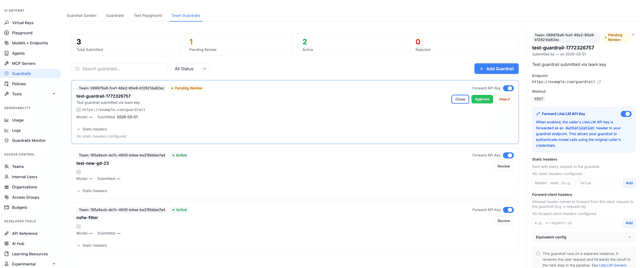
切換到 Team Guardrails 分頁。此分頁會列出所有團隊提交的 guardrails 及其狀態。
3. 審核提交內容
表格顯示:
- Name、Team、Endpoint(api_base)、Status(Pending Review / Active / Rejected)、Submitted 日期、Submitted by(user/email)以及其他設定細節。
摘要卡片會顯示 Total、Pending Review、Active 與 Rejected 的數量。
4. 核准或拒絕
- Pending Review: 使用 Approve 來啟用 guardrail。proxy 會將其狀態設為
active,並在記憶體中初始化,使其可用於請求。 - 使用 Reject 拒絕提交(狀態會變成
rejected)。
核准會觸發與透過設定或管理員 guardrail API 新增 guardrail 相同的初始化;拒絕只會更新狀態,並不會載入 guardrail。
等效 API(僅限管理員)
管理員也可以使用 REST API:
- 列出提交:
GET /guardrails/submissions(選用查詢:status、team_id、search) - 取得單一項目:
GET /guardrails/submissions/{guardrail_id} - 核准:
POST /guardrails/submissions/{guardrail_id}/approve - 拒絕:
POST /guardrails/submissions/{guardrail_id}/reject
這些端點需要 admin(例如 PROXY_ADMIN)驗證。
摘要
| 角色 | 動作 |
|---|---|
| 開發人員 | 使用團隊範圍的金鑰與 POST /guardrails/register 設定呼叫 generic_guardrail_api。提交會進入 pending_review。 |
| 管理員 | 在 UI 中開啟 Guardrails → Team Guardrails(或使用 submissions API),然後對每個提交按 Approve 或 Reject。已核准的 guardrails 會生效。 |
只有具有 litellm_params.guardrail: "generic_guardrail_api" 的 guardrails 才可接受註冊。完整合約與設定選項請參閱 Generic Guardrail API。

