提示壓縮(Headroom)
Headroom 是 LLM 應用程式的上下文最佳化層。它會在工具輸出、資料庫結果、檔案讀取與 RAG 負載到達模型之前先進行壓縮,因此您能以極少的 token 取得相同的答案。
這可在 /v1/chat/completions 與 /v1/messages(Anthropic 格式)上使用。
示範
架構
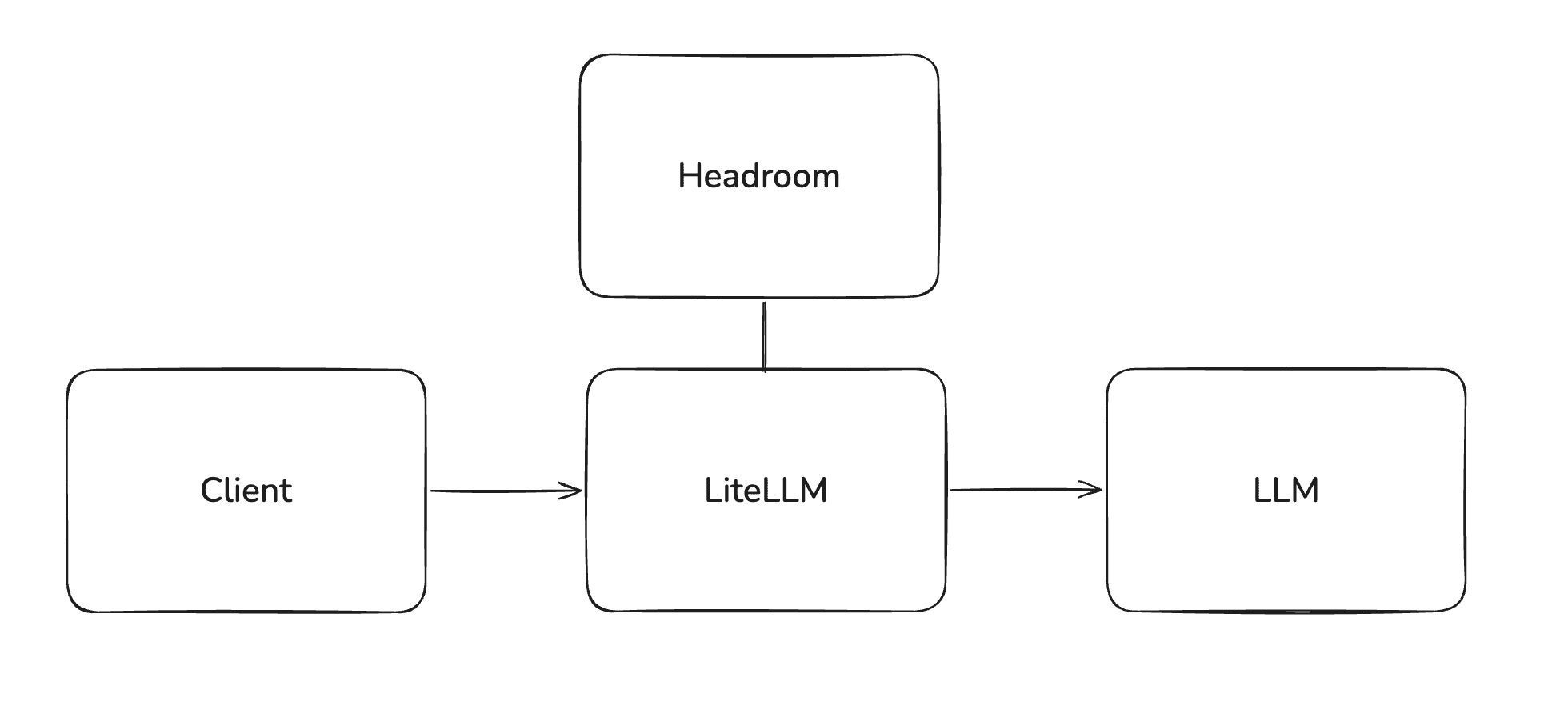
Headroom 以 sidecar 服務的方式與 LiteLLM 並行執行。用戶端流量會照常送到 LiteLLM 閘道;LiteLLM 會在 pre_call 步驟中以 in-process 方式呼叫 Headroom 來重寫訊息,接著將壓縮後的負載轉送給上游 LLM。用戶端與上游 LLM 提供者不會直接與 Headroom 互相通訊。
需求
LiteLLM v1.92.x 或更新版本,以及可連線的 Headroom proxy。請參閱下方的 部署 Headroom 以取得單一檔案的 Dockerfile。
若要在穩定版發布前進行測試,請使用 v1.92.0-dev.1 開發版。
快速開始
1. 在您的設定中定義防護欄
model_list:
  - model_name: claude-sonnet-5
    litellm_params:
      model: anthropic/claude-sonnet-5
      api_key: os.environ/ANTHROPIC_API_KEY

guardrails:
  - guardrail_name: headroom-compression
    litellm_params:
      guardrail: headroom
      mode: pre_call
      api_base: https://your-headroom-service
#     api_key: os.environ/HEADROOM_API_KEY  [OPTIONAL]
#     default_on: true [OPTIONAL]
只有 pre_call 有意義;guardrail 對回應不執行任何操作。
如果您希望透過 proxy 的每個請求都經過壓縮,請加入 default_on: true。若您希望壓縮採用 opt-in,請保持關閉(在逐步推廣給部分使用者或工作負載時建議如此)。
2. 啟動 LiteLLM 閘道
litellm --config config.yaml
3. 發送請求
- OpenAI 格式
- Anthropic 格式
curl -i http://0.0.0.0:4000/v1/chat/completions \
  -H "Content-Type: application/json" \
  -d '{
    "model": "claude-sonnet-5",
    "messages": [
      {"role": "system", "content": "You are a helpful assistant."},
      {"role": "user", "content": "Summarize the prior conversation..."}
    ],
    "guardrails": ["headroom-compression"]
  }'
curl -i http://0.0.0.0:4000/v1/messages \
  -H "Content-Type: application/json" \
  -H "anthropic-version: 2023-06-01" \
  -d '{
    "model": "claude-sonnet-5",
    "max_tokens": 1024,
    "messages": [
      {"role": "user", "content": "Summarize the prior conversation..."}
    ],
    "litellm_metadata": {"guardrails": ["headroom-compression"]}
  }'
訊息會以 JSON 主體 {"messages": [...], "model": "<model>"} 傳送至位於 {api_base}/v1/compress 的 headroom 服務。回傳的 messages 清單會在 LLM 呼叫前取代請求負載。
依金鑰啟用壓縮
當未設定 default_on 時,壓縮只會對 opt-in 的請求執行。典型的管理員模式是將 guardrail 附加到虛擬金鑰,讓使用該金鑰的開發者可自動獲得壓縮,而不需要變更其用戶端程式碼。
建立一個已附加 Headroom 的金鑰:
curl -X POST 'http://0.0.0.0:4000/key/generate' \
  -H "Authorization: Bearer $LITELLM_API_KEY" \
  -H 'Content-Type: application/json' \
  -d '{
        "guardrails": ["headroom-compression"]
      }'
使用回傳金鑰所提出的每個請求,都會在到達 LLM 之前先經過 headroom-compression。若要附加到既有金鑰,請使用 /key/update 與相同的 guardrails 欄位。
依請求啟用壓縮
用戶端可在單次呼叫中 opt-in,而不需要管理員介入。
- OpenAI 格式
- Anthropic 格式
在請求主體中傳入 guardrails 陣列:
curl -i http://0.0.0.0:4000/v1/chat/completions \
  -H "Content-Type: application/json" \
  -H "Authorization: Bearer sk-..." \
  -d '{
    "model": "claude-sonnet-5",
    "messages": [...],
    "guardrails": ["headroom-compression"]
  }'
/v1/messages 沒有頂層 guardrails 欄位,因此請透過 litellm_metadata 進行 opt-in:
curl -i http://0.0.0.0:4000/v1/messages \
  -H "Content-Type: application/json" \
  -H "Authorization: Bearer sk-..." \
  -d '{
    "model": "claude-sonnet-5",
    "max_tokens": 1024,
    "messages": [...],
    "litellm_metadata": {"guardrails": ["headroom-compression"]}
  }'
回應會包含 x-litellm-applied-guardrails: headroom-compression 標頭,讓呼叫端可確認壓縮確實有執行。
x-headroom-bypass 僅會關閉壓縮
LiteLLM 會在 guardrail 本身的程式碼看到任何標頭之前,先決定 headroom-compression 是否會在特定請求上執行:該決定來自 default_on 中的 config.yaml、guardrail 是否附加到呼叫端的金鑰或團隊,或前面所示的每請求 guardrails / litellm_metadata.guardrails opt-in。只有在該決定回傳「執行它」之後,guardrail 才會檢查 x-headroom-bypass,而它唯一視為繞過的值是字面字串 true,並以不區分大小寫方式比對。任何其他值,包括 false、空白標頭,或完全沒有標頭,都不會產生影響,且會讓 guardrail 如既定排程般繼續執行。
具體而言:在 default_on: false 且呼叫端的金鑰未附加 headroom-compression 的情況下,送出 x-headroom-bypass: false 不會為該請求開啟壓縮,而且也沒有任何每請求標頭可以做到這件事。每請求跳過壓縮是可行的(x-headroom-bypass: true,如上方 Claude Code 章節所述);若要在沒有管理員介入的情況下啟用它,則需要 guardrails / litellm_metadata.guardrails 欄位,而不是標頭。
自動路由器後方的壓縮
auto router 所服務的請求會進行兩次呼叫,一次用於分類請求,另一次則是送往它所路由到的模型。預設情況下,兩者都會看到相同的壓縮文字。從 v1.101.0 起,router 可以為每個 hop 指定一個 compression guardrail,或將任一者設為 none,並搭配 auto_router_routing_compression 與 auto_router_model_compression。設定任一欄位都會讓 router 負責其自身請求的壓縮,並停用上述對這些請求的 guardrail,無論這些 guardrail 是附加到金鑰、團隊,還是請求主體。請參閱 壓縮。
Claude Code 使用方式
這是最常見的推廣方式:平台管理員希望為一個透過 Claude Code 處理大量流量的團隊降低輸入 token 成本,而不需要每位開發者都變更其設定。
流程分為三個步驟。
管理員:在 config.yaml 中註冊 Headroom。 如 Quick Start 所示定義 headroom-compression。關閉 default_on,如此只有 opt-in 的金鑰才會獲得壓縮。
管理員:發行一個附加 Headroom 的每位開發者金鑰。 每位開發者都會取得一個綁定了 guardrail 的虛擬金鑰。
curl -X POST 'http://0.0.0.0:4000/key/generate' \
  -H "Authorization: Bearer $LITELLM_API_KEY" \
  -H 'Content-Type: application/json' \
  -d '{
        "key_alias": "claude-code-alice",
        "guardrails": ["headroom-compression"],
        "models": ["claude-sonnet-5"],
        "metadata": {"team": "claude-code-rollout"}
      }'
開發者:將 Claude Code 指向 proxy。 不需要變更程式碼;Claude Code 會從環境中讀取 ANTHROPIC_BASE_URL 與 ANTHROPIC_AUTH_TOKEN。
export ANTHROPIC_BASE_URL="https://your-litellm-proxy.example.com"
export ANTHROPIC_AUTH_TOKEN="sk-the-key-the-admin-issued"

claude
從這裡開始,Claude Code 發出的每個 /v1/messages 請求都會在送往 Anthropic 之前先由 Headroom 壓縮。開發者除了其支出記錄上的 token 使用量降低之外,不會看到任何行為變化。若要驗證壓縮確實有執行,管理員可檢查對應支出記錄列上的 guardrail_information,或查看回應標頭中的 x-litellm-applied-guardrails: headroom-compression。
如果開發者想針對單一請求略過壓縮(例如比較未壓縮的基準),可在該次呼叫上設定 x-headroom-bypass: true 標頭。
驗證 Headroom 已執行
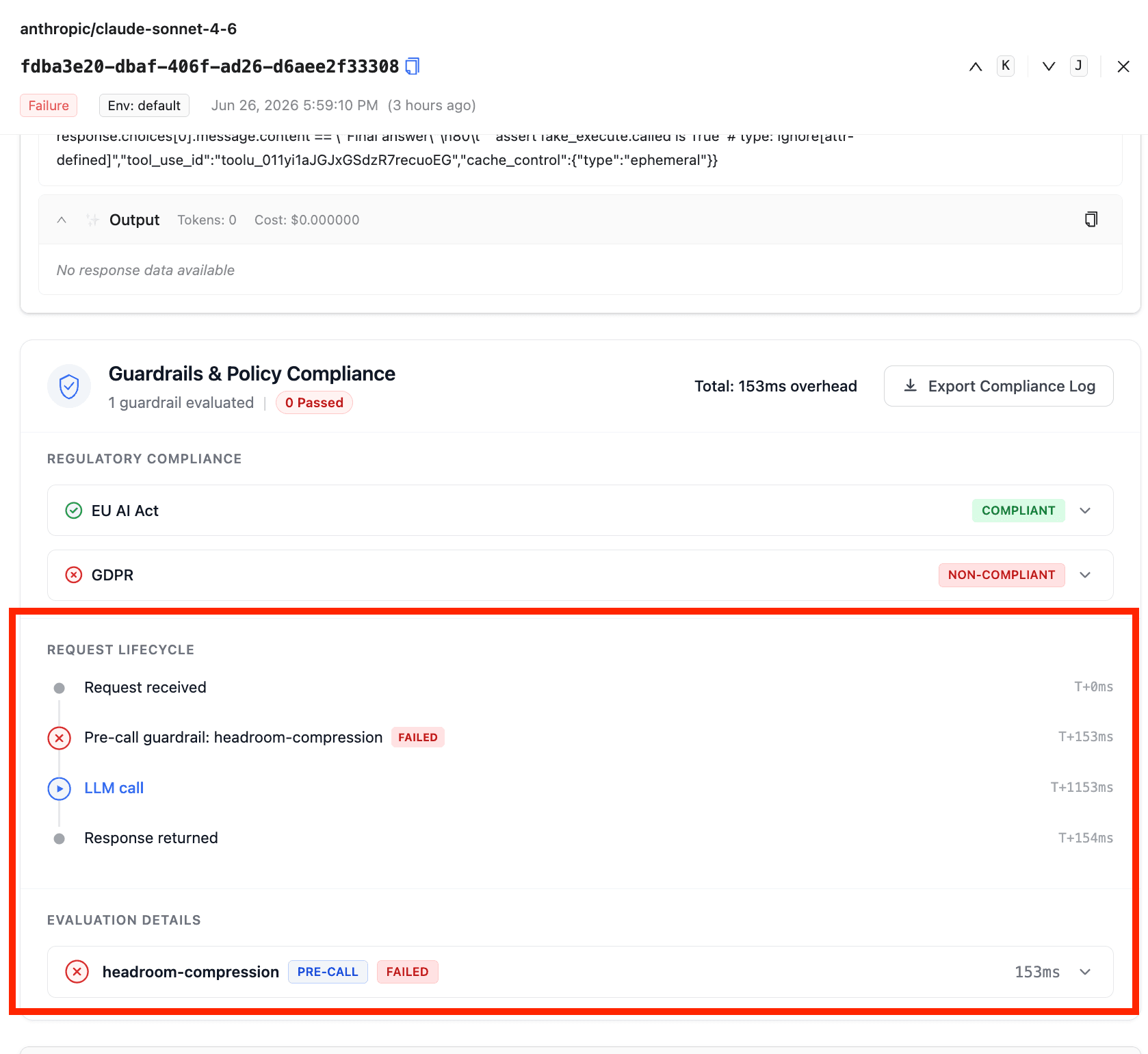
在 Admin UI 中,打開 Logs 內的任何請求,捲動到 Guardrails & Policy Compliance 面板,您會看到 headroom-compression 列在 Request Lifecycle 下方,作為一個具有延遲時間的 pre-call 步驟,並且在 Evaluation Details 下方也有一筆項目。
部署 Headroom
以下是部署 headroom proxy 的 dockerfile
FROM python:3.13-slim

RUN apt-get update \
    && apt-get install -y --no-install-recommends build-essential \
    && pip install --no-cache-dir "headroom-ai[proxy]==0.27.0" \
    && apt-get purge -y build-essential \
    && apt-get autoremove -y \
    && rm -rf /var/lib/apt/lists/*

EXPOSE 8787
ENV HEADROOM_TELEMETRY=off
CMD ["headroom", "proxy", "--host", "0.0.0.0", "--port", "8787"]
為什麼 requests_compressed 可以是 0
Headroom 預設會保護兩種訊息類型,這是設定在 Headroom 容器本身,而不是 LiteLLM 的 config.yaml 中:
user/system訊息,除非設定了ENV HEADROOM_COMPRESS_USER_MESSAGES=1。大多數 Claude Code 流量屬於user角色,因此預設部署不會壓縮其中任何內容。- 帶有 Anthropic
cache_control標記的訊息,永遠如此。壓縮它們會破壞 prompt-cache 的位元組比對。沒有任何覆寫機制。
組態參考
| 參數 | 型別 | 描述 |
|---|---|---|
guardrail | str | 必須為 headroom。 |
mode | str | 使用 pre_call。此防護欄對回應不會有任何作用。 |
api_base | str | headroom 服務的基礎 URL。若無設定,則回退至 HEADROOM_API_BASE 環境變數。必填。 |
api_key | str | headroom 服務的 Bearer token。若無設定,則回退至 HEADROOM_API_KEY。選填。 |
model | str | 傳遞給 /v1/compress 的模型名稱。預設為請求的 model 欄位。 |
default_on | bool | 對每個請求執行此防護欄,而不需要每次呼叫時個別啟用。預設為 false。 |
環境變數
| 變數 | 描述 |
|---|---|
HEADROOM_API_BASE | 當未在防護欄設定中設定 api_base 時的後備值。 |
HEADROOM_API_KEY | 當未在防護欄設定中設定 api_key 時的後備值。 |

