健康檢查
有兩件事會消耗閘道的健康狀態。您的協調器(Kubernetes、負載平衡器、uptime 監控)會輪詢輕量型探測端點,以判斷程序是否已啟動並準備好接受流量。您,作為營運者,則會檢查每個已設定的 LLM 是否 वास्तव際能夠提供請求服務。本頁涵蓋這兩者。
探測端點
這些端點會回答「閘道程序是否已啟動且能夠提供流量?」而不會發出任何 LLM 請求。它們是閘道的正式存活與就緒契約。
| 端點 | 驗證 | 回傳 | 意義 |
|---|---|---|---|
GET /health/liveliness | 無 | "I'm alive!"(200),或在平滑關機期間回傳 {"status": "shutting_down"}(503) | 程序已啟動。未檢查任何相依項目。GET /health/liveness 是採用 Kubernetes 拼法的別名;兩者都是真實路由 |
GET /health/readiness | 無 | 已就緒時回傳 {"status": "healthy", "db": ...}(200);當已設定的資料庫無法連線時回傳 503 | 工作程序已準備好接受流量。當未設定資料庫時,db 欄位為 "connected"、"disconnected",或 "Not connected" |
db 值可讓協調器區分健康的工作程序與已啟動但無法連線到資料庫的工作程序。當已設定資料庫但無法連線時,就緒檢查會回傳 503,因此該 pod 會從輪替中移除。
預設的就緒回應內容刻意維持低細節,因此即使對未經驗證的探測公開也安全。若要取得完整診斷(回呼、快取、版本),可將 general_settings.allow_public_health_readiness_details: true 設為展開 /health/readiness 本身,或呼叫已驗證的 GET /health/readiness/details 端點。
在閘道 4000 埠上的最小 Kubernetes 探測組合:
livenessProbe:
  httpGet:
    path: /health/liveliness
    port: 4000
readinessProbe:
  httpGet:
    path: /health/readiness
    port: 4000
如需完整部署資訊清單,請參閱 Production Deployment 指南 與 生產環境檢查清單。
Admin UI 中的模型健康狀態
檢查模型是否正在提供服務的主要方式是使用 Admin UI。前往 Models + Endpoints,開啟 Health Status 分頁,然後按一下 Run All Checks。每個模型都會顯示狀態、失敗時的錯誤詳細資訊,以及上次檢查與上次成功的時間。
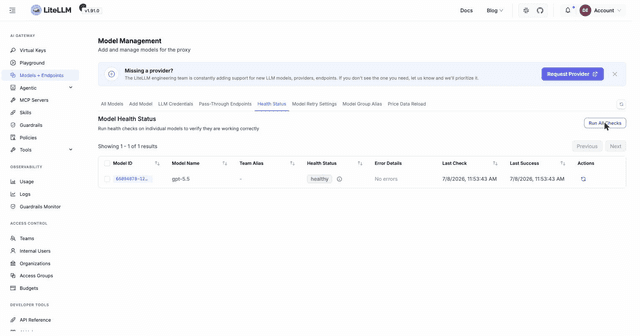
對應的 API 是 GET /health,可接受任何有效金鑰。它會對每個已設定的模型執行一次實際測試請求,因此每個模型會消耗少量 token。
curl --location 'http://0.0.0.0:4000/health' -H "Authorization: Bearer $LITELLM_API_KEY"
{
    "healthy_endpoints": [
        {"model": "azure/gpt-5.6-luna", "api_base": "https://my-endpoint-canada-berri992.openai.azure.com/"}
    ],
    "unhealthy_endpoints": [
        {"model": "azure/gpt-5.6-luna", "api_base": "https://openai-france-1234.openai.azure.com/"}
    ]
}
若要檢查單一模型,請傳入 ?model=<model_name> 或 ?model_id=<id>;您可以從 GET /v1/model/info 找到模型的 id。
背景健康檢查
預設情況下,/health 會在每次呼叫時探測每個模型。為避免過於頻繁地查詢模型,請在背景執行檢查,並讓 /health 提供最後一次快取結果。在 general_settings 中設定此功能:
general_settings:
  background_health_checks: true      # run checks in the background
  health_check_interval: 300          # seconds between runs (default 300)
  health_check_details: true          # include endpoint URLs and errors in the response (default true)
當閘道暴露給廣泛受眾時,將 health_check_details: false 設為從回應中移除端點 URL、錯誤訊息及其他參數。
若要將某個模型排除在背景迴圈之外,請在其 model_info 中設定 disable_background_health_check: true。這只會略過背景迴圈;按需的 GET /health 仍會探測它,除非您也設定 general_settings.health_check_skip_disabled_background_models: true,如此也會將那些部署從按需與共享健康檢查中排除。
model_list:
  - model_name: openai/gpt-5.6-terra
    litellm_params:
      model: openai/gpt-5.6-terra
      api_key: os.environ/OPENAI_API_KEY
    model_info:
      disable_background_health_check: true
若要將背景迴圈限定於特定模型群組,而不是逐一排除模型,請將 general_settings.background_health_check_model_groups 設為要探測的模型群組名稱清單。只會檢查列出群組中的部署,因此 /health 只會回報那些群組,而 健康檢查路由 也只會套用於它們;未列出的群組會保留其已設定的路由行為。之後新增的模型群組在加入清單前不會被探測,而非字串清單的值會在啟動時失敗
general_settings:
  background_health_checks: true
  background_health_check_model_groups: ["prod-openai"]
若要協調多個 pod 之間的檢查,以免昂貴模型每個 pod 都被探測一次,請參閱 共用健康檢查狀態。
模型模式
健康檢查會從模型的 model_info.mode 中選擇要測試的操作。請將其設定正確,讓探測使用對應的 API 介面;如果保留未設定,LiteLLM 會根據模型能力自動偵測,並回退到聊天完成。
mode | 健康檢查呼叫 |
|---|---|
chat(預設) | /chat/completions |
completion | /completions |
embedding | /embeddings |
image_generation | 影像生成 |
audio_transcription | 音訊轉錄 |
audio_speech | 文字轉語音(需要 health_check_voice) |
rerank | 重新排序 |
batch | 批次(僅 Azure) |
realtime | 即時工作階段 |
ocr | OCR |
video_generation | 影片生成 |
image_edit | 影像編輯 |
anthropic_messages | /v1/messages |
Bedrock Mantle 只透過 Anthropic Messages API 提供 Claude 模型,因此 bedrock_mantle/anthropic.claude-* 部署在 mode 未設定時,會以 anthropic_messages 進行探測,而不是聊天完成。明確指定的 mode 仍然優先
對於萬用字元路由(* 位於 litellm_params.model 中),請將 health_check_model 設為探測應呼叫的具體模型。當萬用字元路由上的 mode 未設定時,max_tokens 會在探測請求中維持未設定。
model_list:
  - model_name: azure-embedding-model
    litellm_params:
      model: azure/azure-embedding-model
      api_base: os.environ/AZURE_API_BASE
      api_key: os.environ/AZURE_API_KEY
      api_version: "2023-07-01-preview"
    model_info:
      mode: embedding
健康檢查調整參考
除非另有註明,請在模型的 model_info 下設定這些項目。它們控制探測請求的組成方式。
| 鍵 | 預設值 | 用途 |
|---|---|---|
health_check_timeout | 60s | 探測的每模型逾時 |
health_check_max_tokens | 16(萬用字元路由時未設定) | 探測請求中的 max_tokens |
health_check_max_tokens_reasoning | 未設定 | 當 health_check_max_tokens 未設定時,供推理模型使用的 max_tokens |
health_check_max_tokens_non_reasoning | 未設定 | 當 health_check_max_tokens 未設定時,供非推理模型使用的 max_tokens |
health_check_reasoning_effort | 未設定 | 探測中的 reasoning_effort(僅聊天、完成、批次、回應模式) |
health_check_voice | alloy | audio_speech 探測的語音 |
health_check_model | 未設定 | 萬用字元路由所探測的具體模型 |
disable_background_health_check | false | 在背景迴圈中略過此模型 |
推理模型通常需要較高的探測 max_tokens,因為提供者會將推理 token 納入完成額度;分開的推理與非推理鍵可讓您提高它,而不必列出每個模型。三個環境變數會設定全域預設值:DEFAULT_HEALTH_CHECK_PROMPT 會覆寫預設探測提示詞("test from litellm"),BACKGROUND_HEALTH_CHECK_MAX_TOKENS 是全域 max_tokens 備援,而 BACKGROUND_HEALTH_CHECK_MAX_TOKENS_REASONING 則優先套用於非萬用字元推理模型。
若要將流量導離健康檢查失敗的部署,請參閱 健康檢查驅動的路由。
其他健康端點
除非另有註明,以下端點都需要有效金鑰。
GET /health/services?service=<name>會測試已設定的告警或記錄服務(datadog、slack、langfuse 等);接受任何有效金鑰GET /health/readiness/details會回傳已驗證的就緒診斷資訊(db、cache、callbacks、version)GET /health/history會回傳過去的健康檢查結果GET /health/latest會回傳最近一次健康檢查結果GET /health/backlog會回傳工作程序上進行中的請求數量GET /health/drain會為 KubernetespreStop回呼啟動平滑排空;預設停用(404),除非general_settings.enable_drain_endpoint: true,並在X-Drain-Token設為DRAIN_ENDPOINT_TOKEN時由該標頭控管

