使用 OIDC(Azure AD/Keycloak/etc.)控管模型存取
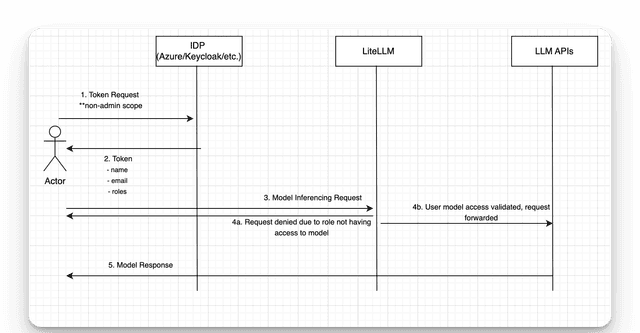
範例 Token
- Azure AD
- Keycloak
{
  "sub": "1234567890",
  "name": "John Doe",
  "email": "john.doe@example.com",
  "roles": ["basic_user"] # 👈 ROLE
}
{
  "sub": "1234567890",
  "name": "John Doe",
  "email": "john.doe@example.com",
  "resource_access": {
    "litellm-test-client-id": {
      "roles": ["basic_user"] # 👈 ROLE
    }
  }
}
Proxy 設定
- Azure AD
- Keycloak
general_settings:
  enable_jwt_auth: True
  litellm_jwtauth:
    user_roles_jwt_field: "roles" # the field in the JWT that contains the roles
    user_allowed_roles: ["basic_user"] # roles that map to an 'internal_user' role on LiteLLM
    enforce_rbac: true # if true, will check if the user has the correct role to access the model

  role_permissions: # control what models are allowed for each role
    - role: internal_user
      models: ["anthropic-claude"]

model_list:
    - model_name: anthropic-claude
      litellm_params:
        model: claude-sonnet-5
    - model_name: openai-gpt-4o
      litellm_params:
        model: gpt-5.6-terra
general_settings:
  enable_jwt_auth: True
  litellm_jwtauth:
    user_roles_jwt_field: "resource_access.litellm-test-client-id.roles" # the field in the JWT that contains the roles
    user_allowed_roles: ["basic_user"] # roles that map to an 'internal_user' role on LiteLLM
    enforce_rbac: true # if true, will check if the user has the correct role to access the model

  role_permissions: # control what models are allowed for each role
    - role: internal_user
      models: ["anthropic-claude"]

model_list:
    - model_name: anthropic-claude
      litellm_params:
        model: claude-sonnet-5
    - model_name: openai-gpt-4o
      litellm_params:
        model: gpt-5.6-terra
運作方式
-
指定 JWT_PUBLIC_KEY_URL - 這是您的 OpenID 提供者的公開金鑰端點。對於 Azure AD,為
https://login.microsoftonline.com/{tenant_id}/discovery/v2.0/keys。對於 Keycloak,為{keycloak_base_url}/realms/{your-realm}/protocol/openid-connect/certs。 -
將 JWT 角色對應至 LiteLLM 角色 - 透過
user_roles_jwt_field和user_allowed_roles完成- 目前僅支援
internal_user進行角色對應。
- 目前僅支援
-
指定模型存取:
role_permissions:控管每個角色可允許使用的模型。role:用來控管存取權的 LiteLLM 角色。允許的角色 = ["internal_user", "proxy_admin", "team"]models:該角色允許存取的模型清單。
model_list:proxy 上的父層模型清單。了解更多
-
模型檢查:proxy 會對接收到的 JWT 執行驗證檢查。程式碼

