[BETA] LiteLLM 受管理檔案
- 在不同提供者之間重用同一個檔案。
- 防止使用者在
list和retrieve請求中看到自己沒有存取權限的檔案。
隨附於 litellm[proxy] 套件或任何 litellm Docker 映像檔中,無須企業版授權即可使用。
| 屬性 | 值 | 備註 |
|---|---|---|
| Proxy | ✅ | |
| SDK | ❌ | 需要 postgres DB 來儲存檔案 id。 |
| 適用於所有提供者 | ✅ | |
| 支援的端點 | /chat/completions, /batch, /fine_tuning, /responses |
使用方式
1. 設定 config.yaml
model_list:
    - model_name: "gemini-3.8-flash"
      litellm_params:
        model: vertex_ai/gemini-3.8-flash
        vertex_project: my-project-id
        vertex_location: us-central1
    - model_name: "gpt-4o-mini-openai"
      litellm_params:
        model: gpt-5.6-luna
        api_key: os.environ/OPENAI_API_KEY

general_settings:
  master_key: os.environ/LITELLM_MASTER_KEY  # alternatively use the env var - LITELLM_MASTER_KEY
  database_url: "postgresql://<user>:<password>@<host>:<port>/<dbname>" # alternatively use the env var - DATABASE_URL

litellm_settings:
  require_managed_files: true # optional - reject POST /v1/files without target_model_names
(選用)在上傳時強制使用受管理檔案
預設情況下,當未指定 POST /v1/files 時,target_model_names 會回退到傳統的提供者檔案路徑。請在 require_managed_files: true 下設定 litellm_settings,以要求每次上傳都使用受管理檔案。
litellm_settings:
  require_managed_files: true
啟用後,未提供 target_model_names 的上傳會回傳 400。當提供 target_model_names 時,既有的受管理檔案行為不會改變。
# String (comma-separated for multiple models)
extra_body={"target_model_names": "gpt-4o-mini-openai, gemini-3.8-flash"}

# List (OpenAI Python SDK sends this as target_model_names[] in multipart form)
extra_body={"target_model_names": ["gpt-4o-mini-openai"]}
2. 啟動 proxy
litellm --config /path/to/config.yaml
3. 測試看看!
指定 target_model_names 以在不同提供者之間使用相同的 file id。這是透過 config.yaml 設定的 model_names 清單(或 UI 上的 'public_model_names')。
target_model_names="gpt-4o-mini-openai, gemini-3.8-flash" # 👈 Specify model_names
請查看 /v1/models,以查看某個 key 可用的模型名稱清單。
儲存 PDF 檔案
from openai import OpenAI

client = OpenAI(base_url="http://0.0.0.0:4000", api_key="sk-<your-litellm-api-key>", max_retries=0)


# Download and save the PDF locally
url = (
    "https://storage.googleapis.com/cloud-samples-data/generative-ai/pdf/2403.05530.pdf"
)
response = requests.get(url)
response.raise_for_status()

# Save the PDF locally
with open("2403.05530.pdf", "wb") as f:
    f.write(response.content)

file = client.files.create(
    file=open("2403.05530.pdf", "rb"),
    purpose="user_data", # can be any openai 'purpose' value
    extra_body={"target_model_names": "gpt-4o-mini-openai, gemini-3.8-flash"}, # 👈 Specify model_names
)

print(f"file id={file.id}")
在不同提供者之間使用相同的 file id
- OpenAI
- Vertex AI
completion = client.chat.completions.create(
    model="gpt-4o-mini-openai",
    messages=[
        {
            "role": "user",
            "content": [
                {"type": "text", "text": "What is in this recording?"},
                {
                    "type": "file",
                    "file": {
                        "file_id": file.id,
                    },
                },
            ],
        },
    ]
)

print(completion.choices[0].message)
completion = client.chat.completions.create(
    model="gemini-3.8-flash",
    messages=[
        {
            "role": "user",
            "content": [
                {"type": "text", "text": "What is in this recording?"},
                {
                    "type": "file",
                    "file": {
                        "file_id": file.id,
                    },
                },
            ],
        },
    ]
)

print(completion.choices[0].message)
完整範例
import base64
import requests
from openai import OpenAI

client = OpenAI(base_url="http://0.0.0.0:4000", api_key="sk-<your-litellm-api-key>", max_retries=0)


# Download and save the PDF locally
url = (
    "https://storage.googleapis.com/cloud-samples-data/generative-ai/pdf/2403.05530.pdf"
)
response = requests.get(url)
response.raise_for_status()

# Save the PDF locally
with open("2403.05530.pdf", "wb") as f:
    f.write(response.content)

# Read the local PDF file
file = client.files.create(
    file=open("2403.05530.pdf", "rb"),
    purpose="user_data", # can be any openai 'purpose' value
    extra_body={"target_model_names": "gpt-4o-mini-openai, vertex_ai/gemini-3.8-flash"},
)

print(f"file.id: {file.id}") # 👈 Unified file id

## GEMINI CALL ###
completion = client.chat.completions.create(
    model="gemini-3.8-flash",
    messages=[
        {
            "role": "user",
            "content": [
                {"type": "text", "text": "What is in this recording?"},
                {
                    "type": "file",
                    "file": {
                        "file_id": file.id,
                    },
                },
            ],
        },
    ]
)

print(completion.choices[0].message)


### OPENAI CALL ###
completion = client.chat.completions.create(
    model="gpt-4o-mini-openai",
    messages=[
        {
            "role": "user",
            "content": [
                {"type": "text", "text": "What is in this recording?"},
                {
                    "type": "file",
                    "file": {
                        "file_id": file.id,
                    },
                },
            ],
        },
    ],
)

print(completion.choices[0].message)
檔案權限
防止使用者在 list 和 retrieve 請求中看到自己沒有存取權限的檔案。
1. 設定 config.yaml
model_list:
    - model_name: "gpt-4o-mini-openai"
      litellm_params:
        model: gpt-5.6-luna
        api_key: os.environ/OPENAI_API_KEY

general_settings:
  master_key: os.environ/LITELLM_MASTER_KEY  # alternatively use the env var - LITELLM_MASTER_KEY
  database_url: "postgresql://<user>:<password>@<host>:<port>/<dbname>" # alternatively use the env var - DATABASE_URL
2. 啟動 proxy
litellm --config /path/to/config.yaml
3. 將 key 發給使用者
讓我們建立一個 id 為 user_123 的使用者。
curl -L -X POST 'http://0.0.0.0:4000/user/new' \
-H "Authorization: Bearer $LITELLM_API_KEY" \
-H 'Content-Type: application/json' \
-d '{"models": ["gpt-4o-mini-openai"], "user_id": "user_123"}'
從回應中取得 key。
{
    "key": "sk-..."
}
4. 使用者建立檔案
4a. 建立檔案
{"messages": [{"role": "system", "content": "Clippy is a factual chatbot that is also sarcastic."}, {"role": "user", "content": "What's the capital of France?"}, {"role": "assistant", "content": "Paris, as if everyone doesn't know that already."}]}
{"messages": [{"role": "system", "content": "Clippy is a factual chatbot that is also sarcastic."}, {"role": "user", "content": "Who wrote 'Romeo and Juliet'?"}, {"role": "assistant", "content": "Oh, just some guy named William Shakespeare. Ever heard of him?"}]}
4b. 上傳檔案
from openai import OpenAI

client = OpenAI(
    base_url="http://0.0.0.0:4000",
    api_key="sk-...", # 👈 Use the key you generated in step 3
    max_retries=0
)

# Upload file
finetuning_input_file = client.files.create(
    file=open("./fine_tuning.jsonl", "rb"), # {"model": "azure-gpt-4o"} <-> {"model": "gpt-4o-my-special-deployment"}
    purpose="fine-tune",
    extra_body={"target_model_names": "gpt-4.1-openai"} # 👈 Tells litellm which regions/projects to write the file in.
)
print(finetuning_input_file) # file.id = "litellm_proxy/..." = {"model_name": {"deployment_id": "deployment_file_id"}}
5. 使用者擷取檔案
- User created file
- User did not create file
from openai import OpenAI

... # User created file (3b)

file = client.files.retrieve(
    file_id=finetuning_input_file.id
)

print(file) # File retrieved successfully
from openai import OpenAI

... # User created file (3b)

try:
    file = client.files.retrieve(
        file_id="bGl0ZWxsbV9wcm94eTphcHBsaWNhdGlvbi9vY3RldC1zdHJlYW07dW5pZmllZF9pZCwyYTgzOWIyYS03YzI1LTRiNTUtYTUxYS1lZjdhODljNzZkMzU7dGFyZ2V0X21vZGVsX25hbWVzLGdwdC00by1iYXRjaA"
    )
except Exception as e:
    print(e) # User does not have access to this file
支援的端點
建立檔案 - /files
from openai import OpenAI

client = OpenAI(base_url="http://0.0.0.0:4000", api_key="sk-<your-litellm-api-key>", max_retries=0)

# Download and save the PDF locally
url = (
    "https://storage.googleapis.com/cloud-samples-data/generative-ai/pdf/2403.05530.pdf"
)
response = requests.get(url)
response.raise_for_status()

# Save the PDF locally
with open("2403.05530.pdf", "wb") as f:
    f.write(response.content)

# Read the local PDF file
file = client.files.create(
    file=open("2403.05530.pdf", "rb"),
    purpose="user_data", # can be any openai 'purpose' value
    extra_body={"target_model_names": "gpt-4o-mini-openai, vertex_ai/gemini-3.8-flash"},
)
擷取檔案 - /files/{file_id}
client = OpenAI(base_url="http://0.0.0.0:4000", api_key="sk-<your-litellm-api-key>", max_retries=0)

file = client.files.retrieve(file_id=file.id)
刪除檔案 - /files/{file_id}/delete
client = OpenAI(base_url="http://0.0.0.0:4000", api_key="sk-<your-litellm-api-key>", max_retries=0)

file = client.files.delete(file_id=file.id)
列出檔案 - /files
client = OpenAI(base_url="http://0.0.0.0:4000", api_key="sk-<your-litellm-api-key>", max_retries=0)

files = client.files.list(extra_body={"target_model_names": "gpt-4o-mini-openai"})

print(files) # All files user has created
GA 前列出檔案的限制:
- 不支援多模型:目前只支援 1 個模型名稱。
- 不支援多部署:目前只支援該模型的 1 個部署(例如,如果您有 2 個具有
gpt-4o-mini-openai公開模型名稱的部署,它會挑選其中一個,並回傳該部署上的所有檔案)。
GA 前的限制會在 Managed Files 功能正式發布前修正。
常見問題
1. LiteLLM 會儲存檔案嗎?
不會,LiteLLM 不會儲存檔案。它只會在 postgres DB 中儲存檔案 ID。
2. LiteLLM 如何知道要為特定檔案 ID 使用哪個檔案?
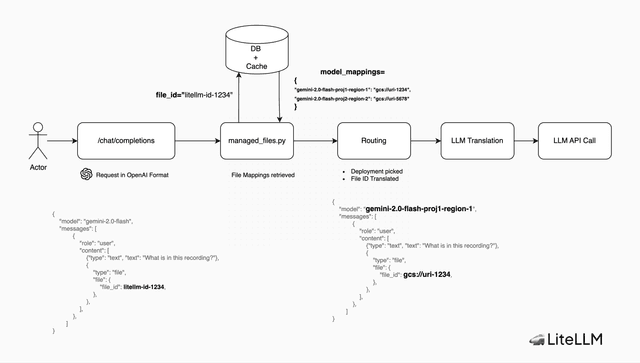
LiteLLM 會在 postgres DB 中儲存 litellm 檔案 ID 與特定於模型的檔案 ID 之間的對應。當請求進來時,LiteLLM 會查詢特定於模型的檔案 ID,並在請求中將其用於提供者。
3. 檔案刪除如何運作?
當檔案被刪除時,LiteLLM 會從 postgres DB 和每個提供者上的檔案中刪除對應關係。
4. 使用者可以呼叫由其他使用者建立的檔案 ID 嗎?
不行,截至 v1.71.2,使用者只能檢視/編輯/刪除自己建立的檔案。
架構