模型存取群組
總覽
將多個模型歸組到單一名稱下,然後授權金鑰或團隊存取整個群組。可在不更新個別金鑰的情況下,將模型加入或移出群組。
使用情境:
- 將正式環境與開發環境模型分開
- 將昂貴模型限制給特定團隊
- 依提供者或能力整理模型
- 使用萬用字元控制對模型家族的存取(例如,
openai/*)
運作方式
重點概念: 將模型分組 → 將群組附加到金鑰 → 金鑰即可存取群組中的所有模型
步驟 1. 在 config.yaml 中指定 model, access group
model_list:
  - model_name: gpt-5.6-terra
    litellm_params:
      model: openai/fake
      api_key: fake-key
      api_base: https://exampleopenaiendpoint-production.up.railway.app/
    model_info:
      access_groups: ["beta-models"] # 👈 Model Access Group
  - model_name: fireworks-llama-v3-70b-instruct
    litellm_params:
      model: fireworks_ai/accounts/fireworks/models/llama-v3-70b-instruct
      api_key: "os.environ/FIREWORKS"
    model_info:
      access_groups: ["beta-models"] # 👈 Model Access Group
- 金鑰存取群組
- 團隊存取群組
建立具有存取群組的金鑰
curl --location 'http://localhost:4000/key/generate' \
-H 'Authorization: Bearer <your-master-key>' \
-H 'Content-Type: application/json' \
-d '{"models": ["beta-models"], # 👈 Model Access Group
			"max_budget": 0,}'
測試金鑰
- 允許的存取
- 不允許的存取
curl -i http://localhost:4000/v1/chat/completions \
  -H "Content-Type: application/json" \
  -H "Authorization: Bearer sk-<key-from-previous-step>" \
  -d '{
    "model": "gpt-5.6-terra",
    "messages": [
      {"role": "user", "content": "Hello"}
    ]
  }'
預期這會失敗,因為 gpt-5.6-luna 不在 beta-models 存取群組中
curl -i http://localhost:4000/v1/chat/completions \
  -H "Content-Type: application/json" \
  -H "Authorization: Bearer sk-<key-from-previous-step>" \
  -d '{
    "model": "gpt-5.6-luna",
    "messages": [
      {"role": "user", "content": "Hello"}
    ]
  }'
建立團隊
curl --location 'http://localhost:4000/team/new' \
-H 'Authorization: Bearer sk-<key-from-previous-step>' \
-H 'Content-Type: application/json' \
-d '{"models": ["beta-models"]}'
為團隊建立金鑰
curl --location 'http://0.0.0.0:4000/key/generate' \
--header 'Authorization: Bearer sk-<key-from-previous-step>' \
--header 'Content-Type: application/json' \
--data '{"team_id": "0ac97648-c194-4c90-8cd6-40af7b0d2d2a"}
測試金鑰
- 允許的存取
- 不允許的存取
curl -i http://localhost:4000/v1/chat/completions \
  -H "Content-Type: application/json" \
  -H "Authorization: Bearer sk-<key-from-previous-step>" \
  -d '{
    "model": "gpt-5.6-terra",
    "messages": [
      {"role": "user", "content": "Hello"}
    ]
  }'
預期這會失敗,因為 gpt-5.6-luna 不在 beta-models 存取群組中
curl -i http://localhost:4000/v1/chat/completions \
  -H "Content-Type: application/json" \
  -H "Authorization: Bearer sk-<key-from-previous-step>" \
  -d '{
    "model": "gpt-5.6-luna",
    "messages": [
      {"role": "user", "content": "Hello"}
    ]
  }'
✨ 控制萬用字元模型的存取
控制對所有具有特定前綴的模型的存取(例如 openai/*)。
也可用於讓使用者存取所有模型,但排除少數您不希望他們使用的模型(例如 openai/o1-*)。
- 設定 config.yaml
model_list:
  - model_name: openai/*
    litellm_params:
      model: openai/*
      api_key: os.environ/OPENAI_API_KEY
    model_info:
      access_groups: ["default-models"]
  - model_name: openai/o1-*
    litellm_params:
      model: openai/o1-*
      api_key: os.environ/OPENAI_API_KEY
    model_info:
      access_groups: ["restricted-models"]
- 產生可存取
default-models的金鑰
curl -L -X POST 'http://0.0.0.0:4000/key/generate' \
-H "Authorization: Bearer $LITELLM_API_KEY" \
-H 'Content-Type: application/json' \
-d '{
    "models": ["default-models"],
}'
- 測試金鑰
- 成功的請求
- 遭拒的請求
curl -i http://localhost:4000/v1/chat/completions \
  -H "Content-Type: application/json" \
  -H "Authorization: Bearer sk-<key-from-previous-step>" \
  -d '{
    "model": "openai/gpt-5.6-terra",
    "messages": [
      {"role": "user", "content": "Hello"}
    ]
  }'
curl -i http://localhost:4000/v1/chat/completions \
  -H "Content-Type: application/json" \
  -H "Authorization: Bearer sk-<key-from-previous-step>" \
  -d '{
    "model": "openai/o1-mini",
    "messages": [
      {"role": "user", "content": "Hello"}
    ]
  }'
透過 API 管理存取群組
存取群組管理 API 僅適用於儲存在資料庫中的模型(透過 /model/new 新增)。
定義於 config.yaml 的模型無法透過這些 API 管理,且必須直接在設定檔中設定。
使用存取群組管理端點可動態建立、更新及刪除存取群組,而無需重新啟動 proxy。
教學:完整的存取群組工作流程
本教學將示範如何建立存取群組、檢視其詳細資訊、將其附加到金鑰,以及更新群組中的模型。
必要條件:
- 模型必須先新增至資料庫(不能只在 config.yaml 中)
- 您需要使用 master key 進行授權
步驟 1:將模型新增至資料庫
首先,將一些模型新增至資料庫:
# Add gpt-5.6-terra to database
curl -X POST 'http://localhost:4000/model/new' \
  -H "Authorization: Bearer $LITELLM_API_KEY" \
  -H 'Content-Type: application/json' \
  -d '{
    "model_name": "gpt-5.6-terra",
    "litellm_params": {
      "model": "gpt-5.6-terra",
      "api_key": "os.environ/OPENAI_API_KEY"
    }
  }'

# Add Claude to database
curl -X POST 'http://localhost:4000/model/new' \
  -H "Authorization: Bearer $LITELLM_API_KEY" \
  -H 'Content-Type: application/json' \
  -d '{
    "model_name": "claude-sonnet-5",
    "litellm_params": {
      "model": "claude-sonnet-5",
      "api_key": "os.environ/ANTHROPIC_API_KEY"
    }
  }'
步驟 2:建立存取群組
建立一個包含多個模型的存取群組:
curl -X POST 'http://localhost:4000/access_group/new' \
  -H "Authorization: Bearer $LITELLM_API_KEY" \
  -H 'Content-Type: application/json' \
  -d '{
    "access_group": "production-models",
    "model_names": ["gpt-5.6-terra", "claude-sonnet-5"]
  }'
回應:
{
  "access_group": "production-models",
  "model_names": ["gpt-5.6-terra", "claude-sonnet-5"],
  "models_updated": 2
}
步驟 3:檢視存取群組資訊
檢查存取群組詳細資訊:
curl -X GET 'http://localhost:4000/access_group/production-models/info' \
  -H "Authorization: Bearer $LITELLM_API_KEY"
回應:
{
  "access_group": "production-models",
  "model_names": ["gpt-5.6-terra", "claude-sonnet-5"],
  "deployment_count": 2
}
步驟 4:建立具有存取群組的金鑰
建立一個可存取群組中所有模型的 API 金鑰:
curl -X POST 'http://localhost:4000/key/generate' \
  -H "Authorization: Bearer $LITELLM_API_KEY" \
  -H 'Content-Type: application/json' \
  -d '{
    "models": ["production-models"],
    "max_budget": 100
  }'
回應:
{
  "key": "sk-...",
  "models": ["production-models"]
}
測試金鑰:
# This succeeds - gpt-5.6-terra is in production-models
curl -X POST 'http://localhost:4000/v1/chat/completions' \
  -H 'Authorization: Bearer sk-...' \
  -H 'Content-Type: application/json' \
  -d '{
    "model": "gpt-5.6-terra",
    "messages": [{"role": "user", "content": "Hello"}]
  }'

# This succeeds - claude-sonnet-5 is in production-models
curl -X POST 'http://localhost:4000/v1/chat/completions' \
  -H 'Authorization: Bearer sk-...' \
  -H 'Content-Type: application/json' \
  -d '{
    "model": "claude-sonnet-5",
    "messages": [{"role": "user", "content": "Hello"}]
  }'
步驟 5:更新存取群組
將模型新增至或從存取群組中移除:
curl -X PUT 'http://localhost:4000/access_group/production-models/update' \
  -H "Authorization: Bearer $LITELLM_API_KEY" \
  -H 'Content-Type: application/json' \
  -d '{
    "model_names": ["gpt-5.6-terra", "claude-sonnet-5", "gemini-3.8-flash"]
  }'
回應:
{
  "access_group": "production-models",
  "model_names": ["gpt-5.6-terra", "claude-sonnet-5", "gemini-3.8-flash"],
  "models_updated": 3
}
第 4 步的 API 金鑰現在會自動存取 gemini-3.8-flash,而無需對金鑰本身做任何變更。
預算
群組也可以包含一個所有被授予該群組的金鑰共用的單一預算。請參閱模型存取群組預算。
API 參考文件 - 存取群組管理
如需包含所有端點、參數與回應 schema 的完整 API 文件,請參閱 存取群組管理 API 參考文件。
透過 UI 管理存取群組
您也可以透過 LiteLLM Admin UI 管理存取群組。
步驟 1:將模型新增至存取群組
將模型新增至資料庫時,請使用「Model Access Group」欄位將其指派給存取群組:
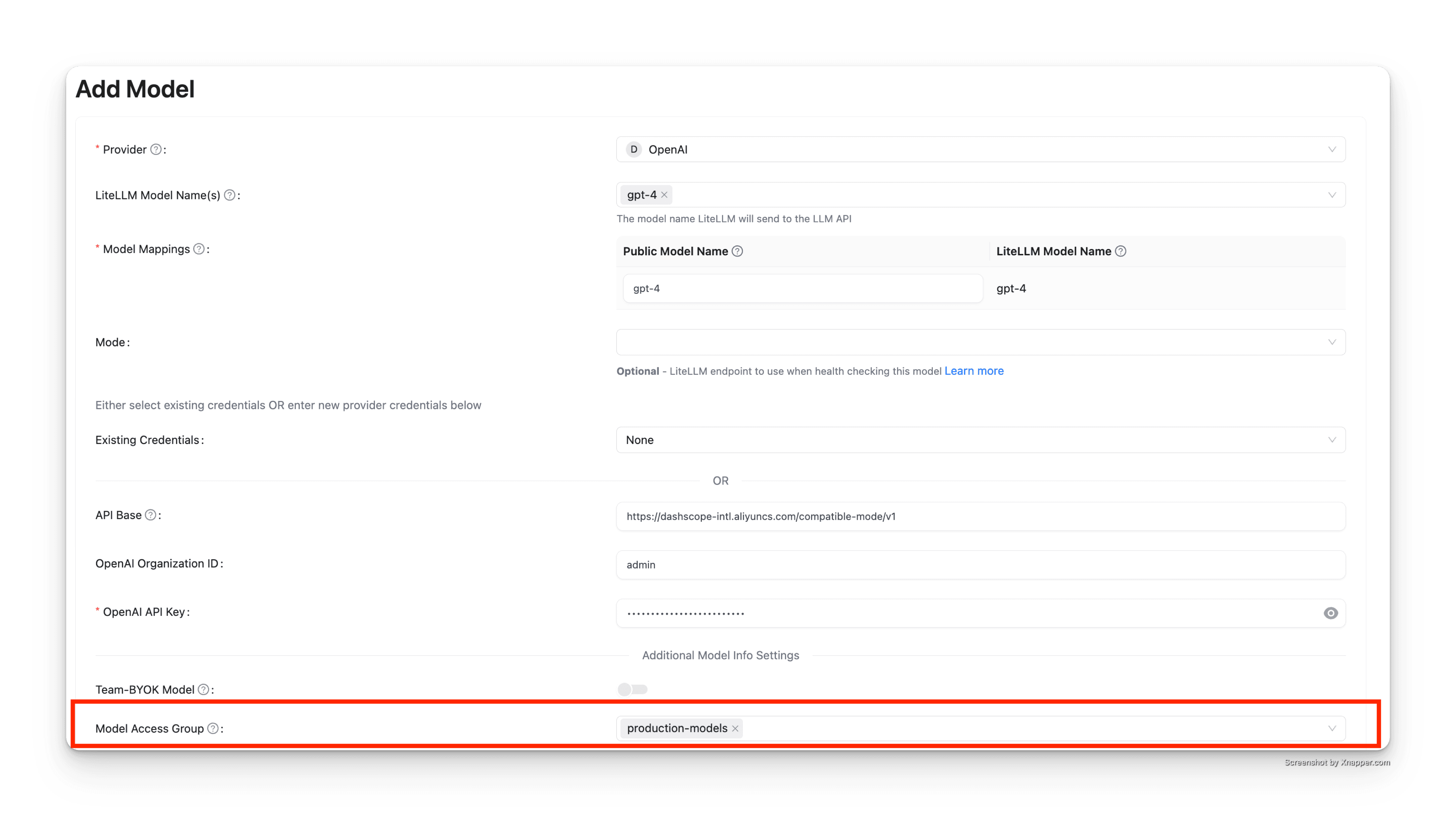
在此範例中,gpt-5.6-terra 被新增至 production-models 存取群組。
步驟 2:建立具有存取群組的金鑰
建立 API 金鑰時,請在「Models」欄位中指定存取群組:
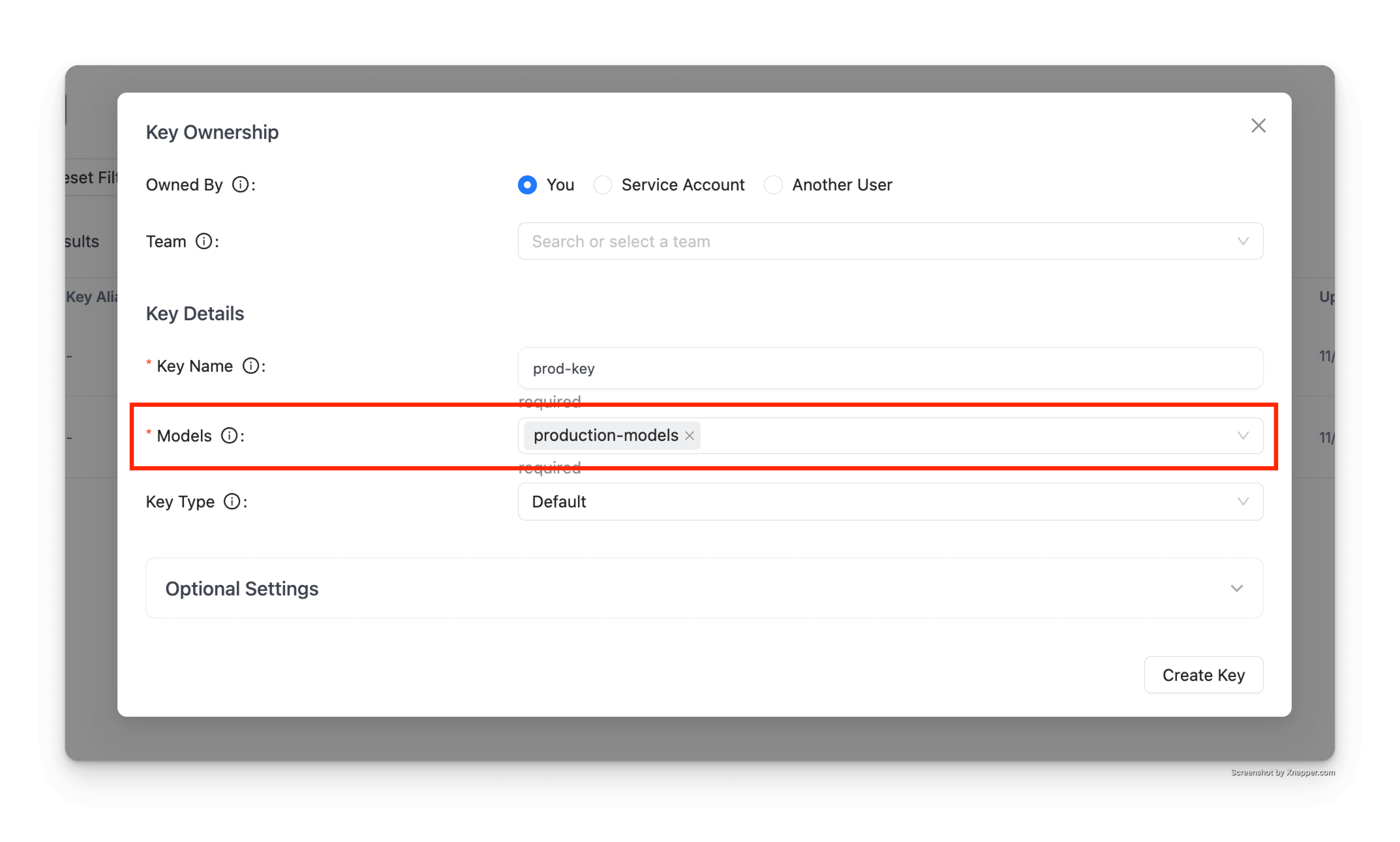
該金鑰將可存取 production-models 群組中的所有模型。
步驟 3:測試金鑰
使用產生的金鑰發出請求:
# This succeeds - gpt-5.6-terra is in production-models
curl -X POST 'http://localhost:4000/v1/chat/completions' \
  -H 'Authorization: Bearer sk-...' \
  -H 'Content-Type: application/json' \
  -d '{
    "model": "gpt-5.6-terra",
    "messages": [{"role": "user", "content": "Hello"}]
  }'
回應:
{
  "id": "chatcmpl-...",
  "object": "chat.completion",
  "created": 1234567890,
  "model": "gpt-5.6-terra",
  "choices": [
    {
      "index": 0,
      "message": {
        "role": "assistant",
        "content": "Hello! How can I help you today?"
      },
      "finish_reason": "stop"
    }
  ]
}
如果您嘗試存取不在該存取群組中的模型,該請求將會被拒絕:
# This fails - gpt-5.6-luna is not in production-models
curl -X POST 'http://localhost:4000/v1/chat/completions' \
  -H 'Authorization: Bearer sk-...' \
  -H 'Content-Type: application/json' \
  -d '{
    "model": "gpt-5.6-luna",
    "messages": [{"role": "user", "content": "Hello"}]
  }'
回應:
{
  "error": {
    "message": "Invalid model for key",
    "type": "invalid_request_error"
  }
}

