模型管理
當 STORE_MODEL_IN_DB 開啟時,您的模型會存在資料庫中,而不是靜態的 config.yaml。這表示第二天起的變更會直接在 Admin UI 中進行:新增模型、編輯定價、輪替提供者金鑰,或退役部署,ทั้งหมด都不需要修改設定檔或重新啟動 proxy。
本頁涵蓋這些持續性的操作。如果您正在新增第一個模型,請從 快速入門 開始,它會帶您完成啟動、提供者連線,以及您的第一個請求。等 gateway 執行中,且您想管理現有模型時,再回到這裡。
模型清單
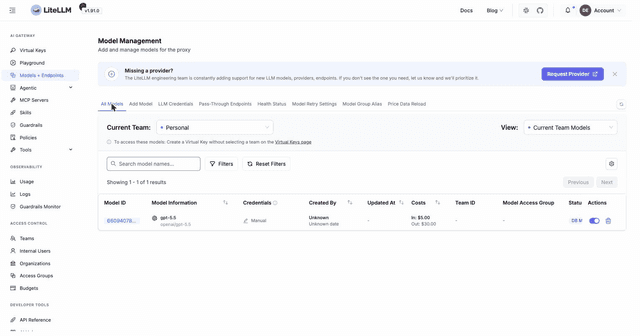
前往 Models + Endpoints,並開啟 All Models 分頁,即可查看 gateway 目前提供的每個模型。每一列會顯示公開模型名稱、底層提供者與 litellm model,以及 LiteLLM 會自動從其 模型成本對應表 映射的每個 token 的輸入與輸出成本。
每個模型上的徽章會告訴您它的來源:透過 UI 或 API 新增的模型會帶有資料庫徽章,而從 config.yaml 載入的模型會標記為 config。這個區別很重要,因為 config 模型不能從 UI 編輯(請參見下方的 資料庫 vs config.yaml 模型)。使用搜尋框與提供者篩選器,將很長的清單縮小為您關心的模型。
檢視並編輯模型
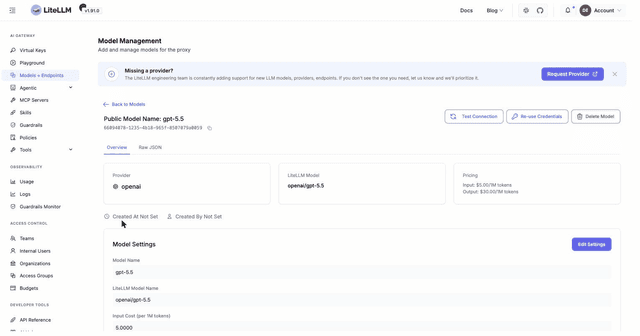
點擊清單中的 Model ID 以開啟其詳細頁面。概覽 分頁會摘要顯示模型設定與提供者,原始 JSON 分頁則顯示完整的儲存定義,當您想確認 gateway 實際持有的內容時非常有用。
點擊 Edit Settings 以就地變更模型。您可以更新客戶端呼叫的公開模型名稱、請求被路由到的 litellm model 名稱,以及當您想覆寫對應定價時,輸入與輸出每 1M tokens 的成本。儲存後,變更會立即對新請求生效。
此頁面還有另外兩個操作。Test Connection 會使用已儲存的憑證重新驗證模型與提供者之間的連線,因此您可以在客戶端打到它之前,確認金鑰仍可使用或新編輯的設定有效。Delete Model 會從 gateway 移除模型;對於資料庫模型,這會直接刪除儲存的定義。
可重用的提供者憑證
大多數部署在同一個提供者帳戶後面會有多個模型。與其把相同的 API 金鑰貼到每個模型中,不如先建立一個具名憑證並重複使用。
開啟 LLM Credentials 分頁並點擊 Add Credential。選擇您的提供者、輸入 API 金鑰,並為該憑證命名。欄位會依您選擇的提供者自動調整,因此例如選擇 Vertex AI 時,您會看到 Vertex Project、Vertex Location 與 Vertex Credentials,而不是單一金鑰欄位。
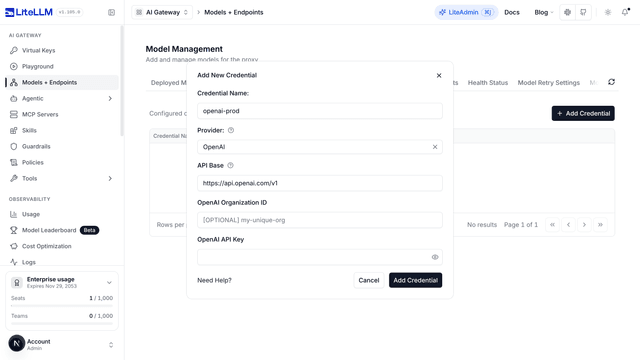
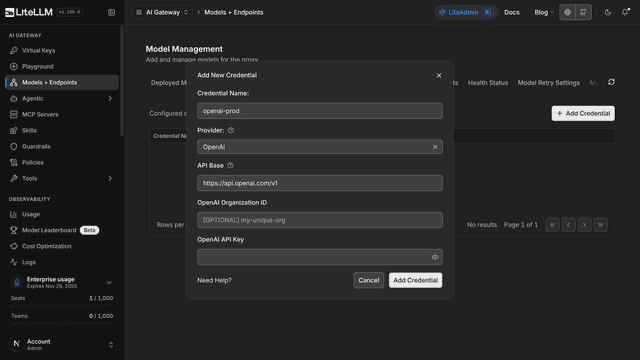
儲存後,該憑證可在您新增或編輯模型的任何地方使用。在 Add Model 表單中,請從 Existing Credentials 下拉選單選取它,而不是輸入金鑰。從模型的詳細頁面,您也可以透過 Re-use Credentials 按鈕反向操作,將您已設定的某個模型憑證轉成供未來模型使用的具名憑證。掛接到具名憑證的模型會在 Usage 頁面中標記為 Credential: <name>,因此您可以依憑證篩選支出,而不需要額外設定;請參見 憑證用量追蹤。
資料庫 vs config.yaml 模型
將模型儲存在資料庫中,才讓以 UI 為驅動的管理成為可能。可透過將 STORE_MODEL_IN_DB="True" 設為環境變數,或在設定中設為 general_settings.store_model_in_db: true 來啟用。您也可以在 UI 的 Models + Endpoints 設定中於執行時切換;對於雲端部署而言,這很方便,因為編輯設定通常代表完整發佈;UI 的值會覆蓋設定值。
啟用後,您透過 UI 或 API 新增的每個模型都會保留在資料庫中,並在重新啟動與額外的 proxy 實例之間持續存在。這些模型的提供者憑證會在靜態儲存時使用 LITELLM_SALT_KEY 加密(如果未設定 salt key,則回退到 LITELLM_MASTER_KEY);請將該值保密,且一旦有模型存在就永遠不要變更,因為使用舊值加密的憑證無法用新值解密。
資料庫儲存不會取代您的 config.yaml。其中定義的任何模型都會繼續運作,並與您的資料庫模型並列顯示。唯一的差異在於 config 模型是由檔案所擁有,因此無法從 UI 編輯或刪除;請在設定檔中修改並重新載入。關於 config 格式本身,請參見 Config.yaml。
在這裡,設定與模型的行為不同。UI 寫入 general_settings、router_settings、litellm_settings 或 environment_variables 的任何內容都會儲存在 LiteLLM_Config 中,並在啟動時疊加到您的 config.yaml 上,因此資料庫值會生效,而您在 YAML 中編輯相同 key 後重新啟動不會生效。請參見 config.yaml 與資料庫設定。
為模型選擇單一真實來源
對於正式環境部署,請為模型定義使用一個主要真實來源:
| 方法 | 儲存位置 | 變更模型是否需要重新啟動? | 最適合 |
|---|---|---|---|
config.yaml | 設定檔 | 是。變更檔案後,重新載入或重新啟動 proxy tasks。 | GitOps 工作流程,讓每次模型變更都與應用程式一併部署。 |
| Admin UI、management API 或 Terraform | LiteLLM 資料庫 | 否。寫入成功後,變更會套用到新的請求。 | 第二天起的操作、頻繁的模型變更,以及集中式自動化。 |
LiteLLM 可以同時載入以檔案為基礎與以資料庫為後端的模型,但同時使用兩者作為模型管理系統會造成兩個真實來源。從 config.yaml 載入的模型仍由該檔案擁有,無法透過 UI 編輯或刪除。請將模型定義保留在單一系統中,並持續針對未透過管理 API 暴露的基礎架構設定使用 config.yaml 或環境變數。
LiteLLM Terraform provider 呼叫與 Admin UI 相同的管理 API。它會將資源儲存在 LiteLLM 資料庫中,因此您不需要為模型變更建構獨立的 REST 用戶端,或重新啟動 proxy。
自動化(API)
相同的操作也可透過 HTTP 使用,這正適合 CI/CD 或腳本化批次變更。這些端點需要啟用 store_model_in_db;若關閉,POST /model/new 就會失敗,因為沒有地方可以持久化模型。
新增模型:
curl -X POST "http://0.0.0.0:4000/model/new" \
    -H "Authorization: Bearer $LITELLM_MASTER_KEY" \
    -H "Content-Type: application/json" \
    -d '{
      "model_name": "azure-gpt-4o",
      "litellm_params": {
        "model": "azure/gpt-5.6-terra",
        "api_key": "os.environ/AZURE_API_KEY",
        "api_base": "https://my-endpoint.openai.azure.com/"
      }
    }'
其餘操作:
| 操作 | 路由 | 備註 |
|---|---|---|
| 列出模型 | GET /model/info | 回傳完整模型清單,且 API 金鑰已遮罩 |
| 更新模型 | POST /model/update | 變更既有模型的 litellm_params 或 model_info |
| 刪除模型 | POST /model/delete | 本文 {"id": "<model_id>"},僅管理員可用。這是 POST;沒有 DELETE 動詞路由 |
您在建立或更新模型時可以附加任意 model_info 欄位,它們會連同對應的成本與內容資料一起直接傳遞給 GET /model/info。這是替模型加註您自己的中繼資料(例如所屬團隊、描述或版本),並以程式方式讀回的機制。

