PagerDuty 警示
處理兩種類型的警示:
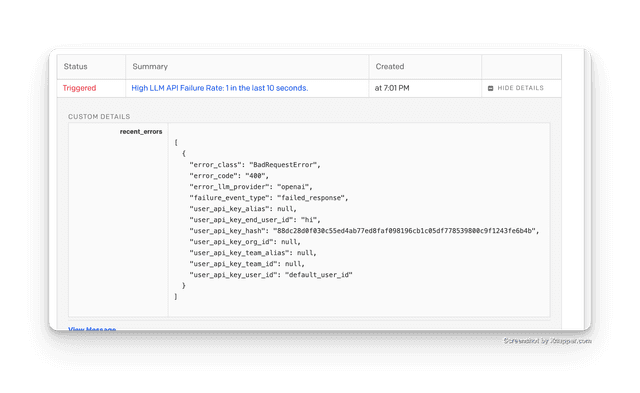
- 高 LLM API 失敗率。設定在 Y 秒內發生 X 次失敗以觸發警示。
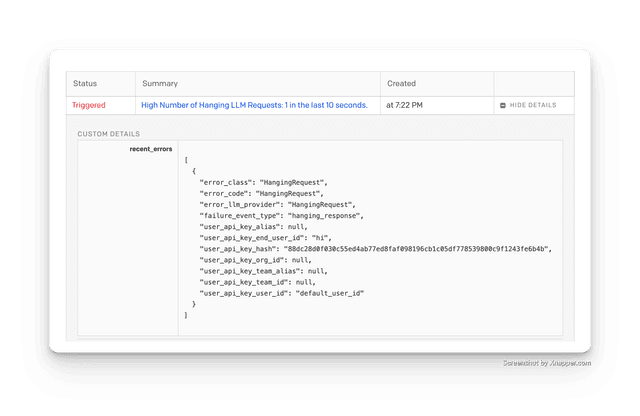
- 高數量的 LLM 請求掛起。設定在 Y 秒內掛起 X 次以觸發警示。
快速入門
- 在您的環境變數中設定
PAGERDUTY_API_KEY="d8bxxxxx"。
PAGERDUTY_API_KEY="d8bxxxxx"
- 在您的設定檔中設定 PagerDuty 警示。
model_list:
  - model_name: "openai/*"
    litellm_params:
      model: "openai/*"
      api_key: os.environ/OPENAI_API_KEY

general_settings:
  alerting: ["pagerduty"]
  alerting_args:
    failure_threshold: 1  # Number of requests failing in a window
    failure_threshold_window_seconds: 10  # Window in seconds

    # Requests hanging threshold
    hanging_threshold_seconds: 0.0000001  # Number of seconds of waiting for a response before a request is considered hanging
    hanging_threshold_window_seconds: 10  # Window in seconds
- 測試它
啟動 LiteLLM Proxy
litellm --config config.yaml
LLM API 失敗警示
嘗試向 proxy 傳送錯誤請求
curl -i --location 'http://0.0.0.0:4000/chat/completions' \
--header 'Content-Type: application/json' \
--header "Authorization: Bearer $LITELLM_API_KEY" \
--data ' {
      "model": "gpt-5.6-terra",
      "user": "hi",
      "messages": [
        {
          "role": "user",
          "bad_param": "i like coffee"
        }
      ]
    }
'
LLM 掛起警示
嘗試向 proxy 傳送掛起請求
由於我們的掛起閾值是 0.0000001 秒,您應該會看到一則警示。
curl -i --location 'http://0.0.0.0:4000/chat/completions' \
--header 'Content-Type: application/json' \
--header "Authorization: Bearer $LITELLM_API_KEY" \
--data ' {
      "model": "gpt-5.6-terra",
      "user": "hi",
      "messages": [
        {
          "role": "user",
          "content": "i like coffee"
        }
      ]
    }
'