Pass-Through 端點上的防護欄
總覽
| 屬性 | 詳細資訊 |
|---|---|
| 說明 | 在 LiteLLM pass-through 端點上啟用防護欄執行,採用 opt-in 啟用並可自動從 org/team/key 層級繼承 |
| 支援的防護欄 | 所有 LiteLLM 防護欄(Bedrock、Aporia、Lakera 等) |
| 預設行為 | 除非明確啟用,否則 pass-through 端點上的防護欄為 停用 |
快速開始
您可以透過 UI(建議)或 設定檔 來設定 pass-through 端點上的防護欄。
使用 UI
1. 前往 Pass-Through Endpoints
前往 Models + Endpoints → 點擊 + Add Pass-Through Endpoint
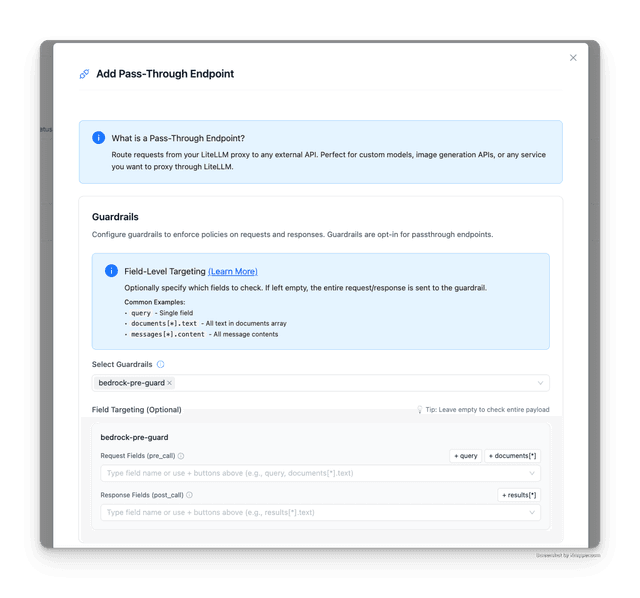
捲動到 Guardrails 區段並選取要強制執行的防護欄。
預設行為
預設情況下,您不需要指定欄位 - LiteLLM 會將整個 request/response payload 轉成 JSON 並傳送給防護欄。
2. 指定特定欄位(選用)
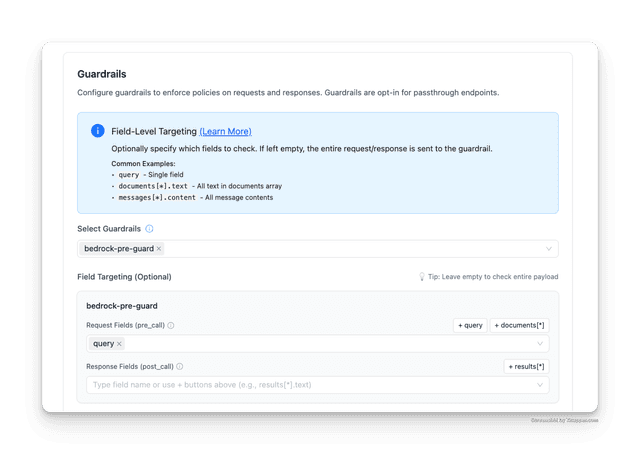
若只要檢查特定欄位而不是整個 payload:
- 選取您的防護欄
- 在 Field Targeting (Optional) 中,為每個防護欄指定欄位
- 使用快速新增按鈕(
+ query、+ documents[*])或輸入自訂 JSONPath expression - Request Fields (pre_call):在傳送至目標 API 前要檢查的欄位
- Response Fields (post_call):要檢查來自目標 API 的回應中的欄位
範例:在上方截圖中,我們將 query 設為 request field,因此只有 query 欄位會被傳送到防護欄,而不是整個 request。
使用設定檔
1. 定義防護欄與 pass-through 端點
config.yaml
guardrails:
  - guardrail_name: "pii-guard"
    litellm_params:
      guardrail: bedrock
      mode: pre_call
      guardrailIdentifier: "your-guardrail-id"
      guardrailVersion: "1"

general_settings:
  pass_through_endpoints:
    - path: "/v1/rerank"
      target: "https://api.cohere.com/v1/rerank"
      headers:
        Authorization: "bearer os.environ/COHERE_API_KEY"
      guardrails:
        pii-guard:
2. 啟動 proxy
litellm --config config.yaml
3. 測試請求
curl -X POST "http://localhost:4000/v1/rerank" \
  -H "Content-Type: application/json" \
  -H "Authorization: Bearer $LITELLM_API_KEY" \
  -d '{
    "model": "rerank-english-v3.0",
    "query": "What is the capital of France?",
    "documents": ["Paris is the capital of France."]
  }'
Opt-In 行為
| 設定 | 行為 |
|---|---|
未設定 guardrails | 不執行任何防護欄(預設) |
已設定 guardrails | 執行所有 org/team/key + pass-through 防護欄 |
啟用防護欄時,系統會收集並執行:
- Org 層級防護欄
- Team 層級防護欄
- Key 層級防護欄
- pass-through 特定防護欄
運作方式
下方圖示說明當用戶端對 /special/rerank 發出請求時會發生什麼事 - 這是一個在您的 config.yaml 中設定了防護欄的 pass-through 端點。
當 pass-through 端點上設定了防護欄時:
- Pre-call guardrails 會在轉送至目標 API 前於 request 上執行
- 若指定了
request_fields(例如["query"]),則只有那些欄位會被傳送到防護欄。否則,會評估整個 request payload。 - 只有在防護欄通過時,request 才會被轉送至目標 API
- Post-call guardrails 會在來自目標 API 的回應上執行
- 若指定了
response_fields(例如["results[*].text"]),則只會評估那些欄位。否則,會檢查整個回應。
資訊
如果您的 pass-through 端點設定中省略或留空 guardrails 區塊,請求會完全跳過防護欄流程,直接送往目標 API。
欄位層級目標指定
指定特定 JSON 欄位,而不是整個 request/response payload。
config.yaml
guardrails:
  - guardrail_name: "pii-detection"
    litellm_params:
      guardrail: bedrock
      mode: pre_call
      guardrailIdentifier: "pii-guard-id"
      guardrailVersion: "1"

  - guardrail_name: "content-moderation"
    litellm_params:
      guardrail: bedrock
      mode: post_call
      guardrailIdentifier: "content-guard-id"
      guardrailVersion: "1"

general_settings:
  pass_through_endpoints:
    - path: "/v1/rerank"
      target: "https://api.cohere.com/v1/rerank"
      headers:
        Authorization: "bearer os.environ/COHERE_API_KEY"
      guardrails:
        pii-detection:
          request_fields: ["query", "documents[*].text"]
        content-moderation:
          response_fields: ["results[*].text"]
欄位選項
| 欄位 | 說明 |
|---|---|
request_fields | input(pre_call)的 JSONPath expression |
response_fields | output(post_call)的 JSONPath expression |
| 兩者皆未指定 | 防護欄會在整個 payload 上執行 |
JSONPath 範例
| 表達式 | 比對 |
|---|---|
query | 名為 query 的單一欄位 |
documents[*].text | text 陣列中的所有 documents 欄位 |
messages[*].content | content 陣列中的所有 messages 欄位 |
設定範例
整個 payload 上的單一防護欄
config.yaml
guardrails:
  - guardrail_name: "pii-detection"
    litellm_params:
      guardrail: bedrock
      mode: pre_call
      guardrailIdentifier: "your-id"
      guardrailVersion: "1"

general_settings:
  pass_through_endpoints:
    - path: "/v1/rerank"
      target: "https://api.cohere.com/v1/rerank"
      guardrails:
        pii-detection:
混合設定的多個防護欄
config.yaml
guardrails:
  - guardrail_name: "pii-detection"
    litellm_params:
      guardrail: bedrock
      mode: pre_call
      guardrailIdentifier: "pii-id"
      guardrailVersion: "1"

  - guardrail_name: "content-moderation"
    litellm_params:
      guardrail: bedrock
      mode: post_call
      guardrailIdentifier: "content-id"
      guardrailVersion: "1"

  - guardrail_name: "prompt-injection"
    litellm_params:
      guardrail: lakera
      mode: pre_call
      api_key: os.environ/LAKERA_API_KEY

general_settings:
  pass_through_endpoints:
    - path: "/v1/rerank"
      target: "https://api.cohere.com/v1/rerank"
      guardrails:
        pii-detection:
          request_fields: ["input", "query"]
        content-moderation:
        prompt-injection:
          request_fields: ["messages[*].content"]

