提示管理
您可以從您的提示管理工具(例如 Langfuse)執行實驗,或變更特定模型(例如從 gpt-5.6-terra 變更為 gpt-5.6-luna finetune),而不是在應用程式中進行變更。
| 支援的整合 | 連結 |
|---|---|
| 原生 LiteLLM GitOps (.prompt files) | 開始使用 |
| Langfuse | 開始使用 |
| Humanloop | 開始使用 |
| 一般提示管理 API | 開始使用 |
透過 config.yaml 上線提示
您可以直接在您的 config.yaml 檔案中上線並初始化提示。這讓您可以:
- 在 proxy 啟動時載入提示
- 將提示與您的 proxy 組態一起作為程式碼進行管理
- 使用任何支援組態上線的提示整合(dotprompt、BitBucket、GitLab、Generic Prompt Management、Arize Phoenix)
基本結構
將 prompts 欄位加入您的 config.yaml:
model_list:
  - model_name: gpt-5.6-terra
    litellm_params:
      model: openai/gpt-5.6-terra
      api_key: os.environ/OPENAI_API_KEY

prompts:
  - prompt_id: "my_prompt_id"
    litellm_params:
      prompt_id: "my_prompt_id"
      prompt_integration: "dotprompt"  # or bitbucket, gitlab, generic_prompt_management, arize_phoenix
      # integration-specific parameters below
了解 prompt_integration
prompt_integration 欄位決定提示的載入位置與方式:
dotprompt:從本機.prompt檔案或內嵌內容載入bitbucket:從 BitBucket 儲存庫.prompt檔案載入(以團隊為基礎的存取控制)gitlab:從 GitLab 儲存庫.prompt檔案載入(以團隊為基礎的存取控制)generic_prompt_management:透過簡單的 API 端點整合任何提示管理系統(不需要 PR)arize_phoenix:從 Arize Phoenix 擷取提示
每個整合都有其各自的組態參數與存取控制機制。任何其他 prompt_integration 值,包括 langfuse 與 custom,都會使 proxy 啟動失敗並出現 ValueError: Unsupported prompt: <value>。Langfuse 提示會透過具有 prompt_id 的 langfuse/ 模型使用(請參閱 快速開始),而自訂提示管理工具則註冊為 callbacks(請參閱 自訂提示管理)
支援的整合
- DotPrompt(檔案型)
- BitBucket
- GitLab
- 一般提示管理
選項 1:使用 .prompt 檔案
將每個項目指向單一檔案並使用 prompt_file,或省略它以從 litellm_settings.global_prompt_directory 載入 <prompt_id>.prompt。每個提示的 prompt_directory 都會在啟動時遭到拒絕並出現 ValueError: Cannot set prompt_directory when working with prompt_initializer
prompts:
  - prompt_id: "hello"
    litellm_params:
      prompt_id: "hello"
      prompt_integration: "dotprompt"
      prompt_file: "./prompts/hello.prompt"  # Path to a single .prompt file

  - prompt_id: "goodbye"
    litellm_params:
      prompt_id: "goodbye"
      prompt_integration: "dotprompt"  # Loads ./prompts/goodbye.prompt from global_prompt_directory

litellm_settings:
  global_prompt_directory: "./prompts"  # Global setting for all dotprompt integrations
選項 2:使用內嵌提示資料
prompts:
  - prompt_id: "my_inline_prompt"
    litellm_params:
      prompt_id: "my_inline_prompt"
      prompt_integration: "dotprompt"
      prompt_data:
        my_inline_prompt:
          content: "Hello {{name}}! How can I help you with {{topic}}?"
          metadata:
            model: "gpt-5.6-terra"
            temperature: 0.7
            max_tokens: 150
選項 3:使用 dotprompt_content 處理單一提示
prompts:
  - prompt_id: "simple_prompt"
    litellm_params:
      prompt_id: "simple_prompt"
      prompt_integration: "dotprompt"
      dotprompt_content: |
        ---
        model: gpt-5.6-terra
        temperature: 0.7
        ---
        System: You are a helpful assistant.

        User: {{user_message}}
在您的提示目錄中建立 .prompt 檔案:
# prompts/hello.prompt
---
model: gpt-5.6-terra
temperature: 0.7
---
System: You are a helpful assistant.

User: {{user_message}}
prompts:
  - prompt_id: "my_bitbucket_prompt"
    litellm_params:
      prompt_id: "my_bitbucket_prompt"
      prompt_integration: "bitbucket"
      bitbucket_workspace: "your-workspace"
      bitbucket_repository: "your-repo"
      bitbucket_access_token: "os.environ/BITBUCKET_ACCESS_TOKEN"
      bitbucket_branch: "main"  # optional, defaults to main

litellm_settings:
  global_bitbucket_config:
    workspace: "your-workspace"
    repository: "your-repo"
    access_token: "os.environ/BITBUCKET_ACCESS_TOKEN"
    branch: "main"
您的 BitBucket 儲存庫應包含 .prompt 檔案:
# prompts/my_bitbucket_prompt.prompt
---
model: gpt-5.6-terra
temperature: 0.7
---
System: You are a helpful assistant.

User: {{user_message}}
prompts:
  - prompt_id: "my_gitlab_prompt"
    litellm_params:
      prompt_id: "my_gitlab_prompt"
      prompt_integration: "gitlab"
      gitlab_project: "group/sub/repo"
      gitlab_access_token: "os.environ/GITLAB_ACCESS_TOKEN"
      gitlab_branch: "main"  # optional
      gitlab_prompts_path: "prompts"  # optional, defaults to root

litellm_settings:
  global_gitlab_config:
    project: "group/sub/repo"
    access_token: "os.environ/GITLAB_ACCESS_TOKEN"
    branch: "main"
您的 GitLab 儲存庫應包含 .prompt 檔案:
# prompts/my_gitlab_prompt.prompt
---
model: gpt-5.6-terra
temperature: 0.7
---
System: You are a helpful assistant.

User: {{user_message}}
prompts:
  - prompt_id: "simple_prompt"
    litellm_params:
      prompt_integration: "generic_prompt_management"
      provider_specific_query_params:
        project_name: litellm
        slug: hello-world-prompt-2bac
      api_base: http://localhost:8080
      api_key: os.environ/GENERIC_PROMPT_API_KEY
      ignore_prompt_manager_model: true  # optional
      ignore_prompt_manager_optional_params: true  # optional
您需要實作的內容:
在 /beta/litellm_prompt_management 提供一個 GET 端點,回傳:
{
  "prompt_id": "simple_prompt",
  "prompt_template": [
    {
      "role": "system",
      "content": "You are a helpful assistant."
    },
    {
      "role": "user",
      "content": "Help me with {task}"
    }
  ],
  "prompt_template_model": "gpt-5.6-terra",
  "prompt_template_optional_params": {
    "temperature": 0.7,
    "max_tokens": 500
  }
}
優點:
- 不需要 PR - 可整合任何提示管理系統
- 完全掌控您的提示儲存與版本控管
- 支援使用
{variable}語法進行變數替換 - 用於篩選與存取控制的自訂查詢參數
深入了解: 一般提示管理 API 文件
完整範例
這裡有一個展示多個提示的完整範例:
model_list:
  - model_name: gpt-5.6-terra
    litellm_params:
      model: openai/gpt-5.6-terra
      api_key: os.environ/OPENAI_API_KEY

prompts:
  # File-based dotprompt
  - prompt_id: "coding_assistant"
    litellm_params:
      prompt_id: "coding_assistant"
      prompt_integration: "dotprompt"
      prompt_file: "./prompts/coding_assistant.prompt"

  # Inline dotprompt
  - prompt_id: "simple_chat"
    litellm_params:
      prompt_id: "simple_chat"
      prompt_integration: "dotprompt"
      prompt_data:
        simple_chat:
          content: "You are a {{personality}} assistant. User: {{message}}"
          metadata:
            model: "gpt-5.6-terra"
            temperature: 0.8

litellm_settings:
  global_prompt_directory: "./prompts"
運作方式
- 在啟動時:代理程式啟動時,會從
prompts讀取config.yaml欄位 - 初始化:每個提示都會根據其
prompt_integration類型進行初始化 - 記憶體內儲存:提示會儲存在
IN_MEMORY_PROMPT_REGISTRY中 - 存取:透過
/v1/chat/completions或/v1/responses搭配請求中的prompt_id使用這些提示
使用從組態載入的提示
透過 config.yaml 載入提示後,請在您的 API 請求中使用它們:
curl -L -X POST 'http://0.0.0.0:4000/v1/chat/completions' \
-H 'Content-Type: application/json' \
-H "Authorization: Bearer $LITELLM_API_KEY" \
-d '{
    "model": "gpt-5.6-terra",
    "prompt_id": "coding_assistant",
    "prompt_variables": {
        "language": "python",
        "task": "create a web scraper"
    }
}'
您也可以在 Responses API 中使用相同的 prompt_id:
curl -L -X POST 'http://0.0.0.0:4000/v1/responses' \
-H 'Content-Type: application/json' \
-H "Authorization: Bearer $LITELLM_API_KEY" \
-d '{
    "model": "gpt-5.6-terra",
    "prompt_id": "coding_assistant",
    "prompt_variables": {
        "language": "python",
        "task": "create a web scraper"
    },
    "input": []
}'
提示結構參考
prompts 清單中的每個提示都需要:
prompt_id(字串,必填):提示的唯一識別碼litellm_params(物件,必填):提示的組態prompt_id(字串,必填):必須與最上層的 prompt_id 相符prompt_integration(字串,必填):下列之一:dotprompt、bitbucket、gitlab、generic_prompt_management、arize_phoenix- 其他特定整合的參數(請見上方分頁)
prompt_info(物件,選填):關於提示的中繼資料prompt_type(字串):對於從組態載入的提示,預設為"config"
注意事項
- 從組態載入的提示具有
prompt_type: "config",且 無法 透過 API 更新 - 若要更新組態提示,請修改您的
config.yaml並重新啟動代理程式 - 若要使用可透過 API 更新的動態提示,請改用
/prompts端點 - 所有支援的整合都可與從組態載入的提示一起使用
快速開始
- SDK
- PROXY
import os
import litellm

os.environ["LANGFUSE_PUBLIC_KEY"] = "public_key" # [OPTIONAL] set here or in `.completion`
os.environ["LANGFUSE_SECRET_KEY"] = "secret_key" # [OPTIONAL] set here or in `.completion`

litellm.set_verbose = True # see raw request to provider

resp = litellm.completion(
    model="langfuse/gpt-5.6-luna",
    prompt_id="test-chat-prompt",
    prompt_variables={"user_message": "this is used"}, # [OPTIONAL]
    messages=[{"role": "user", "content": "<IGNORED>"}],
)
- 設定 config.yaml
model_list:
  - model_name: my-langfuse-model
    litellm_params:
      model: langfuse/openai-model
      prompt_id: "<langfuse_prompt_id>"
      api_key: os.environ/OPENAI_API_KEY
  - model_name: openai-model
    litellm_params:
      model: openai/gpt-5.6-luna
      api_key: os.environ/OPENAI_API_KEY
- 啟動代理程式
litellm --config config.yaml --detailed_debug
- 測試看看!
- CURL
- OpenAI Python SDK
curl -L -X POST 'http://0.0.0.0:4000/v1/chat/completions' \
-H 'Content-Type: application/json' \
-H "Authorization: Bearer $LITELLM_API_KEY" \
-d '{
    "model": "my-langfuse-model",
    "messages": [
        {
            "role": "user",
            "content": "THIS WILL BE IGNORED"
        }
    ],
    "prompt_variables": {
        "key": "this is used"
    }
}'
import openai
client = openai.OpenAI(
    api_key="anything",
    base_url="http://0.0.0.0:4000"
)

# request sent to model set on litellm proxy, `litellm --model`
response = client.chat.completions.create(
    model="gpt-5.6-luna",
    messages = [
        {
            "role": "user",
            "content": "this is a test request, write a short poem"
        }
    ],
    extra_body={
        "prompt_variables": { # [OPTIONAL]
            "key": "this is used"
        }
    }
)

print(response)
預期記錄:
POST Request Sent from LiteLLM:
curl -X POST \
https://api.openai.com/v1/ \
-d '{'model': 'gpt-5.6-luna', 'messages': <YOUR LANGFUSE PROMPT TEMPLATE>}'
如何設定模型
在 LiteLLM 上設定模型
您可以做到 langfuse/<litellm_model_name>
- SDK
- PROXY
litellm.completion(
    model="langfuse/gpt-5.6-luna", # or `langfuse/anthropic/claude-sonnet-5`
    # ...
)
model_list:
  - model_name: gpt-5.6-luna
    litellm_params:
      model: langfuse/gpt-5.6-luna # OR langfuse/anthropic/claude-sonnet-5
      prompt_id: <langfuse_prompt_id>
      api_key: os.environ/OPENAI_API_KEY
在 Langfuse 中設定模型
如果在 Langfuse 組態中指定了模型,將會使用該模型。
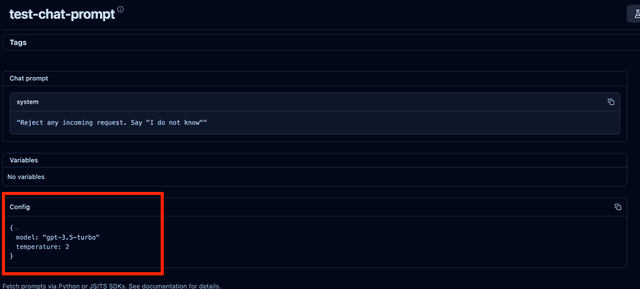
model_list:
  - model_name: gpt-5.6-luna
    litellm_params:
      model: azure/chatgpt-v-2
      api_key: os.environ/AZURE_API_KEY
      api_base: os.environ/AZURE_API_BASE
什麼是 'prompt_variables'?
prompt_variables:一個字典,內含將用來取代提示部分內容的變數。
什麼是 'prompt_id'?
prompt_id:將用於請求的提示 ID。
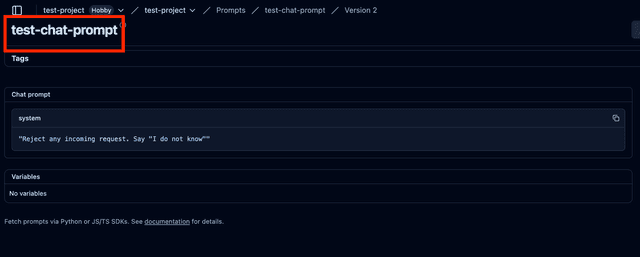
格式化後的提示會是什麼樣子?
/chat/completions 訊息
用戶端傳入的 messages 欄位會被忽略。
Langfuse 提示會取代 messages 欄位。
若要取代提示中的部分內容,請使用 prompt_variables 欄位。查看如何使用提示變數
如果 Langfuse 提示是字串,將會以使用者訊息傳送(並非所有提供者都支援系統訊息)。
如果 Langfuse 提示是清單,將會照原樣傳送(Langfuse 聊天提示與 OpenAI 相容)。
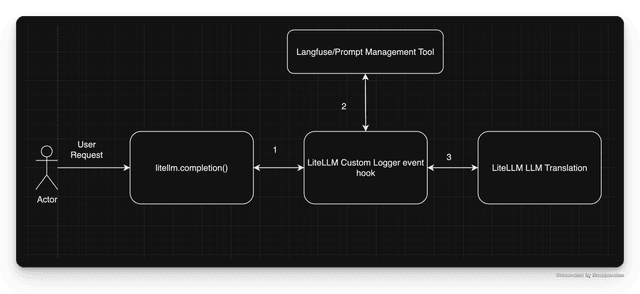
架構總覽
API 參考
以下是您可傳遞給 SDK 中 litellm.completion 函式以及 config.yaml 中 litellm_params 的參數
prompt_id: str # required
prompt_variables: Optional[dict] # optional
prompt_version: Optional[int] # optional
langfuse_public_key: Optional[str] # optional
langfuse_secret: Optional[str] # optional
langfuse_secret_key: Optional[str] # optional
langfuse_host: Optional[str] # optional

