內部使用者自助服務
允許使用者在 Proxy UI 上建立自己的金鑰。
- 將具有權限的使用者新增至 proxy 的團隊
- UI
- API
前往 Internal Users -> +New User
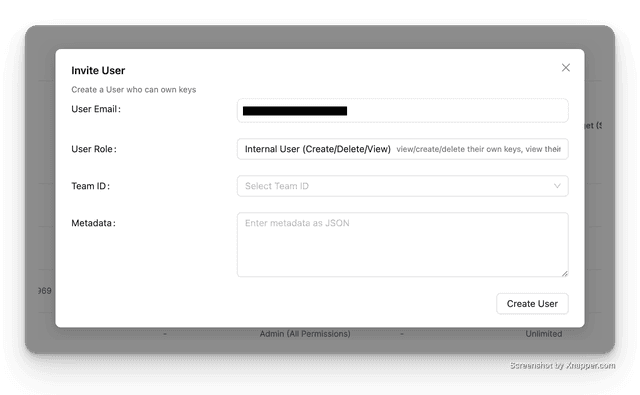
在 LiteLLM 中建立一個新的內部使用者,並將其指派角色 internal_user。
curl -X POST '<PROXY_BASE_URL>/user/new' \
-H 'Authorization: Bearer <PROXY_MASTER_KEY>' \
-H 'Content-Type: application/json' \
-D '{
    "user_email": "krrishdholakia@gmail.com",
    "user_role": "internal_user" # 👈 THIS ALLOWS USER TO CREATE/VIEW/DELETE THEIR OWN KEYS + SEE THEIR SPEND
}'
預期回應
{
    "user_id": "e9d45c7c-b20b-4ff8-ae76-3f479a7b1d7d", 👈 USE IN STEP 2
    "user_email": "<YOUR_USERS_EMAIL>",
    "user_role": "internal_user",
    ...
}
以下是 LiteLLM 內部使用者可用的 UI 角色:
管理員角色:
proxy_admin:平台管理員proxy_admin_viewer:可登入、檢視所有金鑰、檢視所有支出。不能建立/刪除金鑰、加入新使用者。
內部使用者角色:
internal_user:可登入、檢視/建立/刪除自己的金鑰、檢視自己的支出。不能加入新使用者。internal_user_viewer:可登入、檢視自己的金鑰、檢視自己的支出。不能建立/刪除金鑰、加入新使用者。
- 與使用者分享邀請連結
- UI
- API
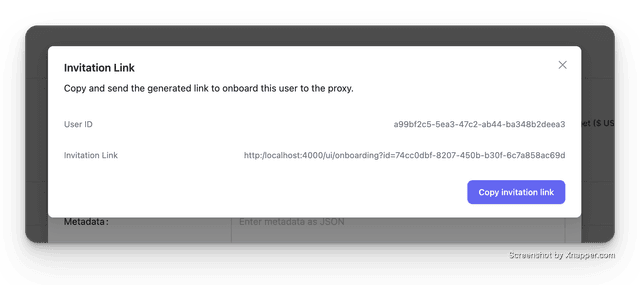
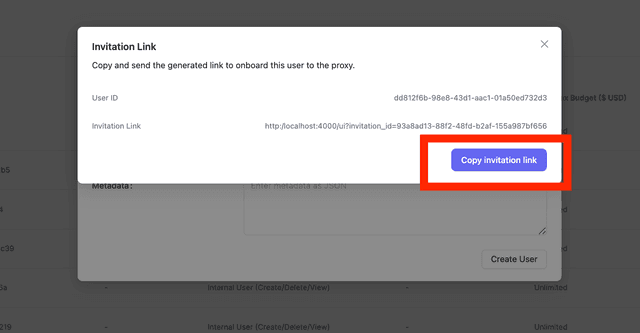
將邀請連結複製給使用者
curl -X POST '<PROXY_BASE_URL>/invitation/new' \
-H 'Authorization: Bearer <PROXY_MASTER_KEY>' \
-H 'Content-Type: application/json' \
-D '{
    "user_id": "e9d45c7c-b20b..." # 👈 USER ID FROM STEP 1
}'
預期回應
{
    "id": "a2f0918f-43b0-4770-a664-96ddd192966e",
    "user_id": "e9d45c7c-b20b..",
    "is_accepted": false,
    "accepted_at": null,
    "expires_at": "2024-06-13T00:02:16.454000Z", # 👈 VALID FOR 7d
    "created_at": "2024-06-06T00:02:16.454000Z",
    "created_by": "116544810872468347480",
    "updated_at": "2024-06-06T00:02:16.454000Z",
    "updated_by": "116544810872468347480"
}
邀請連結:
http://0.0.0.0:4000/ui/onboarding?id=a2f0918f-43b0-4770-a664-96ddd192966e

# <YOUR_PROXY_BASE_URL>/ui/onboarding?id=<id>
使用 電子郵件通知 將上線連結寄送給使用者
- 使用者透過電子郵件 + 密碼驗證登入
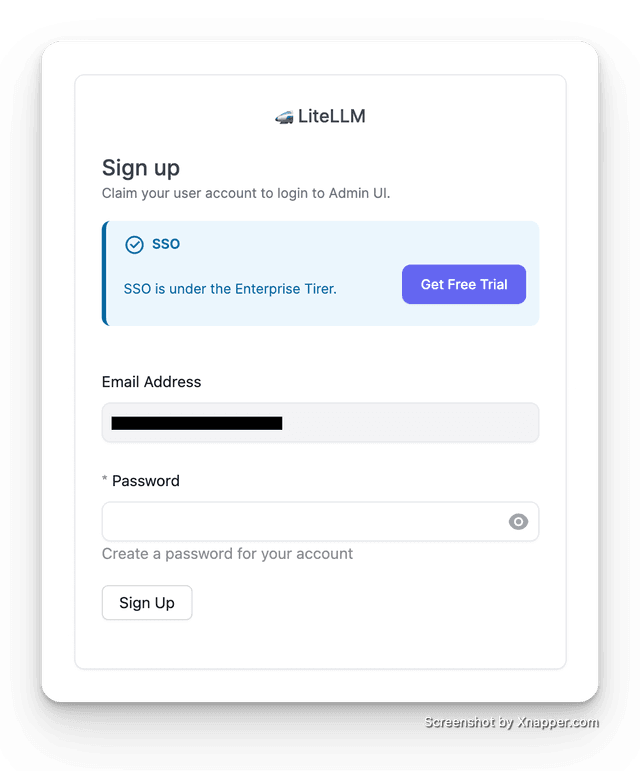
LiteLLM Enterprise:啟用 SSO 登入
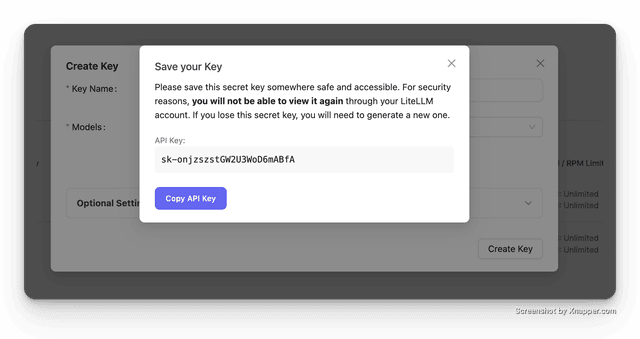
- 使用者現在可以建立自己的金鑰
允許使用者檢視使用量、快取分析
- 前往 Internal Users -> +Invite User
將其角色設定為 Admin Viewer - 這表示他們只能檢視使用量、快取分析
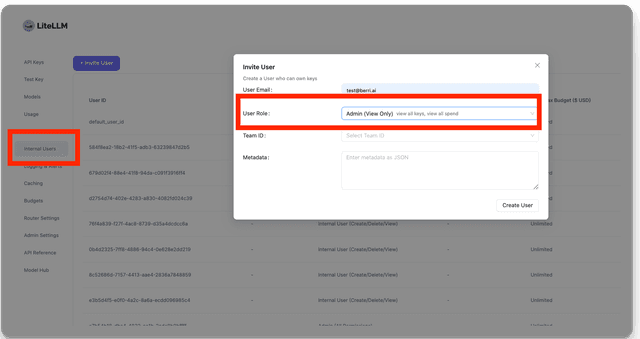
- 與使用者分享邀請連結
- 使用者透過電子郵件 + 密碼驗證登入
- 使用者現在可以檢視使用量、快取分析
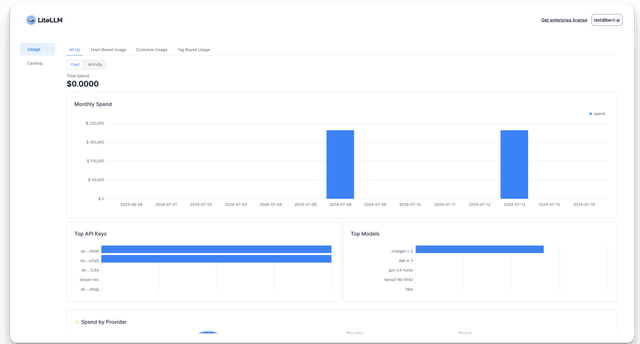
可用角色
以下是 LiteLLM 內部使用者可用的 UI 角色:
管理員角色:
proxy_admin:平台管理員proxy_admin_viewer:可登入、檢視所有金鑰、檢視所有支出。不能建立/刪除金鑰、加入新使用者。
內部使用者角色:
internal_user:可登入、檢視/建立/刪除自己的金鑰、檢視自己的支出。不能加入新使用者。internal_user_viewer:可登入、檢視自己的金鑰、檢視自己的支出。不能建立/刪除金鑰、加入新使用者。
團隊角色:
admin:可將新成員加入團隊、可控制團隊權限、可新增僅限團隊的模型(適合用於讓團隊的微調模型完成上線)。user:可登入、檢視自己的金鑰、檢視自己的支出。不能建立/刪除金鑰(可透過團隊權限控制)、加入新使用者。
自動將 SSO 使用者加入團隊
本節說明如何為 Okta、Google SSO 設定 SSO 自動加入
Okta、Google SSO
- 指定包含使用者所屬團隊 id 的 JWT 欄位。
general_settings:
  master_key: os.environ/LITELLM_MASTER_KEY
  litellm_jwtauth:
    team_ids_jwt_field: "groups" # 👈 CAN BE ANY FIELD
這是假設您的 SSO token 看起來像這樣。如果您需要檢查 LiteLLM 從您的 SSO 提供者收到的 JWT 欄位,請依照這裡的說明操作 這裡
{
  ...,
  "groups": ["team_id_1", "team_id_2"]
}
- 在 LiteLLM 上建立團隊
curl -X POST '<PROXY_BASE_URL>/team/new' \
-H 'Authorization: Bearer <PROXY_MASTER_KEY>' \
-H 'Content-Type: application/json' \
-D '{
    "team_alias": "team_1",
    "team_id": "team_id_1" # 👈 MUST BE THE SAME AS THE SSO GROUP ID
}'
- 測試 SSO 流程
這裡有一個關於 其運作方式 的導覽
Microsoft Entra ID SSO 群組指派
請參閱這份 使用 Microsoft Entra ID 自動將 sso 使用者新增至團隊的教學
偵錯 SSO JWT 欄位
進階
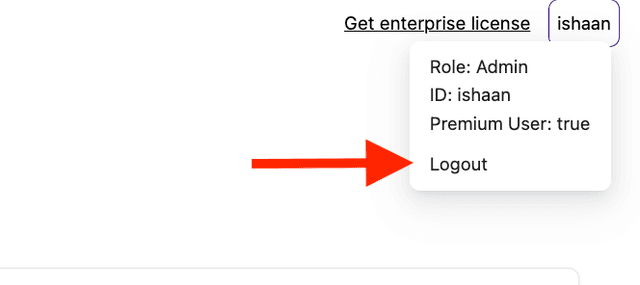
設定自訂登出 URL
如果您希望使用者按一下登出時重新導向到特定 URL,請在您的 .env 中設定 PROXY_LOGOUT_URL
export PROXY_LOGOUT_URL="https://www.google.com"
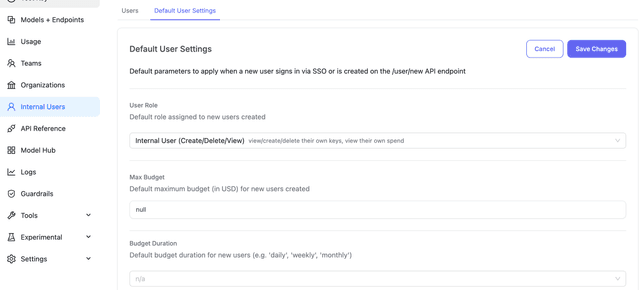
為內部使用者設定預設最大預算
在內部使用者註冊時,自動套用每位使用者的預算。預設情況下,系統會每 10 分鐘檢查一次表格,以便讓使用者重設。若要修改此設定,請 參閱這裡
litellm_settings:
  max_internal_user_budget: 10
  internal_user_budget_duration: "1mo" # reset every month
這會在內部使用者註冊時,為其設定 10 美元的最大預算。
您也可以在 UI 中以視覺化方式管理這些設定:
此預算僅適用於該使用者建立的個人金鑰 - 在 UI 上可於 Default Team 下看到。
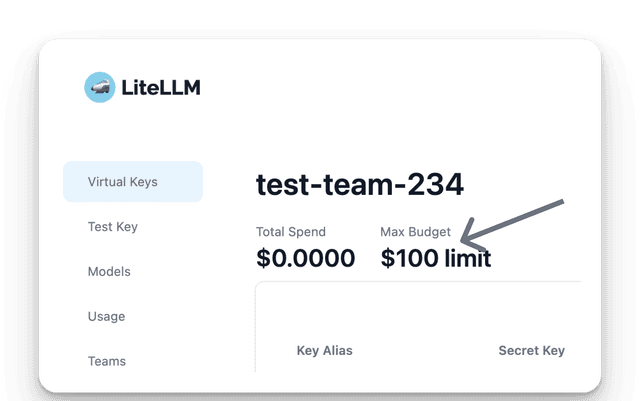
此預算不適用於在非預設團隊下建立的金鑰。
使用者的個人 max_budget 也是他們從 UI 建立的個人金鑰上限。擁有 $500 預算的使用者可以建立一個 max_budget 為 $100 的個人金鑰,而 $600 的請求會以 max_budget (600.0) cannot exceed the caller's own max_budget (500.0) 被拒絕。沒有個人預算的使用者會退回到 UI 工作階段預算(max_ui_session_budget,預設為 $1;null 會移除此上限)作為明確金鑰 max_budget 的上限。將 max_budget 留空不會為該金鑰設定金鑰層級上限;該金鑰上的支出仍受使用者自身預算限制。透過 max_budget、/user/update,或 Internal Users 頁面變更使用者的 /user/bulk_update 會立即在處理該更新的執行個體上生效。若已設定 Redis,變更也會廣播到其他 proxy 執行個體;若未設定 Redis,其他執行個體仍可能持續套用先前的上限,直到其快取的使用者記錄過期(約 60 秒)
為團隊設定最大預算
預設團隊
- UI
- YAML
前往 Internal Users -> Default User Settings,並將預設團隊設定為您剛建立的團隊。
我們也來將預設模型設定為 no-default-models。這表示使用者只能在團隊內建立金鑰。
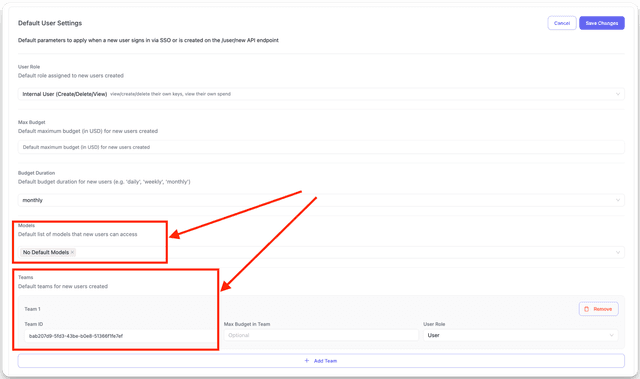
必須先建立團隊,才能將其設定為預設團隊。
litellm_settings:
  default_internal_user_params:    # Default Params used when a new user signs in Via SSO
      user_role: "internal_user"     # one of "internal_user", "internal_user_viewer",
      models: ["no-default-models"] # Optional[List[str]], optional): models to be used by the user
      teams: # Optional[List[NewUserRequestTeam]], optional): teams to be used by the user
        - team_id: "team_id_1" # Required[str]: team_id to be used by the user
          user_role: "user" # Optional[str], optional): Default role in the team. Values: "user" or "admin". Defaults to "user"
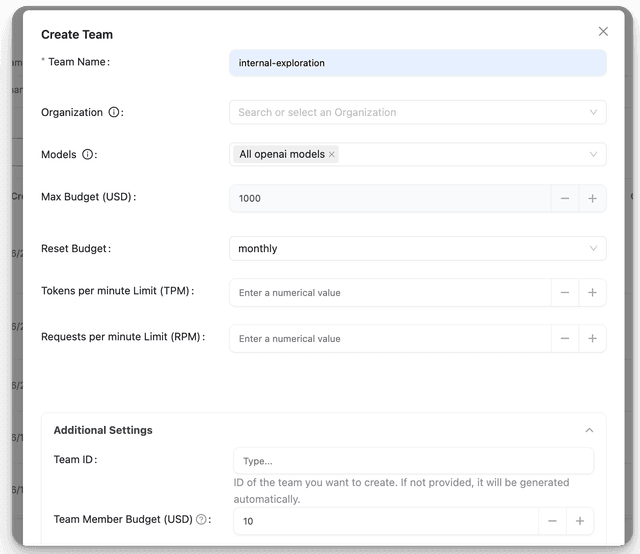
團隊成員預算
設定適用於團隊每位成員的預設最高預算。
您可以在建立新團隊時設定,或透過更新現有團隊來設定。
team_member_budget 是單一的團隊層級預設值。新增且未設定自身 max_budget_in_team 的每位成員都會連結到它,因此透過 /team/update(或 UI 中團隊的 Default Budget 欄位)變更它,會在那些成員的下一個請求時套用,而不只是套用到之後新增的成員。若成員在 /team/member_add 上被指定 max_budget_in_team,或之後透過 /team/member_update 編輯,則會取得自己的預算並停止跟隨團隊預設值
- UI
- API
curl -X POST '<PROXY_BASE_URL>/team/new' \
-H 'Authorization: Bearer <PROXY_MASTER_KEY>' \
-H 'Content-Type: application/json' \
-D '{
    "team_alias": "team_1",
    "budget_duration": "10d",
    "team_member_budget": 10
}'
在既有團隊上設定 team_member_budget 會將其連結到每位尚未有預算的成員,而那些成員已累積的支出會立即計入其中。請參閱 Existing spend counts against a budget added later,了解如何解除已超過新預算之成員的限制。
團隊成員速率限制
為單一團隊成員設定預設 tpm/rpm 限制。
您可以在建立新團隊時設定,或透過更新現有團隊來設定。
- UI
- API
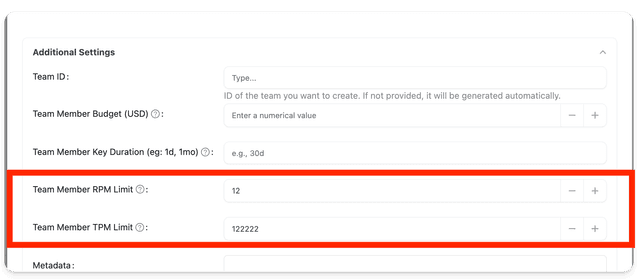
curl -X POST '<PROXY_BASE_URL>/team/new' \
-H 'Authorization: Bearer <PROXY_MASTER_KEY>' \
-H 'Content-Type: application/json' \
-D '{
    "team_alias": "team_1",
    "team_member_rpm_limit": 100,
    "team_member_tpm_limit": 1000
}'
為新團隊設定預設參數
當您將 litellm 連接到您的 SSO 提供者時,litellm 可以自動建立團隊。請使用此功能為這些自動建立的團隊設定預設的 models、max_budget、budget_duration。
運作方式
- 當 litellm 從您的 SSO 提供者擷取
groups時,它會檢查對應的 group_id 是否存在於 litellm 中,作為team_id。 - 如果 team_id 不存在,litellm 會使用您設定的預設參數自動建立團隊。
- 如果 team_id 已存在,litellm 不會對該團隊套用任何設定。
使用方式
litellm_settings:
  default_team_params:             # Applied to all /team/new calls (including SSO auto-created teams) when the field is omitted or null; an explicit budget_duration: null is honored
    max_budget: 100                # Optional[float]: $100 budget for the team
    budget_duration: 30d           # Optional[str]: 30 days budget_duration for the team
    models: ["gpt-5.6-luna"]      # Optional[List[str]]: models for the team (only applied to SSO auto-created teams)
    tpm_limit: 100000              # Optional[int]: tokens per minute limit
    rpm_limit: 1000                # Optional[int]: requests per minute limit
    team_member_permissions:       # Optional[List[str]]: permissions granted to non-admin team members
      - "/team/daily/activity"     # Allow members to view team usage
      - "/key/generate"            # Allow members to generate API keys
這些預設值會填入 /team/new 請求中任何缺少或 null 的欄位。budget_duration 是唯一的例外:送出明確的 "budget_duration": null(UI 建立表單中的「Never resets」選項)會建立一個預算永不重置的團隊,並略過已設定的預設值。
限制使用者建立個人金鑰
如果您只想讓使用者在特定團隊下建立金鑰,這會很有用。
這也會防止使用者在測試金鑰聊天窗格中使用其 session token。
👉 看這裡
所有自助服務 / SSO 流程設定
litellm_settings:
  max_internal_user_budget: 10        # max budget for internal users
  internal_user_budget_duration: "1mo" # reset every month

  default_internal_user_params:    # Default Params used when a new user signs in Via SSO
    user_role: "internal_user"     # one of "internal_user", "internal_user_viewer", "proxy_admin", "proxy_admin_viewer". New SSO users not in litellm will be created as this user
    max_budget: 100                # Optional[float], optional): $100 budget for a new SSO sign in user
    budget_duration: 30d           # Optional[str], optional): 30 days budget_duration for a new SSO sign in user
    models: ["gpt-5.6-luna"]      # Optional[List[str]], optional): models to be used by a new SSO sign in user
    teams: # Optional[List[NewUserRequestTeam]], optional): teams to be used by the user
      - team_id: "team_id_1" # Required[str]: team_id to be used by the user
        max_budget_in_team: 100 # Optional[float], optional): $100 budget for the team. Defaults to None.
        user_role: "user" # Optional[str], optional): "user" or "admin". Defaults to "user"

  default_team_params:             # Applied to all /team/new calls (including SSO auto-created teams) when the field is omitted or null; an explicit budget_duration: null is honored
    max_budget: 100                # Optional[float]: $100 budget for the team
    budget_duration: 30d           # Optional[str]: 30 days budget_duration for the team
    models: ["gpt-5.6-luna"]      # Optional[List[str]]: models for the team (only applied to SSO auto-created teams)
    tpm_limit: 100000              # Optional[int]: tokens per minute limit
    rpm_limit: 1000                # Optional[int]: requests per minute limit
    team_member_permissions:       # Optional[List[str]]: permissions granted to non-admin team members
      - "/team/daily/activity"


  upperbound_key_generate_params:    # Upperbound for /key/generate requests when self-serve flow is on
    max_budget: 100 # Optional[float], optional): upperbound of $100, for all /key/generate requests
    budget_duration: "10d" # Optional[str], optional): upperbound of 10 days for budget_duration values
    duration: "30d" # Optional[str], optional): upperbound of 30 days for all /key/generate requests
    max_parallel_requests: 1000 # (Optional[int], optional): Max number of requests that can be made in parallel. Defaults to None.
    tpm_limit: 1000 #(Optional[int], optional): Tpm limit. Defaults to None.
    rpm_limit: 1000 #(Optional[int], optional): Rpm limit. Defaults to None.

  key_generation_settings: # Restricts who can generate keys. [Further docs](./virtual_keys.md#restricting-key-generation)
    team_key_generation:
      allowed_team_member_roles: ["admin"]
    personal_key_generation: # maps to 'Default Team' on UI
      allowed_user_roles: ["proxy_admin"]

