服務帳戶
如果您想建立不屬於特定使用者、而是為正式環境專案建立的 Virtual Keys,請使用此功能
為什麼要使用服務帳戶金鑰?
- 防止使用者被刪除時,金鑰也被刪除。
- 對金鑰套用團隊限制,而不是團隊成員限制。
服務帳戶與一般金鑰
| 功能 | 一般金鑰 | 服務帳戶金鑰 |
|---|---|---|
user_id | 選填 | 一律 null |
team_id | 選填 | 必填 |
| 套用的限制 | 使用者 + 團隊限制 | 僅團隊限制 |
| 使用者被刪除時,金鑰也會被刪除嗎? | 是 | 否 — 會保留 |
中的 service_account_id metadata | 未設定 | 一旦設定即不可變更 |
team_member_key_duration | 繼承 | 不繼承 |
預算與限制
服務帳戶金鑰會在團隊層級套用預算和速率限制,而不是針對個別使用者或個別金鑰成員。
- 在金鑰本身上設定
max_budget、tpm_limit、rpm_limit,或從團隊繼承。 team_member_key_duration(一項控制團隊成員金鑰有效期長度的企業功能)不適用於服務帳戶金鑰。
使用方式
使用 /key/service-account/generate 端點來產生服務帳戶金鑰。
curl -L -X POST 'http://localhost:4000/key/service-account/generate' \
-H "Authorization: Bearer $LITELLM_API_KEY" \
-H 'Content-Type: application/json' \
-d '{
    "team_id": "my-unique-team"
}'
service_account_id 欄位
您可以選擇在 service_account_id 中提供 metadata,為金鑰提供穩定、可供人類閱讀的識別碼:
curl -L -X POST 'http://localhost:4000/key/service-account/generate' \
-H "Authorization: Bearer $LITELLM_API_KEY" \
-H 'Content-Type: application/json' \
-d '{
    "team_id": "my-unique-team",
    "metadata": {
        "service_account_id": "my-ci-pipeline"
    }
}'
不可變更規則。 一旦 service_account_id 設定完成,就無法變更:
| 操作 | 結果 |
|---|---|
| 以不同值覆寫 | 400 錯誤 |
明確設定為 null | 400 錯誤 |
傳送 metadata: null(會將其清除) | 400 錯誤 |
更新時完全省略 metadata | 安全 — 既有值會保留 |
| 重新傳送相同值 | 允許(無操作) |
範例 - 針對所有服務帳戶請求要求 user 參數
1. 為服務帳戶設定設定
如果您想建立只適用於服務帳戶金鑰的設定,請設定 service_account_settings
general_settings:
    service_account_settings:
        enforced_params: ["user"] # this means the "user" param is enforced for all requests made through any service account keys
2. 在 LiteLLM Proxy Admin UI 建立服務帳戶金鑰
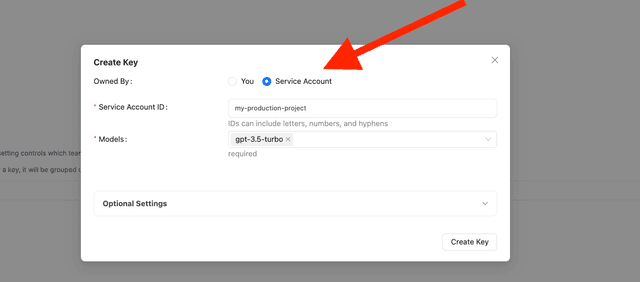
3. 測試服務帳戶金鑰
- Unsuccessful call
- Successful call
curl --location 'http://localhost:4000/chat/completions' \
    --header 'Authorization: Bearer <sk-your-service-account>' \
    --header 'Content-Type: application/json' \
    --data '{
    "model": "gpt-5.6-luna",
    "messages": [
        {
        "role": "user",
        "content": "hello"
        }
    ]
}'
預期回應
{
  "error": {
    "message": "BadRequest please pass param=user in request body. This is a required param for service account",
    "type": "bad_request_error",
    "param": "user",
    "code": "400"
  }
}
curl --location 'http://localhost:4000/chat/completions' \
    --header 'Authorization: Bearer <sk-your-service-account>' \
    --header 'Content-Type: application/json' \
    --data '{
    "model": "gpt-5.6-luna",
    "messages": [
        {
        "role": "user",
        "content": "hello"
        }
    ],
    "user": "test-user"
}'
預期回應
{
  "id": "chatcmpl-ad9595c7e3784a6783b469218d92d95c",
  "choices": [
    {
      "finish_reason": "stop",
      "index": 0,
      "message": {
        "content": "\n\nHello there, how may I assist you today?",
        "role": "assistant",
        "tool_calls": null,
        "function_call": null
      }
    }
  ],
  "created": 1677652288,
  "model": "gpt-5.6-luna",
  "object": "chat.completion",
  "system_fingerprint": "fp_44709d6fcb",
  "usage": {
    "completion_tokens": 12,
    "prompt_tokens": 9,
    "total_tokens": 21,
    "completion_tokens_details": null
  },
  "service_tier": null
}

