設定標籤預算
使用標籤追蹤支出並為您的 API 請求設定預算。標籤可讓您跨不同成本中心、專案與部門分類並監控成本。
前置條件
- 您必須先設定 Postgres 資料庫(例如 Supabase、Neon 等)
什麼是標籤?
標籤是您可以附加到 LLM 請求上的標記,用於依類別追蹤並限制支出。
常見使用情境:
- 成本中心追蹤:將 LLM 成本分配給特定部門或業務單位(例如「engineering」、「marketing」、「customer-support」)
- 專案式預算管理:為不同專案或計畫設定預算(例如「project-alpha」、「chatbot-v2」)
- 客戶歸屬:追蹤每位客戶或用戶端的支出(例如「customer-acme」、「customer-techcorp」)
- 功能監控:監控特定功能的成本(例如「feature-chat」、「feature-summarization」)
標籤可在每次請求時設定(在 metadata 中或透過 x-litellm-tags),或附加到虛擬金鑰,如此每個使用該金鑰的請求都會自動繼承該標籤及其預算限制。
設定標籤預算
1. 建立具有預算的標籤
建立一個標籤來代表成本中心、專案或任何預算類別。設定 max_budget(可使用 $ 金額)與 budget_duration(預算重設的頻率)。
範例: 為您的工程部門建立一個每月 500 美元預算的標籤
API
建立新標籤並設定 max_budget 與 budget_duration
curl -X POST 'http://0.0.0.0:4000/tag/new' \
     -H "Authorization: Bearer $LITELLM_API_KEY" \
     -H 'Content-Type: application/json' \
     -d '{
            "name": "engineering",
            "description": "Engineering department cost center",
            "max_budget": 500.0,
            "budget_duration": "30d",
            "rpm_limit": 100,
            "tpm_limit": 100000
        }'
請求本文參數:
| 參數 | 類型 | 必填 | 說明 |
|---|---|---|---|
name | string | 是 | 標籤的唯一名稱(例如,成本中心名稱) |
description | string | 否 | 此標籤追蹤內容的說明 |
models | list[string] | 否 | 將標籤限制為特定模型 |
max_budget | float | 否 | USD 的最大預算 |
budget_duration | string | 否 | 預算重設頻率(例如「30d」、「1d」) |
soft_budget | float | 否 | 用於警示的軟性預算上限 |
rpm_limit | int | 否 | 允許此標籤在所有金鑰與團隊中的每分鐘最大請求數 |
tpm_limit | int | 否 | 允許此標籤在所有金鑰與團隊中的每分鐘最大 token 數 |
回應:
{
  "name": "engineering",
  "description": "Engineering department cost center",
  "max_budget": 500.0,
  "budget_duration": "30d",
  "budget_reset_at": "2025-11-10T00:00:00Z",
  "created_at": "2025-10-11T00:00:00Z"
}
LiteLLM 管理介面
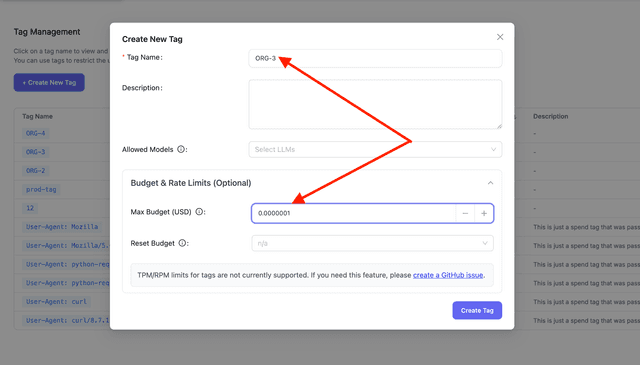
前往 標籤管理 頁面並點擊 建立新標籤。填入標籤詳細資料並設定您的預算:
budget_duration 的可用值:
budget_duration | 預算將於何時重設 |
|---|---|
budget_duration="1s" | 每 1 秒 |
budget_duration="1m" | 每 1 分鐘 |
budget_duration="1h" | 每 1 小時 |
budget_duration="1d" | 每 1 天 |
budget_duration="7d" | 每 1 週 |
budget_duration="30d" | 每 1 個月 |
2. 將標籤附加到 API 金鑰(建議)
在建立或更新虛擬金鑰時附加標籤。每個使用該金鑰發出的請求都會自動繼承該標籤,而且閘道會強制執行該標籤的預算,無須用戶端在每個請求中傳遞 metadata.tags。
API
在 tags 或 /key/generate 上使用頂層的 /key/update 欄位:
curl -X POST 'http://0.0.0.0:4000/key/generate' \
     -H "Authorization: Bearer $LITELLM_API_KEY" \
     -H 'Content-Type: application/json' \
     -d '{
            "tags": ["engineering"]
        }'
您也可以在金鑰 metadata 下設定標籤:
curl -X POST 'http://0.0.0.0:4000/key/generate' \
     -H "Authorization: Bearer $LITELLM_API_KEY" \
     -H 'Content-Type: application/json' \
     -d '{
            "metadata": {
              "tags": ["engineering"]
            }
        }'
LiteLLM 管理介面
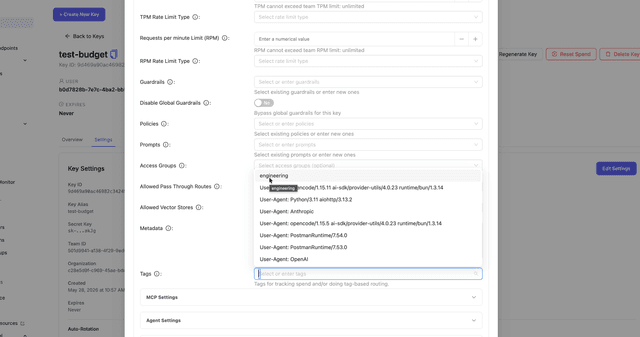
前往 Virtual Keys → Create Key(或編輯現有金鑰),並在 Tags 欄位中選取標籤。
3. 在您的請求中使用標籤(選用)
如果您未將標籤附加到 API 金鑰,請在每個請求的 metadata 欄位中新增標籤(或透過 x-litellm-tags 標頭,請參閱[請求標籤](request_tags.md)):
- OpenAI SDK
- cURL
import openai

client = openai.OpenAI(
    api_key="sk-<your-litellm-api-key>",  # Your LiteLLM proxy key
    base_url="http://0.0.0.0:4000"
)

response = client.chat.completions.create(
    model="gpt-5.6-terra",
    messages=[{"role": "user", "content": "Hello"}],
    extra_body={
        "metadata": {
            "tags": ["engineering"]
        }
    }
)
curl -X POST 'http://0.0.0.0:4000/chat/completions' \
     -H "Authorization: Bearer $LITELLM_API_KEY" \
     -H 'Content-Type: application/json' \
     -d '{
           "model": "gpt-5.6-terra",
           "messages": [{"role": "user", "content": "Hello"}],
           "metadata": {
               "tags": ["engineering"]
           }
         }'
4. 進行測試
使用第 2 步的虛擬金鑰發出請求,直到超出標籤預算。若標籤已在金鑰上,您不需要傳遞 metadata.tags:
curl -X POST 'http://0.0.0.0:4000/chat/completions' \
     -H 'Authorization: Bearer sk-your-key-with-engineering-tag' \
     -H 'Content-Type: application/json' \
     -d '{
           "model": "gpt-5.6-terra",
           "messages": [{"role": "user", "content": "Hello"}]
         }'
如果您略過第 2 步,請改為在請求本文中加入標籤:
curl -X POST 'http://0.0.0.0:4000/chat/completions' \
     -H "Authorization: Bearer $LITELLM_API_KEY" \
     -H 'Content-Type: application/json' \
     -d '{
           "model": "gpt-5.6-terra",
           "messages": [{"role": "user", "content": "Hello"}],
           "metadata": {
               "tags": ["engineering"]
           }
         }'
當預算超過時,請求會以 HTTP 422 被拒絕:
{
  "error": {
    "message": "Budget has been exceeded! Tag=engineering Current cost: 505.50, Max budget: 500.0",
    "type": "budget_exceeded",
    "param": null,
    "code": "422"
  }
}
設定標籤速率限制
在標籤上設定 rpm_limit 與 tpm_limit,即可限制該標籤每分鐘的請求數與 token 數。此限制會套用到標籤本身,因此使用量會在所有傳送該標籤的金鑰與團隊之間共享,無論標籤是透過請求 metadata.tags、x-litellm-tags 標頭,或金鑰附加的標籤傳入。這與金鑰中繼資料內每個金鑰 tag_rpm_limit 對應表不同,後者會獨立計量每個金鑰在某標籤下的請求。
標籤上的速率限制由 v3 平行請求限制器強制執行。一旦某標籤超過其限制,任何帶有該標籤的請求都會以 HTTP 429 被拒絕,並附帶類似 Rate limit exceeded for tag: engineering. Limit type: requests. Current limit: 100 的訊息。rpm_limit 會在接納時計算每個請求,而 tpm_limit 則會在呼叫完成後依據請求的實際 token 使用量計費,因此可能會先接納一個請求,等使用量落定後下一個請求才被拒絕。
建立一個具有速率限制的標籤:
curl -X POST 'http://0.0.0.0:4000/tag/new' \
     -H "Authorization: Bearer $LITELLM_API_KEY" \
     -H 'Content-Type: application/json' \
     -d '{
            "name": "engineering",
            "rpm_limit": 100,
            "tpm_limit": 100000
        }'
更新既有標籤的速率限制:
curl -X POST 'http://0.0.0.0:4000/tag/update' \
     -H "Authorization: Bearer $LITELLM_API_KEY" \
     -H 'Content-Type: application/json' \
     -d '{
            "name": "engineering",
            "rpm_limit": 200,
            "tpm_limit": 200000
        }'
管理標籤
檢視標籤資訊
取得特定標籤的資訊:
curl -X POST 'http://0.0.0.0:4000/tag/info' \
     -H "Authorization: Bearer $LITELLM_API_KEY" \
     -H 'Content-Type: application/json' \
     -d '{
           "names": ["engineering", "marketing"]
         }'
回應:
{
  "engineering": {
    "name": "engineering",
    "description": "Engineering department cost center",
    "spend": 245.50,
    "max_budget": 500.0,
    "budget_duration": "30d",
    "budget_reset_at": "2025-11-10T00:00:00Z",
    "created_at": "2025-10-11T00:00:00Z",
    "updated_at": "2025-10-11T12:30:00Z"
  },
  "marketing": {
    "name": "marketing",
    "description": "Marketing department cost center",
    "spend": 89.20,
    "max_budget": 300.0,
    "budget_duration": "30d",
    "budget_reset_at": "2025-11-10T00:00:00Z",
    "created_at": "2025-10-11T00:00:00Z",
    "updated_at": "2025-10-11T12:30:00Z"
  }
}
更新標籤預算
更新既有標籤的預算:
curl -X POST 'http://0.0.0.0:4000/tag/update' \
     -H "Authorization: Bearer $LITELLM_API_KEY" \
     -H 'Content-Type: application/json' \
     -d '{
           "name": "engineering",
           "max_budget": 750.0,
           "budget_duration": "30d"
         }'
刪除標籤
curl -X POST 'http://0.0.0.0:4000/tag/delete' \
     -H "Authorization: Bearer $LITELLM_API_KEY" \
     -H 'Content-Type: application/json' \
     -d '{
           "name": "engineering"
         }'
每個請求可使用多個標籤
您可以將多個標籤套用到單一請求,以同時追蹤不同維度的成本。例如,同時追蹤成本中心與特定專案:
response = client.chat.completions.create(
    model="gpt-5.6-terra",
    messages=[{"role": "user", "content": "Hello"}],
    extra_body={
        "metadata": {
            "tags": ["engineering", "project-alpha", "customer-acme"]
        }
    }
)
curl -X POST 'http://0.0.0.0:4000/chat/completions' \
     -H "Authorization: Bearer $LITELLM_API_KEY" \
     -H 'Content-Type: application/json' \
     -d '{
           "model": "gpt-5.6-terra",
           "messages": [{"role": "user", "content": "Hello"}],
           "metadata": {
               "tags": ["engineering", "project-alpha", "customer-acme"]
           }
         }'
預算強制執行: 若任何標籤超出其預算,請求將被拒絕。

