UI Logs 入門
查看 LiteLLM 每個請求的支出、Token 使用量、金鑰、團隊名稱
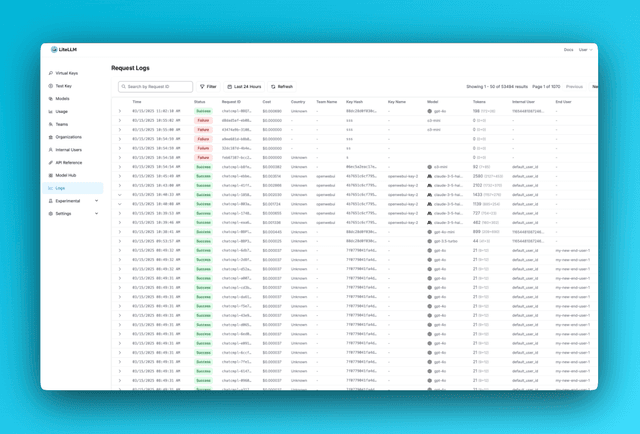
概覽
| 記錄類型 | 預設是否追蹤 |
|---|---|
| 成功記錄 | ✅ 是 |
| 錯誤記錄 | ✅ 是 |
| 儲存的請求/回應內容 | ❌ 預設否,可透過 store_prompts_in_spend_logs 啟用 |
預設情況下,LiteLLM 不會追蹤請求與回應內容。
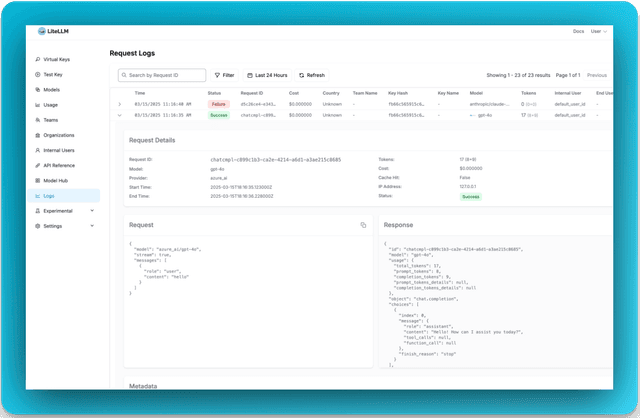
追蹤 - 記錄頁面的請求 / 回應內容
如果您想在 LiteLLM 記錄中查看請求與回應內容,可以在以下任一處啟用:
- 從 UI(無需重新啟動): 使用 UI Spend Log 設定,然後開啟 Logs → Settings → 啟用「在 Spend Logs 中儲存提示詞」→ 儲存。會立即生效並覆蓋設定。
- 從設定檔: 將以下內容加入您的
proxy_config.yaml(需要重新啟動):
general_settings:
  store_prompts_in_spend_logs: true
追蹤工具
查看在您的 completion 請求中提供與呼叫了哪些工具。
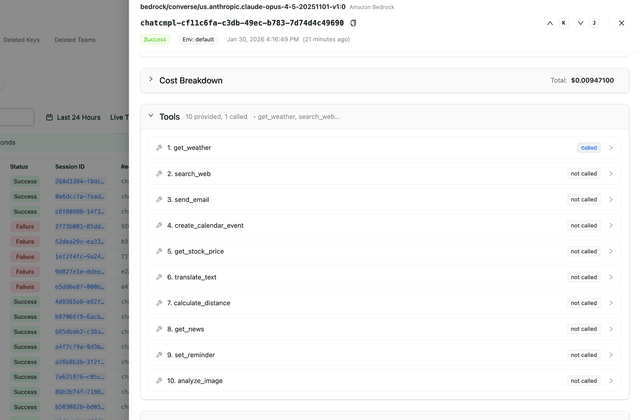
範例: 使用 tools 發出 completion 請求:
curl -X POST 'http://localhost:4000/chat/completions' \
  -H "Authorization: Bearer $LITELLM_API_KEY" \
  -H 'Content-Type: application/json' \
  -d '{
    "model": "gpt-5.6-terra",
    "messages": [{"role": "user", "content": "What is the weather?"}],
    "tools": [
      {
        "type": "function",
        "function": {
          "name": "get_weather",
          "description": "Get the current weather",
          "parameters": {
            "type": "object",
            "properties": {
              "location": {"type": "string"}
            }
          }
        }
      }
    ]
  }'
查看記錄頁面以瞭解所有提供的工具以及哪些工具被呼叫。
停止將錯誤記錄儲存在 DB 中
如果您不想將錯誤記錄儲存在 DB 中,可以使用此設定停用
general_settings:
  disable_error_logs: True   # Only disable writing error logs to DB, regular spend logs will still be written unless `disable_spend_logs: True`
停止將支出記錄儲存在 DB 中
如果您不想將支出記錄儲存在 DB 中,可以使用此設定停用
general_settings:
  disable_spend_logs: True   # Disable writing spend logs to DB
自動刪除舊的支出記錄
如果您正在儲存支出記錄,定期刪除它們以保持資料庫速度可能是個好主意。
您可以在以下任一處設定保留期間:
- 從 UI(無需重新啟動): UI Spend Log 設定,然後前往 Logs → Settings → 設定保留期間 → 儲存。
- 從設定檔: 將以下內容加入您的
proxy_config.yaml(需要重新啟動):
general_settings:
  maximum_spend_logs_retention_period: "7d"  # Delete logs older than 7 days

  # Optional: how often to run cleanup
  maximum_spend_logs_retention_interval: "1d"  # Run once per day
只有在設定了保留期間時才會執行清理,而每次執行都會受到以下限制:每個語句刪除的列數、每個資料表發出的語句數,以及整個執行的總時鐘時間預算。預設值為每個語句 1000 列、每個資料表 500 個語句,以及 5 分鐘。若一次執行達到上限,就會在該處停止,並在下一個 tick 從相同的截斷點繼續,因此大量待處理資料會在多次執行中逐步清除。
如需完整的可調整項目、預設排程,以及大型資料表的指引,請參閱 Spend Logs 刪除
會記錄什麼?
這裡有一個 schema 說明會記錄的內容。

