預算、速率限制
個人預算:建立不含 team_id 的虛擬金鑰,以設定個人支出上限
團隊預算:將 team_id 加到虛擬金鑰上,以使用團隊共享的預算
團隊成員預算:在團隊共享預算內,為個別成員設定支出上限
代理程式預算:為代理程式設定速率限制(tpm/rpm)與工作階段層級上限(迭代次數、美元預算) 跳轉
如果金鑰屬於某個團隊,則只會強制執行團隊(以及 team-member)預算;金鑰擁有者的個人預算不適用。v1.94.0 曾短暫地也在 skip_user_budget_on_team_key opt-out 之下強制執行個人預算;在 v1.95.0 中,強制執行與該旗標都已移除。
需求:
本頁上的每一項預算都是根據從資料庫讀取的支出來強制執行,因此它們都無法在 DB-less deployment 上限制任何內容。litellm_settings.max_budget 在此情況下會 fail open,而不是報錯:只有在存在資料庫用戶端時,proxy 的全域支出才會載入;若沒有可比較的總額,就會略過全域預算檢查,請求仍會在超過限制後繼續提供服務。當設定了預算但未連接資料庫時,啟動時會記錄一次警告,但在請求時不會有任何阻擋。由於沒有資料庫就無法解析虛擬金鑰(No connected db.),金鑰、團隊與使用者預算也同樣無法使用。如果預算是您限制支出的方式之一,請搭配資料庫執行
設定預算
全域 Proxy
在 proxy 上對所有請求套用預算
步驟 1. 修改 config.yaml
general_settings:
  master_key: os.environ/LITELLM_MASTER_KEY

litellm_settings:
  # other litellm settings
  max_budget: 0 # (float) sets max budget as $0 USD
  budget_duration: 30d # (str) frequency of reset - You can set duration as seconds ("30s"), minutes ("30m"), hours ("30h"), days ("30d").
步驟 2. 啟動 proxy
litellm /path/to/config.yaml
步驟 3. 傳送測試請求
curl --location 'http://0.0.0.0:4000/chat/completions' \
    --header "Autherization: Bearer $LITELLM_API_KEY" \
    --header 'Content-Type: application/json' \
    --data '{
    "model": "gpt-5.6-luna",
    "messages": [
        {
        "role": "user",
        "content": "what llm are you"
        }
    ],
}'
團隊
您可以:
- 為 Teams 加入預算
逐步教學:在 Teams 上設定、重設預算(透過 API 或使用 Admin UI)
為團隊新增預算
curl --location 'http://localhost:4000/team/new' \
--header 'Authorization: Bearer <your-master-key>' \
--header 'Content-Type: application/json' \
--data-raw '{
  "team_alias": "my-new-team_4",
  "members_with_roles": [{"role": "admin", "user_id": "5c4a0aa3-a1e1-43dc-bd87-3c2da8382a3a"}],
  "rpm_limit": 99
}'
範例回應
{
    "team_alias": "my-new-team_4",
    "team_id": "13e83b19-f851-43fe-8e93-f96e21033100",
    "admins": [],
    "members": [],
    "members_with_roles": [
        {
            "role": "admin",
            "user_id": "5c4a0aa3-a1e1-43dc-bd87-3c2da8382a3a"
        }
    ],
    "metadata": {},
    "tpm_limit": null,
    "rpm_limit": 99,
    "max_budget": null,
    "models": [],
    "spend": 0.0,
    "max_parallel_requests": null,
    "budget_duration": null,
    "budget_reset_at": null
}
為團隊新增預算期間
budget_duration:預算會在指定持續時間結束時重設。如果未設定,預算將永不重設。您可以將持續時間設定為秒("30s")、分鐘("30m")、小時("30h")、天("30d")。
curl 'http://0.0.0.0:4000/team/new' \
--header 'Authorization: Bearer <your-master-key>' \
--header 'Content-Type: application/json' \
--data-raw '{
  "team_alias": "my-new-team_4",
  "members_with_roles": [{"role": "admin", "user_id": "5c4a0aa3-a1e1-43dc-bd87-3c2da8382a3a"}],
  "budget_duration": "30s",
}'
團隊成員
當您想要限制 Team 內使用者的支出預算時,請使用此功能
步驟 1. 建立使用者
使用 user_id=ishaan 建立使用者
curl --location 'http://0.0.0.0:4000/user/new' \
    --header "Authorization: Bearer $LITELLM_API_KEY" \
    --header 'Content-Type: application/json' \
    --data '{
        "user_id": "ishaan"
}'
步驟 2. 將使用者加入既有團隊 - 設定 max_budget_in_team
在將使用者加入團隊時,設定 max_budget_in_team。我們會使用在步驟 1 中設定的相同 user_id
curl -X POST 'http://0.0.0.0:4000/team/member_add' \
-H "Authorization: Bearer $LITELLM_API_KEY" \
-H 'Content-Type: application/json' \
-d '{"team_id": "e8d1460f-846c-45d7-9b43-55f3cc52ac32", "max_budget_in_team": 0.000000000001, "member": {"role": "user", "user_id": "ishaan"}}'
步驟 3. 為步驟 1 的團隊成員建立金鑰
設定步驟 1 中的 user_id=ishaan
curl --location 'http://0.0.0.0:4000/key/generate' \
    --header "Authorization: Bearer $LITELLM_API_KEY" \
    --header 'Content-Type: application/json' \
    --data '{
        "user_id": "ishaan",
        "team_id": "e8d1460f-846c-45d7-9b43-55f3cc52ac32"
}'
來自 /key/generate 的回應
我們會在步驟 4 中使用此回應中的 key
{"key":"sk-RV-l2BJEZ_LYNChSx2EueQ", "models":[],"spend":0.0,"max_budget":null,"user_id":"ishaan","team_id":"e8d1460f-846c-45d7-9b43-55f3cc52ac32","max_parallel_requests":null,"metadata":{},"tpm_limit":null,"rpm_limit":null,"budget_duration":null,"allowed_cache_controls":[],"soft_budget":null,"key_alias":null,"duration":null,"aliases":{},"config":{},"permissions":{},"model_max_budget":{},"key_name":null,"expires":null,"token_id":null}%
步驟 4. 對團隊成員發出 /chat/completions 請求
此請求請使用步驟 3 中的金鑰。執行 2-3 次請求後,預期會看到以下錯誤 ExceededBudget: Crossed spend within team
curl --location 'http://localhost:4000/chat/completions' \
    --header 'Authorization: Bearer sk-RV-l2BJEZ_LYNChSx2EueQ' \
    --header 'Content-Type: application/json' \
    --data '{
    "model": "llama3",
    "messages": [
        {
        "role": "user",
        "content": "tes4"
        }
    ]
}'
更新團隊成員的預算
使用 /team/member_update 更新現有團隊成員的 max_budget_in_team。新的預算會在該成員的下一個請求時生效
這會讓該成員擁有自己的預算。它不再跟隨團隊的 team_member_budget 預設值,而之後對該預設值的 /team/update 變更也不會影響這位成員。若要變更所有仍使用預設值的成員,請改為更新 team_member_budget 上的 /team/update
curl -X POST 'http://0.0.0.0:4000/team/member_update' \
-H "Authorization: Bearer $LITELLM_API_KEY" \
-H 'Content-Type: application/json' \
-d '{"team_id": "e8d1460f-846c-45d7-9b43-55f3cc52ac32", "user_id": "ishaan", "max_budget_in_team": 10}'
該成員已在此團隊累積的支出會計入新的預算。請參閱 先前的支出會計入後來新增的預算
預算變更是永久性的。當成員的 budget_duration 週期重設時,只會將其目前週期支出重設回 $0,並將下一次重設日期往後移,因此提高後的 max_budget_in_team 會在之後每個週期都維持新值,不會回復到較早的金額或團隊預設值。使用 /team/update 提高 team_member_budget 時,對所有仍使用團隊預設值的成員來說行為相同
當一位使用團隊預設值的成員以這種方式取得自己的預算時,其目前的重設視窗會沿用,且下一次重設仍會落在相同日期。若在同一次 /team/member_update 呼叫中送出 budget_duration,則會從該時間點開始一個新的視窗
若要在有限時間內提高成員的預算,請在 /team/member_update 上將 temp_budget_increase 與 temp_budget_expiry(UTC datetime)一併送出,或在 UI 中編輯該成員時填入 Temporary Budget Increase (USD) 與 Temporary Budget Expiry (UTC)。在 temp_budget_expiry 之前,這項增加會疊加在成員的預算之上;如果該成員使用團隊預設值,則會疊加在團隊預設值之上,並在之後自動停止生效,無需任何操作。它會在該時間到期,而不是在下一次預算重設時到期,因此如果您只希望它持續到目前週期結束,請將到期時間設為成員的下一次重設時間。使用團隊預設值且只獲得臨時增加的成員仍會維持團隊預設值,而對沒有任何預算的成員來說,這項增加不會產生任何效果
curl -X POST 'http://0.0.0.0:4000/team/member_update' \
-H "Authorization: Bearer $LITELLM_API_KEY" \
-H 'Content-Type: application/json' \
-d '{"team_id": "e8d1460f-846c-45d7-9b43-55f3cc52ac32", "user_id": "ishaan", "temp_budget_increase": 25, "temp_budget_expiry": "2026-11-01T00:00:00Z"}'
若要將已自訂的成員恢復為團隊預設值,請在團隊的 Members 分頁中,按一下其預算旁邊的 Use team default,或呼叫 POST /team/{team_id}/member/{user_id}/reset_budget。其支出會被保留,且之後對 team_member_budget 的 /team/update 變更會再次套用到他們。此功能自 v1.104.0 起提供
重設團隊成員的支出
在不變更預算本身的情況下,重設針對成員在團隊內預算所追蹤的支出。這會將成員目前週期支出設為用來與其預算比對的值,並保留其總支出與記錄不變。可由 proxy 管理員,或該團隊或其組織的管理員呼叫。團隊管理員無法重設自己的支出,只有 proxy 管理員可以
- UI
- API
- 前往 Teams 並開啟該團隊
- 開啟 Members 分頁
- 在該成員那一列的 Actions 欄中,按一下 Reset spend 圖示(位於編輯與刪除圖示之間的重新整理圖示)
- Reset Team Member Spend 對話框會顯示該成員及其目前週期支出。按一下 Reset 將其設為 $0
只有可編輯該團隊的使用者才會看到此圖示,而且只會顯示在 Current Cycle Spend (USD) 高於 $0 的列上。團隊管理員不會在自己的列上看到它,但 proxy 管理員會
curl -X POST 'http://0.0.0.0:4000/team/e8d1460f-846c-45d7-9b43-55f3cc52ac32/member/ishaan/reset_spend' \
-H "Authorization: Bearer $LITELLM_API_KEY" \
-H 'Content-Type: application/json' \
-d '{"reset_to": 0}'
reset_to 必須是大於或等於 0 的數字,且不得大於該成員目前的支出或其預算
回應:
{"team_id":"e8d1460f-846c-45d7-9b43-55f3cc52ac32","user_id":"ishaan","spend":0.0,"previous_spend":3.495e-05,"max_budget":10.0}
當團隊管理員指定自己為目標使用者時,端點會回傳 403(Cannot reset your own spend. Ask a proxy admin.);當該使用者在該團隊中沒有成員資料列時,則回傳 404
重設會在該成員的下一個請求時於每個 proxy instance 上生效。它一次只適用於一位成員,且沒有批次版本,因此請針對您要重設的每位成員重複執行
先前的支出會計入後來新增的預算
系統會追蹤每位團隊成員的支出,包括沒有預算的成員。在團隊的 Members 分頁中,Current Cycle Spend (USD) 是用來與成員預算比對的值,並會在成員的 budget_duration 視窗重設時回到 $0;而 Total Spend (USD) 則是累計值,永不重設。沒有預算的成員沒有預算視窗,因此其目前週期支出不會自動重設,並會持續增加。舊版本只會追蹤有預算的成員,而在那些版本中新增的成員會在升級後的下一個請求才開始被追蹤
如果之後您為該成員新增預算,先前已累積的支出會立刻計入。這同時適用於在團隊上使用 /team/update 設定 team_member_budget,這會將團隊的成員預算連結到每一位尚未有預算的成員,以及使用 /team/member_update 為單一成員設定 max_budget_in_team。例如,某成員在沒有預算的情況下花費了 $500,之後管理員設定了 $100 的成員預算,而該成員的下一個請求就會因超過預算而被拒絕
有兩種脫困方式。如果新預算有 budget_duration,成員的目前週期支出會在下一次重設時回到 $0,且不需任何操作即可解除阻擋。如果沒有 budget_duration,成員會持續被阻擋,直到有人在 UI 中或透過 API 重設其支出
內部使用者
在 proxy 上,對內部使用者(金鑰擁有者)可發出的所有請求套用預算。
對於已設定 team_id 的金鑰,這項個人預算不會被強制執行;會改為套用團隊(以及 team-member)預算。v1.94.0 曾在團隊預算之外、透過 skip_user_budget_on_team_key opt-out 一併強制執行,而 v1.95.0 已將兩者都移除。
若要對團隊內的使用者套用預算,請使用團隊成員預算。
LiteLLM 提供一個 /user/new 端點來建立這些預算。
您可以:
預設情況下,max_budget 設為 null,且不會針對金鑰進行檢查
為使用者新增預算
curl --location 'http://localhost:4000/user/new' \
--header 'Authorization: Bearer <your-master-key>' \
--header 'Content-Type: application/json' \
--data-raw '{"models": ["azure-models"], "max_budget": 0, "user_id": "krrish3@berri.ai"}'
範例回應
{
    "key": "sk-YF2OxDbrgd1y2KgwxmEA2w",
    "expires": "2023-12-22T09:53:13.861000Z",
    "user_id": "krrish3@berri.ai",
    "max_budget": 0.0
}
為使用者新增預算期間
budget_duration:預算會在指定持續時間結束時重設。若未設定,預算永不重設。您可以將持續時間設定為秒("30s")、分鐘("30m")、小時("30h")、天("30d")。
curl 'http://0.0.0.0:4000/user/new' \
--header 'Authorization: Bearer <your-master-key>' \
--header 'Content-Type: application/json' \
--data-raw '{
  "team_id": "core-infra", # [OPTIONAL]
  "max_budget": 10,
  "budget_duration": "30s",
}'
為既有使用者建立新金鑰
現在您只需使用該 user_id(例如 krrish3@berri.ai)呼叫 /key/generate,並且:
- 預算檢查:會檢查此金鑰的 krrish3@berri.ai 預算(例如 $10)
- 支出追蹤:此金鑰的支出也會更新 krrish3@berri.ai 的支出
curl --location 'http://0.0.0.0:4000/key/generate' \
--header 'Authorization: Bearer <your-master-key>' \
--header 'Content-Type: application/json' \
--data '{"models": ["azure-models"], "user_id": "krrish3@berri.ai"}'
虛擬金鑰
對金鑰套用預算。
您可以:
預期行為
- 每個金鑰的成本會自動填入
LiteLLM_VerificationToken表格 - 金鑰超過其
max_budget後,請求會失敗 - 若設定了持續時間,支出會在持續時間結束時重設
預設情況下,max_budget 設為 null,且不會針對金鑰進行檢查
為金鑰新增預算
curl 'http://0.0.0.0:4000/key/generate' \
--header 'Authorization: Bearer <your-master-key>' \
--header 'Content-Type: application/json' \
--data-raw '{
  "team_id": "core-infra", # [OPTIONAL]
  "max_budget": 10,
}'
金鑰超過預算時對 /chat/completions 的範例請求
curl --location 'http://0.0.0.0:4000/chat/completions' \
  --header 'Content-Type: application/json' \
  --header 'Authorization: Bearer <generated-key>' \
  --data ' {
  "model": "azure-gpt-3.5",
  "user": "e09b4da8-ed80-4b05-ac93-e16d9eb56fca",
  "messages": [
      {
      "role": "user",
      "content": "respond in 50 lines"
      }
  ],
}'
金鑰超過預算時來自 /chat/completions 的預期回應
{
  "detail":"Authentication Error, ExceededTokenBudget: Current spend for token: 7.2e-05; Max Budget for Token: 2e-07"
}
為金鑰新增預算期間
budget_duration:預算會在指定持續時間結束時重設。若未設定,預算永不重設。您可以將持續時間設定為秒("30s")、分鐘("30m")、小時("30h")、天("30d")。
curl 'http://0.0.0.0:4000/key/generate' \
--header 'Authorization: Bearer <your-master-key>' \
--header 'Content-Type: application/json' \
--data-raw '{
  "team_id": "core-infra", # [OPTIONAL]
  "max_budget": 10,
  "budget_duration": "30s",
}'
在金鑰上設定多個預算視窗
在同一把金鑰上於不同時間尺度套用多個同時生效的預算限制,例如將金鑰上限設為 $10/day 並且 $100/month。
這在什麼情況下有用?
單一 budget_duration 視窗無法防止糟糕的一天燒掉您整個月份的額度。多個預算視窗可讓您:
- 在一天內封鎖失控的用量暴增,同時仍允許正常的每月支出。
- 為 Claude Code rollout 提供每日防護欄(
24h)與每月上限(30d),避免單次大量使用的工作階段耗盡整個月份。 - 在週上限之上,為突發型工作負載分層加入更細的每小時限制。
請參閱 使用者預算文件,以了解預算如何跨金鑰、團隊與使用者運作。
透過 API
將 budget_limits 作為 {budget_duration, max_budget} 物件的清單傳入:
curl 'http://0.0.0.0:4000/key/generate' \
--header 'Authorization: Bearer <your-master-key>' \
--header 'Content-Type: application/json' \
--data-raw '{
  "budget_limits": [
    {"budget_duration": "24h",  "max_budget": 10},
    {"budget_duration": "30d",  "max_budget": 100}
  ]
}'
每個時間窗口都會獨立追蹤,並依各自的排程重設:
budget_duration | 重設 |
|---|---|
1h | 每小時 |
24h | 每日 UTC 午夜 |
7d | 每週一 UTC 午夜(或已設定的重設時間) |
30d | 每月 1 日 UTC 午夜 |
透過儀表板
開啟 Virtual Keys → Create Key → Optional Settings → Budget Windows。
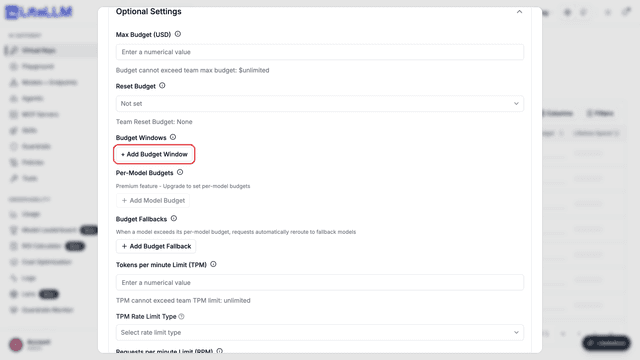
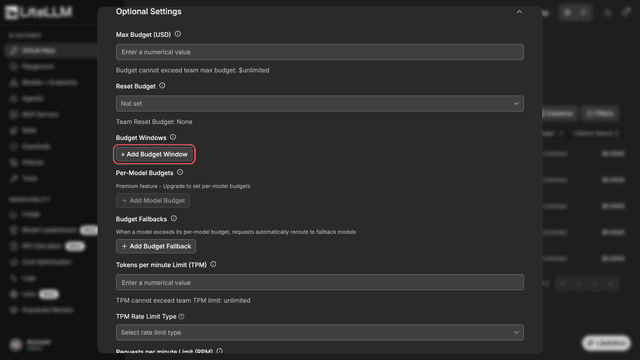
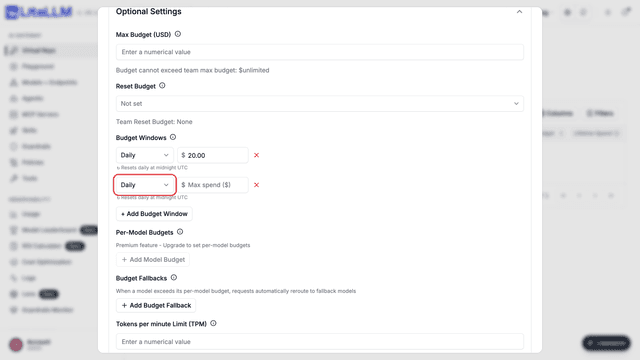
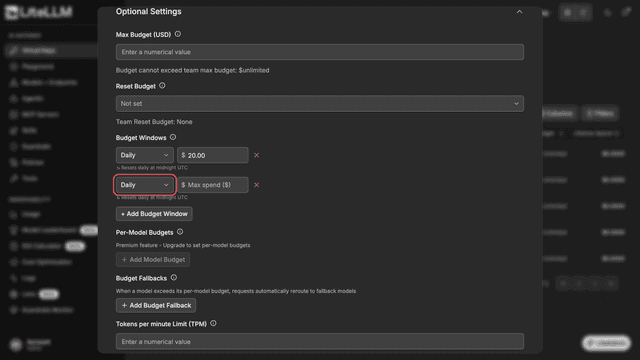
點擊 + Add Budget Window 新增一列,從下拉選單選擇期間,並輸入支出上限。
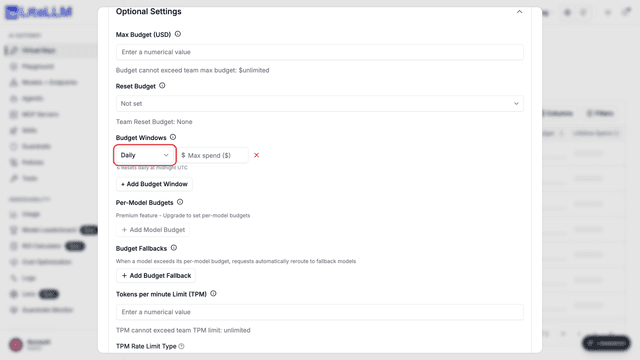
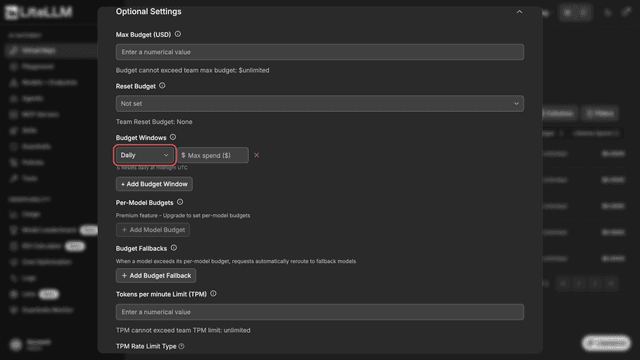
再新增第二列以設定不同時間區間(例如:在每日 10 美元之外,再加上每月 100 美元)。
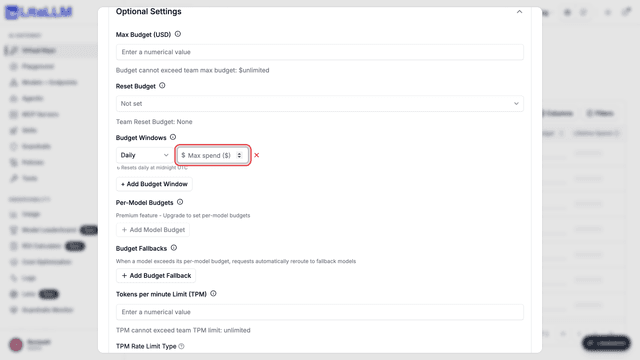
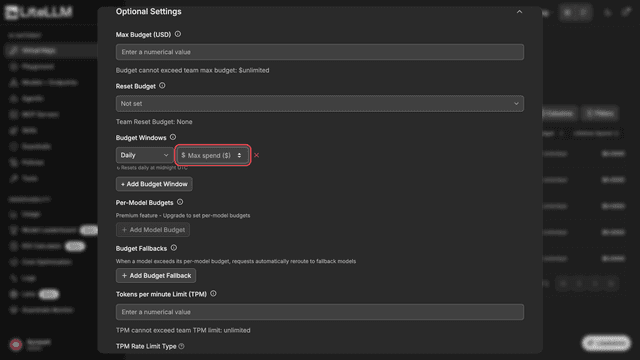
每個窗口都會在輸入欄位下方顯示重設排程,因此您可以清楚知道支出何時重設。
✨ 虛擬金鑰(模型特定)
為每個可供虛擬金鑰使用的模型設定獨立預算。例如,一把金鑰可以有:
gpt-5.6-terra的每日 $0.0000001 預算gpt-5.6-luna的每 30 天 $10 預算
model_max_budget 使用 Dict[str, GenericBudgetInfo] 結構描述。
curl 'http://0.0.0.0:4000/key/generate' \
--header 'Authorization: Bearer <your-master-key>' \
--header 'Content-Type: application/json' \
--data-raw '{
  "model_max_budget": {"gpt-5.6-terra": {"budget_limit": "0.0000001", "time_period": "1d"}}
}'
透過 Dashboard
若要為新金鑰新增按模型預算,請前往 Virtual Keys → Create Key → Optional Settings → Per-Model Budgets。若要更新現有金鑰,請開啟該金鑰的編輯頁面並使用相同區段。
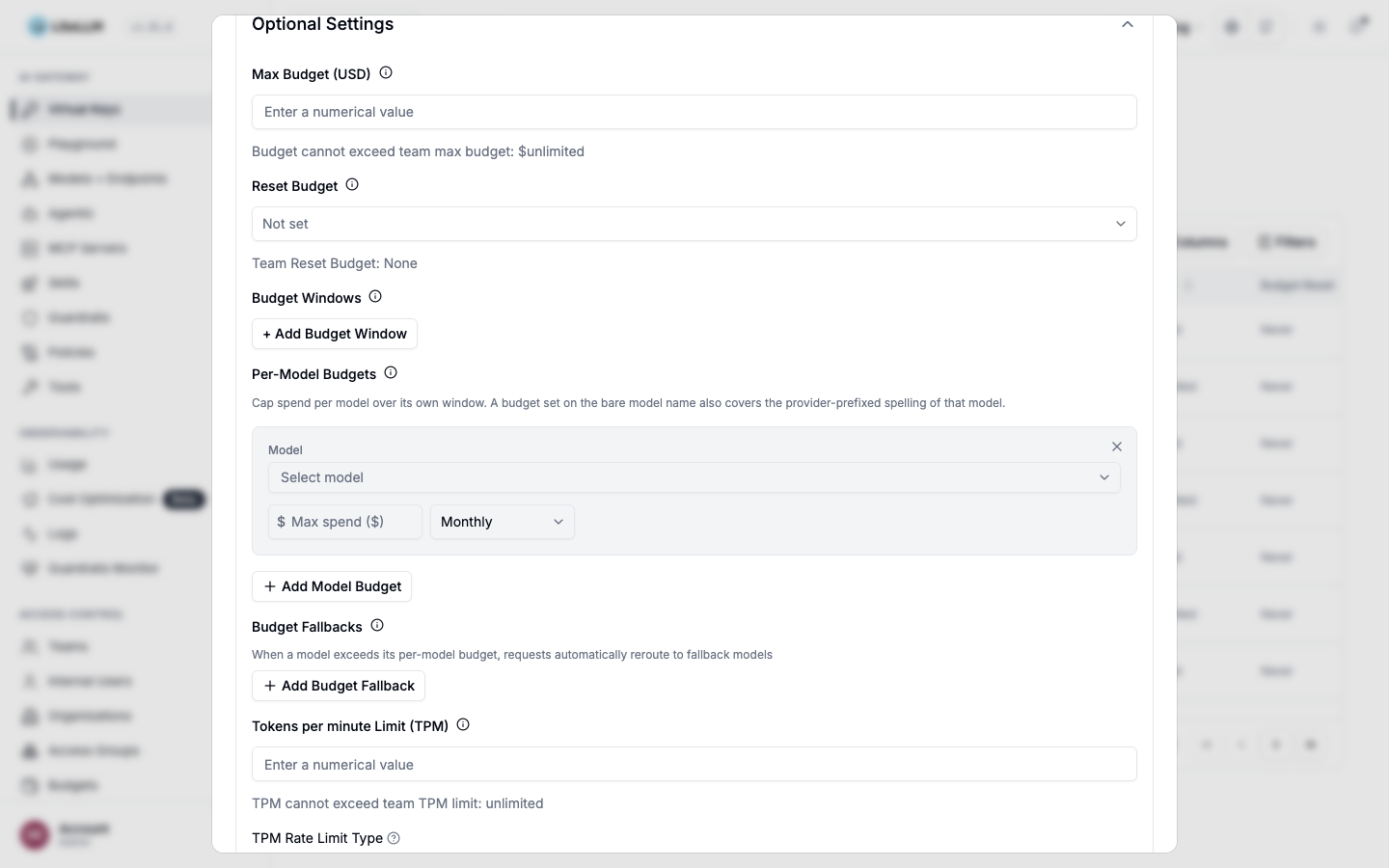
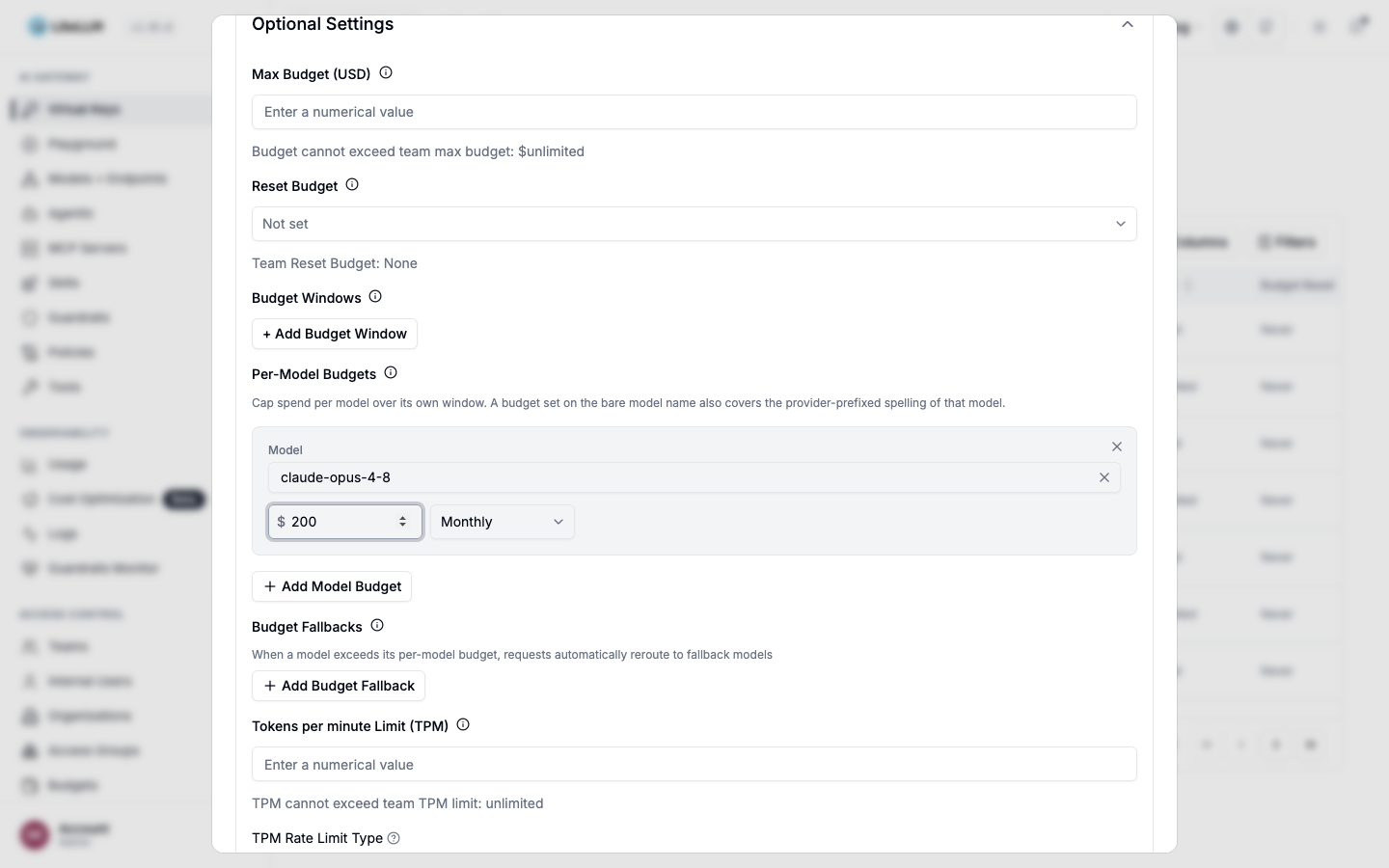
選取 + Add Model Budget,選擇一個模型,設定支出上限,然後選取預算期間。每個模型都有各自的追蹤與重設排程。範例來說,某個模型的每日上限不會影響另一個模型的每月上限。上限可低於 $0.01。
LiteLLM 如何比對模型名稱
LiteLLM 會將預算與請求中的模型名稱及其帶有提供者前綴的形式進行比對。範例來說,claude-opus-4-8 的預算會套用到使用下列任一名稱的請求:
claude-opus-4-8anthropic/claude-opus-4-8bedrock/anthropic.claude-opus-4-8us.anthropic.claude-opus-4-8
請使用在 model_list 中設定的名稱來設定預算。如果您將相同模型以多個名稱進行路由,請使用不帶前綴的模型家族名稱,讓一個預算套用到所有支援的變體。
檢視目前用量
/key/info 會連同 model_max_budget_usage 與 model_max_budget 一併回傳。對於每個有預算的模型,它會回報目前預算期間內的支出金額。LiteLLM 使用相同的用量值來執行預算限制,因此回報的用量會與限制執行一致。
curl -X GET 'http://0.0.0.0:4000/key/info?key=sk-...' \
--header 'Authorization: Bearer <your-master-key>'
{
  "info": {
    "model_max_budget": {"gpt-5.6-terra": {"budget_limit": 0.0001, "time_period": "30d"}},
    "model_max_budget_usage": {
      "gpt-5.6-terra": {"current_spend": 0.0002, "budget_limit": 0.0001, "time_period": "30d"}
    }
  }
}
如果模型的 time_period 遺失或無效,該模型會被省略於 model_max_budget_usage,而不是以零用量回報。
測試預算
使用上方顯示的較小 gpt-5.6-terra 預算時,第一個請求應會成功。第二個請求在金鑰超過上限後應會被拒絕。
- Successful call
- Rejected call
curl --location 'http://0.0.0.0:4000/chat/completions' \
--header 'Content-Type: application/json' \
--header 'Authorization: Bearer <sk-generated-key>' \
--data ' {
      "model": "gpt-5.6-terra",
      "messages": [
        {
          "role": "user",
          "content": "testing request"
        }
      ]
    }
'
再次送出相同的請求。LiteLLM 會在金鑰超過其 gpt-5.6-terra 預算後拒絕該請求。
curl --location 'http://0.0.0.0:4000/chat/completions' \
--header 'Content-Type: application/json' \
--header 'Authorization: Bearer <sk-generated-key>' \
--data ' {
      "model": "gpt-5.6-terra",
      "messages": [
        {
          "role": "user",
          "content": "testing request"
        }
      ]
    }
'
預期回應:
{
    "error": {
        "message": "LiteLLM Virtual Key: 9769f3f6768a199f76cc29xxxx, key_alias: None, exceeded budget for model=gpt-5.6-terra",
        "type": "budget_exceeded",
        "param": null,
        "code": "400"
    }
}
預設情況下,當每模型預算超過時,LiteLLM 會回傳 budget_exceeded 錯誤。如要改為將請求路由到另一個模型,請參閱 預算備援。
✨ 內部使用者(特定模型)
使用內部使用者的每模型預算,將單一上限套用到該使用者擁有的所有金鑰。這可防止使用者透過建立另一把金鑰來繞過限制。範例來說,當工程師有多把金鑰時,可使用此範圍為每位工程師設定每月 $200 的 Opus 預算。
model_max_budget 使用與金鑰層級設定相同的 Dict[str, GenericBudgetInfo] 結構。您可以使用 /user/new 或 /user/update 進行設定。
curl 'http://0.0.0.0:4000/user/new' \
--header 'Authorization: Bearer <your-master-key>' \
--header 'Content-Type: application/json' \
--data-raw '{
  "user_id": "engineer-1",
  "model_max_budget": {"claude-opus-5": {"budget_limit": 200, "time_period": "1mo"}}
}'
使用 1mo 來設定每個月第一天重設的日曆月預算。當使用者超過上限後,LiteLLM 會拒絕使用該使用者任何金鑰所發出的請求:
{
    "error": {
        "message": "LiteLLM User: engineer-1, exceeded budget for model=claude-opus-5",
        "type": "budget_exceeded",
        "param": null,
        "code": "429"
    }
}
/user/info 會以與 /key/info 相同的格式,回傳每個模型在目前預算期間內於 model_max_budget_usage 的支出。
透過儀表板
前往 Internal Users,選取該使用者,然後開啟 Details → Edit → Per-Model Budgets。對於每個現有預算,儀表板會顯示目前期間內的支出金額。
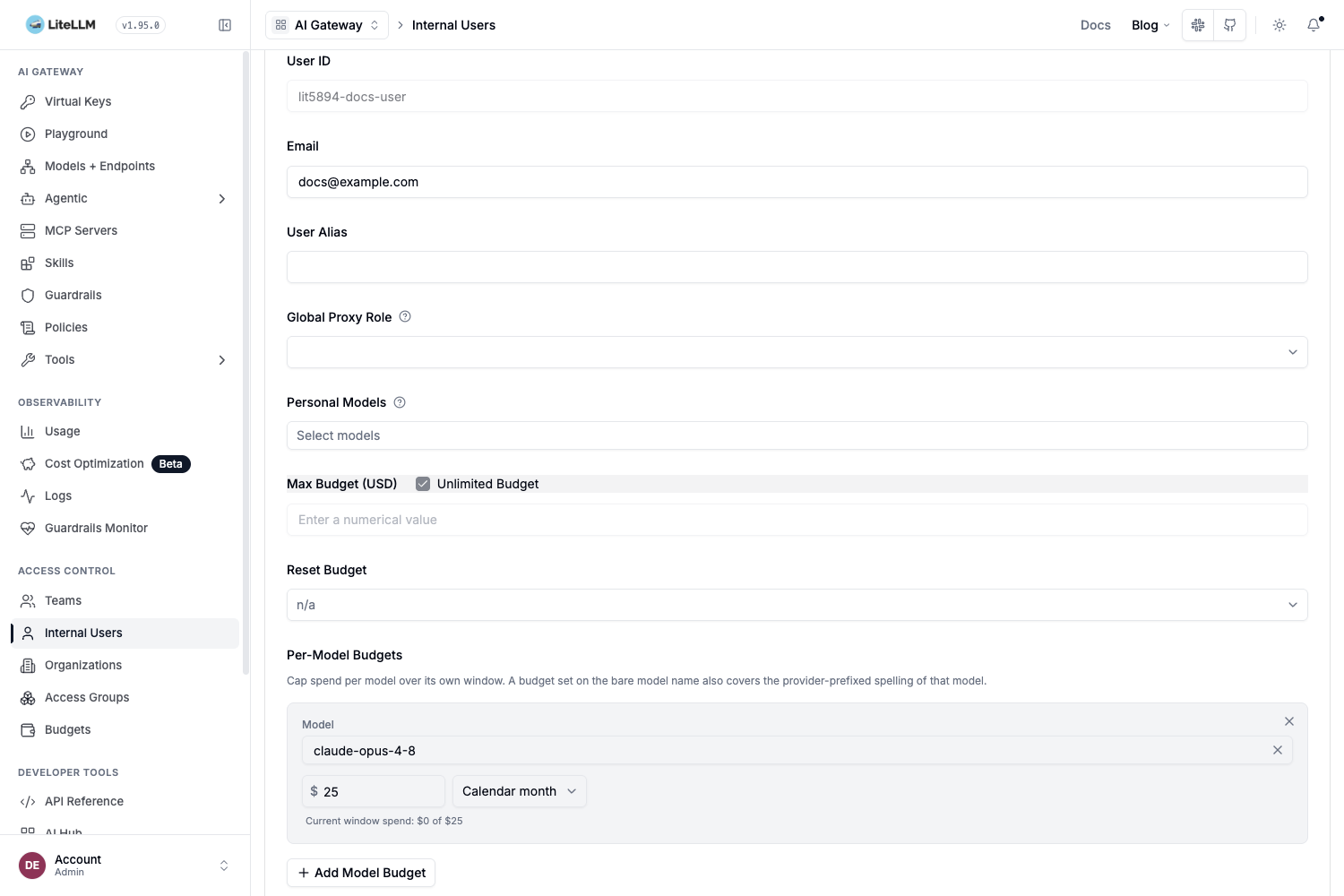
使用者層級與金鑰層級的預算是分開追蹤的。如果某把金鑰有自己的每模型預算,每個請求都會同時計入金鑰預算與擁有者的使用者預算。當任一上限超過時,LiteLLM 會拒絕該請求。
代理程式
在 LiteLLM 註冊的代理程式上設定預算與速率限制,Agent Gateway。您可以控制:
- 每個代理程式的速率限制:套用在代理程式本身的
tpm_limit和rpm_limit - 每個工作階段的速率限制:每個工作階段套用的
session_tpm_limit和session_rpm_limit - 每個工作階段的迭代上限:代理程式
max_iterations中的litellm_params - 每個工作階段的預算上限:代理程式
max_budget_per_session中的litellm_params
- Agent Rate Limits
- Session Rate Limits
- Session Budgets
在代理程式上設定 tpm_limit 和 rpm_limit,以限制所有工作階段的總吞吐量。
curl -X POST 'http://localhost:4000/v1/agents' \
  -H "Authorization: Bearer $LITELLM_API_KEY" \
  -H 'Content-Type: application/json' \
  -d '{
    "agent_name": "my-research-agent",
    "agent_card_params": {
      "name": "my-research-agent",
      "description": "A research agent",
      "url": "http://my-agent:8080",
      "version": "1.0.0"
    },
    "tpm_limit": 100000,
    "rpm_limit": 100
  }'
設定 session_tpm_limit 和 session_rpm_limit,以限制單一工作階段的吞吐量。
curl -X POST 'http://localhost:4000/v1/agents' \
  -H "Authorization: Bearer $LITELLM_API_KEY" \
  -H 'Content-Type: application/json' \
  -d '{
    "agent_name": "my-research-agent",
    "agent_card_params": {
      "name": "my-research-agent",
      "description": "A research agent",
      "url": "http://my-agent:8080",
      "version": "1.0.0"
    },
    "session_tpm_limit": 50000,
    "session_rpm_limit": 50
  }'
在代理程式 max_iterations 中設定 max_budget_per_session 和 litellm_params,以限制個別工作階段。需要 require_trace_id_on_calls_by_agent,因此 LiteLLM 可以追蹤每個工作階段的呼叫。
curl -X POST 'http://localhost:4000/v1/agents' \
  -H "Authorization: Bearer $LITELLM_API_KEY" \
  -H 'Content-Type: application/json' \
  -d '{
    "agent_name": "my-research-agent",
    "agent_card_params": {
      "name": "my-research-agent",
      "description": "A research agent",
      "url": "http://my-agent:8080",
      "version": "1.0.0"
    },
    "litellm_params": {
      "require_trace_id_on_calls_by_agent": true,
      "max_iterations": 25,
      "max_budget_per_session": 5.00
    }
  }'
當工作階段超過限制時,請求會收到 429 Too Many Requests 回應。
請參閱 Agent Iteration Budgets 指南以了解完整細節。
您也可以使用 PATCH /v1/agents/{agent_id} 更新既有代理程式的速率限制:
curl -X PATCH 'http://localhost:4000/v1/agents/<agent_id>' \
  -H "Authorization: Bearer $LITELLM_API_KEY" \
  -H 'Content-Type: application/json' \
  -d '{
    "tpm_limit": 200000,
    "rpm_limit": 200,
    "session_tpm_limit": 50000,
    "session_rpm_limit": 50
  }'
客戶
這可用來為傳遞給 user 的 /chat/completions 編列預算,而不需要為每位使用者建立一把金鑰
步驟 1. 建立預算
curl --location 'http://0.0.0.0:4000/budget/new' \
        --header "Authorization: Bearer $LITELLM_API_KEY" \
        --header 'Content-Type: application/json' \
        --data '{
        "budget_id": "default-customer-budget",
        "max_budget": 0.0001
        }'
步驟 2. 在 config.yaml 中將 max_end_user_budget_id 指向該預算
general_settings:
  master_key: os.environ/LITELLM_MASTER_KEY

litellm_settings:
  max_end_user_budget_id: "default-customer-budget" # applied to any 'user' without their own budget
此預算會套用到所有沒有自己的預算的客戶,包括資料庫中尚不存在的客戶。LiteLLM 會快取該預算物件 60 秒,因此對其所做的編輯最多需要一分鐘才會生效。float 設定 max_end_user_budget 已不再強制執行;如果您的設定中有它,請將其替換為 max_end_user_budget_id,如上所示。
- 發出 /chat/completions 呼叫,傳入 'user' - 第一次呼叫成功
curl --location 'http://0.0.0.0:4000/chat/completions' \
        --header 'Content-Type: application/json' \
        --header 'Authorization: Bearer sk-zi5onDRdHGD24v0Zdn7VBA' \
        --data ' {
        "model": "azure-gpt-3.5",
        "user": "ishaan3",
        "messages": [
            {
            "role": "user",
            "content": "what time is it"
            }
        ]
        }'
- 發出 /chat/completions 呼叫,傳入 'user' - 呼叫失敗,因為 'ishaan3' 已超過預算
curl --location 'http://0.0.0.0:4000/chat/completions' \
        --header 'Content-Type: application/json' \
        --header 'Authorization: Bearer sk-zi5onDRdHGD24v0Zdn7VBA' \
        --data ' {
        "model": "azure-gpt-3.5",
        "user": "ishaan3",
        "messages": [
            {
            "role": "user",
            "content": "what time is it"
            }
        ]
        }'
錯誤
{"error":{"message":"ExceededBudget: End User=ishaan3 over budget. Spend=0.0008869999999999999, Budget=0.0001","type":"auth_error","param":"None","code":401}}%
客戶預算是每個部署的全域設定。支出僅根據客戶 id 進行追蹤,因此同一客戶會在每個虛擬金鑰與團隊之間共用一份預算,而且客戶預算無法限定為單一金鑰或團隊。
重設預算
重設跨金鑰/內部使用者/團隊/客戶的預算
budget_duration:預算會在指定期間結束時重設。如果未設定,預算永遠不會重設。您可以將期間設定為秒("30s")、分鐘("30m")、小時("30h")、天("30d")。
- Internal Users
- Keys
- Teams
curl 'http://0.0.0.0:4000/user/new' \
--header 'Authorization: Bearer <your-master-key>' \
--header 'Content-Type: application/json' \
--data-raw '{
  "max_budget": 10,
  "budget_duration": "30s", # 👈 KEY CHANGE
}'
curl 'http://0.0.0.0:4000/key/generate' \
--header 'Authorization: Bearer <your-master-key>' \
--header 'Content-Type: application/json' \
--data-raw '{
  "max_budget": 10,
  "budget_duration": "30s", # 👈 KEY CHANGE
}'
curl 'http://0.0.0.0:4000/team/new' \
--header 'Authorization: Bearer <your-master-key>' \
--header 'Content-Type: application/json' \
--data-raw '{
  "max_budget": 10,
  "budget_duration": "30s", # 👈 KEY CHANGE
}'
注意: 預設情況下,伺服器每 10 分鐘檢查一次是否需要重設,以減少資料庫呼叫。
若要變更此設定,請設定 proxy_budget_rescheduler_min_time 和 proxy_budget_rescheduler_max_time
例如:每 1 秒檢查一次
general_settings:
  proxy_budget_rescheduler_min_time: 1
  proxy_budget_rescheduler_max_time: 1
備援到「free」模型
如果金鑰/使用者/團隊已達到其預算上限,對設定了 input_cost_per_token: 0 和 output_cost_per_token: 0 的模型之請求仍會被允許。對零成本模型則會完全略過預算檢查。
這讓您可以將免費或自架模型設定為備援,即使預算已用盡的金鑰仍可存取。
若要將模型標記為免費,請在您的 0 中將這兩個成本欄位都明確設為 config.yaml:
model_list:
  - model_name: my-free-model
    litellm_params:
      model: ollama/llama3
      input_cost_per_token: 0
      output_cost_per_token: 0
注意: 成本欄位必須明確設為 0。如果未設定(null/缺失),模型不會被視為免費,預算檢查仍會套用。
預算保留
預算保留預設為啟用。它會在提供者處理請求之前先將該請求計入,藉此協助在並行流量下執行預算限制。
運作方式
- LiteLLM 會根據請求本文與模型定價估算該請求的最高成本。
- 它會暫時為適用的預算保留該金額。
- 如果保留金額會超過預算,LiteLLM 會在將請求送出至提供者之前先拒絕該請求。
- 在回應完成定價後,LiteLLM 會以實際成本取代該保留金額。
當存在 max_tokens 或 max_completion_tokens 時,LiteLLM 會在估算中使用該值。否則,它會使用模型已設定的限制。對於沒有 token 定價的路由,例如某些圖片與音訊路由,LiteLLM 無法保留成本,改以已記錄的支出來執行預算限制。
停用預算保留
只有在未對帳的保留在受影響請求完成後導致非預期的 BudgetExceededError 回應時,才應將保留停用作為暫時性的緩解措施:
general_settings:
  disable_budget_reservation: true
停用保留可能會讓並行請求超出已設定的預算,因為每個請求只會根據已記錄的支出進行評估。
當預算已經耗盡時,請求仍會被拒絕。LiteLLM 在停用保留期間也會為每個請求記錄警告。
如果預算在 Redis 無法使用或包含過期資料時仍必須維持為硬性上限,請保持保留啟用,並同時設定 fail_closed_budget_enforcement。
批次請求
預算保留無法估算批次工作的完整成本。POST /batches 請求包含的是 input_file_id,而不是檔案中的提示,因此 LiteLLM 無法在提交時為完整工作負載定價。提交時的保留會在提交回應後釋放,而 LiteLLM 會在批次完成時記錄最終成本。
請使用 批次速率限制 來控制批次吞吐量,並監控已完成批次的成本以供預算報表使用。
硬性預算強制執行(失敗即封閉)
預算檢查會從 Redis 中的跨 pod 計數器讀取目前支出,這可讓強制執行在 workers 與 replicas 之間保持快速且一致。該計數器是熱路徑上的事實來源,而資料庫會在背景中進行協調。若 Redis 重新啟動並載入較舊的快照,計數器可能會回到低於資料庫中已記錄支出的值;在熱路徑上,系統會信任這個過時值,這可能讓金鑰持續花費超過其 max_budget,直到計數器被修正為止。
對於已設定的預算即使在 Redis 降級時也必須是硬上限的部署,請設定 fail_closed_budget_enforcement:
general_settings:
  fail_closed_budget_enforcement: true
啟用後,每個有預算的請求在被接受前都會先以權威資料庫驗證支出(涵蓋 key、team、user、organization、end-user、tag,以及 per-window 預算),因此過時或缺失的 Redis 計數器無法低估支出。資料庫讀取會在程序內合併並快取數秒,因此額外負載會被限制在每個 worker、每個快取視窗、每個有預算實體約一筆讀取,而不是每個請求一筆讀取。若目前支出無法同時由 Redis 與資料庫驗證,請求會以 503 被拒絕,而不是在無法驗證的預算上被接受。
保持此設定關閉(預設值)可讓健康且未超預算的流量完全不碰資料庫;在預設模式下,當計數器讀到低於呼叫者最後已知記錄支出時,仍會與資料庫交叉檢查,這能在不需要每個請求都讀取資料庫的情況下,攔截常見的過時計數器情境。
設定速率限制
您可以設定:
- tpm 限制(每分鐘 tokens)
- rpm 限制(每分鐘請求數)
- 最大平行請求數
- 針對特定 key 或 team、依模型設定的 rpm / tpm 限制
TPM 速率限制類型(輸入/輸出/總計)
預設情況下,TPM(每分鐘 tokens)速率限制會計算總 tokens(輸入 + 輸出)。您也可以將其設定為只計算輸入 tokens,或改為只計算輸出 tokens。
請在您的 token_rate_limit_type 中設定 config.yaml:
general_settings:
  master_key: os.environ/LITELLM_MASTER_KEY
  token_rate_limit_type: "output"  # Options: "input", "output", "total" (default)
| 值 | 說明 |
|---|---|
total | 計算總 tokens(prompt + completion)。預設行為。 |
input | 僅計算 prompt/input tokens |
output | 僅計算 completion/output tokens |
此設定會全域套用至所有 TPM 速率限制檢查(keys、users、teams 等)。
預估輸出 token(不含 max_tokens 的請求)
TPM 限制是透過在呼叫前保留 token,並在之後與實際用量對帳來執行的。當請求省略 max_tokens / max_completion_tokens 時,LiteLLM 必須猜測需要保留多少輸出 token,而內建的猜測是所有金鑰、團隊與模型共用的單一靜態估算值。
那個估算值在兩個方向都可能錯誤。如果您的模型實際輸出的 token 多於估算值,所有並行請求都會在保留不足的情況下被放行,等它們完成後,該時間窗口就會超出上限。如果模型輸出的 token 遠少於估算值,過度保留會阻擋本可被預算服務的請求。
請使用 default_estimated_output_tokens(單一值)與 default_estimated_output_tokens_per_model(模型名稱到值的對應表)來宣告您的模型實際輸出量。這兩者都可在金鑰與團隊層級設定。
curl --location 'http://0.0.0.0:4000/key/generate' \
--header "Authorization: Bearer $LITELLM_API_KEY" \
--header 'Content-Type: application/json' \
--data '{
  "team_id": "my-prod-team",
  "tpm_limit": 1000000,
  "default_estimated_output_tokens": 2048,
  "default_estimated_output_tokens_per_model": {
    "gpt-5.6-terra": 4096,
    "gpt-5.6-luna": 1024
  }
}'
這兩個欄位也適用於 /team/new 與 /team/update,而且都可在管理介面的金鑰與團隊設定頁面中編輯。
curl --location 'http://0.0.0.0:4000/team/update' \
--header "Authorization: Bearer $LITELLM_API_KEY" \
--header 'Content-Type: application/json' \
--data '{
  "team_id": "my-prod-team",
  "default_estimated_output_tokens": 4096,
  "default_estimated_output_tokens_per_model": {"gpt-5.6-terra": 8192}
}'
保留輸出預算的解析順序,以第一個符合者為準:
| 優先順序 | 來源 |
|---|---|
| 1 | 請求 max_tokens 或 max_completion_tokens |
| 2 | 金鑰 default_estimated_output_tokens_per_model[model] |
| 3 | 金鑰 default_estimated_output_tokens |
| 4 | 團隊 default_estimated_output_tokens_per_model[model] |
| 5 | 團隊 default_estimated_output_tokens |
| 6 | 內建靜態估算 |
值必須為正整數,管理端點會以一則帶有 422 的錯誤拒絕其他任何值,並指出出錯的欄位。缺少的值,或是因為直接寫入 metadata 而非透過這些欄位寫入所造成的格式錯誤值,會往下落到下一層,因此沒有宣告任何值的金鑰,其行為會完全如同目前一樣。Embedding 請求不受影響,因為它們不會產生任何輸出 token。
請根據您觀察到的該模型輸出分佈來設定估算值,約取 p95,而不是依其最大 context。兩個方向都會有代價:
- 宣告多於模型實際輸出的值,會使本可由該預算承接的流量受到節流。若宣告值加上輸入估算超過請求所計費的限制,所有這類請求都會被拒絕,而且 proxy 會以 debug 等級記錄保留量與限制,讓您看見原因。
- 宣告少於模型實際輸出的值,比宣告什麼都不填更糟,因為此時保留量會小於內建估算,在真正用量到達前會允許更多並行請求。
對於最小適用 TPM 限制低於 4096 的租戶,proxy 已經會透過注入一個為該限制四分之一的 max_tokens 來硬性上限生成。宣告大於該上限的值會提高此上限,因此永遠不會被截斷到低於您所宣告的模型輸出量。比該上限更小的宣告會被忽略,因為估算描述的是典型回應,不應在不告知的情況下截斷長尾。
- Per Team
- Per Team Per Model
- Per Internal User
- Per Key
- Per API Key Per model
- Per Agent
- For customers
使用 /team/new 或 /team/update,即可在 team 的多個 key 之間保留 rate limits。
curl --location 'http://0.0.0.0:4000/team/new' \
--header "Authorization: Bearer $LITELLM_API_KEY" \
--header 'Content-Type: application/json' \
--data '{"team_id": "my-prod-team", "max_parallel_requests": 10, "tpm_limit": 20, "rpm_limit": 4}'
預期回應
{
    "key": "sk-sA7VDkyhlQ7m8Gt77Mbt3Q",
    "expires": "2024-01-19T01:21:12.816168",
    "team_id": "my-prod-team"
}
為 team 設定每個 model 的 rate limits
使用 model_rpm_limit 和 model_tpm_limit,可為屬於某個 team 的所有 keys 設定每個 model 的 rate limits。這些限制會套用到 team 中的所有 keys,且除非在 key 層級覆寫,否則會由 keys 繼承。
使用 /team/new 或 /team/update 搭配 model_rpm_limit 和 model_tpm_limit,以 model 名稱對應其限制的字典:
curl --location 'http://0.0.0.0:4000/team/new' \
--header "Authorization: Bearer $LITELLM_API_KEY" \
--header 'Content-Type: application/json' \
--data '{
  "team_id": "my-prod-team",
  "model_rpm_limit": {"gpt-5.6-terra": 100, "gpt-5.6-luna": 200},
  "model_tpm_limit": {"gpt-5.6-terra": 10000, "gpt-5.6-luna": 20000}
}'
更新既有 team 的 per-model 限制:
curl --location 'http://0.0.0.0:4000/team/update' \
--header "Authorization: Bearer $LITELLM_API_KEY" \
--header 'Content-Type: application/json' \
--data '{
  "team_id": "my-prod-team",
  "model_rpm_limit": {"gpt-5.6-terra": 100, "gpt-5.6-luna": 200},
  "model_tpm_limit": {"gpt-5.6-terra": 10000, "gpt-5.6-luna": 20000}
}'
替代方式:使用 metadata
您也可以透過 metadata 欄位傳入 per-model 限制:
curl --location 'http://0.0.0.0:4000/team/update' \
--header "Authorization: Bearer $LITELLM_API_KEY" \
--header 'Content-Type: application/json' \
--data '{
  "team_id": "my-prod-team",
  "metadata": {
    "model_rpm_limit": {"gpt-5.6-terra": 100, "gpt-5.6-luna": 200},
    "model_tpm_limit": {"gpt-5.6-terra": 10000, "gpt-5.6-luna": 20000}
  }
}'
解析順序: 當 key 屬於某個 team 時,rate limits 的解析順序為:Key metadata > Key model_max_budget > Team metadata。Keys 可以使用自己的 model_rpm_limit 或 model_tpm_limit 覆寫 team 層級的 per-model 限制。
驗證: 發出一個 /chat/completions 請求,並檢查回應標頭 x-litellm-key-remaining-requests-{model} 和 x-litellm-key-remaining-tokens-{model},以確認 model-specific 限制。
使用 /user/new 或 /user/update,即可在 internal users 的多個 key 之間保留 rate limits。
curl --location 'http://0.0.0.0:4000/user/new' \
--header "Authorization: Bearer $LITELLM_API_KEY" \
--header 'Content-Type: application/json' \
--data '{"user_id": "krrish@berri.ai", "max_parallel_requests": 10, "tpm_limit": 20, "rpm_limit": 4}'
預期回應
{
    "key": "sk-sA7VDkyhlQ7m8Gt77Mbt3Q",
    "expires": "2024-01-19T01:21:12.816168",
    "user_id": "krrish@berri.ai"
}
如果您只想針對那個 key 使用,請使用 /key/generate。
curl --location 'http://0.0.0.0:4000/key/generate' \
--header "Authorization: Bearer $LITELLM_API_KEY" \
--header 'Content-Type: application/json' \
--data '{"max_parallel_requests": 10, "tpm_limit": 20, "rpm_limit": 4}'
預期回應
{
    "key": "sk-ulGNRXWtv7M0lFnnsQk0wQ",
    "expires": "2024-01-18T20:48:44.297973",
    "user_id": "78c2c8fc-c233-43b9-b0c3-eb931da27b84"  // 👈 auto-generated
}
為每個 api key 設定每個 model 的 rate limits
設定 model_rpm_limit 和 model_tpm_limit,即可為每個 api key 設定每個 model 的 rate limits
這裡的 gpt-5.6-terra 是在 litellm config.yaml 中設定的 model_name
curl --location 'http://0.0.0.0:4000/key/generate' \
--header "Authorization: Bearer $LITELLM_API_KEY" \
--header 'Content-Type: application/json' \
--data '{"model_rpm_limit": {"gpt-5.6-terra": 2}, "model_tpm_limit": {"gpt-5.6-terra": 1000}}'
預期回應
{
    "key": "sk-ulGNRXWtv7M0lFnnsQk0wQ",
    "expires": "2024-01-18T20:48:44.297973"
}
確認此金鑰的 Model Rate Limits 已正確設定
發出 /chat/completions 請求,檢查是否回傳 x-litellm-key-remaining-requests-gpt-5.6-terra
curl -i http://localhost:4000/v1/chat/completions \
  -H "Content-Type: application/json" \
  -H "Authorization: Bearer sk-ulGNRXWtv7M0lFnnsQk0wQ" \
  -d '{
    "model": "gpt-5.6-terra",
    "messages": [
      {"role": "user", "content": "Hello, Claude!ss eho ares"}
    ]
  }'
預期標頭
x-litellm-key-remaining-requests-gpt-5.6-terra: 1
x-litellm-key-remaining-tokens-gpt-5.6-terra: 179
這些標頭表示:
- gpt-5.6-terra 模型對於 key=
sk-ulGNRXWtv7M0lFnnsQk0wQ還剩 1 個請求 - gpt-5.6-terra 模型對於 key=
sk-ulGNRXWtv7M0lFnnsQk0wQ還剩 179 個 token
在透過 Agent Gateway 註冊的 agent 上設定 rate limits。
Agent-level limits 會限制所有 sessions 的總吞吐量:
curl -X POST 'http://0.0.0.0:4000/v1/agents' \
--header "Authorization: Bearer $LITELLM_API_KEY" \
--header 'Content-Type: application/json' \
--data '{"agent_name": "my-agent", "agent_card_params": {"name": "my-agent", "description": "My agent", "url": "http://my-agent:8080", "version": "1.0.0"}, "tpm_limit": 100000, "rpm_limit": 100}'
Session-level limits 會限制單一 session 的吞吐量:
curl -X POST 'http://0.0.0.0:4000/v1/agents' \
--header "Authorization: Bearer $LITELLM_API_KEY" \
--header 'Content-Type: application/json' \
--data '{"agent_name": "my-agent", "agent_card_params": {"name": "my-agent", "description": "My agent", "url": "http://my-agent:8080", "version": "1.0.0"}, "session_tpm_limit": 50000, "session_rpm_limit": 50}'
您也可以透過 litellm_params,為每個 session 設定 max_iterations(呼叫次數上限)與 max_budget_per_session(金額上限)。詳情請參閱 Agent Iteration Budgets。
您也可以在 UI 的「Rate Limits」分頁下,為客戶建立 budget id。
可用來為傳遞給 user 的 /chat/completions 設定 rate limits,而無需為每位使用者建立一個 key
步驟 1. 建立預算
在 budget 上設定 tpm_limit(如有需要,您也可以傳入 rpm_limit)
兩者皆為選用;若預算未設定這兩者,則不會對其客戶套用任何 LiteLLM TPM 或 RPM 限制,僅適用提供者的速率限制
curl --location 'http://0.0.0.0:4000/budget/new' \
--header "Authorization: Bearer $LITELLM_API_KEY" \
--header 'Content-Type: application/json' \
--data '{
    "budget_id" : "free-tier",
    "tpm_limit": 5
}'
步驟 2. 建立具有預算的 Customer
建立這位新客戶時,我們會使用步驟 1 中的 budget_id="free-tier"
curl --location 'http://0.0.0.0:4000/customer/new' \
--header "Authorization: Bearer $LITELLM_API_KEY" \
--header 'Content-Type: application/json' \
--data '{
    "user_id" : "palantir",
    "budget_id": "free-tier"
}'
步驟 3. 在 user_id 請求中傳入 /chat/completions id
將步驟 2 中的 user_id 作為 user="palantir" 傳入
curl --location 'http://localhost:4000/chat/completions' \
    --header "Authorization: Bearer $LITELLM_API_KEY" \
    --header 'Content-Type: application/json' \
    --data '{
    "model": "llama3",
    "user": "palantir",
    "messages": [
        {
        "role": "user",
        "content": "gm"
        }
    ]
}'
為所有內部使用者設定預設預算
可用來為您提供 key 的使用者設定預設 budget。
當使用者有 user_role="internal_user" 時,這會生效(可透過 /user/new 或 /user/update 設定)。
如果 key 有 team_id,這將不會生效(屆時會套用 team budgets)。告訴我們如何改進!
- 在您的 config.yaml 中定義 max budget
model_list:
  - model_name: "gpt-5.6-luna"
    litellm_params:
      model: gpt-5.6-luna
      api_key: os.environ/OPENAI_API_KEY

litellm_settings:
  max_internal_user_budget: 0 # amount in USD
  internal_user_budget_duration: "1mo" # reset every month
- 為使用者建立 key
curl -L -X POST 'http://0.0.0.0:4000/key/generate' \
-H "Authorization: Bearer $LITELLM_API_KEY" \
-H 'Content-Type: application/json' \
-d '{}'
預期回應:
{
  ...
  "key": "sk-X53RdxnDhzamRwjKXR4IHg"
}
- 測試它!
curl -L -X POST 'http://0.0.0.0:4000/chat/completions' \
-H 'Content-Type: application/json' \
-H 'Authorization: Bearer sk-X53RdxnDhzamRwjKXR4IHg' \
-d '{
    "model": "gpt-5.6-luna",
    "messages": [{"role": "user", "content": "Hey, how's it going?"}]
}'
預期回應:
{
    "error": {
        "message": "ExceededBudget: User=<user_id> over budget. Spend=3.7e-05, Budget=0.0",
        "type": "budget_exceeded",
        "param": null,
        "code": "400"
    }
}
多實例速率限制
重要注意事項:
- 速率限制適用於任何設定了
tpm_limit、rpm_limit或max_parallel_requests的金鑰、使用者或團隊,無論其角色為何。除非您自行設定,主金鑰沒有任何限制。 - 測試速率限制時,請使用具有明確限制的虛擬金鑰,讓 limiter 有可執行的限制。
變更:
- 這會在更新目前請求/權杖時改用 async_increment,而不是 async_set_cache。
- 內存快取會每 0.01 秒與 redis 同步一次,以避免每個請求都呼叫 redis。
- 在測試中,這被發現比先前的實作快 2 倍,並將預期與實際失敗之間的偏差在高流量(3 個執行個體上每秒 100 RPS)下減少到最多 10 個請求。
嚴格速率限制強制執行(失敗即關閉)
在多個 instance 之間,tpm、rpm 與 max_parallel_requests 計數器會存放在 Redis(general_settings.coordination_redis 或 REDIS_* 環境變數)中,因此每個 instance 會強制執行相同的限制。當 Redis 無法連線時,每個 instance 會退回使用自身記憶體中的計數器並持續提供服務,因此具有 rpm_limit: 2 的金鑰在每個 instance 上最多會被允許 2 個請求,在 Redis 恢復之前,N 個 instance 會承接 N 倍的限制
對於即使 Redis 當機時,已設定的速率限制也必須是硬性上限的部署,請設定 fail_closed_rate_limit_enforcement:
general_settings:
  fail_closed_rate_limit_enforcement: true
啟用後,無法對照 Redis 驗證其計數器的請求,會以 503 被拒絕,而不是依據每個 instance 的計數器予以放行。這是 503 而非 429,因此用戶端與負載平衡器可以分辨 Redis 當機與速率限制之間的差異。只要 Redis 有回應,這個設定就不會改變任何事情;未攜帶速率限制的請求不受影響,而且請求後的計帳仍屬 best effort,因此已經放行的請求不會在事後失敗
請保持此設定為關閉(預設值),以便在 Redis 當機時仍可透過每個 instance 的限制繼續提供服務。沒有 Redis 時,這個設定不會產生任何作用:若 proxy 在啟用此設定且未設定 Redis 的情況下啟動,會記錄警告並繼續以每個 instance 強制執行限制。由 LEGACY_MULTI_INSTANCE_RATE_LIMITING=true 所選擇的舊版 limiter 也會忽略此設定
授予新模型存取權限
使用模型存取群組來讓使用者可存取特定模型,並隨時間加入新的模型(例如 mistral、llama-2 等)。
使用 /key/generate 與 /user/new 之間有什麼差異?如果您在 /user/new 上這麼做,它會在為該使用者產生的多個金鑰之間持續保留。
步驟 1. 在 config.yaml 中指定模型、存取群組
model_list:
  - model_name: text-embedding-ada-002
    litellm_params:
      model: azure/azure-embedding-model
      api_base: "os.environ/AZURE_API_BASE"
      api_key: "os.environ/AZURE_API_KEY"
      api_version: "2023-07-01-preview"
    model_info:
      access_groups: ["beta-models"] # 👈 Model Access Group
步驟 2. 建立具有存取群組的金鑰
curl --location 'http://localhost:4000/user/new' \
-H 'Authorization: Bearer <your-master-key>' \
-H 'Content-Type: application/json' \
-d '{"models": ["beta-models"], # 👈 Model Access Group
			"max_budget": 0}'
為既有內部使用者建立新金鑰
只要在 /key/generate 請求中加入 user_id 即可。
curl --location 'http://0.0.0.0:4000/key/generate' \
--header 'Authorization: Bearer <your-master-key>' \
--header 'Content-Type: application/json' \
--data '{"models": ["azure-models"], "user_id": "krrish@berri.ai"}'
API 規格
GenericBudgetInfo
一個定義預算資訊、包含時間期間與上限的 Pydantic 模型。
class GenericBudgetInfo(BaseModel):
    budget_limit: float  # The maximum budget amount in USD
    time_period: str    # Duration string like "1d", "30d", etc.
欄位:
budget_limit(float):以 USD 表示的最大預算金額time_period(str):指定預算時間期間的持續時間字串。支援的格式:- 秒:"30s"
- 分鐘:"30m"
- 小時:"30h"
- 天:"30d"
範例:
{
  "budget_limit": "0.0001",
  "time_period": "1d"
}

