使用 LiteLLM 將記錄寫入 Elasticsearch
使用 OpenTelemetry 將您的 LLM 請求、回應、成本與效能資料傳送到 Elasticsearch 進行分析與監控。
快速開始
1. 啟動 Elasticsearch
# Using Docker (simplest)
docker run -d \
  --name elasticsearch \
  -p 9200:9200 \
  -e "discovery.type=single-node" \
  -e "xpack.security.enabled=false" \
  docker.elastic.co/elasticsearch/elasticsearch:8.18.2
2. 設定 OpenTelemetry Collector
建立 OTEL collector 設定檔 otel_config.yaml:
receivers:
  otlp:
    protocols:
      grpc:
        endpoint: 0.0.0.0:4317
      http:
        endpoint: 0.0.0.0:4318

processors:
  batch:
    timeout: 1s
    send_batch_size: 1024

exporters:
  debug:
    verbosity: detailed
  otlphttp/elastic:
    endpoint: "http://localhost:9200"
    headers:
      "Content-Type": "application/json"

service:
  pipelines:
    metrics:
      receivers: [otlp]
      exporters: [debug, otlphttp/elastic]
    traces:
      receivers: [otlp]
      exporters: [debug, otlphttp/elastic]
    logs:
      receivers: [otlp]
      exporters: [debug, otlphttp/elastic]
啟動 OpenTelemetry collector:
docker run -p 4317:4317 -p 4318:4318 \
    -v $(pwd)/otel_config.yaml:/etc/otel-collector-config.yaml \
    otel/opentelemetry-collector:latest \
    --config=/etc/otel-collector-config.yaml
3. 安裝 OpenTelemetry 依賴項
uv add opentelemetry-api opentelemetry-sdk opentelemetry-exporter-otlp
4. 設定 LiteLLM
- LiteLLM Proxy
- Python SDK
建立 config.yaml 檔案:
model_list:
  - model_name: gpt-5.6-terra
    litellm_params:
      model: openai/gpt-5.6-terra
      api_key: os.environ/OPENAI_API_KEY

litellm_settings:
  callbacks: ["otel"]

general_settings:
  otel: true
設定環境變數並啟動 proxy:
export OTEL_EXPORTER="otlp_http"
export OTEL_EXPORTER_OTLP_ENDPOINT="http://localhost:4318"
litellm --config config.yaml
當僅設定了 endpoint 時,LiteLLM 會透過 HTTP 匯出 OTLP,因此該 endpoint 必須是收集器的 HTTP 埠 4318。若要改用 gRPC 埠 4317,請設定 OTEL_EXPORTER="otlp_grpc" 和 OTEL_EXPORTER_OTLP_ENDPOINT="http://localhost:4317"
在您的 Python 程式碼中設定 OpenTelemetry:
import litellm
import os

# Configure OpenTelemetry
os.environ["OTEL_EXPORTER"] = "otlp_http"
os.environ["OTEL_EXPORTER_OTLP_ENDPOINT"] = "http://localhost:4318"

# Enable OTEL logging
litellm.callbacks = ["otel"]

# Make your LLM calls
response = litellm.completion(
    model="gpt-5.6-terra",
    messages=[{"role": "user", "content": "Hello, world!"}]
)
5. 測試整合
發出測試請求以驗證記錄是否正常運作:
- 測試 Proxy
- 測試 Python SDK
curl -X POST "http://localhost:4000/v1/chat/completions" \
  -H "Content-Type: application/json" \
  -H "Authorization: Bearer $LITELLM_API_KEY" \
  -d '{
    "model": "gpt-5.6-terra",
    "messages": [{"role": "user", "content": "Hello from LiteLLM!"}]
  }'
import litellm

response = litellm.completion(
    model="gpt-5.6-terra",
    messages=[{"role": "user", "content": "Hello from LiteLLM!"}],
    user="test-user"
)
print("Response:", response.choices[0].message.content)
6. 驗證是否正常運作
# Check if traces are being created in Elasticsearch
curl "localhost:9200/_search?pretty&size=1"
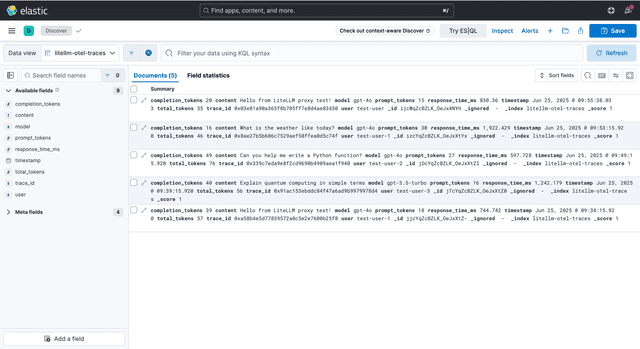
您應該會看到帶有結構化欄位的 OpenTelemetry trace 資料,對應您的 LLM 請求。
7. 在 Kibana 中視覺化
啟動 Kibana 以視覺化您的 LLM telemetry 資料:
docker run -d --name kibana --link elasticsearch:elasticsearch -p 5601:5601 docker.elastic.co/kibana/kibana:8.18.2
在 http://localhost:5601 開啟 Kibana,並為您的 LiteLLM traces 建立 index pattern:
生產環境設定
使用 Elasticsearch Cloud:
更新您的 otel_config.yaml:
exporters:
  otlphttp/elastic:
    endpoint: "https://your-deployment.es.region.cloud.es.io"
    headers:
      "Authorization": "Bearer your-api-key"
      "Content-Type": "application/json"
Docker Compose(完整堆疊):
# docker-compose.yml
version: '3.8'
services:
  elasticsearch:
    image: docker.elastic.co/elasticsearch/elasticsearch:8.18.2
    environment:
      - discovery.type=single-node
      - xpack.security.enabled=false
    ports:
      - "9200:9200"

  otel-collector:
    image: otel/opentelemetry-collector:latest
    command: ["--config=/etc/otel-collector-config.yaml"]
    volumes:
      - ./otel_config.yaml:/etc/otel-collector-config.yaml
    ports:
      - "4317:4317"
      - "4318:4318"
    depends_on:
      - elasticsearch

  litellm:
    image: docker.litellm.ai/berriai/litellm:latest
    ports:
      - "4000:4000"
    environment:
      - OPENAI_API_KEY=${OPENAI_API_KEY}
      - OTEL_EXPORTER=otlp_http
      - OTEL_EXPORTER_OTLP_ENDPOINT=http://otel-collector:4318
    command: ["--config", "/app/config.yaml"]
    volumes:
      - ./config.yaml:/app/config.yaml
    depends_on:
      - otel-collector
config.yaml:
model_list:
  - model_name: gpt-5.6-terra
    litellm_params:
      model: openai/gpt-5.6-terra
      api_key: os.environ/OPENAI_API_KEY

litellm_settings:
  callbacks: ["otel"]

general_settings:
  master_key: os.environ/LITELLM_MASTER_KEY
  otel: true

