自動注入提示快取檢查點
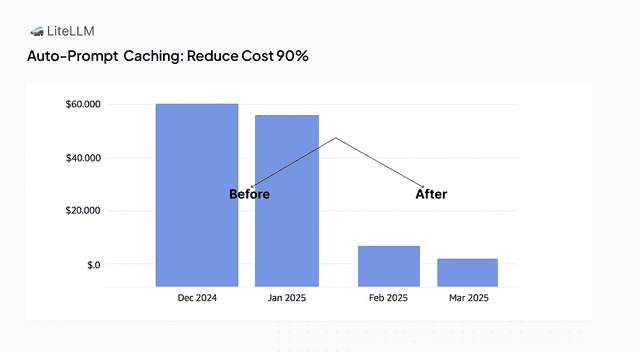
透過使用 LiteLLM 自動注入提示快取檢查點,最多可將成本降低 90%。
支援的提供者(cache_control 標記):
- Anthropic API (
anthropic/) - AWS Bedrock - Claude (
bedrock/) - Vertex AI - Claude and Gemini (
vertex_ai/) - Google AI Studio - Gemini (
gemini/) - Azure AI - Claude (
azure_ai/) - OpenRouter - Claude, Gemini, MiniMax, GLM, z-ai routes (
openrouter/) - Databricks - Claude (
databricks/) - DashScope / Qwen (
dashscope/) - MiniMax (
minimax/) - Z.ai / GLM (
zai/)
支援的提供者(prompt_cache_breakpoint 標記):
- OpenAI GPT-5.6 及更新版本(
openai/),請參閱 OpenAI GPT-5.6 及更新版本
提供者代管(自動,無需標記):
- OpenAI,GPT-5.6 之前的模型(
openai/) - DeepSeek(
deepseek/) - xAI(
xai/) - Gemini 2.5 及更新版本(
gemini/、vertex_ai/),透過 Google 的隱式快取
Gemini 2.5 及更新版本的模型會自行快取重複的前綴,無需標記,也不需額外費用。將 cache_control_injection_points 加到 Gemini 部署會把它切換為 Google 的明確 context caching:LiteLLM 會把標記的訊息從請求中移到獨立的 cachedContents 物件中,並且只傳送對它的參照。該前綴不再是請求的一部分,因此隱式快取不再適用於它,而且 Google 會針對 LiteLLM 建立的每個快取物件收取儲存費用。對大多數 Gemini 流量而言,更好的設定是完全不要使用 injection points。只有在您需要針對一段大型、穩定且會被足夠頻繁重用、以覆蓋儲存成本的前綴,保證折扣時才使用它們。
injection points 是為 Anthropic 風格的快取所設計;在請求帶有 cache_control 標記之前,任何內容都不會被快取。自動快取的提供者(Gemini 2.5+、OpenAI、DeepSeek、xAI)不需要它們
運作方式
LiteLLM 可自動將提示快取檢查點注入到您對 LLM 提供者的請求中。這可帶來:
- 降低成本:提示中長且靜態的部分可被快取,以避免重複處理
- 無需修改應用程式程式碼:您可以在 LiteLLM UI 或
litellm config.yaml檔案中設定自動快取行為。
快取與誰共享
這是提供者端的提示快取,與 LiteLLM 回應快取 是不同的功能。它不需要 Redis。
- 提供者會根據送出該前綴的上游憑證來快取,而不是根據 LiteLLM 金鑰、團隊或終端使用者。
- 任何其請求精確重複該前綴的人都會重用它。共享正是重點:一位使用者快取的長系統提示會被同一組憑證上的其他所有人重用,而代理程式也能受益於使用者已經快取的前綴。
- 另一方面:回應會回報
cache_read_input_tokens,而快取命中更快,因此重複精確前綴的呼叫者可以看出,使用同一組憑證的其他人最近送出過它。 - 這是有界限的。前綴必須完全匹配,而且提供者不會快取低於最小大小的前綴(對 Anthropic 而言,這取決於模型,目前是 1k 到 4k tokens),因此它揭露的是 是否 已經送出過呼叫者已持有的提示,而不是其內容。
- 若要隔離,請為多租戶分配不同的憑證。邊界是提供者帳戶,而不是 LiteLLM 能強制執行的任何東西。
Claude 模型的自動檢查點
需要 LiteLLM v1.94.0
以下內容都在要求您決定檢查點要放在 哪裡。如果您只是想要 Claude 的常見情況,一個旗標就能完成。
litellm_settings:
  enable_anthropic_prompt_caching: true
或者,若不使用設定檔:
export LITELLM_ENABLE_ANTHROPIC_PROMPT_CACHING=true
這也是 Admin UI 上的一個切換開關,位於 Router Settings 下的 General 分頁。
它實際做了什麼
它會加入與您手動寫入時相同的 cache_control_injection_points,在系統提示上放一個檢查點,在最後一輪放一個檢查點,讓穩定前綴持續保持快取,而檢查點則隨著對話推進。這正是像 Claude Code 這樣的用戶端所需要的,因為它本身從不設定 cache_control。
- 預設為關閉。 升級不會改變任何事,直到您啟用它。
- 僅限 Claude。 成本對照表中標示支援提示快取的
anthropic/和bedrock/模型。vertex_ai/和azure_ai/上的 Claude 不在此範圍內;請對那些使用cache_control_injection_points。 - 絕不會重複注入。 如果請求本身已帶有自己的
cache_control,LiteLLM 會退讓,並由用戶端的檢查點生效。 - 明確設定優先。 只有在未設定任何
cache_control_injection_points時,該旗標才會補上。 - 遵守 4 個 block 的提供者限制,並將用戶端提供的 blocks 納入計算。
- 適用於
/v1/messages和/chat/completions。
快取存續時間
預設是 Anthropic 的 5 分鐘 ephemeral cache,這是其 API 預設,也是 Claude Code 所使用的。若是長時間的代理式工作階段,您可以改為要求 1 小時快取:
litellm_settings:
  enable_anthropic_prompt_caching: true
  anthropic_prompt_caching_ttl: "1h"
對應的環境變數是 LITELLM_ANTHROPIC_PROMPT_CACHING_TTL,而 Admin UI 也以下拉式選單提供。請注意,1 小時快取寫入的成本高於 5 分鐘快取,因此只有在前綴會在較長的工作階段中重複使用時才划算。
litellm_settings 會在兩者都設定時優先於環境變數,因為設定會在啟動後套用。
何時改用 injection points
當您需要一個該旗標未涵蓋的提供者、系統提示與最後一輪以外的檢查點、每個模型而非整個閘道的行為,或 location: tool_config 來快取工具定義時,請使用下面說明的 cache_control_injection_points。
設定
您需要在模型設定中指定 cache_control_injection_points。這會告訴 LiteLLM:
- 要在哪裡加入快取指令(
location) - 要針對哪則訊息(
role)
接著,LiteLLM 會自動將 cache_control 指令加入您請求中指定的訊息:
"cache_control": {
    "type": "ephemeral"
}
已設定的點會加在請求已帶有的任何 cache_control 旁邊。用戶端自行標記的訊息會保持原樣,而任何會讓請求超過 Anthropic 4 個快取 blocks 限制的點都會被略過,並先計入用戶端自己的標記,包括 tools 在內
OpenAI GPT-5.6 及更新版本
相同的 cache_control_injection_points 在部署解析為支援 明確提示快取斷點 的 OpenAI 模型時也適用;成本對照表會以 supports_prompt_cache_breakpoint 標示這些模型(openai/ 上的 GPT-5.6 及更新版本)。LiteLLM 看的是真正解析後的部署,而不是傳入請求的形狀,因此一個設定模式就能涵蓋混合 Anthropic 與 OpenAI 的叢集,而在 /v1/messages 上採用 Anthropic 形狀的用戶端也會得到 OpenAI 標記
| Anthropic 目標 | OpenAI GPT-5.6+ 目標 |
|---|---|
目標 block 上的 "cache_control": {"type": "ephemeral"} | 目標 block 上的 "prompt_cache_breakpoint": {"mode": "explicit"} |
| 請求層級不放任何東西 | 請求根層級的 "prompt_cache_options": {"mode": "explicit"} |
control.ttl 會選擇 5 分鐘或 1 小時快取 | control 會被忽略;請自行為 ttl 設定 prompt_cache_options |
LiteLLM 在請求層級加入的 prompt_cache_options 會將 OpenAI 切換為明確模式,因此已設定的檢查點就是完整的快取策略,和在 Anthropic 上完全相同。請求上若已有 prompt_cache_options,就會優先採用且絕不覆寫,這也是您可以變更模式或為每個部署請求 30 分鐘快取的方式:
model_list:
  - model_name: gpt-5.6
    litellm_params:
      model: openai/gpt-5.6
      api_key: os.environ/OPENAI_API_KEY
      cache_control_injection_points:
        - location: message
          role: system
      prompt_cache_options:
        mode: implicit
        ttl: 30m
使用 mode: implicit 時,OpenAI 會在最近的使用者或工具訊息上保留其自動檢查點,並與 LiteLLM 放置的明確檢查點並存,這適合長時間的多輪工作階段;使用預設的 explicit 時,只有已設定的檢查點會寫入快取,這適合許多共享單一長系統提示的單輪請求。無論哪種方式,OpenAI 都會從它能比對到的最長已快取前綴提供讀取
關於 OpenAI 對應,需要知道的是:
- 僅限區塊層級。 OpenAI 接受文字、圖片和檔案區塊上的標記。字串型 system prompt 或訊息會先包裝成單一區塊清單,再放置標記。assistant 區塊與工具結果無法攜帶斷點,因此落在那裡的插入點會被略過
/v1/messagessystem prompt。 OpenAI 不接受頂層instructions欄位上的斷點,因此當 Anthropicsystem攜帶檢查點時,LiteLLM 會改以前置developer訊息送出。OpenAI 會將這兩種形式視為相同的快取前綴,因此切換時不會讓快取冷啟動- 可與用戶端標記並用。 已經帶有自身
cache_control或prompt_cache_breakpoint標記的請求會保留它們,而設定的點會加在旁邊;用戶端已標記的目標會維持原樣。Claude Code 會設定自己的cache_control,OpenAI 永遠看不到,因此在已設定點的 GPT-5.6 部署上執行 Claude Code 工作階段時,會使用您設定的明確檢查點;在該部署上設定prompt_cache_options: {mode: implicit},即可讓 OpenAI 的自動檢查點與它們並存 - 遵守 4 個斷點的限制,會先計入用戶端提供的標記,因此原本會成為第 5 個的設定點會被略過
- 僅適用於送往 OpenAI 本身的請求。 當請求部署連到
api.openai.com(或地區性的*.api.openai.com主機)時,對 GPT-5.6 或更新的 OpenAI 模型(若該項目帶有值,則為費率對映中的supports_prompt_cache_breakpoint標記;否則依模型名稱中的 GPT 版本)會觸發對應,也就是沒有api_base(或base_url),或這些主機上沒有。具有自訂api_base的部署,例如前方有另一個 LiteLLM proxy 或 gateway 的 OpenAI,會維持目前的行為,除非其litellm_params也設定了prompt_cache_options,這會將其納入。litellm_proxy/部署與 Azure OpenAI 部署目前尚未涵蓋 /v1/responses。 標記會落在目標訊息的input_text區塊上,而字串訊息會先包裝成單一區塊清單。OpenAI 不接受頂層instructions欄位上的標記,因此送到那裡的 system prompt 會維持隱式快取;請將其作為developer或system訊息送出,以取得檢查點。用戶端送出的prompt_cache_options會照原樣轉送- 成本回報不變。 OpenAI 的
cached_tokens與cache_write_tokens已經會在/v1/messages上回傳為cache_read_input_tokens與cache_creation_input_tokens,而在/chat/completions上則會回傳為prompt_tokens_details
LiteLLM Python SDK 使用方式
在您的 completion 呼叫中使用 cache_control_injection_points 參數,即可自動注入快取指令。
基本範例 - 快取系統訊息
from litellm import completion
import os

os.environ["ANTHROPIC_API_KEY"] = ""

response = completion(
    model="anthropic/claude-sonnet-5",
    messages=[
        {
            "role": "system",
            "content": [
                {
                    "type": "text",
                    "text": "You are an AI assistant tasked with analyzing legal documents.",
                },
                {
                    "type": "text",
                    "text": "Here is the full text of a complex legal agreement" * 400,
                },
            ],
        },
        {
            "role": "user",
            "content": "what are the key terms and conditions in this agreement?",
        },
    ],
    # Auto-inject cache control to system messages
    cache_control_injection_points=[
        {
            "location": "message",
            "role": "system",
        }
    ],
)

print(response.usage)
重點:
- 使用
cache_control_injection_points參數指定要注入快取的位置 location: "message"目標為對話中的訊息role: "system"目標為所有系統訊息- LiteLLM 會自動將
cache_control加入符合條件訊息的最後一個內容區塊(依 Anthropic 的 API 規格)
LiteLLM 修改後的請求:
LiteLLM 會自動將您的請求轉換為,在系統訊息的最後一個內容區塊加入 cache_control:
{
    "messages": [
        {
            "role": "system",
            "content": [
                {
                    "type": "text",
                    "text": "You are an AI assistant tasked with analyzing legal documents."
                },
                {
                    "type": "text",
                    "text": "Here is the full text of a complex legal agreement...",
                    "cache_control": {"type": "ephemeral"}  // Added by LiteLLM
                }
            ]
        },
        {
            "role": "user",
            "content": "what are the key terms and conditions in this agreement?"
        }
    ]
}
依索引指定特定訊息
您可以依 messages 陣列中的索引來指定特定訊息。使用負索引可從尾端開始指定。
from litellm import completion
import os

os.environ["ANTHROPIC_API_KEY"] = ""

response = completion(
    model="anthropic/claude-sonnet-5",
    messages=[
        {
            "role": "user",
            "content": "First message",
        },
        {
            "role": "assistant",
            "content": "Response to first",
        },
        {
            "role": "user",
            "content": [
                {"type": "text", "text": "Here is a long document to analyze:"},
                {"type": "text", "text": "Document content..." * 500},
            ],
        },
    ],
    # Target the last message (index -1)
    cache_control_injection_points=[
        {
            "location": "message",
            "index": -1,  # -1 targets the last message, -2 would target second-to-last, etc.
        }
    ],
)

print(response.usage)
重要說明:
- 當一則訊息有多個內容區塊(例如圖片或多個文字區塊)時,
cache_control只會加入到最後一個內容區塊 - 這遵循 Anthropic 的 API 規格,其要求:「當使用多個內容區塊時,只有最後一個內容區塊可以有 cache_control」
- Anthropic 每個請求最多可有 4 個帶有
cache_control的區塊
LiteLLM 修改後的請求:
LiteLLM 會將 cache_control 加入目標訊息的最後一個內容區塊(index -1 = 最後一則訊息):
{
    "messages": [
        {
            "role": "user",
            "content": "First message"
        },
        {
            "role": "assistant",
            "content": "Response to first"
        },
        {
            "role": "user",
            "content": [
                {
                    "type": "text",
                    "text": "Here is a long document to analyze:"
                },
                {
                    "type": "text",
                    "text": "Document content...",
                    "cache_control": {"type": "ephemeral"}  // Added by LiteLLM to last content block only
                }
            ]
        }
    ]
}
LiteLLM Proxy 使用方式
您可以在 proxy 設定檔中設定 cache control 注入。
- litellm config.yaml
- LiteLLM UI
model_list:
  - model_name: anthropic-auto-inject-cache-system-message
    litellm_params:
      model: anthropic/claude-sonnet-5
      api_key: os.environ/ANTHROPIC_API_KEY
      cache_control_injection_points:
        - location: message
          role: system
  - model_name: gpt-5.6
    litellm_params:
      model: openai/gpt-5.6
      api_key: os.environ/OPENAI_API_KEY
      cache_control_injection_points:
        - location: message
          role: system
第二個項目會解析為 OpenAI GPT-5.6 模型,因此相同的插入點會在出站請求上變成 prompt_cache_breakpoint 標記加上 prompt_cache_options,如同 OpenAI GPT-5.6 and newer 所述
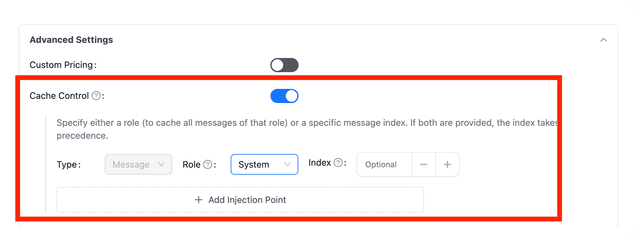
在 LiteLLM UI 上,您可以在新增模型時於 cache_control_injection_points 分頁中指定 Advanced Settings。
詳細範例
1. 傳送至 LiteLLM 的原始請求
在這個範例中,我們有一段非常長且靜態的 system message,以及一段變動的 user message。由於 system message 幾乎不會變更,因此將其快取會更有效率。
{
    "messages": [
        {
            "role": "system",
            "content": [
                {
                    "type": "text",
                    "text": "You are a helpful assistant. This is a set of very long instructions that you will follow. Here is a legal document that you will use to answer the user's question."
                }
            ]
        },
        {
            "role": "user",
            "content": [
                {
                    "type": "text",
                    "text": "What is the main topic of this legal document?"
                }
            ]
        }
    ]
}
2. LiteLLM 修改後的請求
LiteLLM 會根據我們的設定,自動將快取指令注入 system message:
{
    "messages": [
        {
            "role": "system",
            "content": [
                {
                    "type": "text",
                    "text": "You are a helpful assistant. This is a set of very long instructions that you will follow. Here is a legal document that you will use to answer the user's question.",
                    "cache_control": {"type": "ephemeral"}
                }
            ]
        },
        {
            "role": "user",
            "content": [
                {
                    "type": "text",
                    "text": "What is the main topic of this legal document?"
                }
            ]
        }
    ]
}
當模型提供者處理這個請求時,會辨識快取指令,並且只處理一次 system message,將其快取供後續請求使用。
3. 在 OpenAI GPT-5.6 部署上的同一請求
當部署改為指向 openai/gpt-5.6 時,相同設定會在區塊上產生 OpenAI 的明確斷點,並在請求根節點產生明確模式:
{
    "prompt_cache_options": {"mode": "explicit"},
    "messages": [
        {
            "role": "system",
            "content": [
                {
                    "type": "text",
                    "text": "You are a helpful assistant. This is a set of very long instructions that you will follow. Here is a legal document that you will use to answer the user's question.",
                    "prompt_cache_breakpoint": {"mode": "explicit"}
                }
            ]
        },
        {
            "role": "user",
            "content": [
                {
                    "type": "text",
                    "text": "What is the main topic of this legal document?"
                }
            ]
        }
    ]
}
相關文件
- 手動提示快取 - 了解如何手動將
cache_control指令加入您的訊息

