Vertex AI PayGo 與 Priority
優先 PayGo
LiteLLM 支援 Priority PayGo。
傳送 priority 標頭,即可獲得 priority 排隊,並以 priority token 費率計費。
截至本文撰寫時:gemini/gemini-2.5-pro、vertex_ai/gemini-3-pro-preview、vertex_ai/gemini-3.1-pro-preview、vertex_ai/gemini-3-flash-preview,以及其變體。
請查看 LiteLLM 的 model pricing JSON 中的 supports_service_tier: true。
傳送 priority 請求
使用此標頭:
X-Vertex-AI-LLM-Shared-Request-Type: priority
- LiteLLM SDK
- Proxy 設定
- 直通模式
import litellm

response = litellm.completion(
    model="vertex_ai/gemini-3.1-pro-preview",
    messages=[{"role": "user", "content": "Summarize the Gettysburg Address."}],
    vertex_project="YOUR_PROJECT_ID",
    vertex_location="us-central1",
    extra_headers={"X-Vertex-AI-LLM-Shared-Request-Type": "priority"},
)

print(response.choices[0].message.content)
model_list:
  - model_name: gemini-priority
    litellm_params:
      model: vertex_ai/gemini-3.1-pro-preview
      vertex_project: "YOUR_PROJECT_ID"
      vertex_location: "us-central1"
      vertex_credentials: os.environ/GOOGLE_APPLICATION_CREDENTIALS
      extra_headers:
        X-Vertex-AI-LLM-Shared-Request-Type: priority
curl http://localhost:4000/v1/chat/completions \
  -H "Authorization: Bearer sk-your-key" \
  -H "Content-Type: application/json" \
  -d '{"model": "gemini-priority", "messages": [{"role": "user", "content": "Hello"}]}'
使用 x-pass-,讓 LiteLLM 轉送特定提供者的標頭。
MODEL_ID="gemini-3.1-pro-preview"
PROJECT_ID="YOUR_PROJECT_ID"

curl -X POST \
  "${LITELLM_PROXY_BASE_URL}/vertex_ai/v1/projects/${PROJECT_ID}/locations/global/publishers/google/models/${MODEL_ID}:generateContent" \
  -H "Authorization: Bearer sk-your-litellm-key" \
  -H "Content-Type: application/json" \
  -H "x-pass-X-Vertex-AI-LLM-Shared-Request-Type: priority" \
  -d '{"contents": [{"role": "user", "parts": [{"text": "Hello!"}]}]}'
費用追蹤運作方式
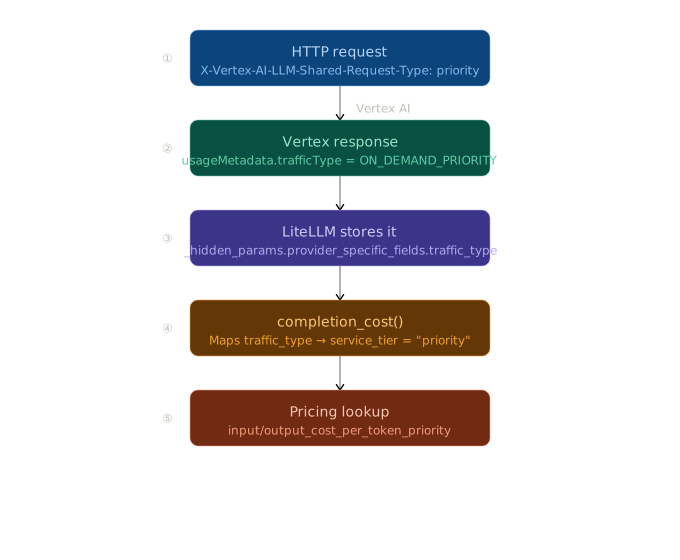
trafficType → service_tier 對應
usageMetadata.trafficType | service_tier | 使用的定價鍵 |
|---|---|---|
ON_DEMAND | None | input_cost_per_token |
ON_DEMAND_PRIORITY | "priority" | input_cost_per_token_priority |
FLEX / BATCH | "flex" | input_cost_per_token_flex |
如果缺少特定層級的鍵,LiteLLM 會回退到標準定價鍵。
標準 PayGo 與 Provisioned Throughput
這與 priority 路由是不同的標頭:
| 標頭值 | 行為 |
|---|---|
X-Vertex-AI-LLM-Request-Type: shared | 強制標準 PayGo(略過 PT) |
X-Vertex-AI-LLM-Request-Type: dedicated | 僅強制 Provisioned Throughput(若耗盡則 429) |
原生路由範例
import litellm

response = litellm.completion(
    model="vertex_ai/gemini-3.8-flash",
    messages=[{"role": "user", "content": "Hello!"}],
    vertex_project="YOUR_PROJECT_ID",
    vertex_location="us-central1",
    extra_headers={"X-Vertex-AI-LLM-Request-Type": "shared"},
)
直通範例
MODEL_ID="gemini-3.8-flash"
PROJECT_ID="YOUR_PROJECT_ID"

curl -X POST \
  "${LITELLM_PROXY_BASE_URL}/vertex_ai/v1/projects/${PROJECT_ID}/locations/global/publishers/google/models/${MODEL_ID}:generateContent" \
  -H "Authorization: Bearer sk-your-litellm-key" \
  -H "Content-Type: application/json" \
  -H "x-pass-X-Vertex-AI-LLM-Request-Type: shared" \
  -d '{
    "contents": [{"role": "user", "parts": [{"text": "Hello!"}]}]
  }'
疑難排解
Q: 403 Permission denied 或 IAM_PERMISSION_DENIED 代表什麼?
A: 服務帳戶或 Application Default Credentials (ADC) 使用者沒有 roles/aiplatform.user 角色。若要解決此問題,請重新執行 gcloud projects add-iam-policy-binding。
Q: 如果我收到 429 Quota exceeded 錯誤,該怎麼做?
A: 這表示您已達到每個區域的 QPM(每分鐘查詢數)或 TPM(每分鐘 token 數)配額。您可以:
- 從 GCP Quotas console 申請提高配額
- 在 LiteLLM 設定中新增更多區域以進行負載平衡
- 升級到 Provisioned Throughput 以獲得保證容量
Q: 我要如何修正 VERTEXAI_PROJECT not set 錯誤?
A: 請在 LiteLLM 呼叫中明確傳入 vertex_project 參數,或在執行程式碼前設定 VERTEXAI_PROJECT 環境變數。

