Getting Started with UI Logs
View Spend, Token Usage, Key, Team Name for Each Request to LiteLLM
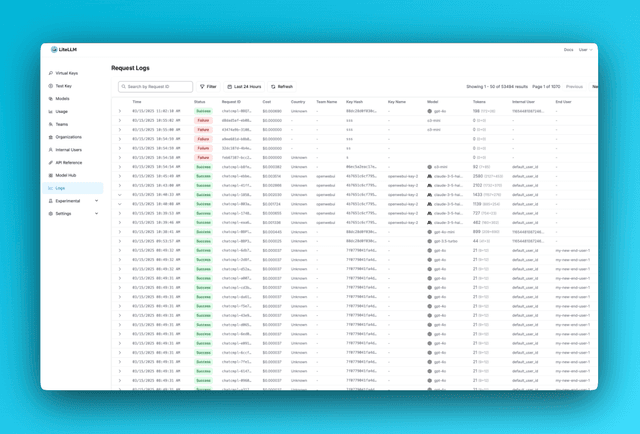
Overview
| Log Type | Tracked by Default |
|---|---|
| Success Logs | ✅ Yes |
| Error Logs | ✅ Yes |
| Request/Response Content Stored | ❌ No by Default, opt in with store_prompts_in_spend_logs |
By default LiteLLM does not track the request and response content.
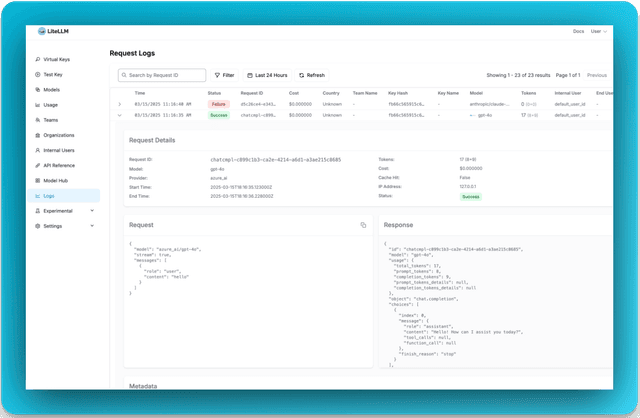
Tracking - Request / Response Content in Logs Page
If you want to view request and response content on LiteLLM Logs, you can enable it in either place:
- From the UI (no restart): Use UI Spend Log Settings, then open Logs → Settings → enable "Store Prompts in Spend Logs" → Save. Takes effect immediately and overrides config.
- From config: Add this to your
proxy_config.yaml(requires restart):
general_settings:
  store_prompts_in_spend_logs: true
Tracing Tools
View which tools were provided and called in your completion requests.
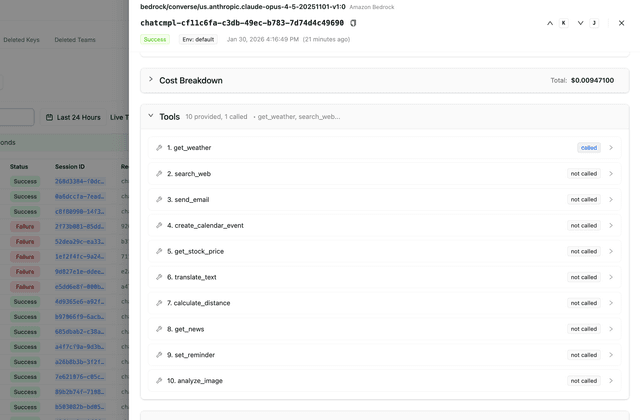
Example: Make a completion request with tools:
curl -X POST 'http://localhost:4000/chat/completions' \
  -H "Authorization: Bearer $LITELLM_API_KEY" \
  -H 'Content-Type: application/json' \
  -d '{
    "model": "gpt-5.6-terra",
    "messages": [{"role": "user", "content": "What is the weather?"}],
    "tools": [
      {
        "type": "function",
        "function": {
          "name": "get_weather",
          "description": "Get the current weather",
          "parameters": {
            "type": "object",
            "properties": {
              "location": {"type": "string"}
            }
          }
        }
      }
    ]
  }'
Check the Logs page to see all tools provided and which ones were called.
Stop storing Error Logs in DB
If you do not want to store error logs in DB, you can opt out with this setting
general_settings:
  disable_error_logs: True   # Only disable writing error logs to DB, regular spend logs will still be written unless `disable_spend_logs: True`
Stop storing Spend Logs in DB
If you do not want to store spend logs in DB, you can opt out with this setting
general_settings:
  disable_spend_logs: True   # Disable writing spend logs to DB
Automatically Deleting Old Spend Logs
If you're storing spend logs, it might be a good idea to delete them regularly to keep the database fast.
You can set the retention period in either place:
- From the UI (no restart): UI Spend Log Settings, then Logs → Settings → set Retention Period → Save.
- From config: Add the following to your
proxy_config.yaml(requires restart):
general_settings:
  maximum_spend_logs_retention_period: "7d"  # Delete logs older than 7 days

  # Optional: how often to run cleanup
  maximum_spend_logs_retention_interval: "1d"  # Run once per day
Cleanup only runs when a retention period is set, and each run is bounded by how many rows it deletes per statement, how many statements it issues per table, and a wall-clock budget for the run as a whole. Defaults are 1000 rows per statement, 500 statements per table, and 5 minutes. A run that hits a bound stops there and resumes from the same cutoff on the next tick, so a large backlog drains over several runs
For the full set of knobs, the default schedule, and guidance for large tables, see Spend Logs Deletion
What gets logged?
Here's a schema breakdown of what gets logged.

