Track Usage for Coding Tools
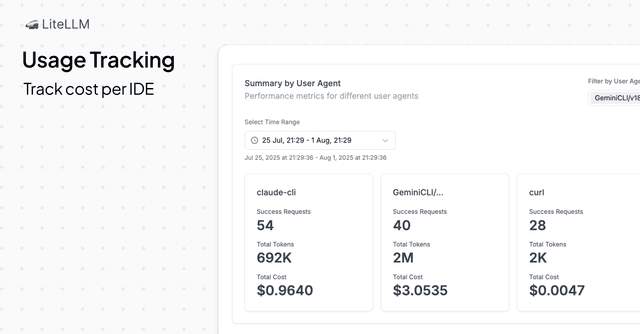
Track usage and costs for AI-powered coding tools like Claude Code, Roo Code, Gemini CLI, and OpenAI Codex through LiteLLM.
Monitor requests, costs, and user engagement metrics for each coding tool using User-Agent headers.
Who This Is For
Central AI Platform teams providing developers access to coding tools through LiteLLM. Monitor tool engagement and track individual user usage patterns.
What You Can Track
Summary Metrics
- Cost per coding tool
- Successful requests and token usage per tool
User Engagement Metrics
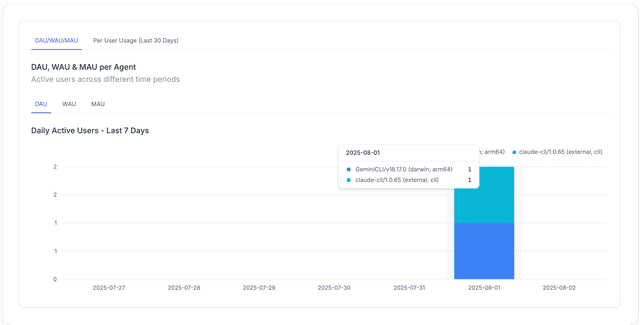
- Daily, weekly, and monthly active users for each User-Agent
Quick Start
1. Connect Your Coding Tool to LiteLLM
Configure your coding tool to send requests through the LiteLLM proxy with appropriate User-Agent headers.
Setup guides:
2. Send Requests with User-Agent Headers
Ensure your coding tool includes identifying User-Agent headers in API requests.
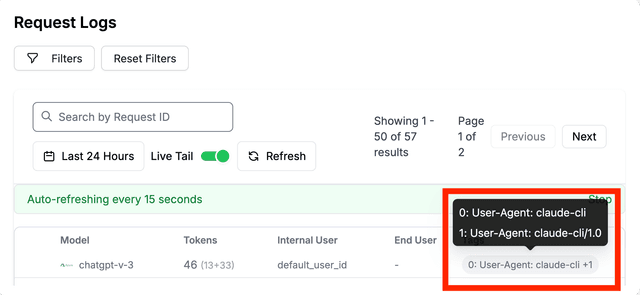
3. Verify Tracking in LiteLLM Logs
Confirm LiteLLM is properly tracking requests by checking logs for the expected User-Agent values.
4. View Usage Dashboard
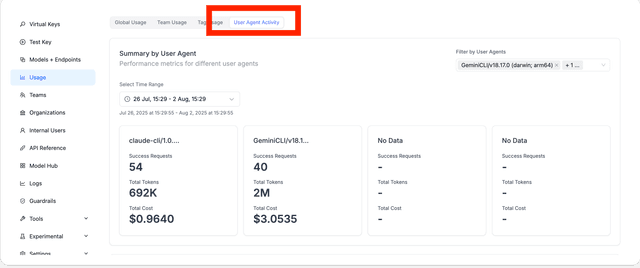
Access the LiteLLM dashboard to view aggregated usage metrics and user engagement data.
Summary Metrics
View total cost and successful requests for each coding tool.
Daily, Weekly, and Monthly Active Users
View active user metrics for each coding tool.
How LiteLLM Identifies Coding Tools
LiteLLM tracks coding tools by monitoring the User-Agent header in incoming API requests (/chat/completions, /responses, etc.). Each unique User-Agent is tracked separately for usage analytics.
Example Request
Example using claude-cli as the User-Agent:
curl -X POST \
  -H "Content-Type: application/json" \
  -H "Authorization: Bearer $LITELLM_API_KEY" \
  -H "User-Agent: claude-cli/1.0" \
  -d '{"model": "claude-sonnet-5", "messages": [{"role": "user", "content": "Hello, how are you?"}]}' \
  http://localhost:4000/chat/completions

